Alias Binding
Download
Focus Mode
Font Size
Overview
What is alias binding?
Alias binding enables you to manage multiple domain names with the same records in one domain name and eliminates your need to perform the same operation repeatedly on them.
When will alias binding be used?
For example,
dnspod.com and dnspod.net need the same records, and it would be troublesome to add and modify records in the two domain names separately.In this case, you can use the alias binding feature to bind
dnspod.net to dnspod.com, so that the two different domain names will have the same records. When you need to make a change, you only need to make the change in the independent domain name dnspod.com just once.Directions
1. Log in to the DNSPod Console.
2. On Authoritative Resolution page, select the target domain and click the domain name to go to its Record Management page. As shown in the figure below:

3. On the Settings tab, click the Domain Alias tab.
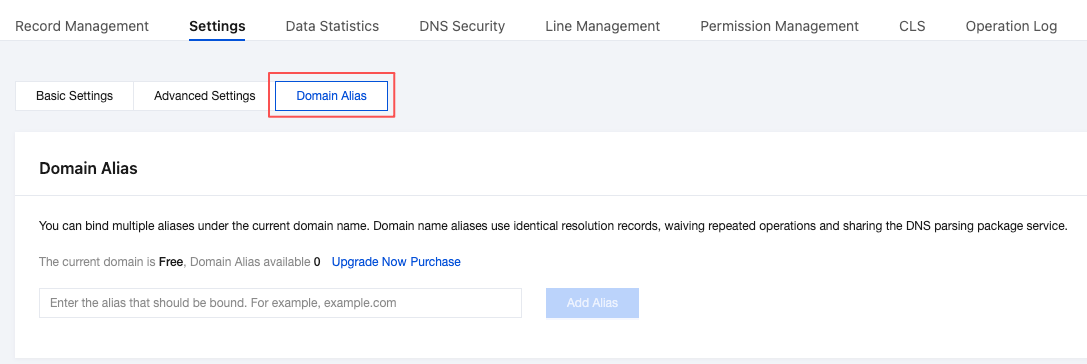
4. In the Domain Alias window, enter the alias domain you want to bind. Then, click Add Alias to complete the alias binding setup.
Note:
If "Alias already exists" is displayed, it means that the domain name you try to bind already exists. In this case, please delete it first and then bind it.
If "This domain has been added by another user, and you are not its legal owner. If you are sure that you own it, please reclaim it." is displayed, it means that this domain name has been added by another user. If you are its legal owner, please reclaim it, delete it after the reclaim, and then bind it.
The Free plan does not include a quota for domain aliases. Please upgrade your DNS plan before binding.
Help and Support
Was this page helpful?
You can also Contact sales or Submit a Ticket for help.
Help us improve! Rate your documentation experience in 5 mins.
Feedback