tencent cloud

Cloud DNS Resolution

Announcements
Pricing Adjustment for DNSPod Ultimate Plan on the International Site
DNSPod Global Upgrade Notification
DNSPod Global API Upgrade Instructions
Product Introduction
Introduction
Supported Resolution Routes for Each Service Plan
Purchase Guide
Pricing Overview
Purchasing DNS Plan
Getting Started
Adding Record
Product Rule
Domain Configuration Rule
Record Rule
Host Rule
Line Type Rule
Operation Guide
Settings of Various Record Types
Manage DNS Records
CAM Policy
Batch Operation
Domain Lock
Round-Robin DNS Record Weight Settings
Alias Binding
Domain Sharing
CNAME Acceleration
Modifying DNS Server
Cross-Account Transfer
API Documentation
FAQs
DNS Resolution Effect
Plans
DNS
IP
Reverse DNS
Effective Time
Line Type Group
DNS Resolution Failure
DNS Resolution
Host Record and Record Value
DNSPod API Call Instance
Others
Cloud DNS Resolution Policy
Privacy Policy
Data Processing And Security Agreement
Contact Us

Cross-Account Transfer

PDF
Focus Mode
Font Size
Last updated: 2026-03-30 15:16:17

Overview

Cross-Account Transfer feature can transfer your currently added domains and resolution records under your current DNSPod account to another DNSPod account.
Description:
As the international site adopts the postpaid mode, cross-account transfer of paid domain names is not supported.

Operation Guide

1. Log in to the DNSPod console.
2. On the Authoritative Resolution page, click the domain name that needs to be transferred. As shown below:

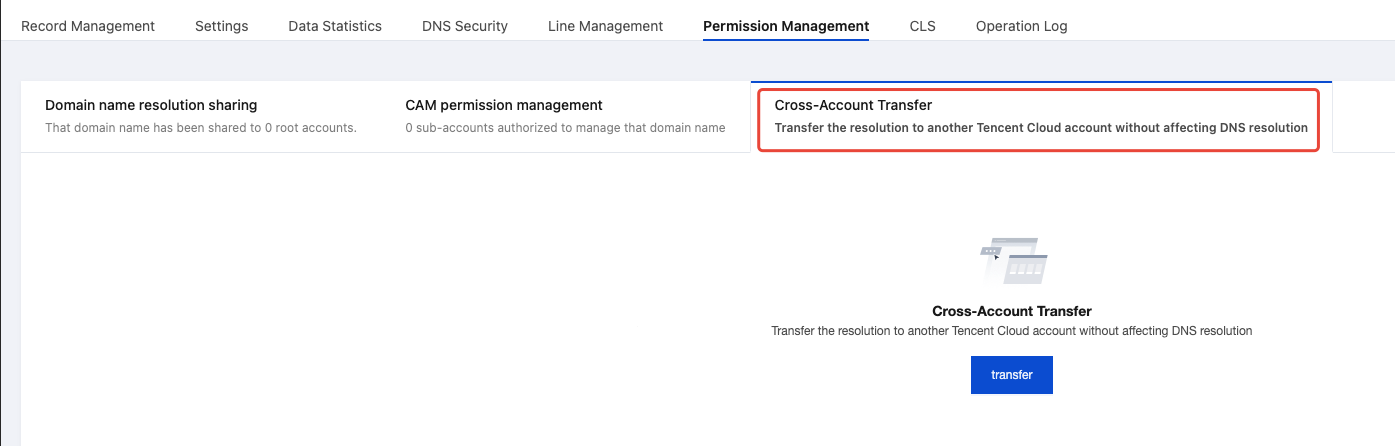
3. On the Record Management page, click the Permission Management tab, and then click transfer. As shown below:
4. In the pop-up Cross-Account Transfer window, enter the account ID you need to transfer. As shown below:

Note:
You can log in to the DNSPod console and then go to the Account Center to view the account ID.
5. Click confirm transfer to complete the transfer successfully.

Help and Support

Was this page helpful?

Help us improve! Rate your documentation experience in 5 mins.

Feedback