OpenClaw
Download
Focus Mode
Font Size
OpenClaw is an open-source, local AI agent framework that enables AI to evolve from "answering questions" to "executing tasks hands-on." It supports autonomous operation on Windows, macOS, and Linux, automatically performing operations such as file organization, email processing, and code writing through built-in tools and an extensible plugin system. This article demonstrates how to integrate a model, using DeepSeek V4 Pro as an example, for use with OpenClaw.
Installation Methods
Install OpenClaw according to your actual environment type. For details, see OpenClaw Installation. If OpenClaw is already installed, you can skip this step.
Obtaining an API Key
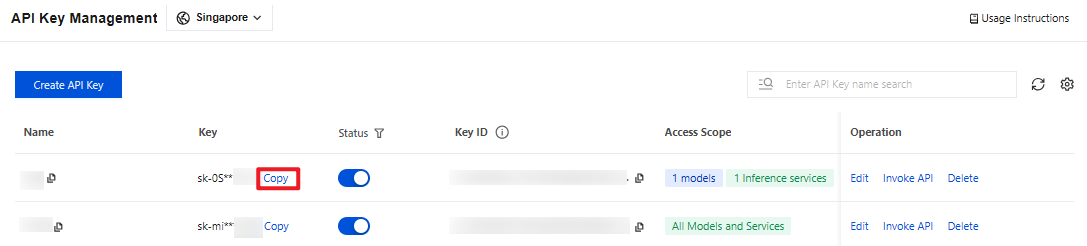
1. Go to the API Key Management page and click Create API Key. For operational details, see Create API Key.
Note:
When setting the Access Scope, if you select "Range", ensure that DeepSeek V4 Pro is selected.
2. After creation, be sure to copy and securely store the API Key. This information will be used in the subsequent process of configuring the tool.
Configuring OpenClaw
Open a terminal and run the following command.
openclaw onboard --auth-choice tokenhub-api-key
Complete the relevant configurations sequentially based on the prompts displayed in the terminal. Refer to the following for the configuration details.
Basic configuration
Terminal Prompt Message | Configuration Details |
I understand this is personal-by-default and shared/multi-user use requires lock-down. Continue? | Select Yes |
Setup mode | Select QuickStartNote: If you have previously configured OpenClaw, selecting QuickStart may trigger the "Existing config detected" message as shown in the figure. The terminal will then output a Config handling options list. Simply select Use existing values to proceed.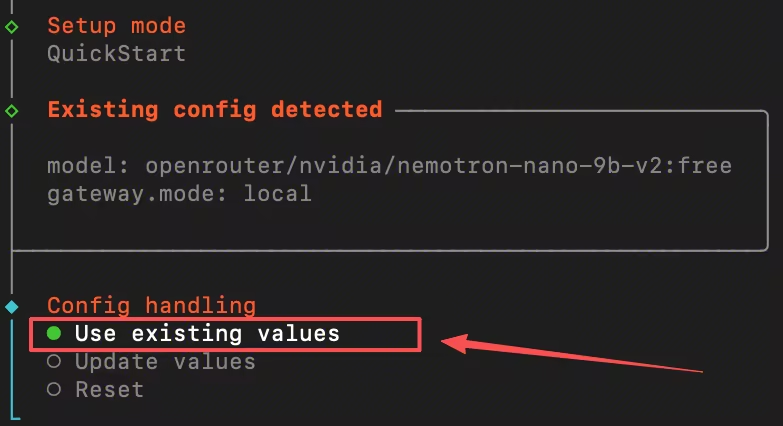 |
Model Configuration
Terminal Prompt Message | Configuration Details |
Enter Tencent TokenHub API key | Enter the obtained API Key. |
Default model | Set to tencent-tokenhub/deepseek-v4-pro. |
Feature Configuration
Terminal Prompt Message | Configuration Details |
Select channel (QuickStart) | Select Skip for now to configure later. |
Configure skills now? (recommended) | Select No to configure later. |
Enable hooks? | Press the Spacebar to select the option, and press the Enter key to go to the next step. |
How do you want to hatch your bot? | Select Hatch in TUI. |
Verifying Model Availability
After completing the configuration, you can run the following command in the terminal to verify whether the model is available:
openclaw models list --provider tencent-tokenhub
If the terminal outputs the information as shown in the following figure, the configuration is successful. You can then use the DeepSeek V4 Pro model in OpenClaw.

Help and Support
Was this page helpful?
You can also Contact sales or Submit a Ticket for help.
Help us improve! Rate your documentation experience in 5 mins.
Feedback