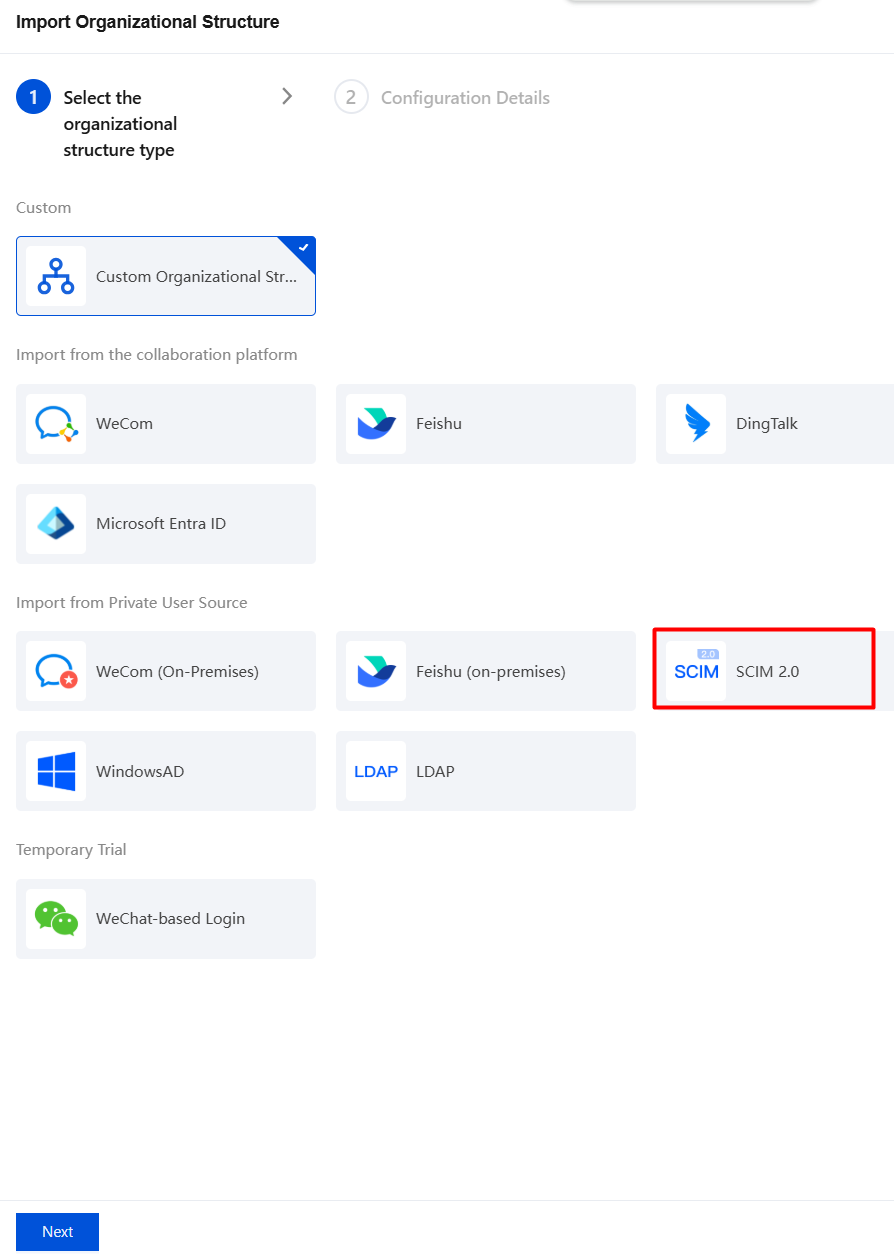
2. On the Organizational Structure Management page, click Add New Organizational Structure, select SCIM2.0, and click Next.
3. On the Import Organizational Structure page, configure the basic information.
Parameter Name
Description
Name
Defines the name of the organizational structure.
Name (English)
Custom English name.
SCIM service URL
IAM platform address.
API Authentication Method
Basic Auth
The username and password may be the account credentials of the IAM platform administrator. If they are incorrect, check the Authorization field in the API request header. The value is Basic Base64(username:password).
OAuth2.0
Obtain the token URL: The access_token URL must be a complete URL. Only the standard OAuth 2.0 method is supported, where the request takes the form of GET https://xxxx.
Client ID: The application ID registered by iOA on the IAM platform.
Client SECRET: The application secret provided by iOA when it applies on the IAM platform.
Automatically Update Organizational Structure
After automatic update is enabled, you can choose to synchronize the organizational structure every week, every day, or every four hours.
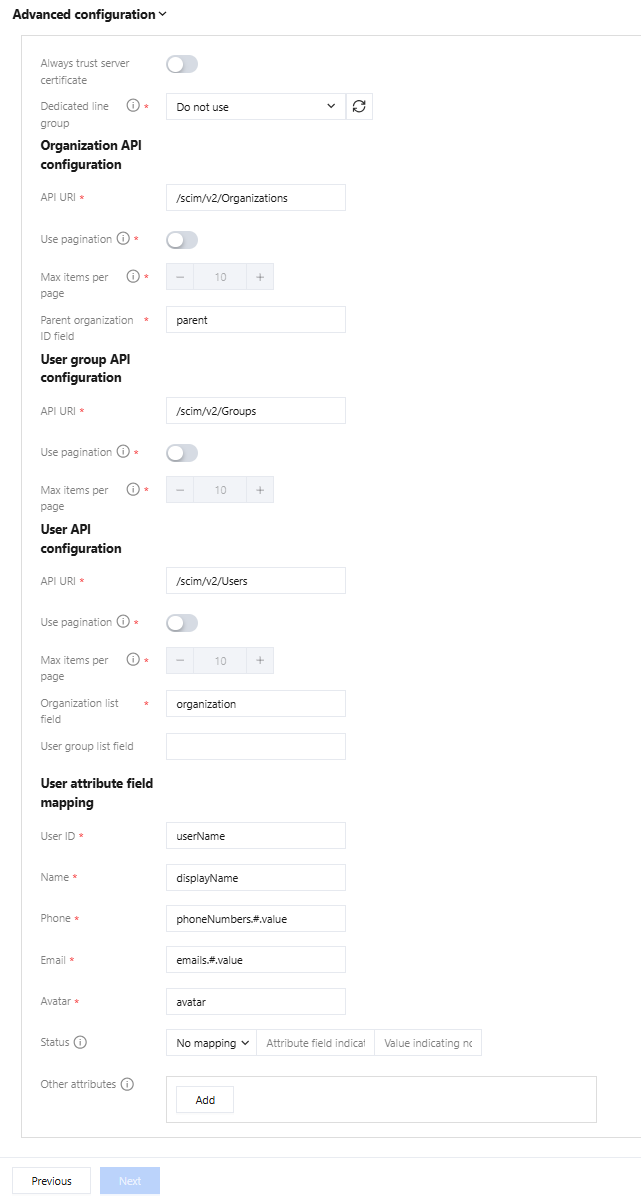
4. (Optional) Advanced configuration: Configure connection groups, organizational structure APIs, user group APIs, user APIs, and user attribute field mappings.
Parameter Type
Parameter Name
Description
Always trust server certificates
Support manually trusting self-signed LDAP certificates.
Connection group
Access service APIs via a connection group.
Organizational structure API configuration
API URI
Default value: /scim/v2/Organizations. If the API is special, fill in the API name by referring to the default format.
Use Pagination or Not
After pagination is enabled, data is pulled page by page. Pagination supports only standard parameters, where startIndex indicates the position of the starting item and count indicates the number of items per page.
If pagination is not enabled, all data is pulled by default with count=-1.
Maximum Number per Page
The minimum data volume per page is 10.
Parent Organization ID Field
The organizational structure must contain a field representing the parent directory ID; otherwise, the directory tree cannot be built.
User group API configuration
API URI
Default value: /scim/v2/Groups. If the interface is special, fill in the interface name by referring to the default format.
Use Pagination or Not
After pagination is enabled, data is pulled page by page. Pagination supports only standard parameters, where startIndex indicates the position of the starting item and count indicates the number of items per page.
If pagination is not enabled, all data is pulled by default with count=-1.
Maximum Number per Page
The minimum data volume per page is 10.
User API configuration
API URI
Default value: /scim/v2/Users. If the interface is special, fill in the interface name by referring to the default format.
Use Pagination or Not
After pagination is enabled, data is pulled page by page. Pagination supports only standard parameters, where startIndex indicates the position of the starting item and count indicates the number of items per page.
If pagination is not enabled, all data is pulled by default with count=-1.
Maximum Number per Page
The minimum data volume per page is 10.
Organizational Structure List Field
Users must contain the ID field of the organizational structure they belong to, which is used to place users into specific organizational structure directories.
User Group List Field
Fill in the default fields. If the fields are special, fill in your own list fields.
User attribute field mapping
User ID
The ID used for user login in iOA can be a username/mobile number/email address, or similar, but it must be unique.
Note: Other user IDs in the system serve no special purpose.
Status
Mapping status refers to associating the status field of the identity source with the locked/unlocked status of iOA. Three types are supported: Int/Bool/String, and the value of the associated status here must be the value of the normal status. All fields marked with an asterisk are required. However, for attributes that cannot be mapped or attributes that have a mapping relationship but do not need to be synchronized, you can assign an incorrect attribute value, and the attribute will then be assigned a null value.
If the user object is in JSON format, simply use syntax to obtain nested properties, such as the name property. For example:
{
    "name":{
        "name256":"xxx"
    }
}
If name256 is designated as the avatar, you can enter name.name256.
{
    "name":[
        {
            "value":"xxx"
       }
    ]
}
To specify the value of an element in an object array, enter name.#.value.
Attention:
Do not modify the user attribute field mappings unless you have special requirements.
5. Click Test connectivity. After the test is successful, click Next and Save.