Terminal Security
Download
Focus Mode
Font Size
How to Enable the Virus Cloud Detection User Plan?
1. Log in to the Tencent iOA Zero Trust Security Management System console. In the left sidebar, choose Terminal Intrusion Prevention > Virus Detection > Policy Configuration.
2. On the policy settings page, click Create Policy, select Apply Template or Do not Use Template, and enable Virus Cloud Detection Plan.
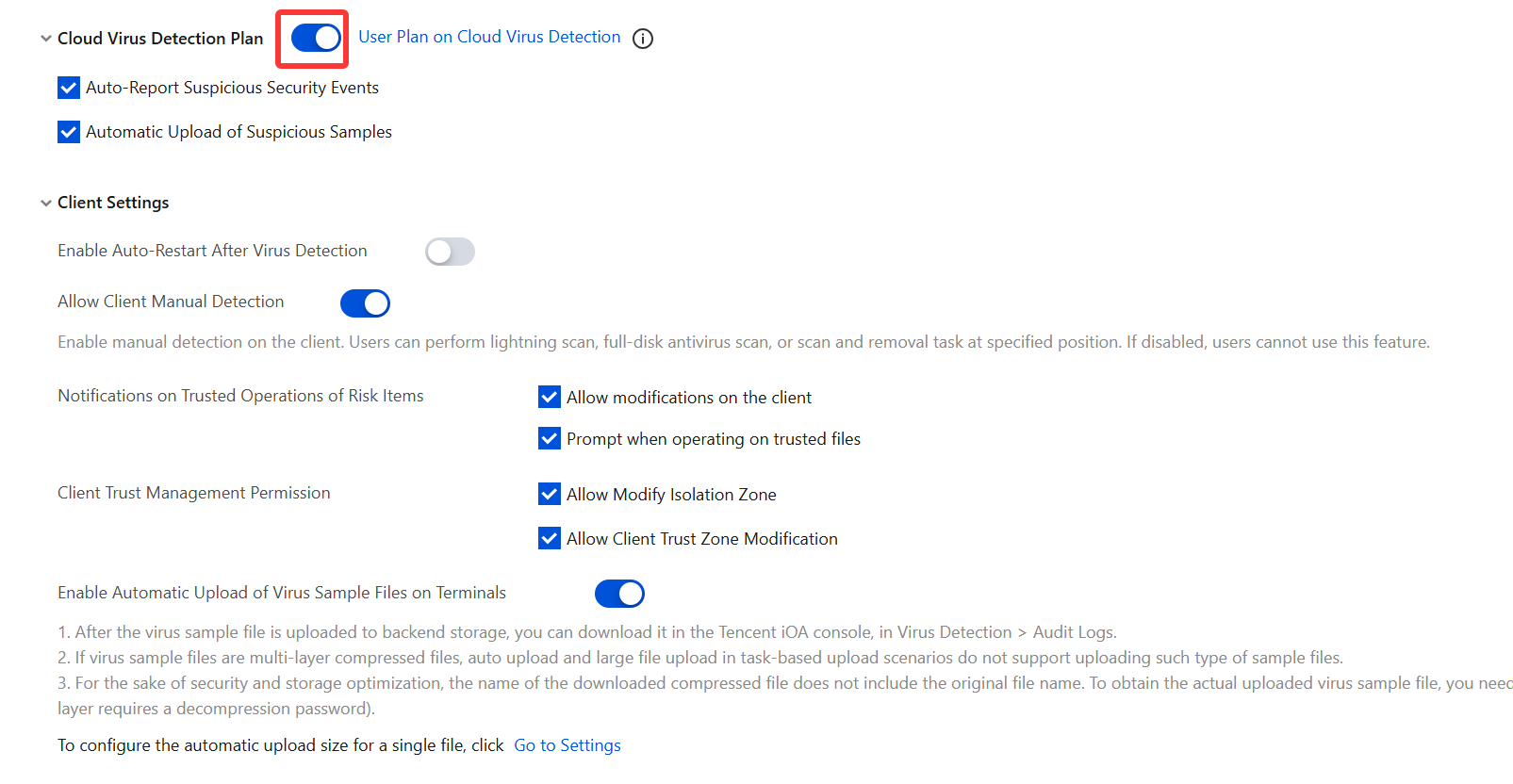
3. After you select Automatic Upload of Suspicious Samples, security threat information about files suspected of being viruses or trojans on personal user client computers, including suspicious executable programs, software IP addresses, and software domains, is automatically uploaded to the Tencent Security Center for analysis. iOA then processes and updates the virus database signatures as soon as possible to promptly identify potential risks on computers and quickly remove newly discovered viruses and other malicious programs.
Statement: We only upload executable files suspected of being viruses or trojans, and we do not upload personal information of individual users. All uploaded files are used solely by the Tencent Security Center for security signature analysis of unknown viruses and trojans.
Help and Support
Was this page helpful?
You can also Contact sales or Submit a Ticket for help.
Help us improve! Rate your documentation experience in 5 mins.
Feedback