Online Inference
Unduh
Mode fokus
Ukuran font
Concept Definition
Online inference services define billing, rate limiting, and routing, while the underlying models perform the actual inference. The same model can be referenced by multiple inference services to provide different SLAs and billing methods externally, and to isolate usage across different business units. The relationship between the two is shown in the following figure:
Feature Overview
The Online Inference page is used to manage how models are used, such as rate limiting configuration, whether to enable pay-per-token billing or select other billing methods, and security policies.
Service Types
Online inference services are categorized into two types:
1. Default
The platform creates online inference services by default for all supported models. Users can claim a free trial package or enable pay-as-you-go billing on the Model Gallery, Enablement Management, or model details page to get started quickly.
2. Custom
If you need to customize the billing policy for model services or create multiple services to track usage statistics and manage permissions by team, you can create custom inference services in Online Inference.
Custom inference services support a wider range of billing options, such as TPM Reservation. In the future, the platform will further support capabilities like intelligent routing, rate limiting rules, and plug-in enablement/disablement in custom services, helping you achieve more flexible service management and governance.
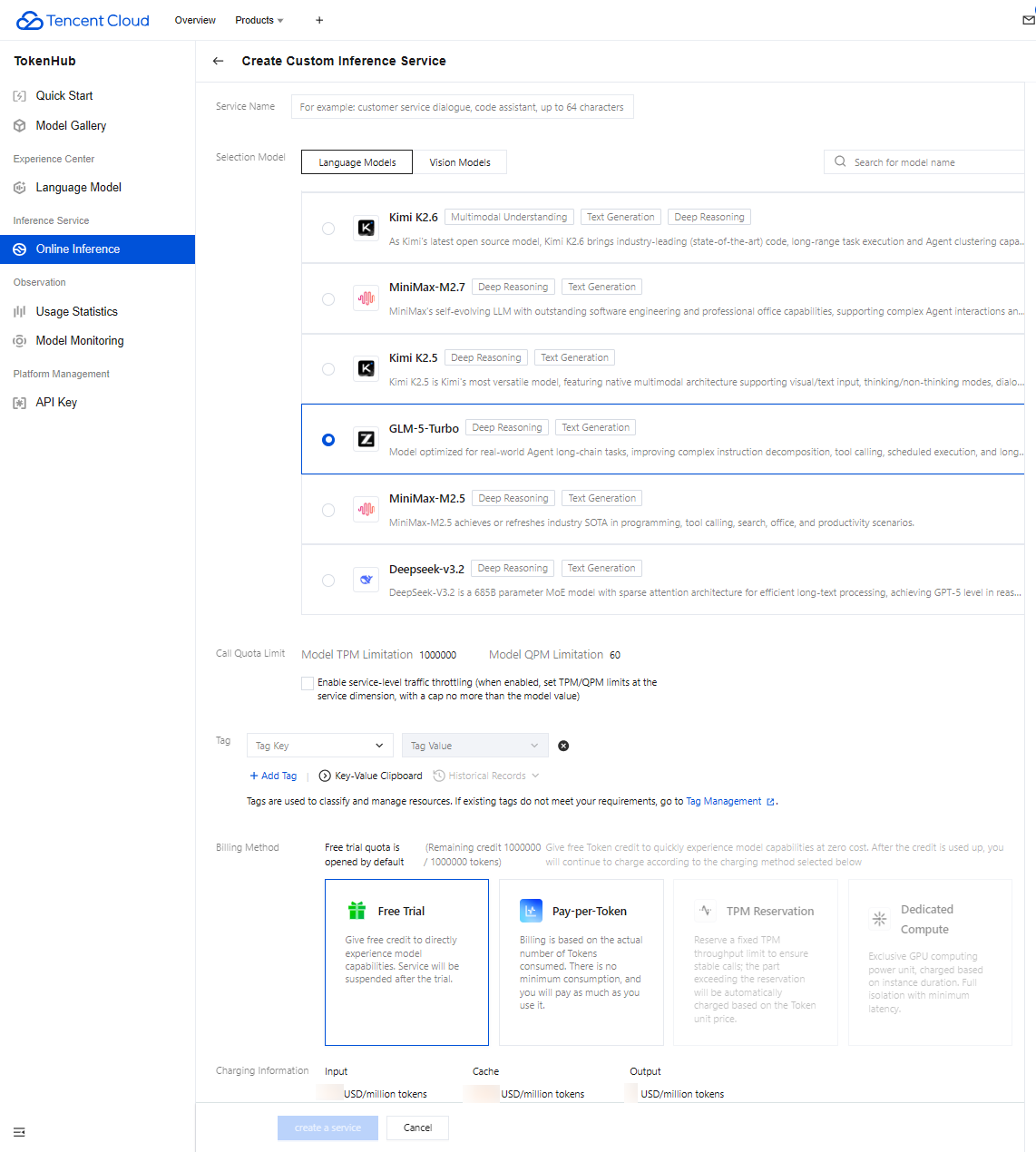
Service Traffic Throttling
After service-level rate limiting is enabled, you can specify a limit threshold for a single service that does not exceed the total TPM and QPM of the model. Note that if multiple inference services are created for one model, the actual total TPM and QPM of these services still cannot exceed the total limit of the model.
Service Status
Each online inference service has a status, as described below:
Status | Description |
Not Enabled | For the default type of inference service, it is in the Not Enabled state before a user starts using it and changes to the Running state after the user begins the free trial. |
Creating | When the service is enabled for the first time, it enters a brief Creating state and is expected to change to Running within 5 seconds. |
Running | The current service is accessible. |
Stopped | 1. When the account has overdue payment, pay-as-you-go services will become Stopped; when the account balance is replenished, the service will automatically return to Running. 2. The service will become Stopped when the free quota is exhausted and postpaid is not enabled, or when the user manually disables postpaid for the service. To restore the service, the user needs to manually enable postpaid on the Online Inference page. |
Billing Mode
The billing method indicates the payment status of the current service, as described below:
Status | Description |
Free Trial | The current service is using a free trial package. Usage within the free trial package is not billed. |
Pay-as-you-go | The current service has activated the postpaid billing method based on Token usage. |
TPM Reservation | The current service has enabled TPM reservation, which reserves a fixed TPM throughput quota to ensure stable calls. Traffic exceeding the reserved quota is billed by Token. |
Model Unit | The current service has activated model units, using dedicated inference resources with exclusive and security-isolated capabilities, and is billed by model unit usage duration. |
None | When the user's free trial package is exhausted and postpaid billing is not enabled, there will be no billing status, and the service will become stopped. |
Note:
Users can enable postpaid in advance even before the free trial package is fully consumed. After postpaid is enabled, both the Free Trial and Pay-per-Token billing statuses are displayed. The platform prioritizes consuming the free trial quota. Once the free trial package is exhausted, billing based on Token usage will begin.
Bantuan dan Dukungan
Apakah halaman ini membantu?
Anda juga dapat Menghubungi Penjualan atau Mengirimkan Tiket untuk meminta bantuan.
masukan