CodeBuddy Code
Unduh
Mode fokus
Ukuran font
CodeBuddy Code is an intelligent programming tool built on Tencent Cloud AI technology. It deeply integrates with the Tencent Cloud ecosystem and provides end-to-end AI assistance, covering everything from code writing to project deployment. This article demonstrates how to integrate a model for use with CodeBuddy Code, using DeepSeek V4 Pro as an example.
Installing CodeBuddy Code
Install CodeBuddy Code according to your actual environment type. For details, see CodeBuddy Code Installation. If CodeBuddy Code is already installed, you can skip this step.
Obtaining an API Key
1. Go to the API Key Management page and click Create API Key. For operational details, see Create API Key.
Note:
When setting the Access Scope, if you select "Range", ensure that DeepSeek V4 Pro is selected.
2. After creation, be sure to copy and securely store the API Key. This information will be used in the subsequent process of configuring the tool.
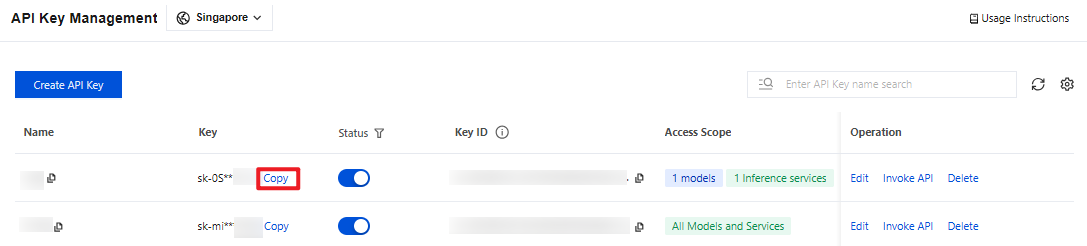
Configuring CodeBuddy Code
1. Locate the configuration file for CodeBuddy Code. The configuration file path is provided below. If the configuration file does not exist, create it.
Windows:
C:\\Users\\<username>\\.codebuddy\\models.json.macOS/Linux:
~/.codebuddy/models.json.2. Copy and paste the following configuration, then save it.
Note:
Replace
<USER_API_KEY> in your code with the API Key string you obtained from the API Key Management page. This key is used for authentication. Keep it secure and do not expose it or commit it to a code repository.models.json is the model configuration file for CodeBuddy Code. If it already exists, you only need to append the deepseek-v4-pro configuration to models and availableModels. For more related configurations, see CodeBuddy Code Model Configuration.{"models": [{"id": "deepseek-v4-pro","name": "deepseek-v4-pro","vendor": "Tencent Cloud","apiKey": "<USER_API_KEY>","url": "https://tokenhub-intl.tencentcloudmaas.com/v1"}],"availableModels": ["deepseek-v4-pro"]}
Using Tikit
After configuration is complete, run the following command to start CodeBuddy Code.
codebuddy
When you use CodeBuddy Code for the first time, the Trust File Selection page appears first, asking whether to trust the project files in the current working directory. Follow the recommendations below to make your selection:
Yes, proceed (Recommended): Select this option only if you trust all files in the current directory. This allows CodeBuddy Code to read and write project files and run commands to assist with development.
No, exit: Select this option when the current directory contains code you do not trust or whose source is unknown. The tool will then exit to ensure security.
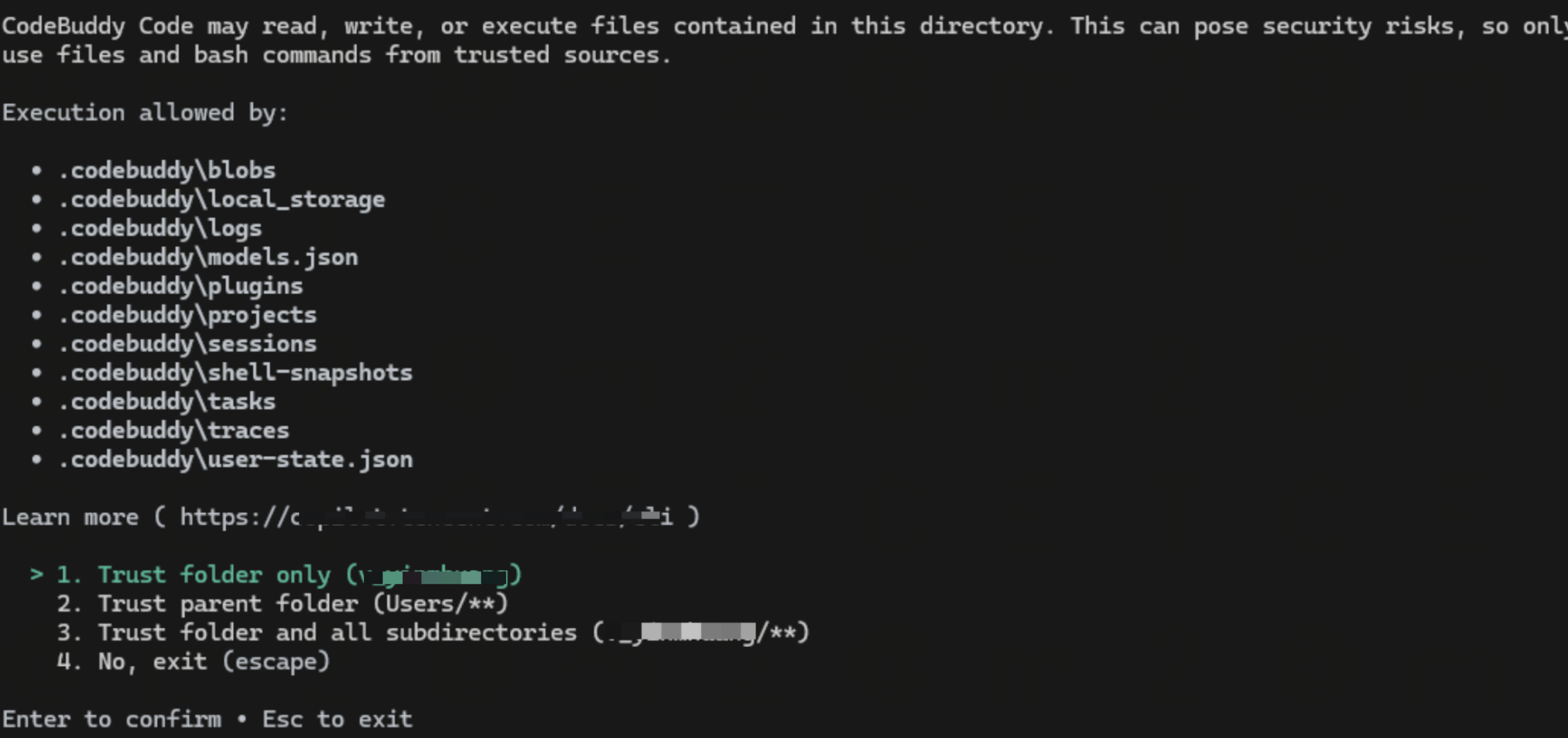
Complete the login authentication. After startup, the login method selection page is displayed:
Select login method:› Log in via Chinese SiteLog in via International SiteLog in via Enterprise DomainLog in via iOA (Tencent only)
The login methods are described as follows:
Login Method | Use Cases | Description |
Chinese Site | Users of the Chinese Site | Authenticate via Tencent Cloud China Site (copilot.tencent.com), supporting mainstream models within China. |
International Site | International Site users | Authenticate via Tencent Cloud International Site (codebuddy.ai), supporting mainstream models outside China. |
Enterprise Domain | Dedicated Edition/Private Deployment | Connect to the enterprise-exclusive or self-built CodeBuddy service, and enter the service address provided by your enterprise. |
iOA | Tencent internal employees | Authenticate via Tencent iOA Zero Trust system, and is restricted to Tencent internal employees only. |
Use the ↑↓ keys to select a login method. After you press Enter to confirm, a browser will automatically open to complete the authentication.
After successful authentication, you are returned to the CodeBuddy Code command-line interface. In the input box, directly type
/model and press Enter to go to the model selection list. Select the deepseek-v4-pro model configured in this document to start using it.Bantuan dan Dukungan
Apakah halaman ini membantu?
Anda juga dapat Menghubungi Penjualan atau Mengirimkan Tiket untuk meminta bantuan.
masukan