Preserved Thinking
Unduh
Mode fokus
Ukuran font
Feature Overview
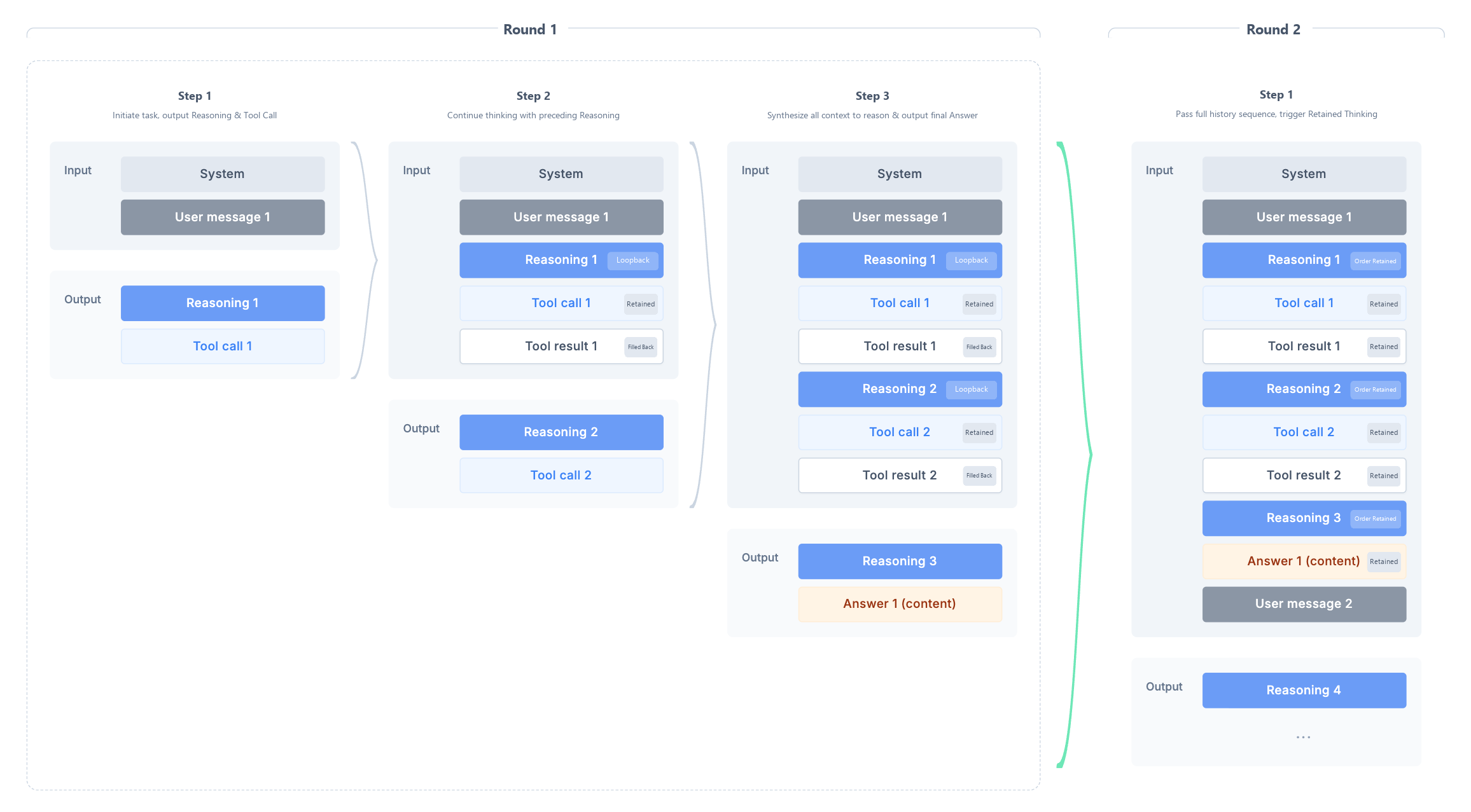
Preserved Thinking extends the retention scope of the model's
reasoning_content from "within the same user query round" to "across user query rounds". When users continue their inquiries in subsequent rounds, previous reasoning drafts can still be preserved and continued. This maintains reasoning continuity and improves model performance in long-running, multi-turn tasks such as Agent and Coding. It also increases cache hit rates and saves tokens due to more stable context prefixes.Recommended
Applicable to cross-round scenarios that involve slow thinking (
high) + tool calls, for example:Agent long-running tasks: multi-turn tool orchestration and information aggregation.
Coding tasks: multi-turn code completion / modification / debugging, requiring the continuation of the reasoning path from the previous round.
In multi-turn conversations that include follow-up questions, the model needs to continue its responses based on prior reasoning when users pose related questions within the same session.
The invocation pattern for this scenario is shown in the following figure:
Differences from Interleaved Thinking
Both revolve around the core mechanism of "preserving
reasoning_content to continue the chain of thought", with the main difference being the scope of retention. Developers operate both modes in the same way,by directly feeding the reasoning_content returned by the model back into the next request.Concept | Retention Scope of Reasoning Content | Plain Explanation |
Interleaved Thinking (Interleaved) | Within the same user turn (User turn) | Similar to looking up reference materials while working on the same problem: the model first writes a piece of solution draft. When the tool result is returned, the developer brings this draft back unchanged, so that the model can continue working based on the previous train of thought. After this round ends, the draft for this problem is not brought back in the next user turn. |
Preserved Thinking (Preserved) | Across user turns (User turn) | Similar to keeping the solution draft for each problem: when the user continues to ask follow-up questions, the developer brings the relevant historical draft back unchanged into the request, and the model continues to reference it for answering. |
Supported Models and Protocols
Supported Models:
hy3, hy4-preview, hy4Supported Protocols: The three protocols:OpenAI Chat Completions, OpenAI Responses, and Anthropic are all supported, with slight differences in their enabling/disabling methods (see the "Enabling/Disabling Methods" section below for details).
Switching Methods
Preserved Thinking can be explicitly enabled or disabled via parameters. The enabling/disabling fields for each protocol are as follows:
Protocol | Control Method | Reference Example |
OpenAI Chat Completions | Top-level field preserved_thinking in the request body | {"reasoning_effort":"high","preserved_thinking":true} |
OpenAI Responses | Field preserved_thinking within the reasoning object | {"reasoning":{"effort":"high","preserved_thinking":true}} |
Anthropic | Request header HY-Preserved-ThinkingValid values are true / false / empty or not passed: explicitly passing true enables the feature, and passing false disables it; when the value is empty or not passed, the API default policy is used; passing an invalid value results in an error. | HY-Preserved-Thinking: true |
Recommendation:
1. Unless there are specific requirements, it is not recommended to manually pass
preserved_thinking, as the platform will automatically process it using the optimal policy.When a request carries
tools (in a tool invocation scenario), Preserved Thinking is enabled by default.When a request does not carry
tools (in a pure text conversation scenario), it is disabled by default.2. Consider manually enabling Preserved Thinking only under the following specific circumstance: when tool definitions are not registered via the standard
tools array (for example, written in the system prompt). In this case, the platform cannot automatically recognize it as a tool invocation scenario, and you can manually set preserved_thinking: true. The recommended approach is to still register tools in the standard way within the tools array, which allows you to reuse the platform's policy and achieve optimal model performance.Field Backfill Requirements
Attention:
The
preserved_thinking parameter only controls the enabling and disabling of Preserved Thinking and does not automatically handle the backfilling of historical reasoning_content. Developers need to backfill the complete, unmodified reasoning_content returned by the model in the previous round, along with the tool results, to the API as-is. Otherwise, model performance may be affected, and cache hit rates may decrease.Common Fields
Using the Chat Completions protocol as an example:
Field | Position | Description |
reasoning_effort | Request | Reasoning depth, with values no_think / high |
preserved_thinking | Request | Preserved thinking switch, with values true / false. When not passed, the platform handles it according to the default policy. |
reasoning_content | Response (to be returned) | The model's reasoning process, which must be filled back unchanged in subsequent requests. |
tool_calls | Response (to be returned) | Tool invocation instructions output by the model |
content | Response time | Final answer content |
Backfill Rules (Must Be Followed)
Backfill As-Is: The
reasoning_content being backfilled must exactly match what the model originally generated. Do not rewrite, truncate, or reorder it, as this will degrade performance and reduce cache hit rates.Follow the corresponding assistant message: Place the
reasoning_content back into its original assistant message (at the same level as content and tool_calls).Persistent Retention: Include the historical
reasoning_content in every request until the final answer is obtained.Call Process
Using the Chat Completions protocol as an example, it is recommended to strictly follow this invocation flow in scenarios involving slow thinking + tool calls:
step1: Initiate the first request (which includes system/user content and the
tools list). Preserved Thinking is enabled by default.step2: The API outputs an assistant message, which may contain:
reasoning_contenttool_callsstep3: Your application executes the tool.
step4: Backfill the tool results with
role=tool, add the previous assistant message (which contains reasoning_content and tool_calls) as-is to the messages array, and then initiate the request again.step5: The model may initiate a new tool call or output the final answer. If it initiates another tool call, repeat steps 3 to 4.
step6: When a user initiates a follow-up question in a new round (across user query rounds), you must also keep all assistant messages from previous rounds (including
reasoning_content) as-is in the messages array. This is the most fundamental difference between Preserved Thinking and Interleaved Thinking.Call Example (Slow Thinking + Multi-Step Tool Calls)
The following provides a simple example of Preserved Thinking, using the Chat Completions protocol as a reference.
Scenario: An enterprise IT permissions assistant Agent provides two tools:
get_user_groups (which queries the groups a user belongs to) and get_group_permissions (which queries a group's permissions for various resources). The user asks questions in three rounds, with the thinking from previous rounds retained in each round:Round 1 user input:
Which user groups does Alice belong to?Round 2 user input:
What permissions do these groups have, respectively?Round 3 user input:
Overall, what specific permissions does Alice have for the "production database"?Note:
1. Preserved Thinking typically does not yield significant performance gains on simple tasks (its benefits in terms of both effectiveness and cost become more pronounced in multi-turn, long-running complex tasks). Therefore, this example is provided solely to demonstrate the usage of cross-round invocation.
2. Replace
YOUR_API_KEY in the sample code with your actual API Key. If you do not have an API Key yet, see Create API Key.1. First Request (User's First Query)
Request:
curl -X POST 'https://tokenhub-intl.tencentcloudmaas.com/v1/chat/completions' \\-H 'Content-Type: application/json' \\-H 'Authorization: Bearer YOUR_API_KEY' \\-d '{"model": "hy4","stream": false,"reasoning_effort": "high","tool_choice": "auto","messages": [{ "role": "system", "content": "You are an enterprise IT permissions assistant Agent that answers questions by invoking tools to query organizational and permission data. Always perform step-by-step reasoning and thinking in Chinese." },{ "role": "user", "content": "Which user groups does Alice belong to?" }],"tools": [{"type": "function","function": {"name": "get_user_groups","description": "Queries all user groups to which a specified user belongs.","parameters": {"type": "object","properties": {"user": { "type": "string" }},"required": ["user"]}}},{"type": "function","function": {"name": "get_group_permissions","description": "Queries the access permissions of a specified user group for various resources.","parameters": {"type": "object","properties": {"group": { "type": "string" }},"required": ["group"]}}}]}'
from openai import OpenAIclient = OpenAI(api_key="YOUR_API_KEY",base_url="https://tokenhub-intl.tencentcloudmaas.com/v1",)tools = [{"type": "function","function": {"name": "get_user_groups","description": "Queries all user groups to which a specified user belongs.","parameters": {"type": "object","properties": {"user": {"type": "string"},},"required": ["user"],},},},{"type": "function","function": {"name": "get_group_permissions","description": "Queries the access permissions of a specified user group for various resources.","parameters": {"type": "object","properties": {"group": {"type": "string"},},"required": ["group"],},},},]messages = [{"role": "system", "content": "You are an enterprise IT permissions assistant Agent that answers questions by invoking tools to query organizational and permission data. Always perform step-by-step reasoning and thinking in Chinese."},{"role": "user", "content": "Which user groups does Alice belong to?"},]# When tools are included, hy4 enables preserved thinking by default.# To explicitly control it, you can pass preserved_thinking: True/False in the extra_body.resp1 = client.chat.completions.create(model="hy4",messages=messages,tools=tools,tool_choice="auto",extra_body={"reasoning_effort": "high"},)msg1 = resp1.choices[0].messageprint("Round 1 reasoning_content:", getattr(msg1, "reasoning_content", ""))print("Round 1 tool_calls:", msg1.tool_calls)
import OpenAI from 'openai';const client = new OpenAI({apiKey: 'YOUR_API_KEY',baseURL: 'https://tokenhub-intl.tencentcloudmaas.com/v1',});const tools = [{type: 'function',function: {name: 'get_user_groups',description: 'Queries all user groups to which a specified user belongs.',parameters: {type: 'object',properties: {user: { type: 'string' },},required: ['user'],},},},{type: 'function',function: {name: 'get_group_permissions',description: 'Queries the access permissions of a specified user group for various resources.',parameters: {type: 'object',properties: {group: { type: 'string' },},required: ['group'],},},},];const messages = [{ role: 'system', content: 'You are an enterprise IT permissions assistant Agent that answers questions by invoking tools to query organizational and permission data. Always perform step-by-step reasoning and thinking in Chinese.' },{"role": "user", "content": "Which user groups does Alice belong to?"},];const resp1 = await client.chat.completions.create({model: 'hy4',messages,tools,tool_choice: 'auto',reasoning_effort: 'high',});const msg1 = resp1.choices[0].message;console.log('Round 1 reasoning_content:', msg1.reasoning_content);console.log('Round 1 tool_calls:', msg1.tool_calls);
import okhttp3.*;import com.google.gson.*;import java.util.*;public class PreservedThinking {static final String URL = "https://tokenhub-intl.tencentcloudmaas.com/v1/chat/completions";static final String API_KEY = "YOUR_API_KEY";static final OkHttpClient HTTP = new OkHttpClient();static final Gson GSON = new Gson();/** A generic chat call that returns the raw JSON response string. */static String chat(List<Map<String, Object>> messages, List<Map<String, Object>> tools) throws Exception {Map<String, Object> body = new HashMap<>();body.put("model", "hy4");body.put("messages", messages);body.put("tools", tools);body.put("tool_choice", "auto");body.put("reasoning_effort", "high");body.put("stream", false);// For explicit control, you can add: body.put("preserved_thinking", true);Request req = new Request.Builder().url(URL).header("Authorization", "Bearer " + API_KEY).post(RequestBody.create(GSON.toJson(body), MediaType.parse("application/json"))).build();try (Response resp = HTTP.newCall(req).execute()) {return resp.body().string();}}public static void main(String[] args) throws Exception {List<Map<String, Object>> tools = List.of(Map.of("type", "function","function", Map.of("name", "get_user_groups","description", "Queries all user groups to which a specified user belongs.","parameters", Map.of("type", "object","properties", Map.of("user", Map.of("type", "string")),"required", List.of("user")))),Map.of("type", "function","function", Map.of("name", "get_group_permissions","description", "Queries the access permissions of a specified user group for various resources.","parameters", Map.of("type", "object","properties", Map.of("group", Map.of("type", "string")),"required", List.of("group")))));List<Map<String, Object>> messages = new ArrayList<>();messages.add(Map.of("role", "system", "content", "You are an enterprise IT permissions assistant Agent that answers questions by invoking tools to query organizational and permission data. Always perform step-by-step reasoning and thinking in Chinese."));messages.add(Map.of("role", "user", "content", "Which user groups does Alice belong to?"));// Round 1: The model decides whether to call a toolString r1 = chat(messages, tools);System.out.println("Round 1 response: " + r1);// Subsequently, backfill the reasoning_content / tool_calls from the response into the messages. Refer to Step 2.}}
package mainimport ("bytes""encoding/json""fmt""io""net/http")const (URL = "https://tokenhub-intl.tencentcloudmaas.com/v1/chat/completions"APIKEY = "YOUR_API_KEY")// Generic chat callfunc chat(messages []map[string]interface{}, tools []map[string]interface{}) (map[string]interface{}, error) {body, _ := json.Marshal(map[string]interface{}{"model": "hy4","messages": messages,"tools": tools,"tool_choice": "auto","reasoning_effort": "high","stream": false,// For explicit control, you can add: "preserved_thinking": true,})req, _ := http.NewRequest("POST", URL, bytes.NewBuffer(body))req.Header.Set("Authorization", "Bearer "+APIKEY)req.Header.Set("Content-Type", "application/json")resp, err := http.DefaultClient.Do(req)if err != nil {return nil, err}defer resp.Body.Close()data, _ := io.ReadAll(resp.Body)var out map[string]interface{}json.Unmarshal(data, &out)return out, nil}func main() {tools := []map[string]interface{}{{"type": "function","function": map[string]interface{}{"name": "get_user_groups","description": "Queries all user groups to which a specified user belongs.","parameters": map[string]interface{}{"type": "object","properties": map[string]interface{}{"user": map[string]string{"type": "string"},},"required": []string{"user"},},},},{"type": "function","function": map[string]interface{}{"name": "get_group_permissions","description": "Queries the access permissions of a specified user group for various resources.","parameters": map[string]interface{}{"type": "object","properties": map[string]interface{}{"group": map[string]string{"type": "string"},},"required": []string{"group"},},},},}messages := []map[string]interface{}{{"role": "system", "content": "You are an enterprise IT permissions assistant Agent that answers questions by invoking tools to query organizational and permission data. Always perform step-by-step reasoning and thinking in Chinese."},{"role": "user", "content": "Which user groups does Alice belong to?"},}// Round 1: The model decides whether to call a toolr1, _ := chat(messages, tools)fmt.Printf("Round 1 response: %+v\\n", r1)// Subsequently, backfill the reasoning_content / tool_calls from the response into the messages. Refer to Step 2.}
Response: The model first reasons and then decides to call
get_user_groups.{"id": "REPLACED_ID","object": "chat.completion","created": 1783084572,"model": "hy4","choices": [{"index": 0,"message": {"role": "assistant","content": "I will query the user groups to which Alice belongs.","reasoning_content": "The user asks which user groups Alice belongs to. I need to call the get_user_groups tool to query the user groups to which Alice belongs. There is only one call, with no dependencies.","tool_calls": [{"id": "chatcmpl-tool-93cc85d5f381f88d","type": "function","function": {"name": "get_user_groups","arguments": "{\\"user\\": \\"Alice\\"}"}}]},"finish_reason": "tool_calls"}],"usage": {"prompt_tokens": 289,"completion_tokens": 60,"total_tokens": 349,"completion_tokens_details": { "reasoning_tokens": 31 }}}
2. Backfill Tool Results and Continue Thinking
Backfill the previous assistant message (which contains
reasoning_content) together with the tool results. Assuming get_user_groups returns ["Engineering","OnCall"]:Request:
curl -X POST 'https://tokenhub-intl.tencentcloudmaas.com/v1/chat/completions' \\-H 'Content-Type: application/json' \\-H 'Authorization: Bearer YOUR_API_KEY' \\-d '{"model": "hy4","stream": false,"reasoning_effort": "high","tool_choice": "auto","messages": [{ "role": "system", "content": "You are an enterprise IT permissions assistant Agent that answers questions by invoking tools to query organizational and permission data. Always perform step-by-step reasoning and thinking in Chinese." },{"role": "user", "content": "Which user groups does Alice belong to?"},{"role": "assistant", "content": "I will query the user groups to which Alice belongs.","reasoning_content": "The user asks which user groups Alice belongs to. I need to call the get_user_groups tool to query the user groups to which Alice belongs. There is only one call, with no dependencies.","tool_calls": [{ "id": "chatcmpl-tool-93cc85d5f381f88d", "type": "function","function": { "name": "get_user_groups", "arguments": "{\\"user\\": \\"Alice\\"}" } }] },{ "role": "tool", "tool_call_id": "chatcmpl-tool-93cc85d5f381f88d","content": "{\\"user\\": \\"Alice\\", \\"groups\\": [\\"Engineering\\", \\"OnCall\\"]}" }],"tools": [ /* Same as above, omitted */ ]}'
# Continuing from step1: Add the assistant message from Round 1 (containing reasoning_content + tool_calls)# Backfill into the messages along with the tool resultimport json# Backfill of the assistant message from Round 1: reasoning_content must be retainedassistant_msg = {"role": "assistant","content": msg1.content or "","reasoning_content": getattr(msg1, "reasoning_content", ""),"tool_calls": [{"id": tc.id,"type": tc.type,"function": {"name": tc.function.name,"arguments": tc.function.arguments,},} for tc in (msg1.tool_calls or [])],}messages.append(assistant_msg)# Execute get_user_groups on the business side and backfill the result with role=tool.for tc in (msg1.tool_calls or []):# Replace with actual business logic heretool_result = json.dumps({"user": "Alice", "groups": ["Engineering", "OnCall"]}, ensure_ascii=False)messages.append({"role": "tool","tool_call_id": tc.id,"content": tool_result,})# Round 2: Send the tool result back to the model, which then continues to thinkresp2 = client.chat.completions.create(model="hy4",messages=messages,tools=tools,tool_choice="auto",extra_body={"reasoning_effort": "high"},)msg2 = resp2.choices[0].messageprint("Round 2 reasoning_content:", getattr(msg2, "reasoning_content", ""))print("Round 2 content:", msg2.content)
// Continuing from step1: Backfill the assistant message and tool result from Round 1const assistantMsg = {role: 'assistant',content: msg1.content || '',reasoning_content: msg1.reasoning_content,tool_calls: msg1.tool_calls,};messages.push(assistantMsg);for (const tc of msg1.tool_calls || []) {// Replace with actual business logic hereconst toolResult = JSON.stringify({ user: 'Alice', groups: ['Engineering', 'OnCall'] });messages.push({role: 'tool',tool_call_id: tc.id,content: toolResult,});}const resp2 = await client.chat.completions.create({model: 'hy4',messages,tools,tool_choice: 'auto',reasoning_effort: 'high',});const msg2 = resp2.choices[0].message;console.log('Round 2 reasoning_content:', msg2.reasoning_content);console.log('Round 2 content:', msg2.content);
// Following main(): Backfill the assistant message and tool result from Round 1, then initiate the Round 2 request// Complete flow illustration (only message construction is shown; the HTTP call reuses the chat() function)// 1. Parse the Round 1 responseJsonObject r1Obj = JsonParser.parseString(r1).getAsJsonObject();JsonObject msg1 = r1Obj.getAsJsonArray("choices").get(0).getAsJsonObject().getAsJsonObject("message");// 2. Backfill the assistant message (including reasoning_content) as a whole into messagesMap<String, Object> assistantEntry = new LinkedHashMap<>();assistantEntry.put("role", "assistant");assistantEntry.put("content", msg1.has("content") ? msg1.get("content").getAsString() : "");if (msg1.has("reasoning_content")) {assistantEntry.put("reasoning_content", msg1.get("reasoning_content").getAsString());}if (msg1.has("tool_calls")) {assistantEntry.put("tool_calls", GSON.fromJson(msg1.get("tool_calls"), List.class));}messages.add(assistantEntry);// 3. Execute get_user_groups on the business side and backfill the result with role=toolfor (JsonElement el : msg1.getAsJsonArray("tool_calls")) {JsonObject call = el.getAsJsonObject();// Replace with actual business logic hereString toolResult = "{\\"user\\": \\"Alice\\", \\"groups\\": [\\"Engineering\\", \\"OnCall\\"]}";messages.add(Map.of("role", "tool","tool_call_id", call.get("id").getAsString(),"content", toolResult));}// 4. Round 2: Send the tool result back to the modelString r2 = chat(messages, tools);System.out.println("Round 2 response: " + r2);
// Following main(): Backfill the assistant message and tool result from Round 1, then initiate the Round 2 request// 1. Extract the assistant message from the Round 1 responsemsg1Wrap := r1["choices"].([]interface{})[0].(map[string]interface{})msg1 := msg1Wrap["message"].(map[string]interface{})// 2. Backfill the assistant message (including reasoning_content) as a whole into messagesmessages = append(messages, msg1)// 3. Execute get_user_groups on the business side and backfill the result with role=tooltoolCalls, _ := msg1["tool_calls"].([]interface{})for _, c := range toolCalls {call := c.(map[string]interface{})// Replace with actual business logic heretoolResult := `{"user": "Alice", "groups": ["Engineering", "OnCall"]}`messages = append(messages, map[string]interface{}{"role": "tool","tool_call_id": call["id"],"content": toolResult,})}// 4. Round 2: Send the tool result back to the modelr2, _ := chat(messages, tools)fmt.Printf("Round 2 response: %+v\\n", r2)
Response: The model's response for this round is completed,
finish_reason=stop:{"id": "REPLACED_ID","object": "chat.completion","created": 1783084576,"model": "hy4","choices": [{"index": 0,"message": {"role": "assistant","content": "Based on the query result, Alice belongs to the following two user groups:\\n\\n- **Engineering**\\n- **OnCall**\\n\\nTherefore, Alice is a member of both the Engineering group and the OnCall group.","reasoning_content": "Based on the tool's returned result, Alice belongs to the Engineering and OnCall user groups."},"finish_reason": "stop"}],"usage": {"prompt_tokens": 375,"completion_tokens": 54,"total_tokens": 429,"prompt_tokens_details": { "cached_tokens": 320 },"completion_tokens_details": { "reasoning_tokens": 18 }}}
3. New User Query, Retaining Previous Thoughts
Append the second user question, and initiate the request again while keeping the context from previous rounds, such as
reasoning_content, intact:Request:
curl -X POST 'https://tokenhub-intl.tencentcloudmaas.com/v1/chat/completions' \\-H 'Content-Type: application/json' \\-H 'Authorization: Bearer YOUR_API_KEY' \\-d '{"model": "hy4","stream": false,"reasoning_effort": "high","tool_choice": "auto","messages": [{ "role": "system", "content": "You are an enterprise IT permissions assistant Agent that answers questions by invoking tools to query organizational and permission data. Always perform step-by-step reasoning and thinking in Chinese." },{"role": "user", "content": "Which user groups does Alice belong to?"},{"role": "assistant", "content": "I will query the user groups to which Alice belongs.","reasoning_content": "The user asks which user groups Alice belongs to. I need to call the get_user_groups tool to query the user groups to which Alice belongs. There is only one call, with no dependencies.","tool_calls": [{ "id": "chatcmpl-tool-93cc85d5f381f88d", "type": "function","function": { "name": "get_user_groups", "arguments": "{\\"user\\": \\"Alice\\"}" } }] },{ "role": "tool", "tool_call_id": "chatcmpl-tool-93cc85d5f381f88d","content": "{\\"user\\": \\"Alice\\", \\"groups\\": [\\"Engineering\\", \\"OnCall\\"]}" },{ "role": "assistant","content": "Based on the query result, Alice belongs to the following two user groups:\\n\\n- **Engineering**\\n- **OnCall**\\n\\nTherefore, Alice is a member of both the Engineering group and the OnCall group.","reasoning_content": "Based on the tool's returned result, Alice belongs to the Engineering and OnCall user groups.",{"role": "user", "content": "What access permissions do these groups have for which resources?"},],"tools": [ /* Same as above, omitted */ ]}'
# Continuing from step2: Append the assistant message from Round 2 (containing reasoning_content) to the messages,# Then append the second round of user questions and initiate the request again.messages.append({"role": "assistant","content": msg2.content or "","reasoning_content": getattr(msg2, "reasoning_content", ""),})messages.append({"role": "user", "content": "What access permissions do these groups have for which resources?"})resp3 = client.chat.completions.create(model="hy4",messages=messages,tools=tools,tool_choice="auto",extra_body={"reasoning_effort": "high"},)msg3 = resp3.choices[0].messageprint("Round 3 reasoning_content:", getattr(msg3, "reasoning_content", ""))print("Round 3 tool_calls:", msg3.tool_calls)
// Continuing from step2: Append the assistant message from Round 2 (containing reasoning_content) to the messages,// Then append the second round of user questions and initiate the request again.messages.push({role: 'assistant',content: msg2.content || '',reasoning_content: msg2.reasoning_content,});messages.push({ role: 'user', content: 'What access permissions do these groups have for which resources?' });const resp3 = await client.chat.completions.create({model: 'hy4',messages,tools,tool_choice: 'auto',reasoning_effort: 'high',});const msg3 = resp3.choices[0].message;console.log('Round 3 reasoning_content:', msg3.reasoning_content);console.log('Round 3 tool_calls:', msg3.tool_calls);
// Continuing from the second round response r2: Append the assistant message from Round 2 (containing reasoning_content) to the messages.JsonObject r2Obj = JsonParser.parseString(r2).getAsJsonObject();JsonObject msg2 = r2Obj.getAsJsonArray("choices").get(0).getAsJsonObject().getAsJsonObject("message");Map<String, Object> assistant2 = new LinkedHashMap<>();assistant2.put("role", "assistant");assistant2.put("content", msg2.has("content") ? msg2.get("content").getAsString() : "");if (msg2.has("reasoning_content")) {assistant2.put("reasoning_content", msg2.get("reasoning_content").getAsString());}messages.add(assistant2);// Append the second round of user questions.messages.add(Map.of("role", "user", "content", "What access permissions do these groups have for which resources?"));// Round 3: Send the new question back to the modelString r3 = chat(messages, tools);System.out.println("Round 3 response: " + r3);
// Continuing from the second round response r2: Append the assistant message from Round 2 (containing reasoning_content) to the messages.msg2Wrap := r2["choices"].([]interface{})[0].(map[string]interface{})msg2 := msg2Wrap["message"].(map[string]interface{})messages = append(messages, msg2)// Append the second round of user questions.messages = append(messages, map[string]interface{}{"role": "user","content": "What access permissions do these groups have for which resources?",})// Round 3: Send the new question back to the modelr3, _ := chat(messages, tools)fmt.Printf("Round 3 response: %+v\\n", r3)
Response: Following its previous line of reasoning, the model initiates a
get_group_permissions call (this round involves initiating two tool calls in parallel):{"id": "REPLACED_ID","object": "chat.completion","created": 1783084580,"model": "hy4","choices": [{"index": 0,"message": {"role": "assistant","content": "I will query the resource access permissions for each of these two user groups.","reasoning_content": "The user wants to know what access permissions the two groups to which Alice belongs (Engineering and OnCall) have for which resources. I need to call the get_group_permissions tool to query the permissions for these two groups. These two calls have no dependencies and can be executed concurrently.","tool_calls": [{"id": "chatcmpl-tool-83653bb310744682","type": "function","function": {"name": "get_group_permissions","arguments": "{\\"group\\": \\"Engineering\\"}"}},{"id": "chatcmpl-tool-b2ee9d73aef14658","type": "function","function": {"name": "get_group_permissions","arguments": "{\\"group\\": \\"OnCall\\"}"}}]},"finish_reason": "tool_calls"}],"usage": {"prompt_tokens": 440,"completion_tokens": 94,"total_tokens": 534,"prompt_tokens_details": { "cached_tokens": 400 },"completion_tokens_details": { "reasoning_tokens": 44 }}}
4. Backfill Tool Results Again
Backfill the tool results (assuming Engineering: read-only for the production database; OnCall: read-write for the production database):
Request:
curl -X POST 'https://tokenhub-intl.tencentcloudmaas.com/v1/chat/completions' \\-H 'Content-Type: application/json' \\-H 'Authorization: Bearer YOUR_API_KEY' \\-d '{"model": "hy4","stream": false,"reasoning_effort": "high","tool_choice": "auto","messages": [/* ...The first 6 messages are the same as above, all reasoning_content is retained, omitted... */{ "role": "assistant", "content": "I will query the resource access permissions for each of these two user groups.","reasoning_content": "The user wants to know what access permissions the two groups to which Alice belongs (Engineering and OnCall) have for which resources. These two calls have no dependencies and can be executed concurrently.","tool_calls": [{ "id": "chatcmpl-tool-83653bb310744682", "type": "function","function": { "name": "get_group_permissions", "arguments": "{\\"group\\": \\"Engineering\\"}" } },{ "id": "chatcmpl-tool-b2ee9d73aef14658", "type": "function","function": { "name": "get_group_permissions", "arguments": "{\\"group\\": \\"OnCall\\"}" } }] },{ "role": "tool", "tool_call_id": "chatcmpl-tool-83653bb310744682","content": "{\\"group\\": \\"Engineering\\", \\"permissions\\": [{\\"resource\\": \\"production database\\", \\"access\\": \\"read-only\\"}, {\\"resource\\": \\"staging environment\\", \\"access\\": \\"read-write\\"}, {\\"resource\\": \\"internal Wiki\\", \\"access\\": \\"read-write\\"}]}" },{ "role": "tool", "tool_call_id": "chatcmpl-tool-b2ee9d73aef14658","content": "{\\"group\\": \\"OnCall\\", \\"permissions\\": [{\\"resource\\": \\"alarm system\\", \\"access\\": \\"read-write\\"}, {\\"resource\\": \\"production database\\", \\"access\\": \\"read-write\\"}]}" }],"tools": [ /* Same as above, omitted */ ]}'
# Continuing from step3: Write back the assistant message from Round 3 (which contains reasoning_content + tool_calls),# Then, backfill the tool results for the two tool_calls in parallel.import jsonassistant_msg3 = {"role": "assistant","content": msg3.content or "","reasoning_content": getattr(msg3, "reasoning_content", ""),"tool_calls": [{"id": tc.id,"type": tc.type,"function": {"name": tc.function.name,"arguments": tc.function.arguments,},} for tc in (msg3.tool_calls or [])],}messages.append(assistant_msg3)# Execute get_group_permissions in parallel on the business side and backfill the two results sequentially.tool_results = {"Engineering": {"group": "Engineering","permissions": [{"resource": "production database", "access": "read-only"},{"resource": "staging environment", "access": "read-write"},{"resource": "internal Wiki", "access": "read-write"},],},"OnCall": {"group": "OnCall","permissions": [{"resource": "alarm system", "access": "read-write"},{"resource": "production database", "access": "read-write"},],},}for tc in (msg3.tool_calls or []):args = json.loads(tc.function.arguments)result = tool_results[args["group"]]messages.append({"role": "tool","tool_call_id": tc.id,"content": json.dumps(result, ensure_ascii=False),})# Round 4: Send both tool results back to the model together.resp4 = client.chat.completions.create(model="hy4",messages=messages,tools=tools,tool_choice="auto",extra_body={"reasoning_effort": "high"},)msg4 = resp4.choices[0].messageprint("Round 4 reasoning_content:", getattr(msg4, "reasoning_content", ""))print("Round 4 content:", msg4.content)
// Continuing from step3: Backfill the assistant message and the two tool results from Round 3messages.push({role: 'assistant',content: msg3.content || '',reasoning_content: msg3.reasoning_content,tool_calls: msg3.tool_calls,});// Execute get_group_permissions in parallel on the business side.const toolResults = {Engineering: {group: 'Engineering',permissions: [{"resource": "production database", "access": "read-only"},{"resource": "staging environment", "access": "read-write"},{"resource": "internal Wiki", "access": "read-write"},],},OnCall: {group: 'OnCall',permissions: [{"resource": "alarm system", "access": "read-write"},{"resource": "production database", "access": "read-write"},],},};for (const tc of msg3.tool_calls || []) {const args = JSON.parse(tc.function.arguments);messages.push({role: 'tool',tool_call_id: tc.id,content: JSON.stringify(toolResults[args.group]),});}const resp4 = await client.chat.completions.create({model: 'hy4',messages,tools,tool_choice: 'auto',reasoning_effort: 'high',});const msg4 = resp4.choices[0].message;console.log('Round 4 reasoning_content:', msg4.reasoning_content);console.log('Round 4 content:', msg4.content);
// Continuing from the Round 3 response r3: Write back the assistant message (which contains reasoning_content + tool_calls)JsonObject r3Obj = JsonParser.parseString(r3).getAsJsonObject();JsonObject msg3 = r3Obj.getAsJsonArray("choices").get(0).getAsJsonObject().getAsJsonObject("message");Map<String, Object> assistant3 = new LinkedHashMap<>();assistant3.put("role", "assistant");assistant3.put("content", msg3.has("content") ? msg3.get("content").getAsString() : "");if (msg3.has("reasoning_content")) {assistant3.put("reasoning_content", msg3.get("reasoning_content").getAsString());}if (msg3.has("tool_calls")) {assistant3.put("tool_calls", GSON.fromJson(msg3.get("tool_calls"), List.class));}messages.add(assistant3);// Execute get_group_permissions in parallel on the business side.Map<String, String> toolResults = Map.of("Engineering", "{\\"group\\": \\"Engineering\\", \\"permissions\\": [{\\"resource\\": \\"production database\\", \\"access\\": \\"read-only\\"}, {\\"resource\\": \\"staging environment\\", \\"access\\": \\"read-write\\"}, {\\"resource\\": \\"internal Wiki\\", \\"access\\": \\"read-write\\"}]}","OnCall", "{\\"group\\": \\"OnCall\\", \\"permissions\\": [{\\"resource\\": \\"alarm system\\", \\"access\\": \\"read-write\\"}, {\\"resource\\": \\"production database\\", \\"access\\": \\"read-write\\"}]}");for (JsonElement el : msg3.getAsJsonArray("tool_calls")) {JsonObject call = el.getAsJsonObject();JsonObject args = JsonParser.parseString(call.getAsJsonObject("function").get("arguments").getAsString()).getAsJsonObject();String group = args.get("group").getAsString();messages.add(Map.of("role", "tool","tool_call_id", call.get("id").getAsString(),"content", toolResults.get(group)));}// Round 4: Send both tool results back to the model together.String r4 = chat(messages, tools);System.out.println("Round 4 response: " + r4);
// Continuing from the Round 3 response r3: Write back the assistant message (which contains reasoning_content + tool_calls)msg3Wrap := r3["choices"].([]interface{})[0].(map[string]interface{})msg3 := msg3Wrap["message"].(map[string]interface{})messages = append(messages, msg3)// Execute get_group_permissions in parallel on the business side.toolResults := map[string]string{"Engineering": `{"group": "Engineering", "permissions": [{"resource": "production database", "access": "read-only"}, {"resource": "staging environment", "access": "read-write"}, {"resource": "internal Wiki", "access": "read-write"}]}`,"OnCall": `{"group": "OnCall", "permissions": [{"resource": "alarm system", "access": "read-write"}, {"resource": "production database", "access": "read-write"}]}`,}toolCalls, _ := msg3["tool_calls"].([]interface{})for _, c := range toolCalls {call := c.(map[string]interface{})fn := call["function"].(map[string]interface{})var args map[string]interface{}json.Unmarshal([]byte(fn["arguments"].(string)), &args)group := args["group"].(string)messages = append(messages, map[string]interface{}{"role": "tool","tool_call_id": call["id"],"content": toolResults[group],})}// Round 4: Send both tool results back to the model together.r4, _ := chat(messages, tools)fmt.Printf("Round 4 response: %+v\\n", r4)
Response: The model has completed its response for this round,
finish_reason=stop:{"id": "REPLACED_ID","object": "chat.completion","created": 1783084585,"model": "hy4","choices": [{"index": 0,"message": {"role": "assistant","content": "Based on the query results, the resource access permissions for these two user groups are as follows:\\n\\n**Engineering Group**\\n- Production database: read-only\\n- staging environment: read-write\\n- Internal Wiki: read-write\\n\\n**OnCall Group**\\n- Alarm system: read-write\\n- Production database: read-write\\n\\n**Note:** Both groups have permissions for the production database, but the levels differ—Engineering has read-only, while OnCall has read-write. Since Alice belongs to both groups, she effectively has the highest-level **read-write** permission for the production database.","reasoning_content": "Now I have the permission information for both groups:\\n\\nEngineering Group:\\n- Production database: read-only\\n- staging environment: read-write\\n- Internal Wiki: read-write\\n\\nOnCall Group:\\n- Alarm system: read-write\\n- Production database: read-write\\n\\nI need to organize this information and respond to the user. Note that both groups have permissions for the production database, but Engineering has read-only, while OnCall has read-write. Since Alice belongs to both groups, the effective permission for the production database should be the union/highest permission, which is read-write..."},"finish_reason": "stop"}],"usage": {"prompt_tokens": 641,"completion_tokens": 266,"total_tokens": 907,"prompt_tokens_details": { "cached_tokens": 512 },"completion_tokens_details": { "reasoning_tokens": 140 }}}
5. Initiate a New User Query Again (Core Value of Retentive Thinking)
Append the third user question. At this point, the complete
messages array is as follows. Note that the reasoning_content and other content from each tool round are preserved as-is:[{ "role": "system", "content": "You are an enterprise IT permissions assistant Agent... Always perform step-by-step reasoning and thinking in Chinese." },{"role": "user", "content": "Which user groups does Alice belong to?"},{"role": "assistant", "content": "I will query the user groups to which Alice belongs.","reasoning_content": "The user asks which user groups Alice belongs to... There is only one call, with no dependencies.","tool_calls": [ { "id": "chatcmpl-tool-93cc85d5f381f88d", "type": "function","function": { "name": "get_user_groups", "arguments": "{\\"user\\": \\"Alice\\"}" } } ] },{ "role": "tool", "tool_call_id": "chatcmpl-tool-93cc85d5f381f88d","content": "{\\"user\\": \\"Alice\\", \\"groups\\": [\\"Engineering\\", \\"OnCall\\"]}" },{"role": "assistant", "content": "Based on the query results, Alice belongs to the following two user groups:","reasoning_content": "Based on the tool's returned result, Alice belongs to the Engineering and OnCall user groups.",{"role": "user", "content": "What access permissions do these groups have for which resources?"},{"role": "assistant", "content": "I will query the resource access permissions for each of these two user groups.","reasoning_content": "...These two calls have no dependency relationship and can be executed concurrently.","tool_calls": [{ "id": "chatcmpl-tool-83653bb310744682", "type": "function","function": { "name": "get_group_permissions", "arguments": "{\\"group\\": \\"Engineering\\"}" } },{ "id": "chatcmpl-tool-b2ee9d73aef14658", "type": "function","function": { "name": "get_group_permissions", "arguments": "{\\"group\\": \\"OnCall\\"}" } } ] },{ "role": "tool", "tool_call_id": "chatcmpl-tool-83653bb310744682","content": "{\\"group\\": \\"Engineering\\", \\"permissions\\": [{\\"resource\\": \\"production database\\", \\"access\\": \\"read-only\\"}, …]}" },{ "role": "tool", "tool_call_id": "chatcmpl-tool-b2ee9d73aef14658","content": "{\\"group\\": \\"OnCall\\", \\"permissions\\": [{\\"resource\\": \\"production database\\", \\"access\\": \\"read-write\\"}, …]}" },{"role": "assistant", "content": "Based on the query results, the resource access permissions for these two user groups are as follows:","reasoning_content": "Now I have the permission information for the two groups:\\nEngineering Group:\\n- Production database: read-only …\\nOnCall Group:\\n- Production database: read-write …" },// The user's third question round: comprehensive follow-up.{"role": "user", "content": "So, overall, what level of access permissions does Alice have for the 'production database'?"}]
Response: The model does not call the tools again. Instead, it directly chains the intermediate conclusions accumulated from the previous two rounds of reasoning (
Alice ∈ {Engineering, OnCall} → deducing that the two groups' permissions for the production database are "read-only / read-write" → taking the highest permission → that is, read-write permission):{"id": "REPLACED_ID","object": "chat.completion","created": 1783084590,"model": "hy4","choices": [{"index": 0,"message": {"role": "assistant","content": "Based on the information queried earlier, I can directly make a comprehensive judgment without needing to call the tools again:\\n\\n- **Engineering Group** → Production database: read-only\\n- **OnCall Group** → Production database: read-write\\n\\nSince Alice **belongs to** both the Engineering and OnCall groups, when multiple groups have different levels of permissions for the same resource, the **highest level** is typically applied (permissions are unioned).\\n\\nTherefore, overall, Alice has **read-write** level access permissions for the 'production database'.","reasoning_content": "The user asks about Alice's comprehensive access permissions for the production database. Based on the previous query results:\\n\\n- Engineering Group: production database - read-only\\n- OnCall Group: production database - read-write\\n\\nAlice belongs to both groups. Overall, she should have the highest level of permission, which is read-write. … I do not need to call the tools again, as all necessary information has already been obtained. I can answer directly based on the existing data.",},"finish_reason": "stop"}],"usage": {"prompt_tokens": 925,"completion_tokens": 283,"total_tokens": 1208,"prompt_tokens_details": { "cached_tokens": 624 },"completion_tokens_details": { "reasoning_tokens": 139 }}}
FAQs
Do I Need to Manually Pass preserved_thinking?
Generally, it is not required. If there are no special requirements, it is recommended not to pass this parameter. The platform automatically adopts the optimal policy : it is
enabled by default when a request carries tools, and disabled by default for pure text conversations. Manual setting to true is only necessary under special circumstances, such as when "tools are not registered via the standard tools array".After Enabling Retentive Thinking, Must I Backfill Historical reasoning_content?
Yes.
preserved_thinking only controls enabling and disabling and does not automatically handle the backfilling of historical reasoning. Developers need to bring back the complete, unmodified reasoning_content returned by the model in the previous round, along with the tool results, as-is. Otherwise, model performance may be affected, and cache hit rates may decrease.Can reasoning_content Be Summarized and Compressed During Backfill?
Not recommended. The
reasoning_content being backfilled must exactly match what the model originally generated. Do not rewrite, truncate, or reorder it, as this will degrade model performance and reduce cache hit rates.Does Retentive Thinking Significantly Increase token Consumption?
Viewed from the perspective of a single request's body length, there is a slight increase. However, because the context prefix is more stable, the cache hit rate improves significantly. For multi-round, long-running tasks, the overall token cost typically decreases, and the response latency is also reduced.
Bantuan dan Dukungan
Apakah halaman ini membantu?
Anda juga dapat Menghubungi Penjualan atau Mengirimkan Tiket untuk meminta bantuan.
masukan