Using pglogical for Logical Replication
다운로드
포커스 모드
폰트 크기
pglogical is a logical replication extension plugin for PostgreSQL. It uses the "publish/subscribe" data model for data replication. This model includes a "publisher" and a "subscriber". The publisher is used to define and publish designated data, and the subscriber can choose to subscribe, thereby receiving and using data changes. pglogical allows users to replicate only specific data content, reducing unnecessary data transmission and processing, making selective replication more efficient.
The replication of pglogical is applicable to various scenarios, including:
database major version upgrade
Complete database replication.
Leverage the replica set to selectively filter tables, rows, and columns.
Can be obtained from multiple upstream servers for data aggregation and merging.
Prerequisites
Note:
If you need to use the pglogical plugin, please submit a ticket and contact us to add the shared_preload_libraries parameter. Modifying the shared_preload_libraries parameter will restart the instance. Ensure the business has a reconnection mechanism.
TencentDB for PostgreSQL supports configuring pglogical logical replication between the same instance or different instances in the same region.
Note: Currently, only TencentDB for PostgreSQL instances with Linux kernel versions v11.22_r1.21, v12.20_r1.24, v13.16_r1.19, v14.13_r1.26, v15.6_r1.13, v16.4_r1.7 or higher and major versions from 11 to 16 support the pglogical plugin.
Please ensure the shared_preload_libraries parameter includes pglogical, as shown below:
postgres=> show shared_preload_libraries;shared_preload_libraries--------------------------------------------------------------------------------------------------------------------------------------pg_stat_statements,pg_stat_log,wal2json,decoderbufs,decoder_raw,pg_hint_plan,rds_server_handler,tencentdb_pwdcheck,pgaudit,pglogical(1 row)
The value of the wal_level parameter is logical, as shown below.
postgres=> show wal_level;wal_level-----------logical(1 row)
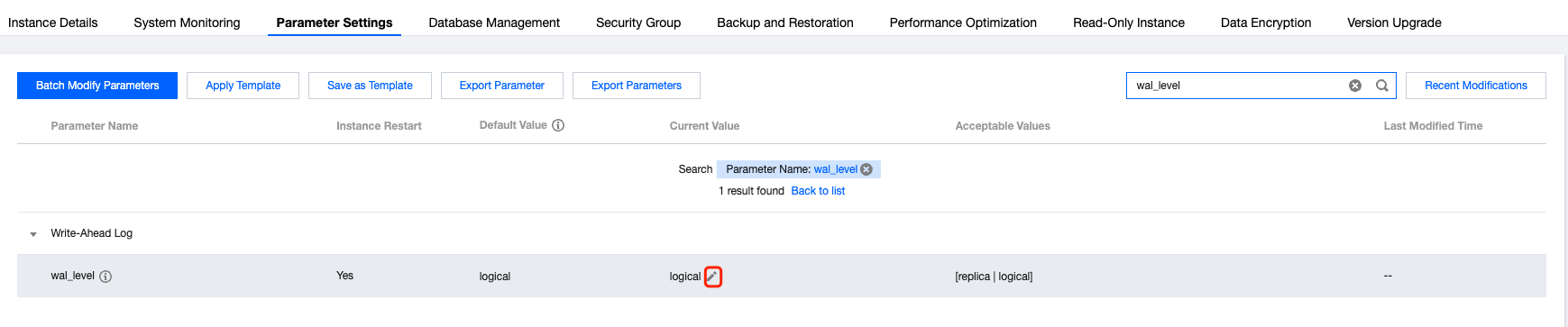
If you need to modify the wal_level parameter, please enter the Parameter Settings page of the TencentDB for PostgreSQL console to modify the parameter.
Directions
Check whether the pglogical plugin can be installed in instances at the publishing end and subscription end.
postgres=> select * from pg_available_extensions where name='pglogical';name | default_version | installed_version | comment-----------+-----------------+-------------------+--------------------------------pglogical | 2.4.4 | | PostgreSQL Logical Replication(1 row)
Installing Plugin
Create a database named am and switch to am.
postgres=> create database am;CREATE DATABASEpostgres=> \\c amYou are now connected to database "am" as user "dbadmin".am=>
Create table t and insert data
am=> create table t(a int primary key, b int);CREATE TABLEam=> insert into t(a,b)values(1,1),(2,2),(3,3);INSERT 0 3am=> select * from t;a | b---+---1 | 12 | 23 | 3(3 rows)
Execute the following commands on both the publisher and subscriber instances to create the pglogical plugin.
am=> create extension pglogical;CREATE EXTENSION
Use the following command to check whether it is installed successfully.
am=> select * from pg_extension where extname='pglogical';oid | extname | extowner | extnamespace | extrelocatable | extversion | extconfig | extcondition-------+-----------+----------+--------------+----------------+------------+-----------+--------------16424 | pglogical | 16387 | 16423 | f | 2.4.4 | |(1 row)
Create a Publishing Node on the Publisher
Create a publishing node. For parameters in dns, refer to Cross-database Access. The parameters here should be filled with the instance information where the Publisher is located.
am=> SELECT pglogical.create_node(node_name := 'provider1',dsn := 'host=10.*.*.* port=5432 dbname=am user=**** password=**** instanceid=postgres-****** uin=********');create_node-------------2976894835(1 row)
Configure a Replica Set
The following example shows one way to configure a Replica Set. Use the pglogical_republication_set_add_all_tables function to add all tables under the specified schema to the designated Replica Set. 'default' refers to the name of the Replica Set, which can be customized; here, the default Replica Set name is used. 'public' refers to the schema name where the tables to be published are located, which is 'public' in this case.
am=> SELECT pglogical.replication_set_add_all_tables('default', ARRAY['public']);replication_set_add_all_tables--------------------------------t(1 row)
Create a Subscription Node on the Subscriber
Create a table in the corresponding database on the subscriber side.
postgres=> \\c ampsql (14.11, server 15.6)WARNING: psql major version 14, server major version 15.Some psql features might not work.You are now connected to database "am" as user "dbadmin".am=> create table t(a int primary key, b int);CREATE TABLE
Create a node on the subscriber side. For parameters in dns, refer to Cross-database Access. The parameters here should be filled with the instance information where the subscriber is located.
am=> SELECT pglogical.create_node(node_name := 'subscriber1',dsn := 'host=10.*.*.* port=5432 dbname=am user=**** password=**** instanceid=postgres-***** uin=*******');create_node-------------330520249(1 row)
Create a Subscription on the Subscriber Side
Create a node on the subscriber side. For parameters in dns, refer to Cross-database Access. The parameters here should be filled with the instance information where the publisher is located.
am=> SELECT pglogical.create_subscription(subscription_name := 'subscription1',provider_dsn := 'host=10.*.*.* port=5432 dbname=am user=**** password=**** instanceid=postgres-**** uin=*******');create_subscription---------------------1763399739(1 row)
Query the table at the subscription end. Verify the target data. If the query result is consistent with the publisher's data, logical replication is successful.
am=> select * from t;a | b---+---1 | 12 | 23 | 3(3 rows)
피드백