Billing Instructions
다운로드
포커스 모드
폰트 크기
This document introduces the billing for CPU elastic scaling.
Automatic Scaling Billing Instructions
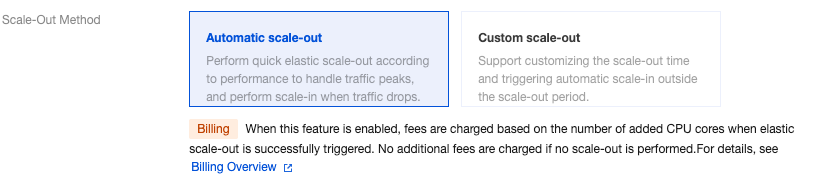
After enabling Elastic CPU scale-out > Automatic scale-out, fees are charged based on the number of scaled CPU cores when elastic scale-out is successfully triggered. No additional fees are charged if no scaling is performed.
Automatic scaling is performed by continuously monitoring the CPU utilization metric. To avoid frequent scale-out and scale-in, it is recommended to set reasonable scale-out and scale-in rules.
Billing Formula
When the method of the CPU elastic scaling feature is automatic scaling, the fees are charged in Pay-as-You-Go mode on a minute basis and are deducted once per hour.
Billing formula = (Single-replica single-core fee x Additional CPU cores per replica x Number of replicas) x Scaling duration (minutes) / 60.
Automatic Scaling Billing Example
Example 1
For a high-availability instance in the Guangzhou region with a CPU specification of 4 cores, its CPU increases to 8 cores, with a scaling duration of 1 hour after automatic performance scaling is triggered. The unit price in the Guangzhou region is 0.27 USD/core/hour. The billing formula is 0.27 (unit price) x 4 (additional CPU cores) x 2 (number of replicas) x 1 (scaling duration) = 2.16 USD.
Example 2
For a read-only instance in the Guangzhou region with a CPU specification of 2 cores, its CPU increases to 4 cores, with a scaling duration of 30 minutes after automatic performance scaling is triggered. The unit price in the Guangzhou region is 0.27 USD/core/hour. The billing formula is 0.27 (unit price) x 2 (additional CPU cores) x 1 (number of replicas) x 30/60 (scaling duration) = 0.27 USD.
Custom Scale-Out Billing Instructions

Billing Formula
When the method of the CPU elastic scale-out feature is custom scale-out, the fees are charged in Pay-as-You-Go mode on a minute basis and are deducted once per hour.
Billing formula = (Single-replica single-core fee x Additional CPU cores per replica x Number of replicas) x Scaling duration (minutes) / 60.
Scale-Out Time Selection and Billing Instructions
When the scaling time is set to now, the feature takes effect immediately and triggers scale-out after being enabled, with fees being charged synchronously until you disable the scale-out. For how to disable scale-out, see Setting Automatic Scale-out. For a billing example, see Example 1.
When the scaling time is by period or cycle, the feature takes effect and triggers scale-out according to the selected period or cycle after being enabled, and billing starts synchronously after successful scaling. No fees are charged in other periods or cycles. For billing examples, see Example 2 and Example 3.
Custom Scale-Out Billing Example
Example 1
A high-availability instance in the Beijing region has a CPU specification of 2 cores. At 10:00 AM, CPU elastic scaling mode was enabled for the instance. The mode was custom scaling, and the scaling time was Now, with 2 additional CPU cores. At 5:00 PM, CPU elastic scaling was disabled, resulting in a scaling duration of 7 hours. The unit price in the Beijing region is 0.27 USD/core/hour. The billing for this custom scaling of this instance is: 0.27 (unit price) × 2 (additional CPU cores) × 2 (number of replicas) × 7 (scaling duration) = 7.56 USD.
Example 2
A high-availability instance in the Beijing region has a CPU specification of 2 cores. CPU elastic scaling was enabled for the instance. The mode was custom scaling, the number of additional cores was 2, and scaling time was By period, with a start time of 00:00 on May 1, 2025, and an end time of 00:00 on May 15, 2025. The billing for custom scaling of this instance in May 2025 is: 0.27 (unit price) x 2 (additional CPU cores) x 2 (number of replicas) x 360 (scaling duration) = 388.8 USD.
Example 3
A high-availability instance in the Beijing region has a CPU specification of 2 cores. The CPU elastic scaling was enabled for the instance on April 30, 2025. The mode was custom scaling, and scaling time was By cycle, with 2 additional CPU cores. The cycle was from Monday to Friday, and the start time and end time were from 00:00 to 00:00. The CPU elastic scaling policy was not changed until May 31. The billing for the custom scaling price of this instance in May 2025 is: 0.27 (unit price) x 2 (number of additional CPU cores) x 2 (number of replicas) x 528 (scaling duration) = 570.24 USD.
피드백