How to Use Log Analysis Search Statements
Download
Focus Mode
Font Size
Log Analysis allows you to filter and aggregate log data either through the console's visual interface or by writing search queries. This document describes the search query syntax, supported filter fields, and how to append SQL statements in Query mode for aggregation and analysis.
Filter Types
Log Analysis supports three types of filter conditions:
1. Log source (required): Select a log type (Layer 7 access logs or Managed Rules logs) and a data availability zone.
2. Time range (Required): Specify the time range of the logs to query. For details, see How to Modify the Log Analysis Query Time Range.
3. Other Filter Conditions: Filter logs by supported fields. Available filter fields vary by log type. For details, see Supported Filter Items.
Search Modes and Results
The search bar supports two modes. You can switch between them using the mode selector on the left side of the search bar.
Mode | Description |
Interactive Mode | Add filter conditions by selecting a field, operator, and value. Conditions within the same group are joined by AND, while different groups are joined by OR. When you switch from Interactive mode to Query mode, the configured filter conditions are automatically converted into a search query and populated in the input box. |
Statement Mode | Write filter conditions as a search query. You can also append an SQL statement using the pipe character | for statistical analysis. |
The displayed results depend on whether the search query contains an SQL statement:
Without SQL: The Raw Logs tab is displayed by default.
With SQL: After the query is executed, the Statistics tab remains active and displays the results in a table. You can download the results from above the table. The Raw Logs tab also displays the logs that match the filter conditions, and you can switch between the two tabs as needed.
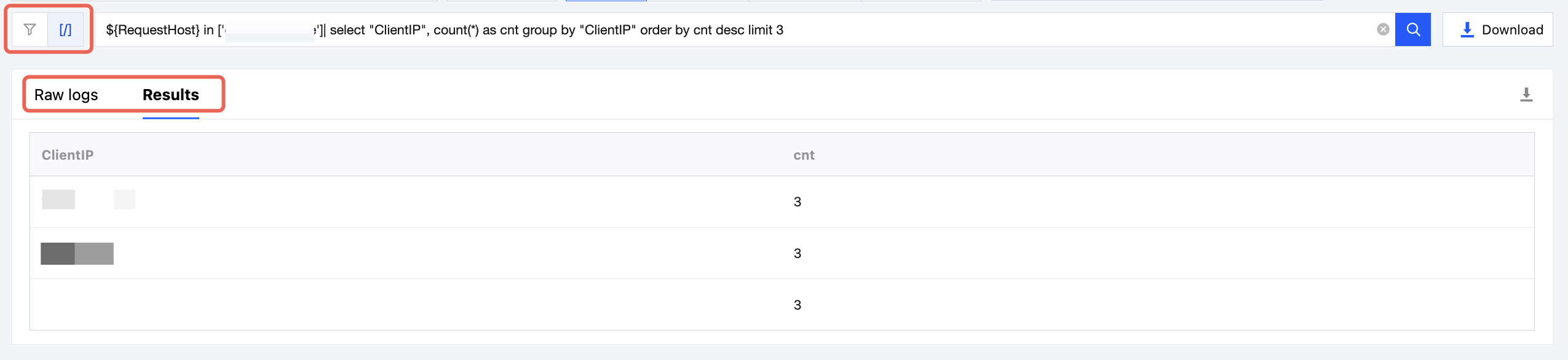
Search Query Structure
A complete search query consists of a filter expression and an SQL aggregation statement, separated by the pipe character
|:[Filter Expression] | [SQL]
Filter expression: Performs row-level filtering on raw logs. For syntax, see Filter Condition Syntax.
SQL: Performs aggregate statistics on filtered results. For syntax, see SQL Statistical Syntax. The SQL statement is optional. If omitted, only matching raw logs are returned.
Filter Syntax
Expression Structure
A log analysis filter condition expression consists of three parts: Filter Item, Operator, and Value. Its format is shown in the following figure:
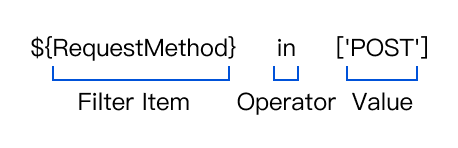
Filter Item: Built-in log fields in the format of
${…}, such as ${RequestHost} and ${EdgeResponseStatusCode}.Operator: Defines the relationship between the filter field and the specified value, such as
in or >.Value: A string, number, or list. String values must be enclosed in single quotation marks and square brackets, for example,
['POST']. Numeric values can be specified directly, for example, >500.Relationship Between Multiple Filter Conditions: Multiple filter conditions are joined with AND, while multiple values within the same condition are evaluated with OR. For example:
${ClientRegion} in ['SG','TH'] AND ${EdgeResponseStatusCode} in [404]. This expression matches logs where the client country/region is Singapore or Thailand and the edge response status code is 404.Operators
Logical Operators
Logical operators can be used to combine multiple filter conditions:
Operator | Description |
AND | Matches when both conditions are true. |
OR | Matches when either condition is true. |
NOT | Negates the condition that follows. |
Operator precedence is NOT > AND > OR. Logical operators are case-insensitive. For example, 'and' is equivalent to 'AND'.
Comparison Operators
Term | Operator | Description | Example |
Equal to | in | Matches when the field value is included in the specified list. | ${RequestHost} in ['example.com', 'demo.com'] |
Not in | not ${…} in | Matches when the field value is not included in the specified list. | not ${RequestMethod} in ['GET'] |
Greater than | > | Matches when the numeric field value is greater than the specified value. | ${EdgeResponseTime} > 500 |
SQL Statistics Syntax
An SQL statement can be appended to the filter expression using the pipe character
| to aggregate the matching logs. SQL follows MySQL-style syntax with the following conventions:Enclose log fields in double quotation marks, for example,
"ClientIP".The FROM clause is omitted. The input dataset is the set of logs produced by the filter expression to the left of the pipe character.
Using counting the request volume of the Top 100 client IPs as an example, an SQL statement can be built step by step:
select "ClientIP", count(*) as cnt: Selects the client IP and the number of matching log entries. count(*) counts the entries and as cnt names the result column.group by "ClientIP": Groups the results by client IP so that the number of entries is calculated separately for each IP.order by cnt desc: Sorts the results by count in descending order.limit 100: Returns only the first 100 rows.The complete search query is:
${RequestHost} in ['example.com'] | select "ClientIP", count(*) as cnt group by "ClientIP" order by cnt desc limit 100
Search Query Examples
1. Filter requests with a response time greater than 500 ms under specified domains:
${RequestHost} in ['example.com'] and ${EdgeResponseTime} > 500
2. Filter requests with a status code of 404 or 500 under specified domains:
${RequestHost} in ['example.com'] and ${EdgeResponseStatusCode} in ['404', '500']
3. In Layer 7 Access Logs, filter requests that trigger specified rules and have an action of Block or Observe:
${SecurityRuleID} in ['2123456789'] and ${SecurityAction} in ['Deny', 'Monitor']
4. In managed rule logs, filter requests whose request paths match a managed rule and are ultimately blocked:
${SecurityMatchingPosition} in ['Full request path'] and ${SecurityAction} in ['drop']
5. Count the number of requests for each status code under specified domains and sort the results in descending order by the number of requests:
${RequestHost} in ['example.com'] | select "EdgeResponseStatusCode", count(*) as cnt group by "EdgeResponseStatusCode" order by cnt desc
6. Count the Top 100 client IPs by access volume under specified domains and their respective percentages:
${RequestHost} in ['example.com'] | select "ClientIP", count(*) as cnt, round(count(*)*100.0/(select count(*)), 2) as pct group by "ClientIP" order by cnt desc limit 100
7. Calculate the average and maximum response times under specified domains:
${RequestHost} in ['example.com'] | select avg("EdgeResponseTime") as avg_time, max("EdgeResponseTime") as max_tim
Supported Filters
Layer 7 Access Logs
When the log type is Layer 7 Access Logs, the following filters are supported. For detailed descriptions and values of each field, see Layer 7 Access Logs.
General Information
Filter Item Name | Filter Name | Data Type | Operator |
Log Time | LogTime | Equal to | |
Request ID. | RequestID | String | Equal to, Not equal to |
Content ID | ContentID | String | Equal to, Not equal to |
Request Completion Time | EdgeEndTime | Equal to, Greater than | |
Edge Function Subrequest | EdgeFunctionSubrequest | Integer | Equal to, Not equal to |
Edge Function Parent Request ID | ParentRequestID | String | Equal to, Not equal to |
Request Information
Filter Item Name | Filter Name | Data Type | Operator |
Request domain | RequestHost | String | Equal to |
Request method | RequestMethod | String | Equal to, Not equal to |
Request Time | RequestTime | Equal to | |
Request URL | RequestUrl | String | Equal to, Not equal to |
Request URL parameters | RequestUrlQueryString | String | Equal to, Not equal to |
Referer | RequestReferer | String | Equal to, Not equal to |
User-Agent | RequestUA | String | Equal to, Not equal to |
HTTP protocol | RequestProtocol | String | Equal to, Not equal to |
HTTP/HTTPS | RequestScheme | String | Equal to, Not equal to |
TLS version | RequestSSLProtocol | String | Equal to, Not equal to |
Request status | RequestStatus | String | Equal to, Not equal to |
Request range | RequestRange | String | Equal to |
Request length (bytes) | RequestBytes | Integer | Equal to, Greater than |
Request body length (bytes) | RequestBodyBytes | Integer | Equal to, Greater than |
Edge node port | RemotePort | Integer | Equal to, Not equal to |
Client Information
Filter Item Name | Filter Name | Data Type | Operator |
Client IP Address | ClientIP | String | Equal to, Not equal to |
Client Country/Region | ClientRegion | String | Equal to, Not equal to |
Client Administrative Region (Chinese mainland) | ClientState | String | Equal to, Not equal to |
Client ISP | ClientISP | String | Equal to, Not equal to |
Device Type | ClientDeviceType | String | Equal to, Not equal to |
Client Port | ClientPort | Integer | Equal to, Not equal to |
Client Connection ID | ClientConnectionID | String | Equal to, Not equal to |
Response Information
Filter Item Name | Filter Name | Data Type | Operator |
Cache status | EdgeCacheStatus | String | Equal to, Not equal to |
Response status code | EdgeResponseStatusCode | Integer | Equal to, Not equal to |
Total response length (bytes) | EdgeResponseBytes | Integer | Equal to, Greater than |
Response body length (bytes) | EdgeResponseBodyBytes | Integer | Equal to, Greater than |
Internal processing time (ms) | EdgeInternalTime | Integer | Equal to, Greater than |
Total response time (ms) | EdgeResponseTime | Integer | Equal to, Greater than |
Edge Server Information
Filter Item Name | Filter Name | Data Type | Operator |
Edge server ID | EdgeServerID | String | Equal to, Not equal to |
Edge server IP | EdgeServerIP | String | Equal to, Not equal to |
Edge node country/region | EdgeServerRegion | String | Equal to, Not equal to |
Edge node administrative division (Chinese mainland) | EdgeServerRegionTopDivision | String | Equal to, Not equal to |
Edge exception information | EdgeException | String | Equal to, Not equal to |
Origin Server Information
Filter Item Name | Filter Name | Data Type | Operator |
Origin DNS resolution time (ms) | OriginDNSResponseDuration | Double | Equal to, Greater than |
Origin IP Address | OriginIP | String | Equal to, Not equal to |
Origin request header transmission time (ms) | OriginRequestHeaderSendDuration | Double | Equal to, Greater than |
Origin response header wait time (ms) | OriginResponseHeaderDuration | Double | Equal to, Greater than |
Origin response status code | OriginResponseStatusCode | Integer | Equal to, Not equal to |
Origin TLS version | OriginSSLProtocol | String | Equal to, Not equal to |
Origin TCP handshake time (ms) | OriginTCPHandshakeDuration | Double | Equal to, Greater than |
Origin TLS handshake time (ms) | OriginTLSHandshakeDuration | Double | Equal to, Greater than |
Security Information
Filter Item Name | Filter Name | Data Type | Operator |
Action | SecurityAction | String | Equal to, Not equal to |
Rule ID | SecurityRuleID | String | Equal to, Not equal to |
Rule category | SecurityModule | String | Equal to, Not equal to |
Bot intelligent analysis characteristic | BotCharacteristic | String | Equal to, Not equal to |
Network attack risk level | BotClassAttacker | String | Equal to, Not equal to |
Malicious Bot risk level | BotClassMaliciousBot | String | Equal to, Not equal to |
Network proxy risk level | BotClassProxy | String | Equal to, Not equal to |
Scanner risk level | BotClassScanner | String | Equal to, Not equal to |
Account takeover attack risk level | BotClassAccountTakeOver | String | Equal to, Not equal to |
Bot Tag | BotTag | String | Equal to, Not equal to |
Request JA3 fingerprint | JA3Hash | String | Equal to, Not equal to |
Managed Rule Logs
When the log type is Managed Rule Logs, the following filter conditions are supported. For detailed descriptions and values of each field, see Managed Rule Logs.
Request Information
Filter Item Name | Filter Name | Data Type | Operator |
Site | RequestHost | String | Equal to, Not equal to |
Request ID. | RequestID | String | Equal to, Not equal to |
Request Time | RequestTime | Equal to | |
Request method | RequestMethod | String | Equal to, Not equal to |
User-Agent | RequestUA | String | Equal to, Not equal to |
Request URI | RequestURI | String | Equal to, Not equal to |
Request body (first 10 KB) | RequestBody | String | Equal to, Not equal to |
Client Information
Filter Item Name | Filter Name | Data Type | Operator |
Client IP Address | ClientIP | String | Equal to, Not equal to |
Client Country/Region | ClientCountry | String | Equal to, Not equal to |
Security Information
Filter Item Name | Filter Name | Data Type | Operator |
Rule ID | SecurityRuleID | String | Equal to, Not equal to |
Rule category | SecurityModule | String | Equal to, Not equal to |
Action | SecurityAction | String | Equal to, Not equal to |
Matching field. | SecurityMatchingField | String | Equal to, Not equal to |
Matching position | SecurityMatchingPosition | String | Equal to, Not equal to |
Help and Support
Was this page helpful?
You can also Contact sales or Submit a Ticket for help.
Help us improve! Rate your documentation experience in 5 mins.
Feedback