Enable Automatic Cache Eviction Mechanism for syscache/relcache
Download
Focus Mode
Font Size
Last updated: 2025-06-05 11:33:16
AI-Translated
Function Background
Under large-scale complex business scenarios, processes maintain long connections that open numerous tables, indexes, etc., causing significant pressure on syscache and relcache. This leads to excessively high memory usage or a drop in cache hit rate, impacting overall performance.
Feature Introduction
TencentDB for PostgreSQL supports an elimination mechanism for syscache and relcache based on LRU (Least Recently Used). After users enable the feature, you can set a maximum allowed number of syscache/relcache per process. The system can dynamically identify and eliminate unaccessed relation caches for a long time, prioritize retaining hot metadata cache, and reduce memory usage.
Supported Editions
Database instances with kernel minor versions v13.20_r1.21, v14.17_r1.29, v15.12_r1.15, v16.8_r1.9, v17.4_r1.3 or higher support this feature. You can also obtain this feature through kernel minor version upgrade.
Applicable scenario
syscache/relcache cache management in persistent connection environments.
Usage Instructions
For syscache, the system provides two parameters used to manage the syscache elimination mechanism.
Parameter Name
Description
Value Suggestion
tencentdb_syscache_max_num
A process can possess a maximum of how many syscaches. When this number is exceeded, cache elimination begins.
Default value is -1, which means this feature is disabled.
If high process memory usage is detected or abnormal growth in syscache quantity is found, the recommended value range is 10000 - 50000.
If modification is needed, you can select an intermediate value such as 20000 and adjust it gradually based on monitoring and actual effect.
tencentdb_syscache_evict_num
How many syscaches are eliminated in one elimination.
Default value is 1, which means only one is eliminated at a time.
Generally, keeping the default value of 1 is sufficient to ensure a smooth elimination process with minimal performance impact.
If syscache grows rapidly or faster memory release is required, this value can be appropriately increased to 5 - 10, but setting it too large is not recommended to avoid eliminating too many caches at one time and affecting query performance.
For relcache, the system provides two parameters used to manage the relcache elimination mechanism.
Parameter Name
Description
Value Suggestion
tencentdb_relcache_max_num
A process can possess a maximum of how many relcaches. When this number is exceeded, cache elimination begins.
Default value is -1, which means this feature is disabled.
If there are a large number of tables in the system or frequent access to different tables, the number of relcaches may surge. The recommended value range is 1000 - 5000. Adjust the specific value according to the memory size and load condition of the instance.
If the instance memory is sufficient and the number of accessed tables is small, you can keep the default value -1, disable this feature, and avoid the performance overhead caused by frequent elimination.
tencentdb_relcache_evict_num
How many relcaches are eliminated in one elimination.
Default value is 1, which means only one is eliminated at a time.
If you want to release the cache faster through elimination, you can increase this value appropriately, such as 5 - 10, to reduce the elimination frequency, but it may cause instantaneous performance fluctuations.
If you want the elimination process to be smoother and avoid significant performance impact, keeping the default value of 1 is more stable.
Directions
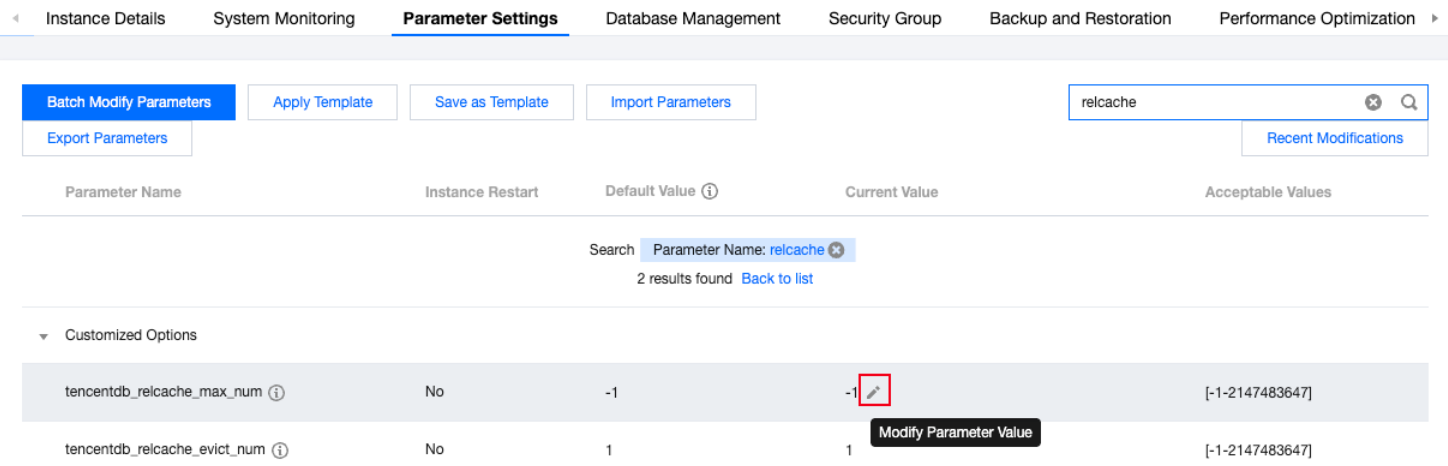
Enter the TencentDB for PostgreSQL console, on the instance details page where you need to manage the relcache cache, select Parameter Settings, click
after the parameter runtime value, and modify the parameter values of tencentdb_syscache_max_num, tencentdb_syscache_evict_num, tencentdb_relcache_max_num, and tencentdb_relcache_evict_num as needed.