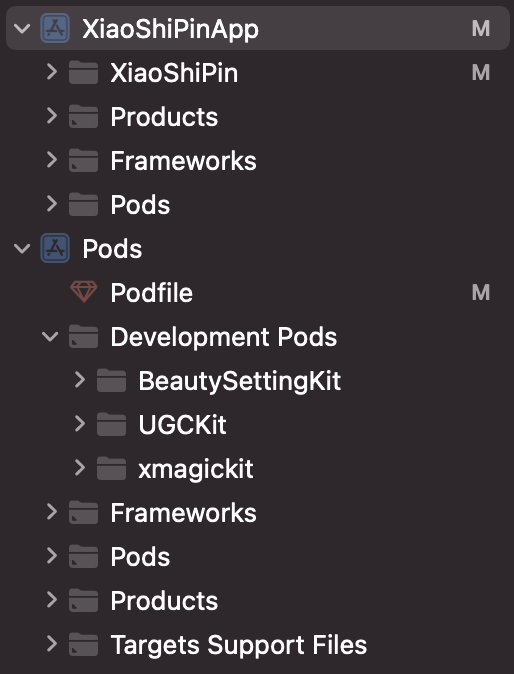
The UGSV demo app mainly integrates UGCKit as the core feature library, which is used for playback and shooting. For the integration method, see SDK Integration (Xcode).
The UGSV demo app's beauty filter feature consists of basic beauty filters and effects from Tencent Effect. You can implement basic beauty filters by integrating BeautySettingkit as instructed in Special Effects (iOS), and the code is in the BeautySettingKit directory. You can implement Tencent Effect by integrating xmagickit as instructed in SDK Integration Guide (iOS), and the code is in the xmagickit directory.
Module Overview
The UGSV demo app has seven modules:
The account, list management, publishing, and profile modules are under the XiaoshiPinApp directory.
The video playback, shooting, and editing modules are parts of UGCKit.
Account module
The account module handles the logics of user login/registration and login data caching.
You can replace this module with your own account system if you already have one.
The UI of the account module is implemented by XiaoShiPin/AppViewControllers/Account and XiaoShiPin/AppViewControllers/AccountInfo. The former is responsible for login, and the latter is responsible for profile processing.
You can view the business logic of the account module in XiaoShiPin/Model.
Main UI and list management
Description
The main UI offers access to three primary features of the app: video list, video shooting, and user profile.
By default, users log in to the video list page. When they tap the shooting tab, they will be directed to the login page if they are not logged in or the publishing page if they are logged in. If they tap the profile tab, the user profile page will be displayed.
The list management module pulls and displays the video list.
Code
Model:
TCLiveListModel(XiaoShiPin/AppViewControllers/mainList): Data-level definition and pickling/unpickling of the video list
UI:
TCNavigationController: Controller for the navigation bar, used to customize the background color of the navigation bar
TCMainViewController: Controller for the tab bar of the main UI, used to switch among the video list, shooting, and user profile pages
TCVideoListCell: Cell class of the VOD list, which displays the thumbnail, title, and username
TCLiveListViewController: TableViewController for the video list, which displays videos and directs users to the playback page when they tap a video
Playback module
Description
The playback module offers features including video preloading, playback, caching, sharing, etc.
Code
You can find the code in /XiaoShiPin/AppViewControllers/VideoPlayer, which includes the UI logic and business logic for playback.
Shooting module
Description
The shooting module offers features including segment-based shooting and deletion, multi-resolution shooting, changing shooting speed, etc.
Code
You can find the logic for shooting in UGCKit/Source/Record.
Editing module
Description
The video editing module offers features including video clipping, background music, filters, special effects, animated and static stickers, etc.
Code
You can find the logic for video editing in UGCKit/Source/Edit.
Publishing module
Description
The publishing module offers the video publishing feature.
Code
You can find the logic for publishing in XiaoShiPin/AppViewController/Publish.
Profile module
Description
The user profile module is responsible for displaying, saving, and modifying user profiles and syncing the data to the server.
The user profile contains a user profile photo, nickname, and gender information.
The user profile module syncs the latest user profile data from the server to your app. It allows users to view their profiles, including photos, names, and gender.
Users can modify their profiles. The changes will be synced to the server.
Other modules can obtain and modify user profiles from this module.
Code
You can find the logic for user profiles in XiaoShiPin/AppViewController/AccountInfo.
ugckit
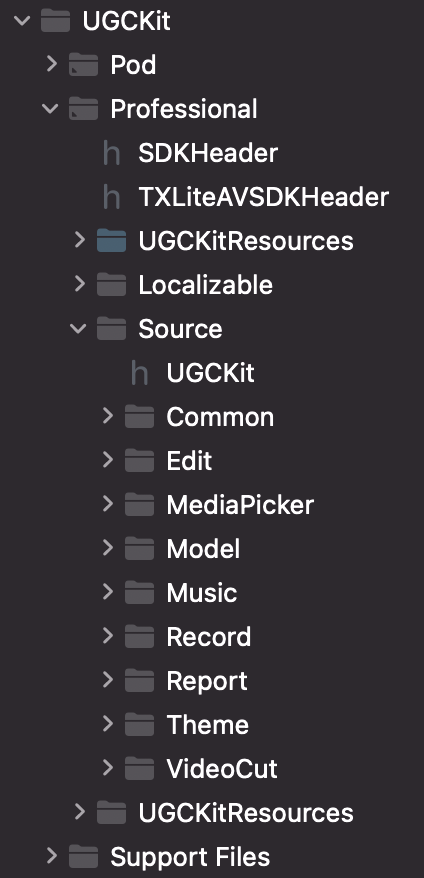
This module is the advanced encapsulation (with the UI) of the UGSV SDK to facilitate quick integration.
Directory description:
File/Directory
Description
Source/Common
The custom view module
Source/Edit
The video editing module
Source/MediaPicker
The media selection module
Source/Model
The media model module
Source/Music
The music module
Source/Record
The video shooting module
Source/Report
The data reporting module
Source/Theme
The resource theme module
Source/VideoCut
The video clipping module
xmagickit
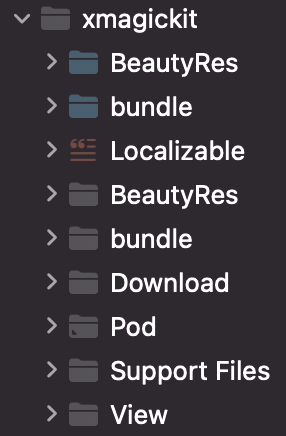
This module encapsulates Tencent Effect so that it can quickly integrated.
File/Directory
Description
BeautyRes
Image resources
bundle
Beauty filter materials
Download
The download module
View
The beauty filter panel and data
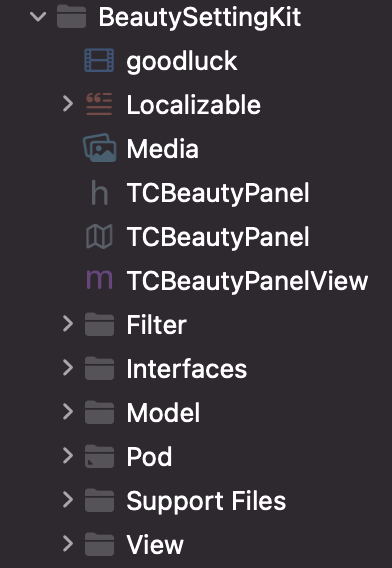
beautysettingkit
This module is the basic beauty filter module of UGSV. To use basic beauty filters, you can use this module for quick integration.