tencent cloud
最新优惠
产品
解决方案
价格中心
合作伙伴网络
云市场
探索更多
Prev
Next
云点播
动态与公告
产品动态
公告
产品简介
产品概述
产品特性
产品功能
产品优势
应用场景
解决方案
购买指南
计费概述
计费方式
购买指引
账单查询
续费说明
欠费说明
退费说明
专业版
云点播专业版简介
快速入门
控制台指南
开发指南
快速入门
媒体 AI Agent
智能成片/问答 Agent 接入
控制台指南
控制台介绍
服务概览
应用管理
媒体管理
资源包管理
License 管理
实时日志分析
实践教程
媒体上传
如何将点播的媒体文件进行智能降冷
媒体处理
分发播放
如何接收事件通知
如何进行源站迁移
直播录制
如何进行自定义源站回源
直播精彩剪辑固化至云点播 VOD 指引
开发指南
媒体上传
媒体处理
事件通知
媒体分发播放
媒体加密与版权保护
播放频道
访问管理
下载媒体文件
应用体系
错误码
第三方播放器
播放器 SDK 文档
概述
基本概念
产品功能
Demo 体验
免费测试
购买指南
SDK 下载
License 指引
播放器教程
AI Coding
含 UI 集成方案
无 UI 集成方案
高级功能
API 文档
第三方播放器插件
播放器 SDK 政策
服务端 API 文档
History
Introduction
API Category
AI Creation APIs
Media Processing APIs
Parameter Template APIs
Task Management APIs
Media Upload APIs
Media Management APIs
Event Notification APIs
Media Classification APIs
Domain Name Management APIs
Distribution APIs
AI Sample Management APIs
Park Management APIs
Data Statistics APIs
Loop Banner APIs
Just In Time Transcode APIs
Real-Time Log APIs
Other APIs
Deprecated APIs
Making API Requests
AI-based image processing APIs
Task Flow APIs
Data Types
Error Codes
Video on Demand API 2024-07-18
常见问题
移动端播放问题
费用相关问题
视频上传问题
视频发布问题
视频播放问题
Web 端播放问题
全屏播放问题
数据统计问题
访问管理相关问题
媒资降冷问题
相关协议
Service Level Agreement
隐私政策
数据处理和安全协议
联系我们
词汇表
文档
云点播
购买指南
续费说明
续费说明
下载
聚焦模式
字号
最后更新时间: 2021-02-19 12:27:19
日结(后付费)
对于
日结后付费
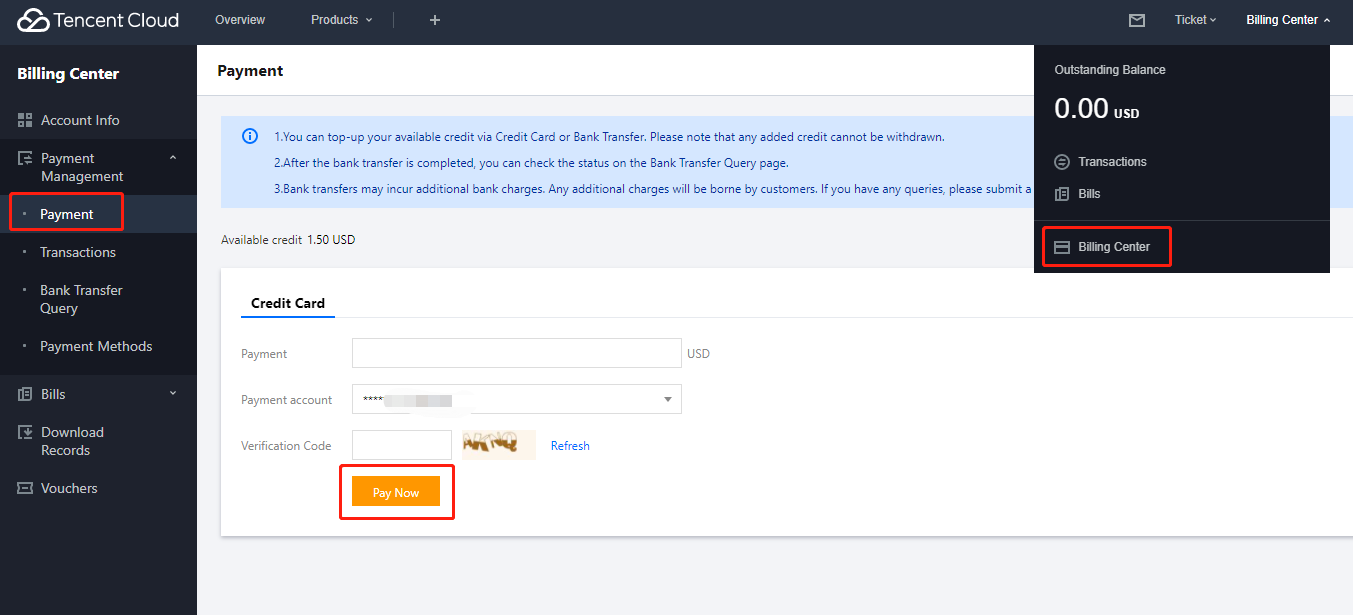
,按实际使用量计算消耗的费用,用户需要在控制台上及时充值续费,避免余额不足抵扣产生欠费,具体操作步骤如下:
1.
登录控制台,选择右上角的
费用中心
,进入充值页面。
2.
选择对应的充值渠道,输入充值金额,单机
立即付款
,完成充值续费。
上一篇: 账单查询
下一篇: 欠费说明
帮助和支持
本页内容是否解决了您的问题?
是
否
您也可以
联系销售
或
提交工单
以寻求帮助。
填写满意度调查问卷,共创更好文档体验。
点击前往
文档反馈
搜索
仅搜索标题
请输入关键词搜索文档