Server-side Upload Guide
Download
Focus Mode
Font Size
This document provides guidance for server-side uploads to the Professional Edition application.
Applicable Scenarios
Developers uploading files stored on their backend servers to the Professional Edition storage via API or SDK. This document explains how to upload files using AWS S3 SDK.
Upload Methods
The server must upload via Professional Edition preset domains. Supported methods:
Upload Method | Upload Domain | Authentication | Supported Operations |
Bucket Preset Domain | [BucketId].vodpro.[Region].eovod.com | AccessKeys (Recommended) | Upload to specified bucket |
| | Credentials | Upload to specified bucket |
Application Preset Domain | [SubAppId].vodpro-upload.com | Credentials | Upload to specified bucket Nearby upload to buckets in any region within the application |
Bucket Preset Domain
The Professional Edition provides an internet access domain for each bucket to upload files to specific buckets.
Uploading Files Using AccessKeys via AWS S3 SDK
Below demonstrates how to upload files to Professional Edition buckets using AccessKey in common programming languages.
Assumptions: Professional Edition App ID =
1234567890, Bucket Region = ap-guangzhou, Bucket ID = bucketid1Example domain:
bucketid1.vodpro.ap-guangzhou.eovod.comPreparations
1. Create Professional Edition App and Bucket.
Create in VOD Console.
Refer to:
2. Obtain App-level AccessKeys Pair.
Get AccessKeyId and SecretAccessKey from App Key Management.
Refer to: Key Management
Upload Examples
Code implementations for initializing S3 clients and uploading files:
// Package main// This example uses AWS SDK for Go v2 service/s3 v1.72.3// Versions v1.73.0+ require disabling S3 default integrity protection// Ref: https://github.com/aws/aws-sdk-go-v2/discussions/2960package mainimport ("context""errors""fmt""log""net/url""os""github.com/aws/aws-sdk-go-v2/aws""github.com/aws/aws-sdk-go-v2/credentials""github.com/aws/aws-sdk-go-v2/feature/s3/manager""github.com/aws/aws-sdk-go-v2/service/s3"smep "github.com/aws/smithy-go/endpoints""github.com/aws/smithy-go/logging")// customEndpointResolverV2 Custom endpoint resolvertype customEndpointResolverV2 struct{}// ResolveEndpoint Custom endpoint resolutionfunc (r *customEndpointResolverV2) ResolveEndpoint(ctx context.Context,params s3.EndpointParameters) (smep.Endpoint, error) {if params.Bucket == nil || params.Region == nil {return smep.Endpoint{}, errors.New("invalid endpoint param")}return smep.Endpoint{URI: url.URL{Scheme: "https",Host: fmt.Sprintf("%s.vodpro.ap-guangzhou.eovod.com", *params.Bucket),},}, nil}func main() {// Initialize S3 clients3cli := s3.New(s3.Options{Credentials: credentials.NewStaticCredentialsProvider("AccessKeyId", // Enter AccessKeyId"SecretAccessKey", // Enter SecretAccessKey""), // No session token needed for AccessKeyEndpointResolverV2: new(customEndpointResolverV2),UsePathStyle: false,Logger: logging.NewStandardLogger(os.Stdout),ClientLogMode: aws.LogRequest | aws.LogResponse,Region: "auto",})// Open local filefile, err := os.Open("demo.mp4")if err != nil {log.Fatalf("failed to open file: %v", err)return}defer file.Close()// Upload file to S3uploader := manager.NewUploader(s3cli, func(u *manager.Uploader) {u.PartSize = 10 * 1024 * 1024 // 10MB part sizeu.Concurrency = 5 // Concurrent upload threads})result, err := uploader.Upload(context.TODO(), &s3.PutObjectInput{Bucket: aws.String("bucketid1"), // Bucket IDKey: aws.String("upload/demo.mp4"), // Object keyBody: file,})if err != nil {log.Fatalf("failed to upload file: %v", err)return}log.Printf("etag: %s", *result.ETag) // Get file ETag}
// This example is implemented using AWS SDK for Java v2 service/s3 v2.31.35.// AWS SDK for Java 2.30.0 and later require disabling S3's default integrity protection.// Reference: https://github.com/aws/aws-sdk-java-v2/issues/5801import software.amazon.awssdk.auth.credentials.AwsBasicCredentials;import software.amazon.awssdk.auth.credentials.StaticCredentialsProvider;import software.amazon.awssdk.http.nio.netty.NettyNioAsyncHttpClient;import software.amazon.awssdk.regions.Region;import software.amazon.awssdk.services.s3.S3AsyncClient;import software.amazon.awssdk.services.s3.S3Configuration;import software.amazon.awssdk.transfer.s3.S3TransferManager;import software.amazon.awssdk.transfer.s3.model.UploadFileRequest;import software.amazon.awssdk.transfer.s3.progress.LoggingTransferListener;import software.amazon.awssdk.core.checksums.RequestChecksumCalculation;import software.amazon.awssdk.core.checksums.ResponseChecksumValidation;import java.io.File;import java.net.URI;import java.util.concurrent.CompletableFuture;public class Main {public static void main(String[] args) {S3AsyncClient s3AsyncClient = null;S3TransferManager transferManager = null;try {// Professional Edition application AccessKey AccessKeyIdAwsBasicCredentials credentials = AwsBasicCredentials.create("AccessKeyId", // Professional Edition application permanent AccessKeyId"SecretAccessKey" // Professional Edition application permanent SecretAccessKey);String region = "ap-guangzhou"; // Professional Edition application bucket regionString bucketId = "bucketid1"; // Professional Edition application bucket IDString filePath = "demo.mp4"; // Local file pathString key = "upload/demo.mp4"; // File path in bucketString endpointUrl = String.format("https://vodpro.%s.eovod.com", region); // Bucket-level preset domain endpoint// Build S3 async client with custom endpoints3AsyncClient = S3AsyncClient.builder().credentialsProvider(StaticCredentialsProvider.create(credentials)) // Set credentials provider.endpointOverride(URI.create(endpointUrl)) // Set endpoint.region(Region.of("auto")) // Must be set to "auto".httpClient(NettyNioAsyncHttpClient.builder().build()) // Set HTTP client.serviceConfiguration(S3Configuration.builder().pathStyleAccessEnabled(false) // Set path style access, bucket level must explicitly disable PathStyle mode.build()).requestChecksumCalculation(RequestChecksumCalculation.WHEN_REQUIRED).responseChecksumValidation(ResponseChecksumValidation.WHEN_REQUIRED).build();// Create S3TransferManager with S3 async clienttransferManager = S3TransferManager.builder().s3Client(s3AsyncClient).build();File fileToUpload = new File(filePath);// Create upload request with transfer listener for progress trackingUploadFileRequest uploadRequest = UploadFileRequest.builder().putObjectRequest(builder -> builder.bucket(bucketId).key(key)).addTransferListener(LoggingTransferListener.create()).source(fileToUpload).build();// Start uploadCompletableFuture<Void> future = transferManager.uploadFile(uploadRequest).completionFuture().thenAccept(response -> {System.out.println("Upload successful! ETag: " + response.response().eTag());});// Wait for upload to completefuture.join();System.out.println("Upload task completed");} catch (Exception e) {System.err.println("Upload failed: " + e.getMessage());e.printStackTrace();} finally {// Release resourcestry {if (transferManager != null) {transferManager.close();}if (s3AsyncClient != null) {s3AsyncClient.close();}System.out.println("Resources released");} catch (Exception e) {System.err.println("Error closing resources: " + e.getMessage());}}}}
// This example is implemented using AWS SDK for C++ v1.11.560.// AWS SDK for C++ v1.11.486 and later require disabling S3's default integrity protection.// Reference: https://github.com/aws/aws-sdk-cpp/issues/3253#include <aws/core/Aws.h>#include <aws/core/auth/AWSCredentials.h>#include <aws/core/client/ClientConfiguration.h>#include <aws/s3/S3Client.h>#include <aws/transfer/TransferManager.h>#include <iostream>int main(){// AWS SDK initializationAws::SDKOptions options;options.loggingOptions.logLevel = Aws::Utils::Logging::LogLevel::Info;Aws::InitAPI(options);{// Define authentication and endpoint informationconst Aws::String accessKeyId = "AccessKeyId"; // Fill in AccessKeyId from VOD Professional key pairconst Aws::String secretAccessKey = "SecretAccessKey"; // Fill in SecretAccessKey from VOD Professional key pairconst Aws::String region = "ap-guangzhou"; // Bucket regionconst Aws::String bucketId = "bucketid1"; // Bucket ID in VOD Professional Editionconst Aws::String keyName = "upload/demo.mp4"; // File path in bucketconst Aws::String filePath = "demo.mp4"; // Local file path// Configure clientAws::Client::ClientConfiguration clientConfig;clientConfig.region = "auto"; // Must be set to "auto"clientConfig.scheme = Aws::Http::Scheme::HTTPS; // Use HTTPS protocolclientConfig.enableEndpointDiscovery = false; // Disable endpoint discoveryclientConfig.verifySSL = true; // Enable SSL certificate verificationclientConfig.endpointOverride = "vodpro." + region + ".eovod.com"; // Bucket-level preset domain// Disable integrity checkclientConfig.checksumConfig.requestChecksumCalculation = Aws::Client::RequestChecksumCalculation::WHEN_REQUIRED;clientConfig.checksumConfig.responseChecksumValidation = Aws::Client::ResponseChecksumValidation::WHEN_REQUIRED;// Set authentication informationAws::Auth::AWSCredentials credentials(accessKeyId, secretAccessKey); // Fill in VOD Professional AccessKey// Create S3 clientauto s3Client = Aws::MakeShared<Aws::S3::S3Client>("S3Client",credentials,clientConfig,Aws::Client::AWSAuthV4Signer::PayloadSigningPolicy::Never, // Disable payload signingtrue // Bucket-level domain requires explicit VirtualAddressing);// Create thread pool executorauto executor = Aws::MakeShared<Aws::Utils::Threading::PooledThreadExecutor>("executor", 10);// Configure TransferManagerAws::Transfer::TransferManagerConfiguration transferConfig(executor.get());transferConfig.s3Client = s3Client;// Set part size to 10MBtransferConfig.bufferSize = 10 * 1024 * 1024;// Create TransferManagerauto transferManager = Aws::Transfer::TransferManager::Create(transferConfig);std::cout << "Starting file upload: " << filePath << " to " << bucketId << "/" << keyName << std::endl;// Perform uploadauto uploadHandle = transferManager->UploadFile(filePath, // Local file pathbucketId, // Bucket IDkeyName, // Object key (storage path)"application/octet-stream", // Content typeAws::Map<Aws::String, Aws::String>() // Metadata);// Wait for upload to completeuploadHandle->WaitUntilFinished();// Check upload statusif (uploadHandle->GetStatus() == Aws::Transfer::TransferStatus::COMPLETED){std::cout << "File upload completed successfully!" << std::endl;}else{auto lastError = uploadHandle->GetLastError();std::cerr << "File upload failed: " << lastError.GetMessage() << std::endl;}}// Clean up SDK resourcesAws::ShutdownAPI(options);return 0;}
#!/usr/bin/env python3# -*- coding: utf-8 -*-"""This example is implemented using AWS SDK for Python v1.38.7.Boto3 AWS SDK for Python v1.36.0 and later require disabling S3's default integrity protection.Reference: https://github.com/boto/boto3/issues/4392"""import boto3from botocore.config import Configfrom botocore.exceptions import ClientError# Constant definitionsREGION = "ap-guangzhou" # Bucket regionBUCKET_ID = "bucketid1" # Fill in bucket ID in VOD Professional EditionFILE_PATH = "demo.mp4" # Local file pathOBJECT_KEY = "upload/demo.mp4" # File path in bucket# Create S3 clients3_client = boto3.client("s3",aws_access_key_id="AccessKeyId", # Fill in AccessKeyId from key pairaws_secret_access_key="SecretAccessKey", # Fill in SecretAccessKey from key pairendpoint_url=f"https://vodpro.{REGION}.eovod.com", # Bucket-level preset upload domainregion_name="auto", # Must be set to "auto"config=Config(s3={"addressing_style": "virtual"}, # Use virtual hosted-stylerequest_checksum_calculation="when_required", # Boto3 AWS SDK for Python v1.36.0+ require disabling S3's default integrity protectionresponse_checksum_validation="when_required", # Boto3 AWS SDK for Python v1.36.0+ require disabling S3's default integrity protection),)try:# Upload fileresponse = s3_client.upload_file(Bucket=BUCKET_ID, # Fill in bucket ID in VOD Professional EditionKey=OBJECT_KEY, # File path in bucketFilename=FILE_PATH, # Local file path)print(response)except ClientError as e:print(f"Error: {e}")
Note:
When using AWS SDK, confirm data integrity protection features.
When using bucket preset internet domains, the path must be in VirtualStyle format.
Upload Files Using Credentials with AWS S3 SDK
Below is an introduction to uploading files to a Professional Edition application bucket using credentials in common programming languages.
Assume the Professional Edition application ID is
1234567890, the bucket region is ap-guangzhou, and the bucket ID is bucketid1.The example bucket access domain is:
bucketid1.vodpro.ap-guangzhou.eovod.com.Upload Steps
Temporary credentials are typically used in scenarios requiring high key security.
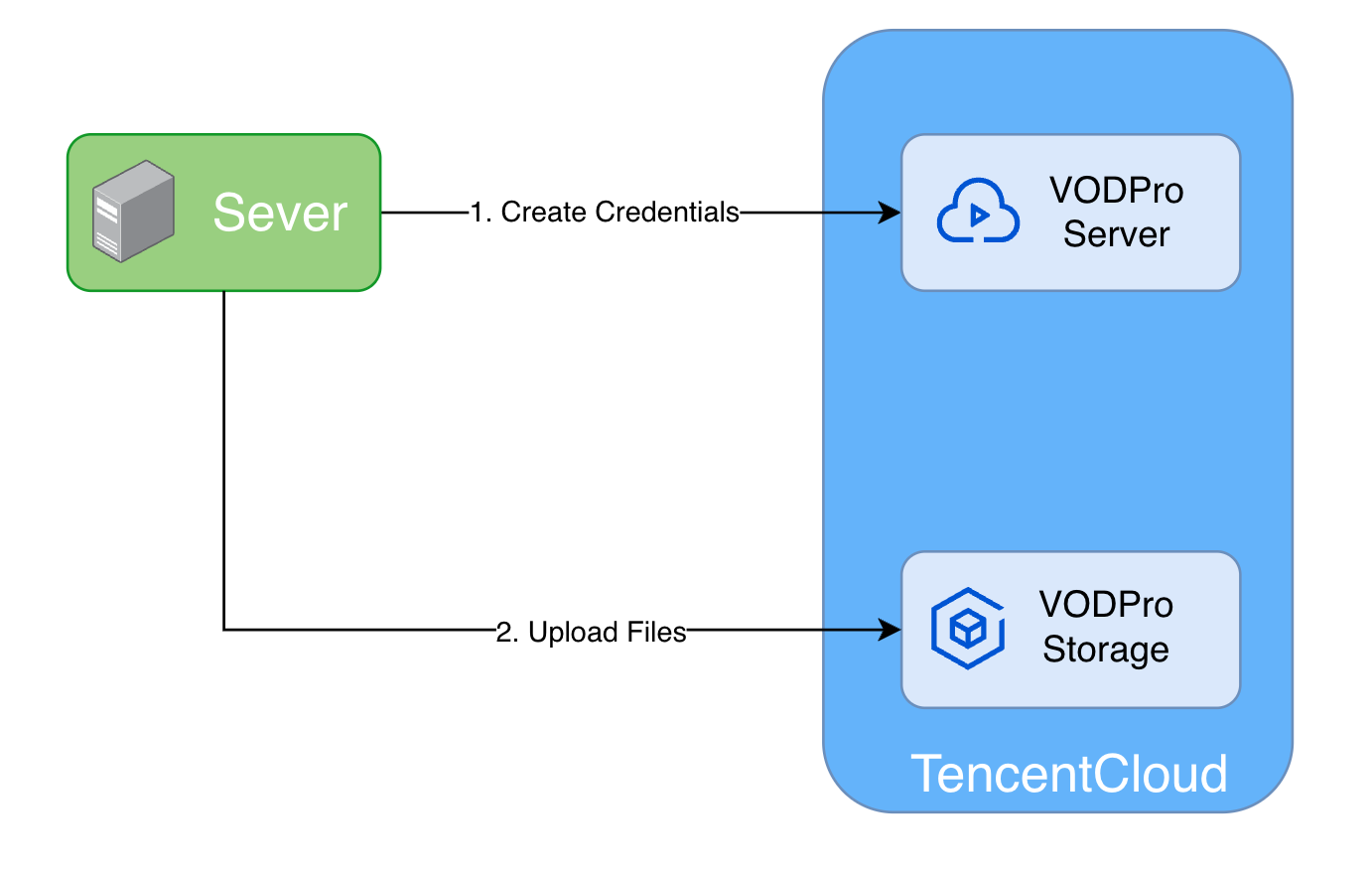
1. Apply for upload credentials: Server calls Professional Edition service's Create Application Storage Temporary Access Credentials interface.
2. Upload files: Server uses credentials to upload files to Professional Edition storage.
Preparation
1. Create the Professional Edition application and bucket in the VOD Console. For specific steps, refer to Quick Start and Create Bucket.
2. Obtain Tencent Cloud account AccessKey pair:
2.1 Log in to Tencent Cloud Console, select Cloud Access Management > Access Key > API Keys, enter the "API Key Management" page.
2.2 Obtain Cloud API key. If you haven't created a key, click New Key to create a pair of SecretId and SecretKey.
Upload Files
Apply for Upload Credentials
Apply for credentials to upload
upload/demo.mp4 to bucketid1 bucket.// Package mainpackage mainimport ("context""encoding/json""fmt""log""net/url""github.com/tencentcloud/tencentcloud-sdk-go/tencentcloud/common""github.com/tencentcloud/tencentcloud-sdk-go/tencentcloud/common/profile"vod20240718 "github.com/tencentcloud/tencentcloud-sdk-go/tencentcloud/vod/v20240718")const (appId = 251000000 // Tencent Cloud account APPIDsubAppId = 1234567890 // VOD Professional Edition application APPIDbucketId = "bucketid1" // VOD Professional Edition application bucket IDfileKey = "upload/demo.mp4" // File KEY in storage after upload, including full path and filename)// createStorageCredentialsPolicy create storage credential policytype createStorageCredentialsPolicy struct {Statement []policyStatement `json:"statement"`Version string `json:"version"`}// policyStatement policy statementtype policyStatement struct {Action []string `json:"action"`Effect string `json:"effect"`Resource []string `json:"resource"`}// cred credentialstype cred struct {AccessKeyId stringSecretAccessKey stringSessionToken string}// getCredential obtain credentialsfunc getCredential(context.Context) (*cred, error) {// 1. Obtain credentials// 1.1 Initialize Tencent Cloud API objectcredential := common.NewCredential("SecretId", // Tencent Cloud account SecretId"SecretKey", // Tencent Cloud account SecretKey)prof := profile.NewClientProfile()vodClient, err := vod20240718.NewClient(credential, "ap-guangzhou", prof)if err != nil {log.Fatalf("create VOD client fail: %+v", err)return nil, fmt.Errorf("create VOD client fail: %w", err)}// 1.2 Construct temporary credential requestpolicy := createStorageCredentialsPolicy{Statement: []policyStatement{{Action: []string{ // Currently only supported actions"name/vod:PutObject","name/vod:ListParts","name/vod:PostObject","name/vod:CreateMultipartUpload","name/vod:UploadPart","name/vod:CompleteMultipartUpload","name/vod:AbortMultipartUpload","name/vod:ListMultipartUploads",},Effect: "allow",Resource: []string{fmt.Sprintf("qcs::vod:%s:uid/%d:prefix//%d/%s/%s","ap-guangzhou", // Bucket regionappId, // Tencent Cloud account APPIDsubAppId, // VOD Professional Edition application APPIDbucketId, // VOD Professional Edition application bucket IDfileKey, // File KEY in storage after upload),},}},Version: "2.0",}req := vod20240718.NewCreateStorageCredentialsRequest()req.SubAppId = common.Uint64Ptr(subAppId)policyStr, _ := json.Marshal(policy)req.Policy = common.StringPtr(url.QueryEscape(string(policyStr)))// 1.3 Apply for upload credentialsresp, err := vodClient.CreateStorageCredentials(req)if err != nil {log.Fatalf("create storage credentials fail: %+v", err)return nil, fmt.Errorf("create storage credentials fail: %w", err)}log.Printf("create storage credentials success: %+v", resp)creds := resp.Response.Credentialsreturn &cred{AccessKeyId: *creds.AccessKeyId,SecretAccessKey: *creds.SecretAccessKey,SessionToken: *creds.SessionToken,}, nil}
// This example is implemented based on AWS SDK for Java v2 service/s3 v2.31.35.// For AWS SDK for Java version 2.30.0 and later, the default integrity protection for S3 must be disabled.// Reference: https://github.com/aws/aws-sdk-java-v2/issues/5801import software.amazon.awssdk.auth.credentials.AwsSessionCredentials;import software.amazon.awssdk.auth.credentials.StaticCredentialsProvider;import software.amazon.awssdk.http.nio.netty.NettyNioAsyncHttpClient;import software.amazon.awssdk.regions.Region;import software.amazon.awssdk.services.s3.S3AsyncClient;import software.amazon.awssdk.services.s3.S3Configuration;import software.amazon.awssdk.transfer.s3.S3TransferManager;import software.amazon.awssdk.transfer.s3.model.UploadFileRequest;import software.amazon.awssdk.transfer.s3.progress.LoggingTransferListener;import software.amazon.awssdk.core.checksums.RequestChecksumCalculation;import software.amazon.awssdk.core.checksums.ResponseChecksumValidation;import java.io.File;import java.net.URI;import java.util.concurrent.CompletableFuture;public class Main {public static void main(String[] args) {S3AsyncClient s3AsyncClient = null;S3TransferManager transferManager = null;try {// 1. Get credentialsCredentialHelper.Cred cred = CredentialHelper.getCredential();System.out.println("Temporary credentials obtained successfully. AccessKeyId: " + cred.getAccessKeyId());// 2. Create session credentialsAwsSessionCredentials sessionCredentials = AwsSessionCredentials.create(cred.getAccessKeyId(),cred.getSecretAccessKey(),cred.getSessionToken());String region = "ap-guangzhou";String bucketId = "bucketid1";String filePath = "demo.mp4";String key = "upload/demo.mp4";String endpointUrl = String.format("https://vodpro.%s.eovod.com", region);// 3. Build S3AsyncClient with checksum protection disableds3AsyncClient = S3AsyncClient.builder().credentialsProvider(StaticCredentialsProvider.create(sessionCredentials)).endpointOverride(URI.create(endpointUrl)).region(Region.of("auto")).httpClient(NettyNioAsyncHttpClient.builder().build()).serviceConfiguration(S3Configuration.builder().pathStyleAccessEnabled(false).build())// Critical fix - disable CRC32C integrity protection.requestChecksumCalculation(RequestChecksumCalculation.NONE).responseChecksumValidation(ResponseChecksumValidation.DISABLED).build();// 4. Create transfer managertransferManager = S3TransferManager.builder().s3Client(s3AsyncClient).build();// 5. Validate fileFile fileToUpload = new File(filePath);if (!fileToUpload.exists()) {throw new RuntimeException("File does not exist: " + filePath);}// 6. Prepare upload requestUploadFileRequest uploadRequest = UploadFileRequest.builder().putObjectRequest(b -> b.bucket(bucketId).key(key)).addTransferListener(LoggingTransferListener.create()).source(fileToUpload).build();// 7. Execute uploadSystem.out.println("Starting file upload...");CompletableFuture<Void> future = transferManager.uploadFile(uploadRequest).completionFuture().thenAccept(response -> {System.out.println("Upload successful! ETag: " + response.response().eTag());});// 8. Wait for completionfuture.join();System.out.println("Upload task completed");} catch (Exception e) {System.err.println("Upload failed: " + e.getMessage());e.printStackTrace();} finally {// 9. Cleanup resourcestry {if (transferManager != null) transferManager.close();if (s3AsyncClient != null) s3AsyncClient.close();System.out.println("Resources released");} catch (Exception e) {System.err.println("Error closing resources: " + e.getMessage());}}}}
#include <tencentcloud/core/TencentCloud.h>#include <tencentcloud/core/profile/ClientProfile.h>#include <tencentcloud/core/profile/HttpProfile.h>#include <tencentcloud/core/Credential.h>#include <tencentcloud/vod/v20240718/VodClient.h>#include <tencentcloud/vod/v20240718/model/CreateStorageCredentialsRequest.h>#include <tencentcloud/vod/v20240718/model/CreateStorageCredentialsResponse.h>#include <string>#include <sstream>#include <iomanip>#include <iostream>#include <nlohmann/json.hpp>using json = nlohmann::json;const uint64_t APP_ID = 251000000; // Tencent Cloud Account APPIDconst uint64_t SUB_APP_ID = 1234567890; // VOD Professional Application APPIDconst std::string BUCKET_ID = "bucketid1"; // VOD Professional Storage Bucket IDconst std::string REGION = "ap-guangzhou"; // VOD Professional Bucket Regionconst std::string OBJECT_KEY = "upload/demo.mp4"; // Storage Object KEY for authorization// Credential structurestruct Credential{std::string accessKeyId;std::string secretAccessKey;std::string sessionToken;};// URL encoding functionstd::string UrlEncode(const std::string &value){std::ostringstream escaped;escaped.fill('0');escaped << std::hex;for (char c : value){if (isalnum(c) || c == '-' || c == '_' || c == '.' || c == '~'){escaped << c;}else{escaped << std::uppercase;escaped << '%' << std::setw(2) << int((unsigned char)c);escaped << std::nouppercase;}}return escaped.str();}// Obtain credentialsCredential GetCredential(){// Initialize Tencent Cloud SDKTencentCloud::InitAPI();// Create VOD clientTencentCloud::Credential credential("SecretId", "SecretKey"); // Enter your Tencent Cloud SecretId and SecretKeyTencentCloud::HttpProfile httpProfile;TencentCloud::ClientProfile clientProfile;clientProfile.SetHttpProfile(httpProfile);TencentCloud::Vod::V20240718::VodClient client(credential, "ap-guangzhou", clientProfile);// Build policyjson policy_json = {{"statement", {{{"action", {"name/vod:PutObject", "name/vod:ListParts", "name/vod:PostObject","name/vod:CreateMultipartUpload", "name/vod:UploadPart","name/vod:CompleteMultipartUpload", "name/vod:AbortMultipartUpload","name/vod:ListMultipartUploads"}},{"effect", "allow"},{"resource", {"qcs::vod:" + REGION + ":uid/" + std::to_string(APP_ID) +":prefix//" + std::to_string(SUB_APP_ID) + "/" + BUCKET_ID + "/" + OBJECT_KEY}}}}},{"version", "2.0"}};std::string policy = policy_json.dump();// Create request objectTencentCloud::Vod::V20240718::Model::CreateStorageCredentialsRequest req;req.SetSubAppId(SUB_APP_ID);req.SetPolicy(UrlEncode(policy));// Send requestauto outcome = client.CreateStorageCredentials(req);if (!outcome.IsSuccess()){std::cerr << "Failed to get storage credentials: " << outcome.GetError().GetErrorMessage() << std::endl;TencentCloud::ShutdownAPI();exit(1);}// Extract credentialsauto response = outcome.GetResult();auto creds = response.GetCredentials();Credential result;result.accessKeyId = creds.GetAccessKeyId();result.secretAccessKey = creds.GetSecretAccessKey();result.sessionToken = creds.GetSessionToken();// Clean up Tencent Cloud SDKTencentCloud::ShutdownAPI();return result;}
#!/usr/bin/env python3# -*- coding: utf-8 -*-import jsonimport urllib.parsefrom typing import NamedTuplefrom tencentcloud.common import credentialfrom tencentcloud.common.profile import client_profilefrom tencentcloud.vod.v20240718 import vod_client, models# ConstantsAPP_ID = 251000000 # Tencent Cloud account APPIDSUB_APP_ID = 1234567890 # VOD Professional Application APPIDBUCKET_ID = "bucketid1" # VOD Professional Storage Bucket IDOBJECT_KEY = "upload/demo.mp4" # File KEY for storage after uploadREGION = "ap-guangzhou" # Regionclass Credential(NamedTuple):"""Temporary credential for storage access"""access_key_id: strsecret_access_key: strsession_token: strdef get_credential() -> Credential:"""Obtain credentials for VOD storage access"""# 1. Initialize Tencent Cloud API clientcred = credential.Credential("SecretId", # Tencent Cloud account SecretId"SecretKey", # Tencent Cloud account SecretKey)prof = client_profile.ClientProfile()vod_cli = vod_client.VodClient(cred, REGION, prof)# 2. Prepare policy for requesting credentialspolicy = {"statement": [{"action": ["name/vod:PutObject","name/vod:ListParts","name/vod:PostObject","name/vod:CreateMultipartUpload","name/vod:UploadPart","name/vod:CompleteMultipartUpload","name/vod:AbortMultipartUpload","name/vod:ListMultipartUploads",],"effect": "allow","resource": [f"qcs::vod:{REGION}:uid/{APP_ID}:prefix//{SUB_APP_ID}/{BUCKET_ID}/{OBJECT_KEY}"],}],"version": "2.0",}# 3. Create credential requestreq = models.CreateStorageCredentialsRequest()req.SubAppId = SUB_APP_IDreq.Policy = urllib.parse.quote(json.dumps(policy))# 4. Request temporary storage credentialsresp = vod_cli.CreateStorageCredentials(req)creds = resp.Credentialsreturn Credential(access_key_id=creds.AccessKeyId,secret_access_key=creds.SecretAccessKey,session_token=creds.SessionToken,)
File Upload
Common languages initialize the S3 client and upload files to the bucket as shown below:
// Package main// This example is implemented using AWS SDK for Go v2 service/s3 v1.72.3.// AWS SDK for Go v2 service/s3 v1.73.0 and later require disabling S3's default integrity protection.// Reference: https://github.com/aws/aws-sdk-go-v2/discussions/2960package mainimport ("context""errors""fmt""log""net/url""os""github.com/aws/aws-sdk-go-v2/aws""github.com/aws/aws-sdk-go-v2/credentials""github.com/aws/aws-sdk-go-v2/feature/s3/manager""github.com/aws/aws-sdk-go-v2/service/s3"smep "github.com/aws/smithy-go/endpoints""github.com/aws/smithy-go/logging")type customEndpointResolverV2 struct {}// ResolveEndpoint custom endpointfunc (r *customEndpointResolverV2) ResolveEndpoint(ctx context.Context,params s3.EndpointParameters) (smep.Endpoint, error) {if params.Bucket == nil || params.Region == nil {return smep.Endpoint{}, errors.New("invalid endpoint param")}return smep.Endpoint{URI: url.URL{Scheme: "https",Host: fmt.Sprintf("%s.vodpro.ap-guangzhou.eovod.com",*params.Bucket, // Fill in bucket ID in VOD Professional Edition),},}, nil}func main() {// 1. Obtain credentialscred, err := getCredential(context.Background())if err != nil {log.Fatalf("get credential fail: %v", err)return}// 2. Upload file using credentials// 2.1 Create s3 clients3cli := s3.New(s3.Options{Credentials: credentials.NewStaticCredentialsProvider(cred.AccessKeyId, // Fill in AccessKeyId from credentialscred.SecretAccessKey, // Fill in SecretAccessKey from credentialscred.SessionToken, // Fill in SessionToken from credentials),EndpointResolverV2: new(customEndpointResolverV2), // Custom endpointUsePathStyle: false, // Disable path style requestsLogger: logging.NewStandardLogger(os.Stdout), // Log to stdoutClientLogMode: aws.LogRequest | aws.LogResponse, // Log request and response headersRegion: "auto", // Must be set to "auto"})// 2.2 Open local filefile, err := os.Open("demo.mp4") // Local file pathif err != nil {log.Fatalf("failed to open file: %v", err)return}defer file.Close()// 2.3 Upload file to S3// 2.3.1 Create uploaderuploader := manager.NewUploader(s3cli, func(u *manager.Uploader) {u.PartSize = 10 * 1024 * 1024 // Set part size to 10MBu.Concurrency = 5 // Set concurrent upload parts})// 2.3.2 Upload fileresult, err := uploader.Upload(context.TODO(), &s3.PutObjectInput{Bucket: aws.String(bucketId), // Set Bucket to bucket ID in VOD Professional EditionKey: aws.String(fileKey), // Media file path in bucketBody: file,})if err != nil {log.Fatalf("failed to upload file: %v", err)return}log.Printf("etag: %s", *result.ETag) // Get uploaded file etag}
// This example is implemented using AWS SDK for Java v2 service/s3 v2.31.35.// AWS SDK for Java 2.30.0 and later require disabling S3's default integrity protection.// Reference: https://github.com/aws/aws-sdk-java-v2/issues/5801import software.amazon.awssdk.auth.credentials.AwsBasicCredentials;import software.amazon.awssdk.auth.credentials.AwsCredentials;import software.amazon.awssdk.auth.credentials.AwsSessionCredentials;import software.amazon.awssdk.auth.credentials.StaticCredentialsProvider;import software.amazon.awssdk.http.nio.netty.NettyNioAsyncHttpClient;import software.amazon.awssdk.regions.Region;import software.amazon.awssdk.services.s3.S3AsyncClient;import software.amazon.awssdk.services.s3.S3Configuration;import software.amazon.awssdk.transfer.s3.S3TransferManager;import software.amazon.awssdk.transfer.s3.model.UploadFileRequest;import software.amazon.awssdk.transfer.s3.progress.LoggingTransferListener;import software.amazon.awssdk.core.checksums.RequestChecksumCalculation;import software.amazon.awssdk.core.checksums.ResponseChecksumValidation;import java.io.File;import java.net.URI;import java.util.concurrent.CompletableFuture;public class Main {public static void main(String[] args) {S3AsyncClient s3AsyncClient = null;S3TransferManager transferManager = null;try {// 1. Obtain credentialsCredentialHelper.Cred cred = CredentialHelper.getCredential();System.out.println("Obtained credentials, AccessKeyId: " + cred.getAccessKeyId());// 2. Create session credentials (with temporary token)AwsSessionCredentials sessionCredentials = AwsSessionCredentials.create(cred.getAccessKeyId(), // Temporary credential AccessKeyIdcred.getSecretAccessKey(), // Temporary credential SecretAccessKeycred.getSessionToken() // Temporary credential SessionToken);String region = "ap-guangzhou"; // Professional Edition bucket regionString bucketId = "bucketid1"; // Professional Edition bucket IDString filePath = "demo.mp4"; // Local file pathString key = "upload/demo.mp4"; // File path in bucketString endpointUrl = String.format("https://vodpro.%s.eovod.com", region); // Bucket-level preset domain endpoint// 3. Build S3 async client with custom endpoints3AsyncClient = S3AsyncClient.builder().credentialsProvider(StaticCredentialsProvider.create(sessionCredentials)) // Set credentials provider.endpointOverride(URI.create(endpointUrl)) // Set endpoint.region(Region.of("auto")) // Set region to auto.httpClient(NettyNioAsyncHttpClient.builder().build()) // Set HTTP client.serviceConfiguration(S3Configuration.builder().pathStyleAccessEnabled(false) // Set path style access, bucket level must explicitly disable PathStyle mode.build()).requestChecksumCalculation(RequestChecksumCalculation.WHEN_REQUIRED).responseChecksumValidation(ResponseChecksumValidation.WHEN_REQUIRED).build();// 4. Create S3TransferManager with S3 async clienttransferManager = S3TransferManager.builder().s3Client(s3AsyncClient).build();// 5. Prepare file for uploadFile fileToUpload = new File(filePath);if (!fileToUpload.exists()) {throw new RuntimeException("File not found: " + filePath);}// 6. Create upload request with transfer listener for progress trackingUploadFileRequest uploadRequest = UploadFileRequest.builder().putObjectRequest(builder -> builder.bucket(bucketId).key(key)).addTransferListener(LoggingTransferListener.create()).source(fileToUpload).build();// 7. Start uploadSystem.out.println("Starting file upload...");CompletableFuture<Void> future = transferManager.uploadFile(uploadRequest).completionFuture().thenAccept(response -> {System.out.println("Upload successful! ETag: " + response.response().eTag());});// 8. Wait for upload to completefuture.join();System.out.println("Upload task completed");} catch (Exception e) {System.err.println("Upload failed: " + e.getMessage());e.printStackTrace();} finally {// Release resourcestry {if (transferManager != null) {transferManager.close();}if (s3AsyncClient != null) {s3AsyncClient.close();}System.out.println("Resources released");} catch (Exception e) {System.err.println("Error closing resources: " + e.getMessage());}}}}
// This example is implemented using AWS SDK for C++ v1.11.560.// AWS SDK for C++ v1.11.486 and later require disabling S3's default integrity protection.// Reference: https://github.com/aws/aws-sdk-cpp/issues/3253#include <aws/core/Aws.h>#include <aws/core/auth/AWSCredentials.h>#include <aws/core/client/ClientConfiguration.h>#include <aws/s3/S3Client.h>#include <aws/transfer/TransferManager.h>#include <iostream>#include <string>// Reference credential struct from get_cred.cppstruct Credential{std::string accessKeyId;std::string secretAccessKey;std::string sessionToken;};// Reference function from get_cred.cppextern Credential GetCredential();int main(){// AWS SDK initializationAws::SDKOptions options;options.loggingOptions.logLevel = Aws::Utils::Logging::LogLevel::Info;Aws::InitAPI(options);{// Get credentialsstd::cout << "Getting credentials..." << std::endl;Credential cred = GetCredential();std::cout << "Successfully obtained credentials, access key Id: " << cred.accessKeyId << std::endl;// Define endpoint informationconst Aws::String region = "ap-guangzhou"; // VOD Professional Edition bucket regionconst Aws::String bucketId = "bucketid1"; // VOD Professional Edition bucket IDconst Aws::String keyName = "upload/demo.mp4"; // File path in bucketconst Aws::String filePath = "demo.mp4"; // Local file path// Configure clientAws::Client::ClientConfiguration clientConfig;clientConfig.region = "auto"; // Must be set to "auto"clientConfig.scheme = Aws::Http::Scheme::HTTPS; // Use HTTPS protocolclientConfig.enableEndpointDiscovery = false; // Disable endpoint discoveryclientConfig.verifySSL = true; // Enable SSL certificate verificationclientConfig.endpointOverride = "vodpro." + region + ".eovod.com"; // Bucket-level preset domain// Disable integrity checkclientConfig.checksumConfig.requestChecksumCalculation = Aws::Client::RequestChecksumCalculation::WHEN_REQUIRED;clientConfig.checksumConfig.responseChecksumValidation = Aws::Client::ResponseChecksumValidation::WHEN_REQUIRED;// Set authentication information (using credentials)Aws::Auth::AWSCredentials credentials(cred.accessKeyId.c_str(),cred.secretAccessKey.c_str(),cred.sessionToken.c_str());// Create S3 clientauto s3Client = Aws::MakeShared<Aws::S3::S3Client>("S3Client",credentials,clientConfig,Aws::Client::AWSAuthV4Signer::PayloadSigningPolicy::Never, // Disable payload signingtrue // Bucket-level domain requires explicit VirtualAddressing);// Create thread pool executorauto executor = Aws::MakeShared<Aws::Utils::Threading::PooledThreadExecutor>("executor", 10);// Configure TransferManagerAws::Transfer::TransferManagerConfiguration transferConfig(executor.get());transferConfig.s3Client = s3Client;// Set part size to 10MBtransferConfig.bufferSize = 10 * 1024 * 1024;// Create TransferManagerauto transferManager = Aws::Transfer::TransferManager::Create(transferConfig);std::cout << "Starting file upload: " << filePath << " to " << bucketId << "/" << keyName << std::endl;// Perform uploadauto uploadHandle = transferManager->UploadFile(filePath, // Local file pathbucketId, // Bucket IDkeyName, // Object key (storage path)"application/octet-stream", // Content typeAws::Map<Aws::String, Aws::String>() // Metadata);// Wait for upload to completeuploadHandle->WaitUntilFinished();// Check upload statusif (uploadHandle->GetStatus() == Aws::Transfer::TransferStatus::COMPLETED){std::cout << "File upload completed successfully!" << std::endl;}else{auto lastError = uploadHandle->GetLastError();std::cerr << "File upload failed: " << lastError.GetMessage() << std::endl;}}// Clean up SDK resourcesAws::ShutdownAPI(options);return 0;}
#!/usr/bin/env python3# -*- coding: utf-8 -*-"""This example is implemented using AWS SDK for Python v1.38.7.Boto3 AWS SDK for Python v1.36.0 and later require disabling S3's default integrity protection.Reference: https://github.com/boto/boto3/issues/4392"""import boto3from botocore.config import Configfrom botocore.exceptions import ClientErrorfrom get_cred import get_credential, REGION, BUCKET_ID, OBJECT_KEY# Constant definitionsFILE_PATH = "demo.mp4"try:# 1. Obtain credentialscred = get_credential()# 2. Create S3 clients3_client = boto3.client("s3",aws_access_key_id=cred.access_key_id, # Temporary credential AccessKeyIdaws_secret_access_key=cred.secret_access_key, # Temporary credential SecretAccessKeyaws_session_token=cred.session_token, # Temporary credential SessionTokenendpoint_url=f"https://vodpro.{REGION}.eovod.com", # Bucket-level preset upload domainregion_name="auto", # Must be set to "auto"config=Config(s3={"addressing_style": "virtual"}, # Use virtual hosted-stylerequest_checksum_calculation="when_required", # Boto3 v1.36.0+ require disabling default integrity protectionresponse_checksum_validation="when_required", # Boto3 v1.36.0+ require disabling default integrity protection),)# 3. Upload fileresponse = s3_client.upload_file(Bucket=BUCKET_ID, # Fill in bucket ID in VOD Professional EditionKey=OBJECT_KEY, # File path in bucketFilename=FILE_PATH, # Local file path)print(response)except ClientError as e:print(f"Error: {e}")
Note:
When using AWS SDK, confirm data integrity protection features.
When using bucket preset internet domains, the path must be in VirtualStyle format.
Application Preset Domain
Professional Edition presets an internet upload acceleration domain for each application, which can be used to upload to all buckets within the application.
Upload Files Using Credentials with AWS S3 SDK
Below is an introduction to how to adapt common programming languages to upload files to Professional Edition application buckets.
Assume the Professional Edition application ID is
1234567890, the bucket region is ap-guangzhou, and the bucket ID is bucketid1. The example application upload acceleration domain is: 1234567890.vodpro-upload.com.Preparation
1. Create the Professional Edition application and bucket in the VOD Console. For specific steps, refer to Quick Start and Create Bucket.
2. Obtain Tencent Cloud account AccessKey pair
2.1 Log in to Tencent Cloud Console, select Cloud Access Management > Access Key > API Keys, enter the "API Key Management" page.
2.2 Obtain Cloud API key. If you haven't created a key, click New Key to create a pair of SecretId and SecretKey.
Upload Example
Apply for Upload Credentials
// Package mainpackage mainimport ("context""encoding/json""fmt""log""net/url""github.com/tencentcloud/tencentcloud-sdk-go/tencentcloud/common""github.com/tencentcloud/tencentcloud-sdk-go/tencentcloud/common/profile"vod20240718 "github.com/tencentcloud/tencentcloud-sdk-go/tencentcloud/vod/v20240718")const (appId = 251000000 // Tencent Cloud account APPIDsubAppId = 1234567890 // VOD Professional Edition application APPIDfileKey = "upload/demo.mp4" // File KEY to apply permissions forbucketId = "auto" // VOD Professional Edition bucket ID, "auto" means automatically select nearby bucketregion = "auto" // VOD Professional Edition bucket region, "auto" means automatically select nearby region)// createStorageCredentialsPolicy create storage credential policytype createStorageCredentialsPolicy struct {Statement []policyStatement `json:"statement"`Version string `json:"version"`}// policyStatement policy statementtype policyStatement struct {Action []string `json:"action"`Effect string `json:"effect"`Resource []string `json:"resource"`}// cred credentialstype cred struct {AccessKeyId stringSecretAccessKey stringSessionToken string}// getCredential obtain credentialsfunc getCredential(context.Context) (*cred, error) {// 1. Obtain credentials// 1.1 Initialize Tencent Cloud API objectcredential := common.NewCredential("SecretId", // Tencent Cloud account SecretId"SecretKey", // Tencent Cloud account SecretKey)prof := profile.NewClientProfile()vodClient, err := vod20240718.NewClient(credential, "ap-guangzhou", prof)if err != nil {log.Fatalf("create VOD client fail: %+v", err)return nil, fmt.Errorf("create VOD client fail: %w", err)}// 1.2 Construct temporary credential requestpolicy := createStorageCredentialsPolicy{Statement: []policyStatement{{Action: []string{ // Currently only supported actions"name/vod:PutObject","name/vod:ListParts","name/vod:PostObject","name/vod:CreateMultipartUpload","name/vod:UploadPart","name/vod:CompleteMultipartUpload","name/vod:AbortMultipartUpload","name/vod:ListMultipartUploads",},Effect: "allow",Resource: []string{fmt.Sprintf("qcs::vod:%s:uid/%d:prefix//%d/%s/%s",region, // Nearby region uploadappId, // Tencent Cloud account APPIDsubAppId, // VOD Professional Edition application APPIDbucketId, // Nearby region bucketfileKey, // File KEY in storage after upload),},}},Version: "2.0",}req := vod20240718.NewCreateStorageCredentialsRequest()req.SubAppId = common.Uint64Ptr(subAppId)policyStr, _ := json.Marshal(policy)req.Policy = common.StringPtr(url.QueryEscape(string(policyStr)))// 1.3 Apply for upload credentialsresp, err := vodClient.CreateStorageCredentials(req)if err != nil {log.Fatalf("create storage credentials fail: %+v", err)return nil, fmt.Errorf("create storage credentials fail: %w", err)}log.Printf("create storage credentials success: %+v", resp)creds := resp.Response.Credentialsreturn &cred{AccessKeyId: *creds.AccessKeyId,SecretAccessKey: *creds.SecretAccessKey,SessionToken: *creds.SessionToken,}, nil}
import com.tencentcloudapi.common.Credential;import com.tencentcloudapi.common.exception.TencentCloudSDKException;import com.tencentcloudapi.common.profile.ClientProfile;import com.tencentcloudapi.vod.v20240718.VodClient;import com.tencentcloudapi.vod.v20240718.models.CreateStorageCredentialsRequest;import com.tencentcloudapi.vod.v20240718.models.CreateStorageCredentialsResponse;import org.json.JSONArray;import org.json.JSONObject;import java.net.URLEncoder;import java.nio.charset.StandardCharsets;/*** Credential helper class to obtain temporary storage credentials*/public class CredentialHelper {// Constant definitionsprivate static final long APP_ID = 251000000; // Tencent Cloud account APPIDprivate static final long SUB_APP_ID = 1234567890; // VOD Professional Application APPIDprivate static final String BUCKET_ID = "auto"; // VOD Professional storage bucket ID, 'auto' enables automatic bucket selectionprivate static final String FILE_KEY = "upload/demo.mp4"; // Storage object key with full path, e.g., upload/demo.mp4private static final String REGION = "auto"; // VOD Professional bucket region, 'auto' enables automatic region selection/*** Credential object holding credentials*/public static class Cred {private final String accessKeyId;private final String secretAccessKey;private final String sessionToken;public Cred(String accessKeyId, String secretAccessKey, String sessionToken) {this.accessKeyId = accessKeyId;this.secretAccessKey = secretAccessKey;this.sessionToken = sessionToken;}public String getAccessKeyId() {return accessKeyId;}public String getSecretAccessKey() {return secretAccessKey;}public String getSessionToken() {return sessionToken;}}/*** Obtains temporary storage credentials** @return Temporary credential object* @throws Exception If credential retrieval fails*/public static Cred getCredential() throws Exception {try {// 1. Initialize Tencent Cloud API clientCredential credential = new Credential("SecretId", "SecretKey"); // Tencent Cloud SecretId and SecretKeyClientProfile clientProfile = new ClientProfile(); // Client configurationVodClient vodClient = new VodClient(credential, "ap-guangzhou", clientProfile); // Create VodClient instance// 2. Construct and encode policyString policyJson = createPolicyJson();String encodedPolicy = URLEncoder.encode(policyJson, StandardCharsets.UTF_8.name());// 3. Create and send requestCreateStorageCredentialsRequest req = new CreateStorageCredentialsRequest();req.setSubAppId(SUB_APP_ID); // VOD Professional Application APPIDreq.setPolicy(encodedPolicy); // Policy string// 4. Get response and return credentialsCreateStorageCredentialsResponse resp = vodClient.CreateStorageCredentials(req);return new Cred(resp.getCredentials().getAccessKeyId(),resp.getCredentials().getSecretAccessKey(),resp.getCredentials().getSessionToken());} catch (TencentCloudSDKException e) {System.err.println("Failed to obtain storage credentials: " + e.getMessage());throw new Exception("Storage credential retrieval failed", e);}}/*** Creates policy JSON string using org.json library** @return Policy JSON string*/private static String createPolicyJson() {// Build resource pathString resource = String.format("qcs::vod:%s:uid/%d:prefix//%d/%s/%s",REGION,APP_ID,SUB_APP_ID,BUCKET_ID,FILE_KEY);// Build action listString[] actions = {"name/vod:PutObject","name/vod:ListParts","name/vod:PostObject","name/vod:CreateMultipartUpload","name/vod:UploadPart","name/vod:CompleteMultipartUpload","name/vod:AbortMultipartUpload","name/vod:ListMultipartUploads"};// Build JSON using JSONObjectJSONObject policy = new JSONObject();policy.put("version", "2.0");JSONArray statements = new JSONArray();JSONObject statement = new JSONObject();JSONArray actionArray = new JSONArray();for (String action : actions) {actionArray.put(action);}statement.put("action", actionArray);statement.put("effect", "allow");JSONArray resources = new JSONArray();resources.put(resource);statement.put("resource", resources);statements.put(statement);policy.put("statement", statements);return policy.toString();}}
#include <tencentcloud/core/TencentCloud.h>#include <tencentcloud/core/profile/ClientProfile.h>#include <tencentcloud/core/profile/HttpProfile.h>#include <tencentcloud/core/Credential.h>#include <tencentcloud/vod/v20240718/VodClient.h>#include <tencentcloud/vod/v20240718/model/CreateStorageCredentialsRequest.h>#include <tencentcloud/vod/v20240718/model/CreateStorageCredentialsResponse.h>#include <string>#include <sstream>#include <iomanip>#include <iostream>#include <nlohmann/json.hpp>using json = nlohmann::json;// Constantsconst uint64_t APP_ID = 251000000; // Tencent Cloud Account APPIDconst uint64_t SUB_APP_ID = 1234567890; // VOD Professional Application APPIDconst std::string BUCKET_ID = "auto"; // VOD Professional Bucket ID, 'auto' enables automatic selectionconst std::string REGION = "auto"; // VOD Professional Bucket Region, 'auto' enables automatic selectionconst std::string OBJECT_KEY = "upload/demo.mp4"; // Storage object key with full path// Credential structurestruct Credential{std::string accessKeyId;std::string secretAccessKey;std::string sessionToken;};// URL encoding functionstd::string UrlEncode(const std::string &value){std::ostringstream escaped;escaped.fill('0');escaped << std::hex;for (char c : value){if (isalnum(c) || c == '-' || c == '_' || c == '.' || c == '~'){escaped << c;}else{escaped << std::uppercase;escaped << '%' << std::setw(2) << int((unsigned char)c);escaped << std::nouppercase;}}return escaped.str();}// Obtain temporary storage credentialsCredential GetCredential(){// Initialize Tencent Cloud SDKTencentCloud::InitAPI();// Create VOD clientTencentCloud::Credential credential("SecretId", "SecretKey"); // Enter your Tencent Cloud SecretId and SecretKeyTencentCloud::HttpProfile httpProfile;TencentCloud::ClientProfile clientProfile;clientProfile.SetHttpProfile(httpProfile);TencentCloud::Vod::V20240718::VodClient client(credential, "ap-guangzhou", clientProfile);// Build policyjson policy_json = {{"statement", {{{"action", {"name/vod:PutObject", "name/vod:ListParts", "name/vod:PostObject","name/vod:CreateMultipartUpload", "name/vod:UploadPart","name/vod:CompleteMultipartUpload", "name/vod:AbortMultipartUpload","name/vod:ListMultipartUploads"}},{"effect", "allow"},{"resource", {"qcs::vod:" + REGION + ":uid/" + std::to_string(APP_ID) +":prefix//" + std::to_string(SUB_APP_ID) + "/" + BUCKET_ID + "/" + OBJECT_KEY}}}}},{"version", "2.0"}};std::string policy = policy_json.dump();// Create credential requestTencentCloud::Vod::V20240718::Model::CreateStorageCredentialsRequest req;req.SetSubAppId(SUB_APP_ID);req.SetPolicy(UrlEncode(policy));// Send requestauto outcome = client.CreateStorageCredentials(req);if (!outcome.IsSuccess()){std::cerr << "Failed to obtain storage credentials: " << outcome.GetError().GetErrorMessage() << std::endl;TencentCloud::ShutdownAPI();exit(1);}// Extract credentialsauto response = outcome.GetResult();auto creds = response.GetCredentials();Credential result;result.accessKeyId = creds.GetAccessKeyId();result.secretAccessKey = creds.GetSecretAccessKey();result.sessionToken = creds.GetSessionToken();// Clean up Tencent Cloud SDKTencentCloud::ShutdownAPI();return result;}
#!/usr/bin/env python3# -*- coding: utf-8 -*-import jsonimport urllib.parsefrom typing import NamedTuplefrom tencentcloud.common import credentialfrom tencentcloud.common.profile import client_profilefrom tencentcloud.vod.v20240718 import vod_client, models# ConstantsAPP_ID = 251000000 # Tencent Cloud account APPIDSUB_APP_ID = 1234567890 # VOD Professional Application APPIDBUCKET_ID = "auto" # VOD Professional Bucket ID, 'auto' enables automatic bucket selectionOBJECT_KEY = "upload/demo.mp4" # File KEY for storage after uploadREGION = "auto" # Region setting, 'auto' enables automatic region selectionclass Credential(NamedTuple):"""Temporary credentials for storage access"""access_key_id: strsecret_access_key: strsession_token: strdef get_credential() -> Credential:"""Obtain credentials for VOD storage access"""# 1. Initialize Tencent Cloud API clientcred = credential.Credential("SecretId", # Tencent Cloud account SecretId"SecretKey", # Tencent Cloud account SecretKey)prof = client_profile.ClientProfile()vod_cli = vod_client.VodClient(cred, "ap-guangzhou", prof)# 2. Prepare policy for requesting credentialspolicy = {"statement": [{"action": ["name/vod:PutObject","name/vod:ListParts","name/vod:PostObject","name/vod:CreateMultipartUpload","name/vod:UploadPart","name/vod:CompleteMultipartUpload","name/vod:AbortMultipartUpload","name/vod:ListMultipartUploads",],"effect": "allow","resource": [f"qcs::vod:{REGION}:uid/{APP_ID}:prefix//{SUB_APP_ID}/{BUCKET_ID}/{OBJECT_KEY}"],}],"version": "2.0",}# 3. Create credential requestreq = models.CreateStorageCredentialsRequest()req.SubAppId = SUB_APP_IDreq.Policy = urllib.parse.quote(json.dumps(policy))# 4. Request temporary storage credentialsresp = vod_cli.CreateStorageCredentials(req)creds = resp.Credentialsreturn Credential(access_key_id=creds.AccessKeyId,secret_access_key=creds.SecretAccessKey,session_token=creds.SessionToken,)
Upload Files
Common languages initialize the S3 client and upload files as shown below:
// Package main// This example is implemented using AWS SDK for Go v2 service/s3 v1.72.3.// AWS SDK for Go v2 service/s3 v1.73.0 and later require disabling S3's default integrity protection.// Reference: https://github.com/aws/aws-sdk-go-v2/discussions/2960package mainimport ("context""errors""fmt""log""net/url""os""github.com/aws/aws-sdk-go-v2/aws""github.com/aws/aws-sdk-go-v2/credentials""github.com/aws/aws-sdk-go-v2/feature/s3/manager""github.com/aws/aws-sdk-go-v2/service/s3"smep "github.com/aws/smithy-go/endpoints""github.com/aws/smithy-go/logging")type customEndpointResolverV2 struct {}// ResolveEndpoint custom endpointfunc (r *customEndpointResolverV2) ResolveEndpoint(ctx context.Context,params s3.EndpointParameters) (smep.Endpoint, error) {if params.Bucket == nil || params.Region == nil {return smep.Endpoint{}, errors.New("invalid endpoint param")}return smep.Endpoint{URI: url.URL{Scheme: "https",Host: fmt.Sprintf("%d.vodpro-upload.com",subAppId, // Sub-account Id),},}, nil}func main() {// 1. Obtain credentialscred, err := getCredential(context.Background())if err != nil {log.Fatalf("get credential fail: %v", err)return}// 2. Upload file using credentials// 2.1 Create s3 clients3cli := s3.New(s3.Options{Credentials: credentials.NewStaticCredentialsProvider(cred.AccessKeyId,cred.SecretAccessKey,cred.SessionToken,),EndpointResolverV2: new(customEndpointResolverV2), // Custom endpointUsePathStyle: true, // Application-level domain must explicitly enable path style requestsLogger: logging.NewStandardLogger(os.Stdout), // Log to stdoutClientLogMode: aws.LogRequest | aws.LogResponse, // Log request and response headersRegion: "auto", // Must be set to "auto"})// 2.2 Open local filefile, err := os.Open("demo.mp4") // Local file pathif err != nil {log.Fatalf("failed to open file: %v", err)return}defer file.Close()// 2.3 Upload file to S3// 2.3.1 Create uploaderuploader := manager.NewUploader(s3cli, func(u *manager.Uploader) {u.PartSize = 10 * 1024 * 1024 // Set part size to 10MBu.Concurrency = 5 // Set concurrent upload parts})// Application-level upload path is bucketId/fileKey// S3 SDK Uploader doesn't support path style mode, need to concatenate as upload keypath, err := url.JoinPath(bucketId, fileKey)if err != nil {log.Fatalf("failed to join path: %v", err)return}// 2.3.2 Upload fileresult, err := uploader.Upload(context.TODO(), &s3.PutObjectInput{Bucket: aws.String(bucketId), // Set Bucket to bucket ID in VOD Professional Edition// File path in bucket// Application-level upload path is bucketId/fileKey// S3 SDK Uploader doesn't support path style mode, need to concatenate as upload keyKey: aws.String(path),Body: file,})if err != nil {log.Fatalf("failed to upload file: %v", err)return}log.Printf("etag: %s", *result.ETag) // Get uploaded file etag}
// This example is implemented using AWS SDK for Java v2 service/s3 v2.31.35.// AWS SDK for Java 2.30.0 and later require disabling S3's default integrity protection.// Reference: https://github.com/aws/aws-sdk-java-v2/issues/5801import software.amazon.awssdk.auth.credentials.AwsBasicCredentials;import software.amazon.awssdk.auth.credentials.AwsCredentials;import software.amazon.awssdk.auth.credentials.AwsSessionCredentials;import software.amazon.awssdk.auth.credentials.StaticCredentialsProvider;import software.amazon.awssdk.http.nio.netty.NettyNioAsyncHttpClient;import software.amazon.awssdk.regions.Region;import software.amazon.awssdk.services.s3.S3AsyncClient;import software.amazon.awssdk.services.s3.S3Configuration;import software.amazon.awssdk.transfer.s3.S3TransferManager;import software.amazon.awssdk.transfer.s3.model.UploadFileRequest;import software.amazon.awssdk.transfer.s3.progress.LoggingTransferListener;import software.amazon.awssdk.core.checksums.RequestChecksumCalculation;import software.amazon.awssdk.core.checksums.ResponseChecksumValidation;import java.io.File;import java.net.URI;import java.util.concurrent.CompletableFuture;public class Main {public static void main(String[] args) {S3AsyncClient s3AsyncClient = null;S3TransferManager transferManager = null;try {// 1. Obtain credentialsCredentialHelper.Cred cred = CredentialHelper.getCredential();System.out.println("Obtained credentials, AccessKeyId: " + cred.getAccessKeyId());// 2. Create session credentials (with temporary token)AwsSessionCredentials sessionCredentials = AwsSessionCredentials.create(cred.getAccessKeyId(), // Temporary credential AccessKeyIdcred.getSecretAccessKey(), // Temporary credential SecretAccessKeycred.getSessionToken() // Temporary credential SessionToken);long subAppId = 1234567890; // VOD Professional Edition application APPIDString bucketId = "auto"; // VOD Professional Edition bucket ID, "auto" means automatically select nearby bucketString filePath = "demo.mp4"; // Local file pathString key = "upload/demo.mp4"; // File KEY to apply permissions forString endpointUrl = String.format("https://%d.vodpro-upload.com", subAppId); // Application-level preset domain endpoint// 3. Build S3 async client with custom endpoints3AsyncClient = S3AsyncClient.builder().credentialsProvider(StaticCredentialsProvider.create(sessionCredentials)) // Set credentials provider.endpointOverride(URI.create(endpointUrl)) // Set endpoint.region(Region.of("auto")) // Must be set to "auto".httpClient(NettyNioAsyncHttpClient.builder().build()) // Set HTTP client.serviceConfiguration(S3Configuration.builder().pathStyleAccessEnabled(true) // Set path style access, application level must explicitly use PathStyle mode.build()).requestChecksumCalculation(RequestChecksumCalculation.WHEN_REQUIRED).responseChecksumValidation(ResponseChecksumValidation.WHEN_REQUIRED).build();// 4. Create S3TransferManager with S3 async clienttransferManager = S3TransferManager.builder().s3Client(s3AsyncClient).build();// 5. Prepare file for uploadFile fileToUpload = new File(filePath);if (!fileToUpload.exists()) {throw new RuntimeException("File not found: " + filePath);}// 6. Create upload request with transfer listener for progress trackingUploadFileRequest uploadRequest = UploadFileRequest.builder().putObjectRequest(builder -> builder.bucket(bucketId).key(key)).addTransferListener(LoggingTransferListener.create()).source(fileToUpload).build();// 7. Start uploadSystem.out.println("Starting file upload...");CompletableFuture<Void> future = transferManager.uploadFile(uploadRequest).completionFuture().thenAccept(response -> {System.out.println("Upload successful! ETag: " + response.response().eTag());});// 8. Wait for upload to completefuture.join();System.out.println("Upload task completed");} catch (Exception e) {System.err.println("Upload failed: " + e.getMessage());e.printStackTrace();} finally {// Release resourcestry {if (transferManager != null) {transferManager.close();}if (s3AsyncClient != null) {s3AsyncClient.close();}System.out.println("Resources released");} catch (Exception e) {System.err.println("Error closing resources: " + e.getMessage());}}}}
// This example is implemented using AWS SDK for C++ v1.11.560.// AWS SDK for C++ v1.11.486 and later require disabling S3's default integrity protection.// Reference: https://github.com/aws/aws-sdk-cpp/issues/3253#include <aws/core/Aws.h>#include <aws/core/auth/AWSCredentials.h>#include <aws/core/client/ClientConfiguration.h>#include <aws/s3/S3Client.h>#include <aws/transfer/TransferManager.h>#include <iostream>#include <string>// Reference credential struct from get_cred.cppstruct Credential{std::string accessKeyId;std::string secretAccessKey;std::string sessionToken;};// Reference function from get_cred.cppextern Credential GetCredential();int main(){// AWS SDK initializationAws::SDKOptions options;options.loggingOptions.logLevel = Aws::Utils::Logging::LogLevel::Info;Aws::InitAPI(options);{// Get credentialsstd::cout << "Getting credentials..." << std::endl;Credential cred = GetCredential();std::cout << "Successfully obtained credentials, access key Id: " << cred.accessKeyId << std::endl;// Define constantsconst uint64_t subAppId = 1234567890; // VOD Professional Edition application SubAppIdconst Aws::String bucketId = "auto"; // VOD Professional Edition bucket ID, "auto" means automatically select nearby bucketconst Aws::String keyName = "upload/demo.mp4"; // File path in bucket, including full path and filenameconst Aws::String filePath = "demo.mp4"; // Local file path// Configure clientAws::Client::ClientConfiguration clientConfig;clientConfig.region = "auto"; // Must be set to "auto"clientConfig.scheme = Aws::Http::Scheme::HTTPS; // Use HTTPS protocolclientConfig.enableEndpointDiscovery = false; // Disable endpoint discoveryclientConfig.verifySSL = true; // Enable SSL certificate verificationclientConfig.endpointOverride = std::to_string(subAppId) + ".vodpro-upload.com"; // Application-level preset domain// Disable integrity checkclientConfig.checksumConfig.requestChecksumCalculation = Aws::Client::RequestChecksumCalculation::WHEN_REQUIRED;clientConfig.checksumConfig.responseChecksumValidation = Aws::Client::ResponseChecksumValidation::WHEN_REQUIRED;// Set authentication information (using credentials)Aws::Auth::AWSCredentials credentials(cred.accessKeyId.c_str(),cred.secretAccessKey.c_str(),cred.sessionToken.c_str());// Create S3 clientauto s3Client = Aws::MakeShared<Aws::S3::S3Client>("S3Client",credentials,clientConfig,Aws::Client::AWSAuthV4Signer::PayloadSigningPolicy::Never, // Disable payload signingfalse // Application-level domain requires explicit PathStyle format);// Create thread pool executorauto executor = Aws::MakeShared<Aws::Utils::Threading::PooledThreadExecutor>("executor", 10);// Configure TransferManagerAws::Transfer::TransferManagerConfiguration transferConfig(executor.get());transferConfig.s3Client = s3Client;// Set part size to 10MBtransferConfig.bufferSize = 10 * 1024 * 1024;// Create TransferManagerauto transferManager = Aws::Transfer::TransferManager::Create(transferConfig);std::cout << "Starting file upload: " << filePath << " to " << bucketId << "/" << keyName << std::endl;// Perform uploadauto uploadHandle = transferManager->UploadFile(filePath, // Local file pathbucketId, // Bucket IDkeyName, // Object key (storage path)"application/octet-stream", // Content typeAws::Map<Aws::String, Aws::String>() // Metadata);// Wait for upload to completeuploadHandle->WaitUntilFinished();// Check upload statusif (uploadHandle->GetStatus() == Aws::Transfer::TransferStatus::COMPLETED){std::cout << "File upload completed successfully!" << std::endl;}else{auto lastError = uploadHandle->GetLastError();std::cerr << "File upload failed: " << lastError.GetMessage() << std::endl;}}// Clean up SDK resourcesAws::ShutdownAPI(options);return 0;}
#!/usr/bin/env python3# -*- coding: utf-8 -*-"""This example is implemented using AWS SDK for Python v1.38.7.Boto3 AWS SDK for Python v1.36.0 and later require disabling S3's default integrity protection.Reference: https://github.com/boto/boto3/issues/4392"""import boto3from botocore.config import Configfrom botocore.exceptions import ClientErrorfrom get_cred import get_credential, SUB_APP_ID, BUCKET_ID, OBJECT_KEY# Constant definitionsFILE_PATH = "demo.mp4"try:# 1. Obtain credentialscred = get_credential()# 2. Create S3 clients3_client = boto3.client("s3",aws_access_key_id=cred.access_key_id, # Temporary credential AccessKeyIdaws_secret_access_key=cred.secret_access_key, # Temporary credential SecretAccessKeyaws_session_token=cred.session_token, # Temporary credential SessionTokenendpoint_url=f"https://{SUB_APP_ID}.vodpro-upload.com", # Application-level preset upload domainregion_name="auto", # Must be set to "auto"config=Config(s3={"addressing_style": "path"}, # Use path-stylerequest_checksum_calculation="when_required", # Boto3 v1.36.0+ require disabling default integrity protectionresponse_checksum_validation="when_required", # Boto3 v1.36.0+ require disabling default integrity protection),)# 3. Upload fileresponse = s3_client.upload_file(Bucket=BUCKET_ID, # Fill in bucket ID in VOD Professional EditionKey=OBJECT_KEY, # File path in bucketFilename=FILE_PATH, # Local file path)print(response)except ClientError as e:print(f"Error: {e}")
Note:
When using AWS SDK, confirm data integrity protection features.
When using application-level upload acceleration domains, the path must be in VirtualStyle format.
Help and Support
Was this page helpful?
You can also Contact sales or Submit a Ticket for help.
Help us improve! Rate your documentation experience in 5 mins.
Feedback