Access Overview
Unduh
Mode fokus
Ukuran font
If you are new to iOA network access control, this page helps you get started quickly, whether you are an administrator, an evaluator, or a technical decision maker. This document describes the core features, applicable scenarios, and system architecture of iOA network access control, as well as the configuration getting-started path that best suits you.
1. What Is Network Access?
Network access control transforms enterprise Wi-Fi and wired network ports from plug-and-play/instant connectivity into a model that requires identity verification and security posture checks before access is granted.It does not require enterprises to replace existing wireless controllers or switches. Instead, it adds a layer of "identity + security + authorization" control behind the network.
2. Overall Architecture: Cloud Control + Local Networking
iOA network access control is built on a SaaS architecture with cloud-based control and local forwarding. A single tenant can manage multiple offices (headquarters, branches, and overseas sites) simultaneously. Each office performs authentication and traffic forwarding locally, while the cloud is responsible only for policy delivery, identity synchronization, certificate issuance, and audit log aggregation.
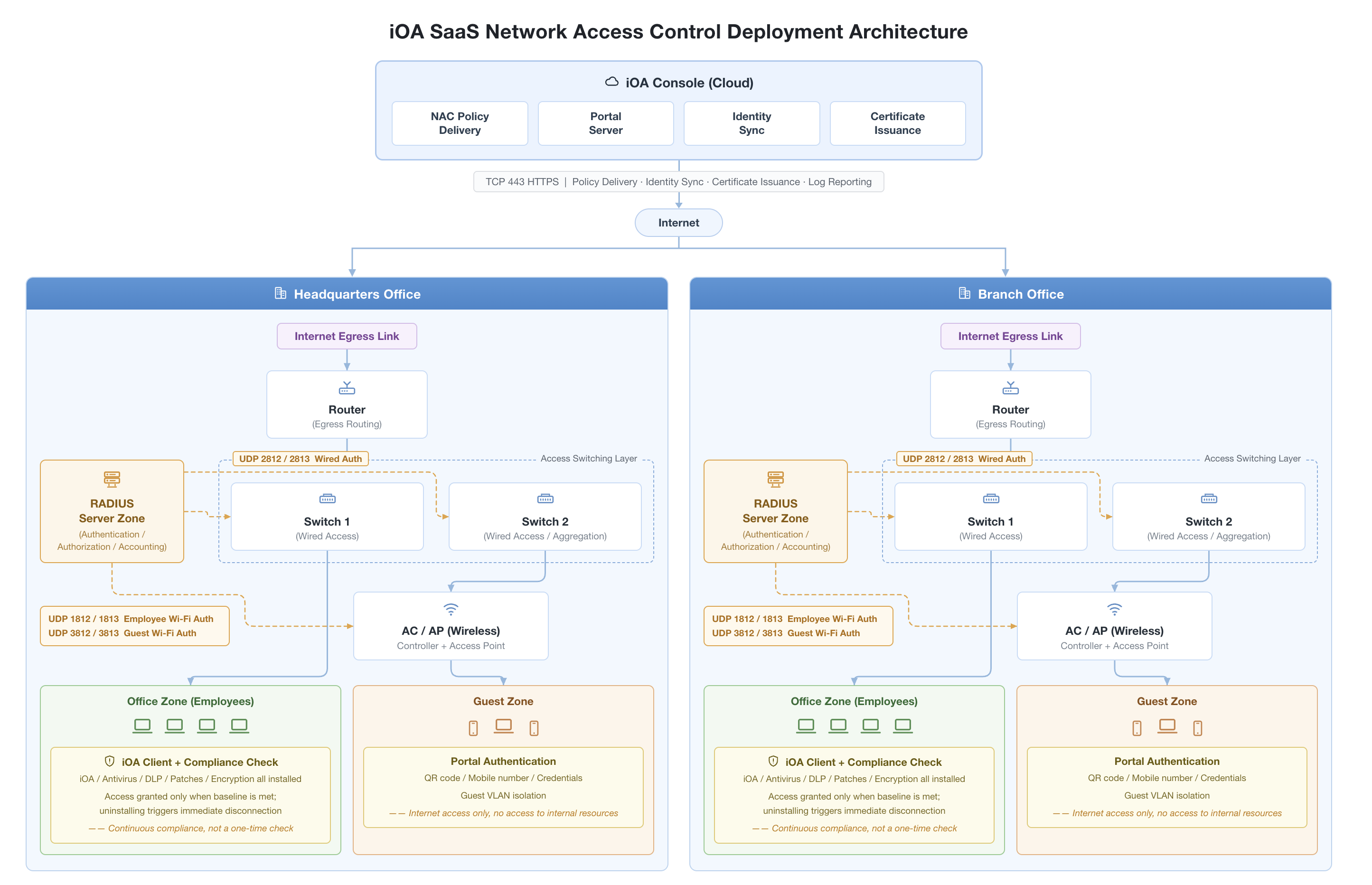
Deployment Form
Cloud (iOA console)—a unified control plane shared across offices:
Access control policy delivery: Authentication methods, SSID configurations, compliance baselines, and allow/deny rules are centrally managed, and policy changes are synchronized to each office within seconds.
Portal server: Portal pages for guest QR code sign-in and phone number login are hosted in the cloud, allowing employees and guests to use the same entry point at any office.
Identity synchronization: The system integrates with identity sources such as enterprise AD/LDAP, Feishu, and WeCom, and automatically synchronizes employee onboarding and offboarding changes to the RADIUS server at each office.
Certificate issuance: The CA and terminal certificates required for 802.1X certificate authentication are issued and revoked centrally by the cloud.
Enterprise private network (each office)—authentication and forwarding are completed locally, and user authentication traffic does not go to the cloud. A typical network topology for each office:
Component | Function | Description |
RADIUS server area | Performs 802.1X / Portal / MAB authentication and accounting | RADIUS node provided by iOA, deployed on an enterprise server |
Egress router | Connects the enterprise private network to the Internet | Policy and log traffic synchronized to the cloud goes through TCP 443. |
Access switch | Provides wired terminal access and forwards authentication requests to RADIUS | Existing enterprise device, no replacement required. |
Wireless AP | Provides Wi-Fi access | Existing enterprise device, no replacement required. |
Terminal | Employee PCs, mobile phones, dumb terminals, and guest devices | Use 802.1X / Portal / MAB by scenario |
Consistent multi-office architecture: The local network topology is identical across headquarters, branches, and overseas sites (RADIUS zone + egress + access switches + wireless APs), and all are centrally managed under the same iOA console in the cloud. Administrators manage a single set of policies and distribute them to all sites.
Two-Way Communication Between Local Devices and the Cloud
Only HTTPS (TCP 443) is used for communication between the cloud and the RADIUS nodes at each office for the following purposes:
Policy delivery (authentication rules, compliance baselines, and Portal configurations)
Identity synchronization (employee accounts, guest records, and MAC allowlists for dumb terminals)
Certificate issuance (802.1X client certificates and CA certificates)
Log reporting (audit events, access failure records, and compliance exceptions)
The actual user authentication traffic (RADIUS UDP 1812/1813) remains fully confined within the enterprise private network and does not traverse the internet.
3. Network Access Scenarios
Three business scenarios are currently covered, and they can be enabled simultaneously without conflicts.
Scenario | Applicable Scope | Required Components | Authentication Method |
Employee Wi-Fi | Enterprise employees | RADIUS node + wireless controller + employee SSID | 802.1X (certificate, username and password) / Wi-Fi account Portal |
Guest Wi-Fi | Visitors | RADIUS node + wireless controller + guest SSID + guest Portal Server | Portal username and password / SMS / QR code |
Wired network | Employee PCs and dumb terminals | RADIUS node + switch | 802.1X (certificate, username and password) / MAB (dumb terminal) |
4. Core Concepts
Concept | Description | Position |
iOA console | A cloud-based unified management console shared across workplaces. | Cloud |
RADIUS node | An authentication service component provided by iOA, deployed on the enterprise premises. | Enterprise private network (per office) |
Wireless controller (AC) | A network device that manages thin APs and is typically already deployed in enterprises. | Enterprise private network |
Switch | An access layer switch on the enterprise office network that must support 802.1X / MAB. | Enterprise private network |
Wi-Fi SSID | A name for a Wi-Fi signal, divided into employee SSID and guest SSID. | Configured on the wireless controller |
Guest Portal Server | A login page where visitors scan a QR code or enter their mobile number, hosted on the iOA cloud. | In the cloud, accessed by visitors through a browser. |
Compliance baseline | A list of security components to check before admission and their version/status requirements. | Configured in the iOA console, delivered and executed by RADIUS |
5. Configuration Guide
Based on your role, three recommended reading paths are provided:
Path 1: Technology Selection
1. Read through this page to understand its positioning and architecture.
2. Recommendations for selecting network access authentication methods (choose the appropriate one based on your scenario).
3. RADIUS Server Deployment Recommendations and Requirements (Confirm deployment feasibility).
Path 2: Administrators Performing Initial Configuration
1. Read through this document + RADIUS Server Deployment Recommendations and Requirements to prepare the RADIUS server.
2. Network Access Configuration Guide (vendor adaptation: Huawei / H3C / Ruijie, and so on).
3. Manage employee network access / Manage guest network access / Manage dumb terminal network access.
Path 3: Daily Ops for Existing Users
Simply view employee network access, guest Wi-Fi application records, and dumb terminal network access.
6. RADIUS Server Deployment Suggestions and Requirements
Resource Configuration Reference
Deploy iOA RADIUS nodes on brand-new servers to avoid conflicts with other running application services. Each office should be deployed independently and sized to match the office scale.
Operating System (Recommended) | Hardware Specifications | Certified Concurrency (QPS) |
CentOS 7, Debian 9, Rocky 9 or later | 2-core CPU / 2 GB memory | 300 times/sec |
| 4-core CPU / 4 GB memory | 600 times/sec |
| 8-core CPU / 8 GB memory | 1000 times/sec |
Note:
QPS refers to the number of authentication requests that can be completed per second. Online users who have completed authentication are not interrupted by new incoming requests. Requests exceeding the QPS are processed sequentially in subsequent periods, which may cause a small number of users to wait 1–2 seconds for authentication.
IP Address Requirements
Server | Network Exposure | Sample IP | Quantity | Description |
RADIUS Server | Internal network access only (recommended) | 172.16.10.110 | Based on the number of nodes in the order | Use a fixed IP address instead of DHCP. |
Port Requirements
Inbound: The RADIUS node is accessed by wireless controllers/switches.
Port | Protocol | . | Purpose | Scenario |
1812 | UDP | Wireless controller | Employee Wi-Fi authentication | Employee Wi-Fi |
1813 | UDP | Wireless controller | Employee Wi-Fi accounting | Employee Wi-Fi |
3812 | UDP | Wireless controller | Guest Wi-Fi authentication | Guest Wi-Fi |
3813 | UDP | Wireless controller | Guest Wi-Fi accounting | Guest Wi-Fi |
2812 | UDP | Wired switch | Wired network authentication | Employee wired / dumb terminals |
2813 | UDP | Wired switch | Wired network accounting | Employee wired / dumb terminals |
Note:
The port number can be modified, but it must be consistent with the configuration on the wireless controller/switch.
Outbound: The RADIUS node accesses the iOA cloud.
Target | Port | Protocol | Purpose |
IP address resolved from the iOA tenant domain name | 443 | TCP | Policy synchronization, identity synchronization, certificate issuance, and log reporting |
Bantuan dan Dukungan
Apakah halaman ini membantu?
Anda juga dapat Menghubungi Penjualan atau Mengirimkan Tiket untuk meminta bantuan.
masukan