Recommendations for Selecting a Network Access Authentication Method
Unduh
Mode fokus
Ukuran font
Recommendations for Selecting a Network Access Authentication Method
The previous chapter Network Access Control Overview introduces the positioning, scenarios, and overall architecture of iOA network access control. This document describes three authentication methods: 802.1x, Portal, and MAB, helping you choose the one that best fits your business needs.
Three Authentication Methods
Authentication Method | Description | Example |
802.1X | Secure access for employees: with the iOA client installed, identity verification and compliance check are performed, and the device silently accesses the network. | Managed employee terminals (PC/laptop) |
Portal | Visitor registration desk: open a browser, scan a QR code or enter a Captcha, and connect instantly. | Visitors, BYOD users, outsourced personnel |
MAB | Allowlist for dumb terminals: if the MAC address is registered, access is granted; otherwise, access is denied. | Printers, cameras, access control systems, and IP phones |
Note:
All three methods can be deployed on the same set of iOA RADIUS nodes without conflicting with each other.
Network-Wide Access Planning
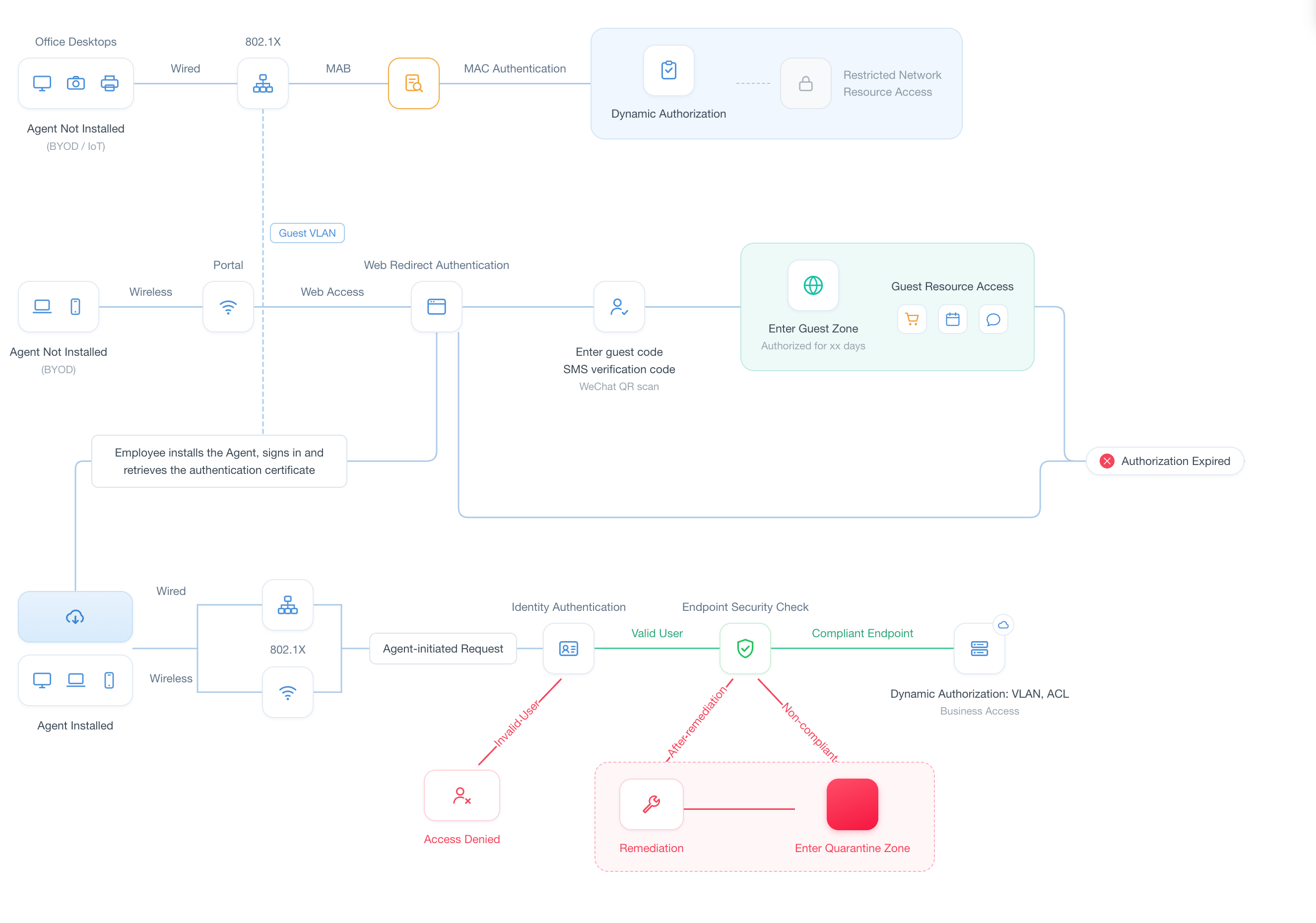
802.1X Authentication - Employee Network Access
802.1X is a port-based network access control standard and the preferred access method for enterprise wired and wireless office networks. Unlike the approach where all users share a single Wi-Fi password, it requires each employee to use unique identity credentials, such as an iOA account, an AD domain account, or a digital certificate, to access the network.
Must-Knows
The iOA client must be installed on the terminal.
For certificate authentication, you must complete CA configuration and certificate issuance in the iOA console in advance.
It is recommended to configure both a Guest VLAN (a temporary network before authentication) and an Auth-Fail VLAN (an isolated network for authentication failures) to prevent terminals from being completely disconnected before authentication.
Core Components and Roles
The iOA 802.1x architecture includes the following four core roles:
Terminal device: an employee's office device. The iOA client usually needs to be installed on the device to initiate EAP authentication requests, submit identity information, and perform environment security checks.
Network access device: network hardware that has access control capabilities and has authentication enabled, such as a wired switch, a wireless controller (AC), or a wireless access point (AP). Its role is to intercept all business traffic before authentication is passed and forward authentication information to the authentication server as a relay.
iOA RADIUS node: the authentication access component of iOA, responsible for communicating with network access devices, processing identity verification requests, and returning authentication results to network access devices.
iOA admin console: the control core of the system, responsible for storing user information, maintaining access control policies, performing identity verification, and issuing final access decisions. It primarily manages RADIUS and does not directly participate in the access control process.
Network Architecture and Data Flow
Workflow
1. Connection and interception: The terminal connects to Wi-Fi or plugs in a network cable, and the network access device (switch/AC) intercepts all business traffic and allows only authentication packets (EAP) to pass.
2. Authentication initiation: The iOA client submits identity credentials (account password or certificate), and the network access device encapsulates them into a RADIUS packet and forwards it to the iOA RADIUS node.
3. Dual verification of identity + compliance: The RADIUS node works with the iOA backend to simultaneously verify whether the identity is valid, whether the iOA client is online, and whether security components such as antivirus, DLP, and patches meet compliance requirements.
4. Issuing the access decision: If the verification passes, send Access-Accept with authorization attributes (VLAN/ACL). If the verification fails, send Reject.
5. Dynamic authorization (CoA): After the terminal accesses the network, iOA continuously monitors its compliance status. Once the device becomes non-compliant (for example, antivirus is disabled), it can be switched to an isolated VLAN in real time without disconnecting and reconnecting.
Solution strengths
Layer 2 physical interception: Illegal traffic is intercepted at the data link layer, providing higher security than Portal authentication based on Layer 3 redirection.
Dynamic network switching (CoA): It supports real-time awareness of the security status while the terminal is running. Once the device becomes non-compliant, it can be dynamically switched to an isolated VLAN without disconnecting and reconnecting.
Automated network access: works with the iOA client to achieve silent connection, eliminating the cost of manually configuring complex parameters such as SSID, protocol, and certificate.
Portal Authentication
Portal authentication (also known as Web authentication) is a clientless access method. After the user connects to Wi-Fi, traffic is intercepted by the network access device and redirected to an authentication page (Portal page). The user can access the network after completing identity verification on the page.
Core Components and Roles
The iOA Portal architecture mainly includes the following core roles:
Terminal device: a device used by an employee or visitor. It does not require the iOA client to be installed. It only needs a standard web browser (PC browser or mobile H5).
Network access device: network hardware with HTTP redirection capabilities, such as a wireless controller (AC), wireless access point (AP), or wired switch. It is responsible for intercepting HTTP requests from users before authentication and forcibly redirecting them to the authentication page. After receiving the "authentication successful" instruction, it grants network access permissions.
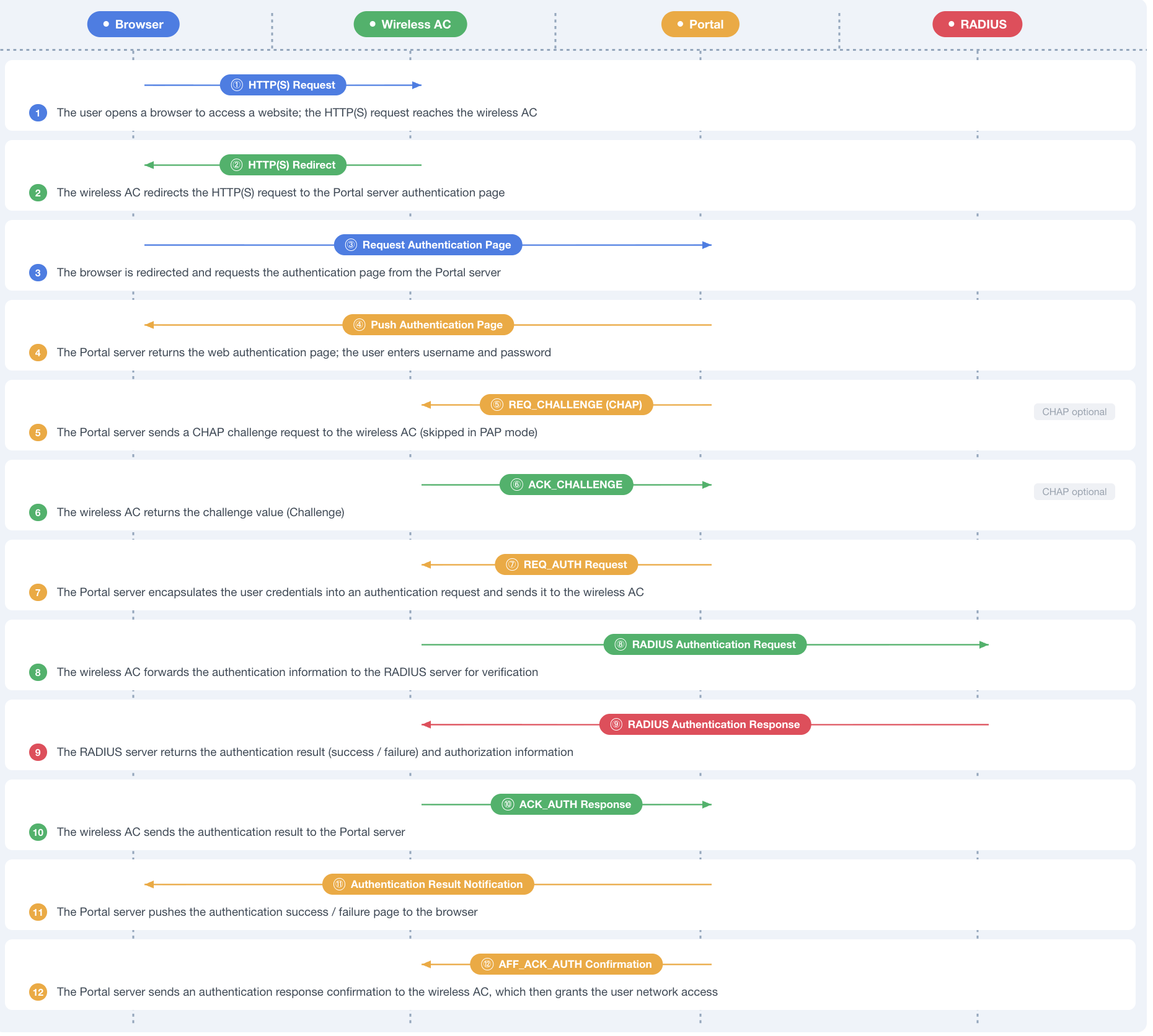
Portal module: a component responsible for receiving identity credentials submitted from the terminal web page and initiating authentication handshake requests to the network access device. Depending on the selected solution, its deployment modes are divided into two types:
iOA Portal server: An independent protocol processing component is provided by the iOA backend. It is responsible for receiving terminal forms on behalf of the network access device, encapsulating them into standard Portal authentication request packets, and forwarding them to the network access device. It also receives authentication results from the network access device and pushes the final page to the terminal.
RADIUS: identifies network access devices and delivers the specified "authentication information receiving address". It also serves as the final database to verify the validity of account passwords.
Must-Knows
Portal authentication does not support terminal compliance checks. It only verifies identity and does not check the device security status.
The authentication session has a validity period. After it expires, the user must log in again (unlike 802.1x, which can automatically renew the session).
Some older browsers or operating systems may not trigger the automatic login page pop-up. In this case, you need to manually access any HTTP page to trigger the redirect.
Workflow
1. Interception and redirection: After the terminal connects to the network and obtains an IP address, the network access device intercepts its HTTP request and returns a 302 redirect to the iOA Portal authentication page.
2. Displaying the login page: The browser automatically pops up the authentication webpage provided by iOA. Employees enter their account and password, while visitors scan a QR code or enter an SMS verification code.
3. Credential submission and verification: After the user submits credentials, the data is reported to RADIUS through the network access device for identity verification.
4. Granting network access: After the verification passes, RADIUS sends an Accept message, the network access device removes the interception, and the terminal accesses the network normally.
Solution strengths
Zero client: Any device with a browser can be used, and visitors do not need to install any software.
Rapid deployment: You only need to configure the Portal redirect rule on the AC, without pushing any client.
Flexible authentication methods: Supports account passwords, third-party QR code scanning (WeCom/Feishu/DingTalk), SMS verification codes, and email verification codes.
MAB Authentication
MAB (MAC Authentication Bypass) is designed specifically for dumb terminals that cannot install clients or open browsers. It is a clientless access method. On a network port with the 802.1x protocol enabled, the switch sends the MAC address as the authentication username to RADIUS for verification. Once the verification passes, access is granted. MAB is part of 802.1x authentication.
Must-Knows
Security boundary: MAC addresses can be forged, and MAB is less secure than 802.1X and Portal. MAB should be used only for dumb terminals in fixed locations, such as printers and cameras, and is not recommended for employee or guest scenarios.
Allowlist maintenance: Administrators need to register the MAC address and purpose group of each dumb terminal in the iOA console in advance, such as "Printer", "Camera", and "Access Control", to facilitate group management and auditing.
Integration with 802.1X: MAB is typically deployed on the same switch port as a fallback policy for 802.1X. The switch first attempts 802.1X and automatically falls back to MAB after a timeout.
Authentication Process
1. Device access with automatic fallback: After a dumb terminal is connected to the network cable, the switch first attempts to initiate 802.1X authentication. If the response times out, the switch automatically falls back to MAB mode and reads the device MAC address.
2. MAC reporting and matching: The switch encapsulates the MAC address as the username and password in a RADIUS request and reports it to the iOA RADIUS node. RADIUS then queries the dumb terminal MAC allowlist in the iOA backend.
3. Allow or deny: For a MAC in the allowlist, Accept is returned and the port is opened. For an unregistered MAC, Reject is returned and the port remains closed.
Comparison and Hybrid Deployment
Comparison of Authentication Methods
Dimension | 802.1x | Portal | MAB |
Applicable Subjects | Enterprise employees (managed terminals) | Visitors, BYOD users, outsourced personnel | Dumb terminals (printers, cameras, and so on) |
Client Requirements | iOA client installation required. | Browser only. | No software required. |
Security | Extremely high (Layer 2 blocking + compliance check + CoA) | Medium (Layer 3 redirection + identity authentication) | Basic (MAC allowlist, can be spoofed) |
Network access experience | Automatic connection after initial configuration | Manual login is required after each expiration. | Plug and play (within allowlist) |
Permission control | Strong (dynamic VLAN/ACL + CoA-based network switching) | Medium (traffic is typically allowed based on static IP address ranges) | Basic (grouped by MAC) |
Compliance Verification | Supported (antivirus/DLP/patch) | Not supported | Not applicable |
Deployment Complexity | Medium (client + certificate/account configuration required). | Low (only the Portal page needs to be configured). | Low (maintain MAC allowlist) |
Authentication Method | iOA account / AD domain / digital certificate | iOA account / QR code scan / SMS / email | MAC Address |
Typical Hybrid Deployment Solution
In real enterprise environments, a single authentication method is almost never used. The following combinations cover the most common deployment scenarios:
Combination A: Standard enterprise office network (most common)
SSID/Port | Authentication Method | Target User |
Employee Wi-Fi (such as Corp-WiFi) | 802.1X | Employees |
Guest Wi-Fi (such as Guest-WiFi) | Portal | Visitors |
Wired switch port | 802.1X + MAB fallback | Employee PCs + dumb terminals |
This combination applies to most enterprises. Employees use 802.1X to ensure security and experience, visitors use Portal to avoid client installation, and dumb terminals are granted access through MAB based on the allowlist.
Combination B: High-security environment (finance, R&D, and so on)
Based on Combination A, add the following:
802.1X uses digital certificate authentication instead of username and password, further preventing credential theft.
Enable CoA dynamic network switching: If a terminal becomes non-compliant while running, it is switched to an isolated VLAN in real time.
Guest Wi-Fi is physically isolated from the private network through an independent VLAN + ACL, rather than merely logically isolated.
Configuration After Selection
After determining the authentication method, go to the specific configuration by following the path below:
Authentication Method | Documentation Link |
802.1X (employee Wi-Fi/wired) | Manage 802.1X employee network access (vendor adaptation). |
Portal (guest Wi-Fi) | Manage guest Portal Server (Portal configuration). |
MAB (dumb terminals) | |
Hybrid deployment | Configure each scenario separately as described above, sharing the same set of RADIUS nodes. |
Note:
Before configuration, confirm that the RADIUS server is deployed and ready. For deployment requirements, see RADIUS Server Deployment Recommendations and Requirements.
Bantuan dan Dukungan
Apakah halaman ini membantu?
Anda juga dapat Menghubungi Penjualan atau Mengirimkan Tiket untuk meminta bantuan.
masukan