Portal Server
Unduh
Mode fokus
Ukuran font
The Portal Server module is the core Web authentication engine for clientless devices in the dumb terminal network access system. It registers and manages authentication servers that provide Captive Portal pages, enabling guests, temporary devices, or browser-capable dumb terminals (such as smart tablets and screen-equipped industrial computers) to enter account credentials on a web page to complete identity verification and gain network access permissions.
1. Log in to the Tencent iOA Zero Trust Management Platform console and choose Basic Settings > Portal Server in the left sidebar.
2. On the Portal Server page, click Add Server.
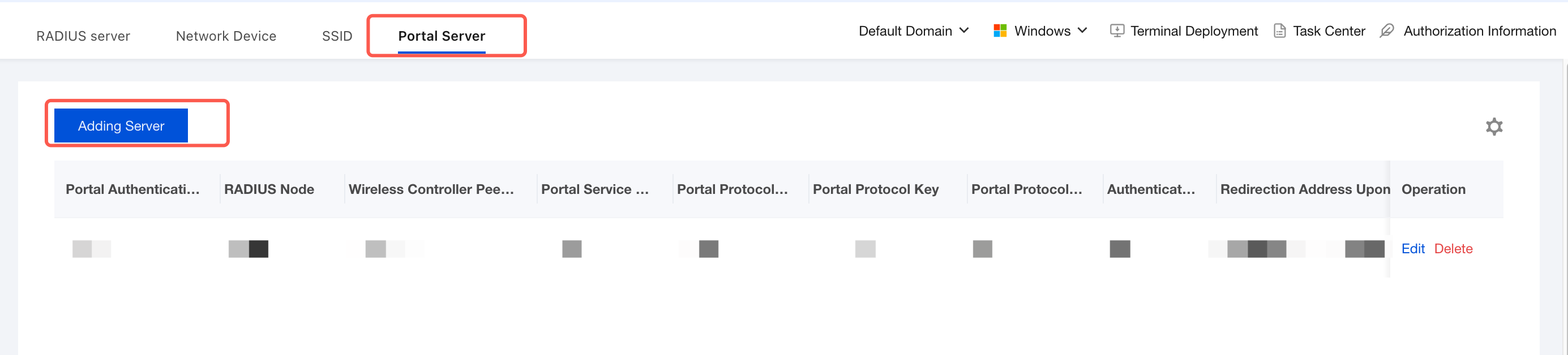
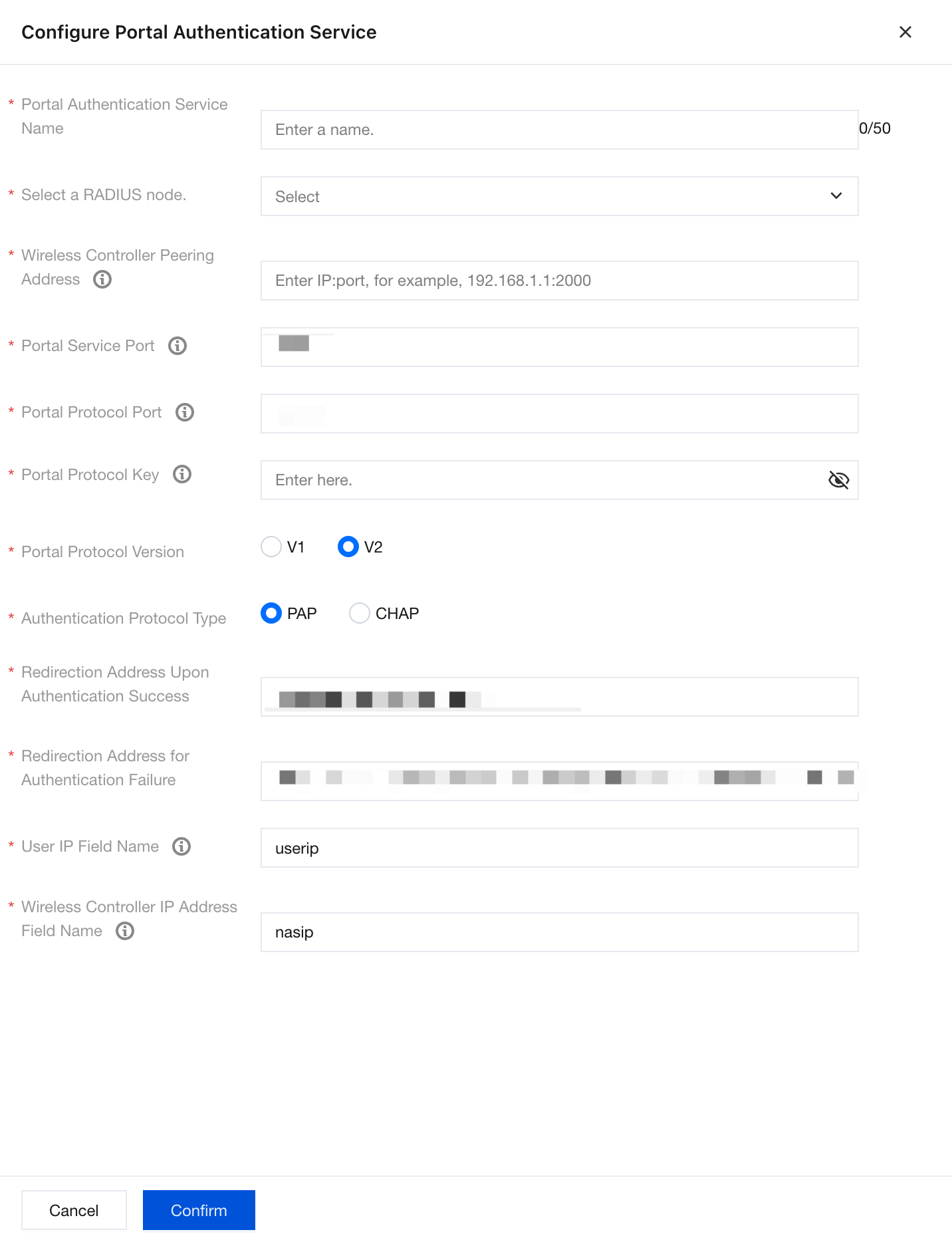
3. On the Portal authentication service configuration page, configure the following parameters, and click Confirm to save after completing the configuration.
Parameter Name | Description |
Portal Authentication Service Name | Custom Portal Authentication Service Name. |
Select RADIUS Node. | Select one of the managed RADIUS servers as the backend authentication source for this Portal service. After the user submits credentials on the Portal page, the system forwards the credentials to this RADIUS node for verification. |
Wireless Controller Interconnection Address | Enter the management IP address or domain name of the wireless controller (AC). Purpose: The Portal server sends authentication success/failure commands to the AC through this address, triggering VLAN switching or redirection. |
Portal Service Port | Port on which the Portal server listens for HTTP/HTTPS requests. Typically, the AC initiates a connection to this port to obtain the authentication page or push results. The firewall must allow traffic through this port (TCP), and the AC-side configuration must match. |
Portal Protocol Port | A dedicated port for exchanging control messages such as authentication status, heartbeat, and accounting between the AC and the Portal server (based on RFC 3576 or a proprietary protocol). It must be consistent with the Portal server port configured on the AC. Otherwise, the control channel cannot be established. |
Portal Protocol Key | The shared key between the AC and the Portal server, used to encrypt control messages (such as authentication result notifications). It must be exactly the same as the Portal shared-key configured in the AC CLI. |
Portal Protocol Version | Keep the protocol version and protocol type consistent with the network device. V1: An older protocol with poor compatibility, not recommended. V2: Supports richer attribute delivery and better error handling mechanisms. It must match the version supported by the AC. Mainstream vendors all support V2. |
Authentication Protocol Type | PAP: Transmits passwords in plaintext and is suitable for internal trusted environments or when used with RADIUS. CHAP: Challenge-response based, more secure but unsupported by some legacy ACs. |
Redirect Address After Successful Authentication | The target page to which the browser automatically redirects after successful user authentication. It must be an HTTPS link to prevent man-in-the-middle attacks. |
Redirect Address After Failed Authentication | The error page to which the browser redirects when user authentication fails (for example, due to an incorrect password or account disablement). |
User IP Field Name | Name of the address variable that the AC carries in Portal requests to convey the terminal IP. Most devices use the standard field userip, which requires no modification. Some special devices may require Client-IP or Framed-IP-Address. |
Wireless Controller IP Field Name | The variable name for the AC's own IP address, used for log tracing and policy delivery target identification. The standard value is nasip (Network Access Server IP), and it generally requires no adjustment. |
Bantuan dan Dukungan
Apakah halaman ini membantu?
Anda juga dapat Menghubungi Penjualan atau Mengirimkan Tiket untuk meminta bantuan.
masukan