Managing Guest Portal Server
Unduh
Mode fokus
Ukuran font
iOA Guest Wi-Fi is a Portal authentication process based on the HTTP protocol. For router devices that do not support direct HTTP connection (such as Ruijie AC and TP-Link), you need to deploy an independent Portal Server to complete authentication. The RADIUS service in the iOA admin console has a built-in Portal Server feature, so you only need to manually configure the Portal Server in the admin console to implement Portal authentication for Guest Wi-Fi.
Prerequisites
The RADIUS server has been added. For detailed configuration, see RADIUS Server.
The wireless router device has been added and the guest Wi-Fi capability has been enabled. For detailed configuration, see Wireless Controller.
Configuring Guest Portal Server
1. Log in to the Tencent iOA Zero Trust Management Platform console and choose Basic Settings > Portal Server in the left sidebar.
2. On the Portal Server page, click Adding Server.

3. On the Portal authentication service configuration page, configure the following parameters, and click OK to save after completing the configuration.
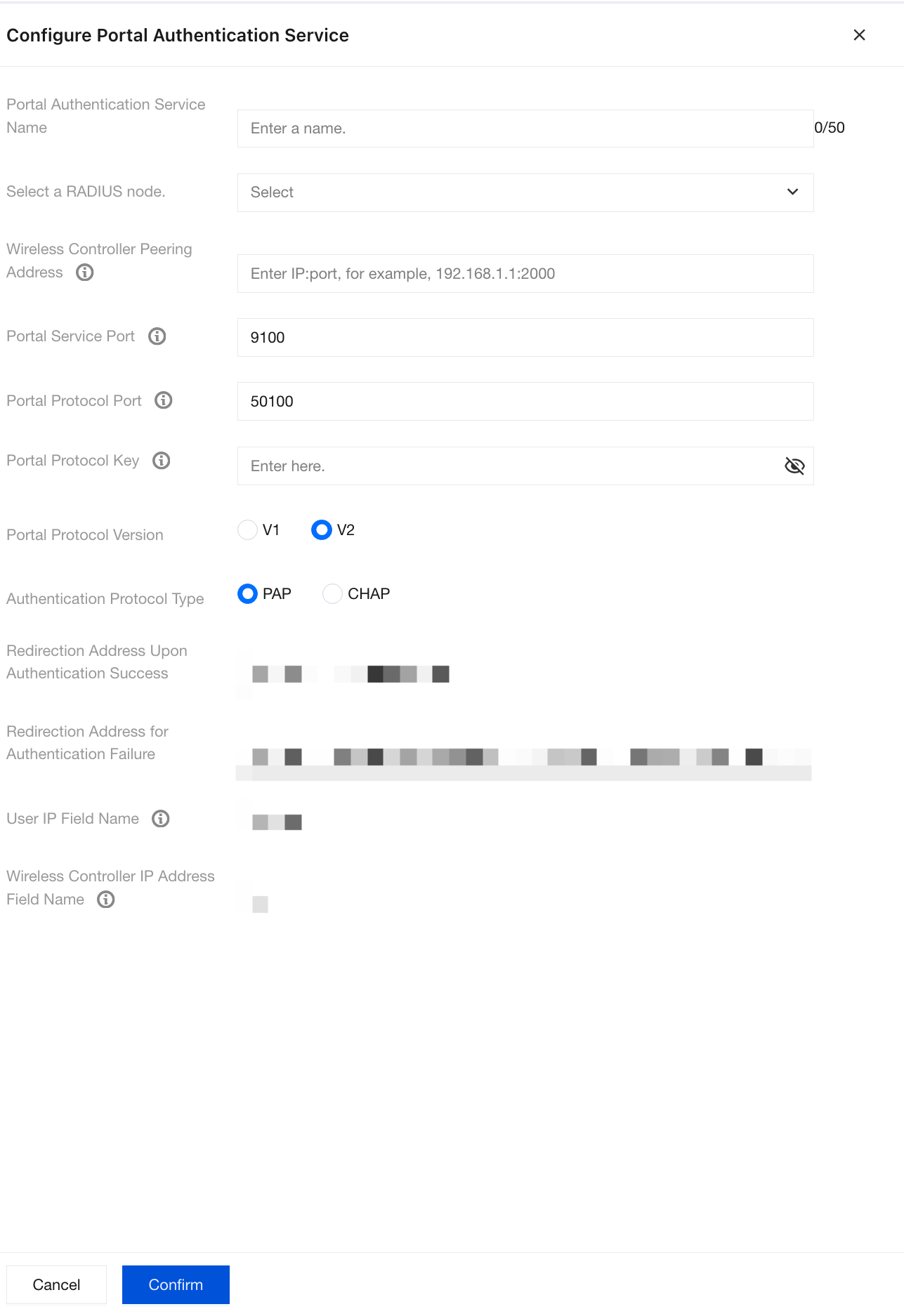
Parameter Name | Description |
Portal Authentication Server Name | Custom name used to identify the service. |
Select RADIUS Node. | Select one from the managed RADIUS servers as the backend authentication source for this Portal service. After a user submits credentials on the Portal page, the system forwards the credentials to this RADIUS node for verification. |
Wireless Controller Interconnection Address | Wireless controller management IP address and port, in format of IP address:Port |
Portal Service Port | HTTP listening port of the Portal authentication service, used for connecting to the Portal authentication page and receiving guest authentication information. If no special configuration is required, keep the default port 9100. |
Portal Protocol Port | Port used for Portal protocol communication, used to receive Portal protocol packets sent by the controller. If no special configuration is required, keep the default port 50100. |
Portal Protocol Key | Shared key used for Portal protocol communication. |
Portal Protocol Version | Available options are v1 and v2. Currently, most wireless router device brands mainly use v2. |
Authentication Protocol Type | PAP and CHAP are available. Currently, most wireless router device brands support both protocols, and either can be selected. |
Redirect Address After Successful Authentication | The address to which the Web page redirects after guest Wi-Fi authentication succeeds. For example, it can be configured as the homepage of the enterprise's official website. |
Redirect Address After Failed Authentication | Error page to which users are redirected when authentication fails due to reasons such as incorrect password or disabled account. Friendly prompt information can be customized to guide users to retry or contact the administrator. |
User IP Field Name | Parameter field name used in the Portal protocol to transmit the user IP address. Used to obtain the user IP address from the Portal authentication URL. |
Wireless Controller IP Field Name | Parameter field name used in the Portal protocol to transmit the wireless controller IP address |
Editing or Deleting Guest Portal Server
1. Log in to the Tencent iOA Zero Trust Management Platform console and choose Basic Settings > Portal Server in the left sidebar.
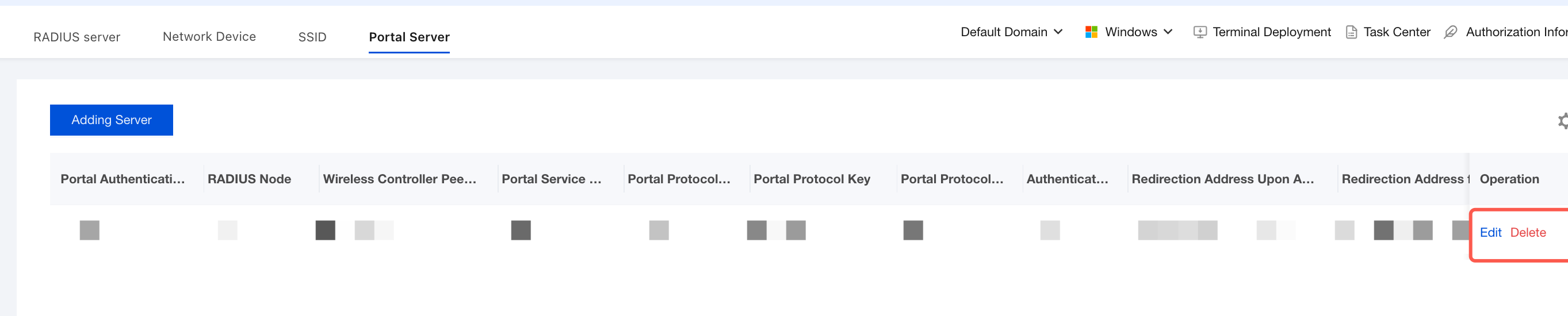
2. On the Portal Server page, you can edit or delete the configured Portal Server.
Attention:
After you edit the existing Portal Server configuration, the connectivity of the guest authentication service may be affected. Please proceed with caution.
After a Portal Server is deleted, the corresponding guest Wi-Fi cannot be used for guest authentication. Once deleted, it cannot be restored. Please proceed with caution.
Bantuan dan Dukungan
Apakah halaman ini membantu?
Anda juga dapat Menghubungi Penjualan atau Mengirimkan Tiket untuk meminta bantuan.
masukan