Security and Access Control
Download
Focus Mode
Font Size
This document introduces the security and access control features of the Tencent Healthcare Data Services console.
Prerequisites
Creating an Instance has been finished.
Identity Authentication
1. On the Tencent Healthcare Data Services > Browser page, select and click the name of the data storage instance.
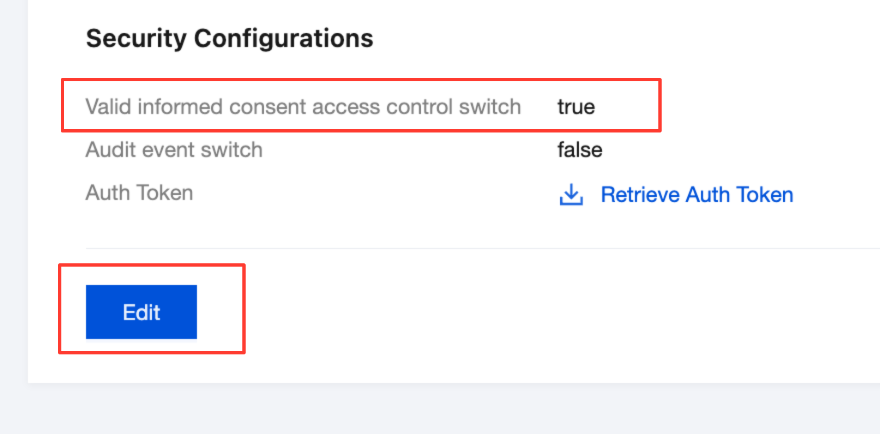
2. On the data storage details page, you can enable the identity verification feature by modifying the instance configuration, which is to turn on the Valid informed consent access control switch.
true: indicates that it is enabled.
false: indicates that it is disabled.
Attention:
After you turn on the Valid informed consent access control switch, the instance status displays as Updating, and you need to wait for a few minutes. When the instance status displays as Running, it indicates that the identity verification feature has been successfully enabled.

3. After the identity verification feature is enabled, on the informed consent page, you can view the identity verification configurations that have been added under this instance, or click Add informed consent to create a new identity verification configuration.

The configuration items are described as follows.
Configuration Item | Description |
Range | The scope of authentication, currently supporting four options: adr: Advanced Care. research: indicates research purposes. patient-privacy: Patient Privacy. treatment: Treatment. |
Classification | The classification of authentication, which supports multiple selections. |
Patient | Information of the applicant, with the entry format being resource type/resource ID. |
Type | Allow/Deny, which indicates the action the system takes when the authentication conditions are met. |
Period | Define the start time and end time when this authentication takes effect. |
Participant | Enter the party to whom information is authorized, for example, a doctor. |
Operation | Describes the operations that the authorized party can perform on the information, including read, write, update, delete, and search, with multiple selections supported. |
Purpose | Describes the scenario in which this authentication data is used. treatment: Treatment. healthcare payment: Healthcare Payment. public health: Public Health. healthcare research: Healthcare Research. healthcare operations: Healthcare Operations. patient requested: indicates a patient-initiated request. |
Category | The specific FHIR resource to be authorized, for example, the registration resource and the consultation resource of patient Zhang San. |
Encoding/Data Type/Data Value | Optional, used to control access to data at a finer granularity. |
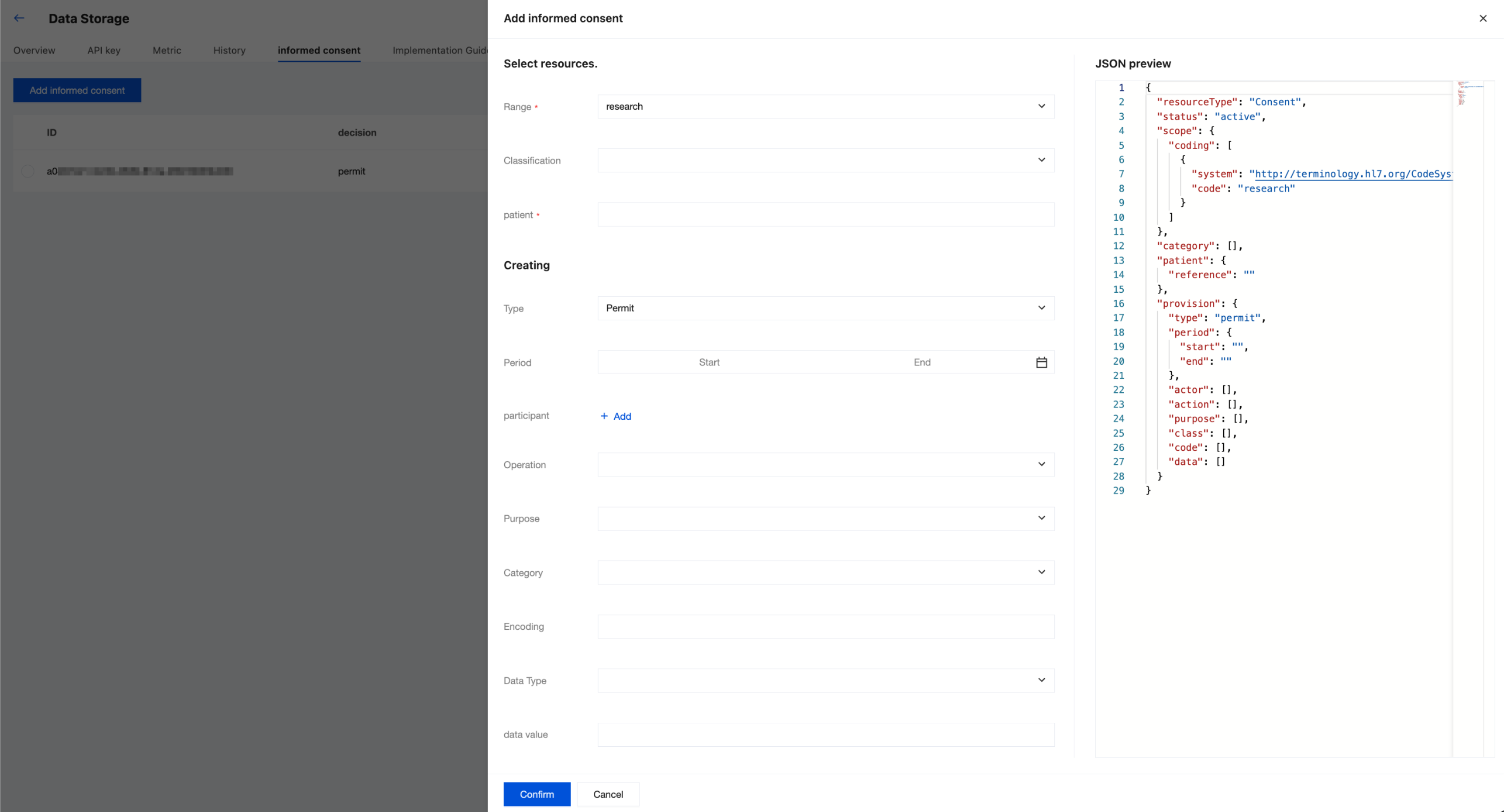
4. After completing the configuration, click Confirm.
De-identification (Data Masking)
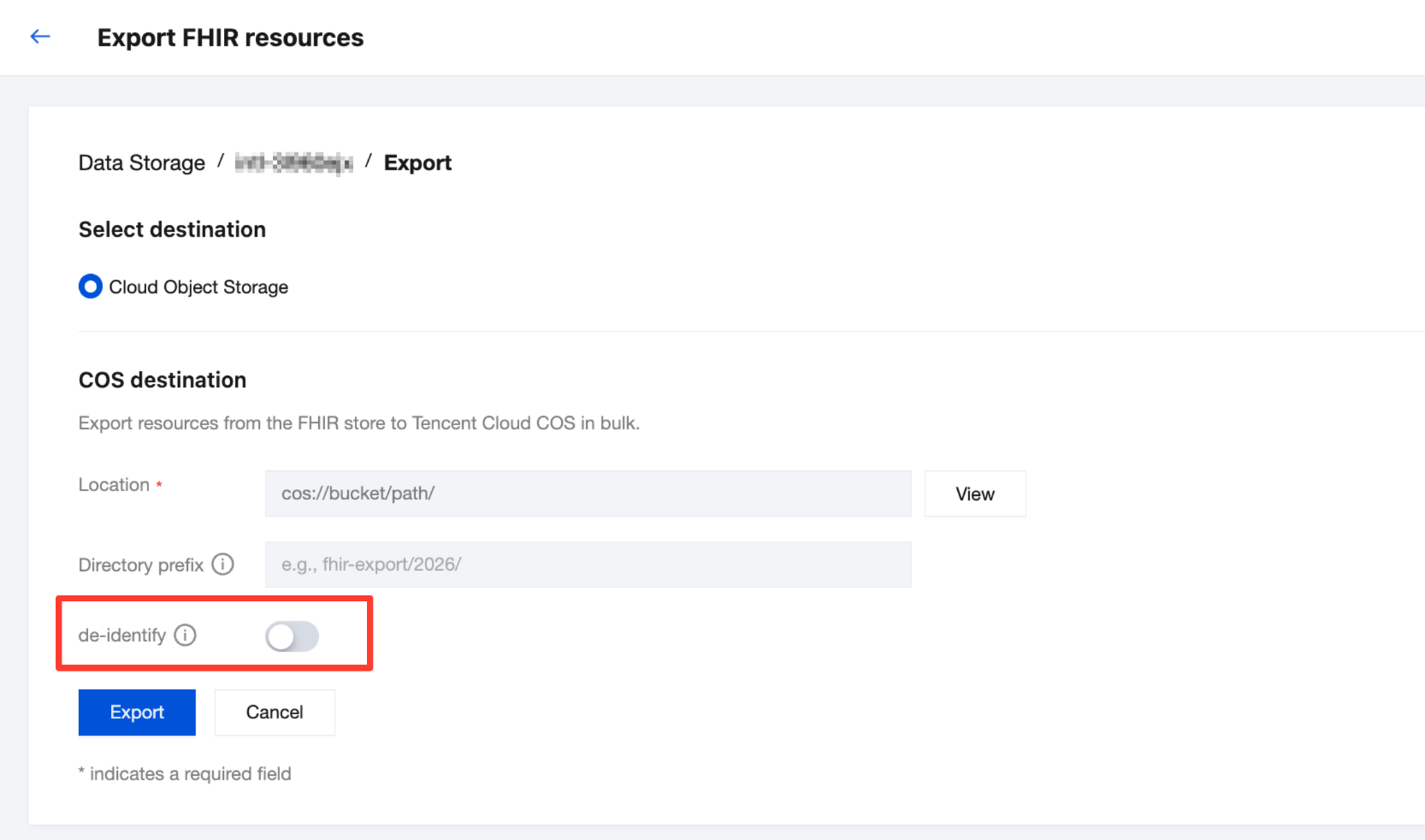
On the Tencent Healthcare Data Services > Browser page, click Operation on the right side of the instance, and then select Export.

Go to the Export FHIR resources page, where you can choose whether to enable the de-identification feature.
De-identification Data Types:
AGE: Age.
CREDIT_CARD_NUMBER: Credit Card.
DATE: Date.
EMAIL_ADDRESS: Email Address.
IP_ADDRESS: IP Address.
LOCATION: Address.
MAC_ADDRESS: MAC Address.
PASSPORT: Passport Number.
PERSON_NAME: Patient Name.
PHONE_NUMBER: Phone Number.
SWIFT_CODE: SWIFT Code.
IDENTIFICATION_NUMBER: Identity ID.
SECURITY_NUMBER: Social Security Number.
LICENSE_NUMBER: Driver's License.
De-identification Method | Description | Parameter | Original Data Sample | De-identified Sample | Applicable Scenarios |
Date Shift (DateShiftConfig) | Shifts date values within a specified range, generates a unique offset for each individual, and maintains the relative temporal relationships between events. | Offset range. Encryption key. Individual identification field. | Patient record: Date of Birth: 1985-03 -15. Admission Date: 2023-01-10. Discharge Date: 2023-01-17. | Patient record (shifted -7 days): Date of Birth: 1985-03-08. Admission Date: 2023-01-03. Discharge Date: 2023-01-10. | Clinical research. Longitudinal data analysis. Maintain the temporal sequence of events. |
Redaction (RedactConfig) | Completely removes sensitive information and optionally replaces it with information type tags. | Sensitive information type. Whether to replace the Tag. | Patient record: Name: John Smith. Date: 2023-05-12. Contact Number: 212-555-1234. | Patient record: Name: [PERSON_NAME]. Date: [DATE]. Contact Number: [PHONE_NUMBER]. | Highly sensitive data. Do not retain the original format. Text data cleaning. |
Character Masking (CharacterMaskConfig) | Replaces original characters with fixed characters (for example, * or X) and can retain partial plaintext. | Masking character. Number of characters to retain. Position (Front/Back). | Health Insurance Number: 987-65-4321. Credit Card: 4111-2222-3333-4444. | Health Insurance Number: XXX-XX-4321. Credit Card: XXXX-XXXX-XXXX-4444. | Identity identifier. Account information Retain partial information for verification. |
Encryption (CryptoHashConfig) | Uses cryptographic hash functions to replace sensitive data, ensuring the same input yields the same output. | Encryption key. Encryption method. Output encoding. | Patient ID: PT12345. MRN:MR98765 | Patient ID: 7f4e6s2a1d8c9b. MRN:3a7b9c2d8e4f6g | Maintain data associations. Cross-system identifier matching. Data connection analysis. |
Audit Log
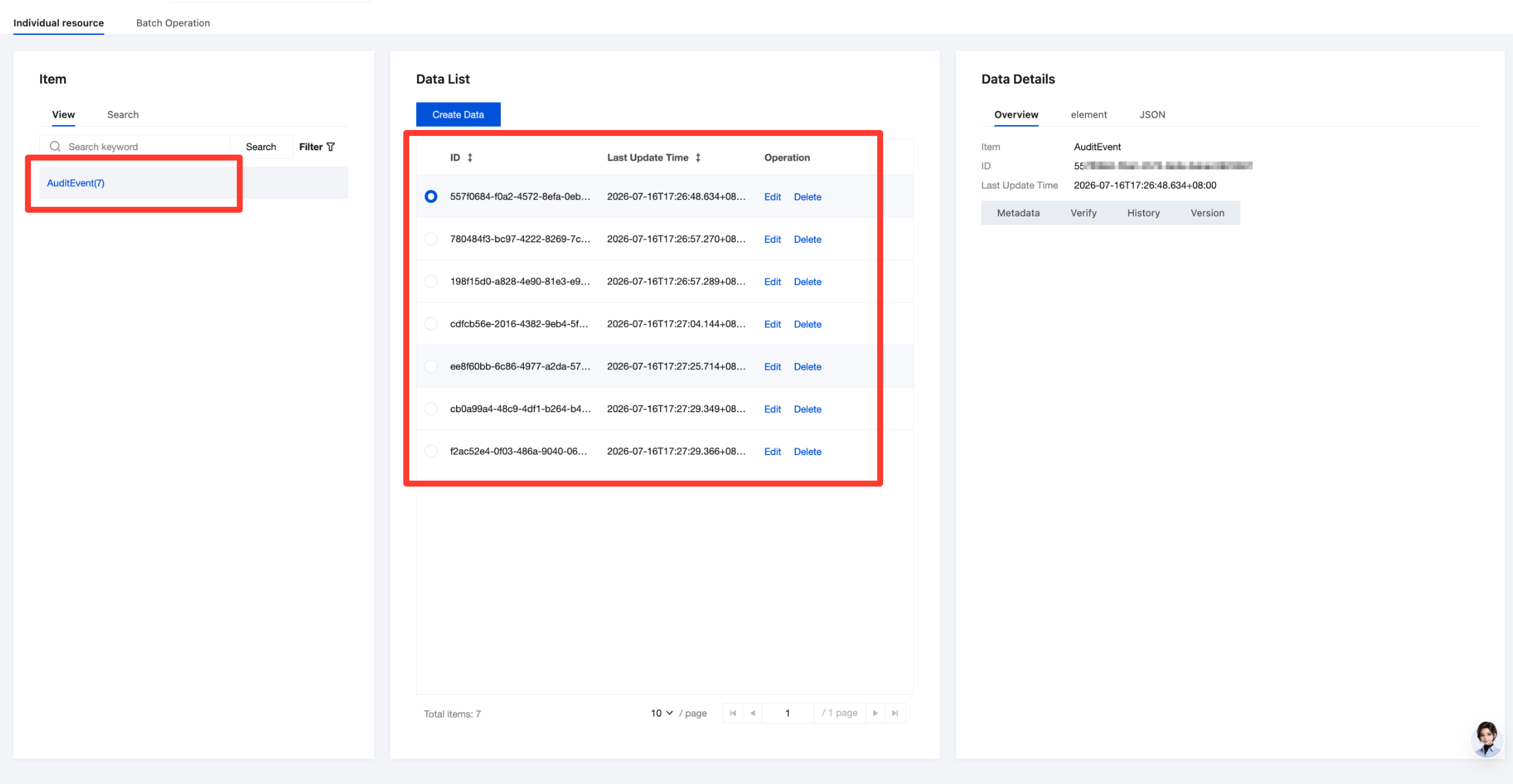
For a FHIR instance with the AuditEvent feature enabled, corresponding audit data is generated in the AuditEvent resource each time a data record is created during instance creation.
1. On the Tencent Healthcare Data Services > Viewer page, select the created instance at the top of the page.
2. On the Individual resource > View page, select the AuditEvent resource type.
3. Select the corresponding data, and you can view the audit data on the Data Details > JSON page.
Help and Support
Was this page helpful?
You can also Contact sales or Submit a Ticket for help.
Help us improve! Rate your documentation experience in 5 mins.
Feedback