This document shows you how to use a third-party player to play encrypted (Widevine, FairPlay) videos of VOD.
Overview
To decrypt and play an encrypted video using a third-party player, you need to obtain the playback information.
You will need the following playback information:
Widevine
DrmToken (which is used to get the playback license)
The URL of the video content
The URL of the playback license
FairPlay
DrmToken (which is used to get the playback license)
The URL of the video content
The URL of the playback license
The URL of the certificate
Workflow
Commercial-grade DRM (Widevine and FairPlay)
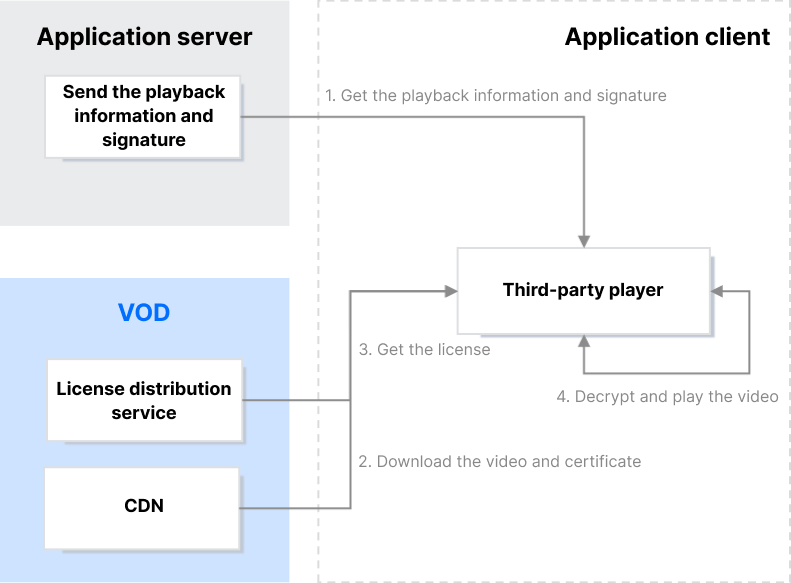
Get the playback information and signature
After successful authentication, your application server sends the playback information and signature (DrmToken) to the client.
Download the video and certificate and request a license
When the player tries to play the video, a request for the license and certificate will be sent automatically.
Decrypt and play the video
The player uses the license obtained to decrypt and play the video.
Generating DrmToken
DrmToken is essentially a variant of JSON Web Token (JWT). It also consists of three parts: the header, the payload, and the signature. However, unlike JWT, VOD connects the three parts with ~.
Header
The header is in JSON format and indicates the algorithm information used by JWT. Its content is fixed as follows:
{
"alg":"HS256",
"typ":"JWT"
}
Payload
The payload is in JSON format and includes the player signature parameters. Below is an example:
{
"type":"DrmToken",
"appId":1500014561,
"fileId":"387702307091793695",
"currentTimeStamp":1650964374,
"expireTimeStamp":2147483647,
"random":4220003655,
"issuer":"client"
}
Payload parameters
Parameter
Type
Required
Description
type
string
Yes
The signature type, which should be set to DrmToken.
appId
int64
Yes
The AppId.
fileId
string
Yes
The file ID.
issuer
string
Yes
The issuer, which should be set to client.
currentTimeStamp
int64
Yes
The current time (Unix timestamp).
expireTimeStamp
int64
No
The expiration time (Unix timestamp). If you do not specify this, the signature will not expire.
Include in the request body the license request data generated by the DRM client module.
Response
If the request is successful, the status code will be 200, and the binary data of the license will be returned.
If the request fails, the status code will be a value other than 200.
Status codes
Status Code
Description
200
Request successful.
400
Parameter error.
403
Authentication failed.
500
Internal error.
License request example
A license request URL for Widevine: https://widevine.drm.vod-qcloud.com/widevine/getlicense/v2?drmToken=eyJhbGciOiJIUzI1NiIsInR5cCI6IkpXVCJ9~eyJ0eXBlIjoiRHJtVG9r
To play a FairPlay-encrypted video, you need to apply for a FairPlay certificate and submit the certificate information to VOD. License URLs are not required for Widevine.
After submitting the information, you can view the license URL in the VOD console. Each subapplication has only one license URL.
Playing the Video Using a Third-Party Player
Once you have the playback URL, license URL, and certificate URL, you can use a third-party player to play the DRM-encrypted video.
Summary
Now, you should know how to play encrypted videos of VOD using a third-party player.