This document shows you how to use a third-party player to play encrypted (SimpleAES) videos of VOD.
Overview
To decrypt and play an encrypted video using a third-party player, you need to obtain the playback information.
You will need the following information:
DrmToken (which is used to get the decryption key)
The URL of the video content
Workflow
Private encryption
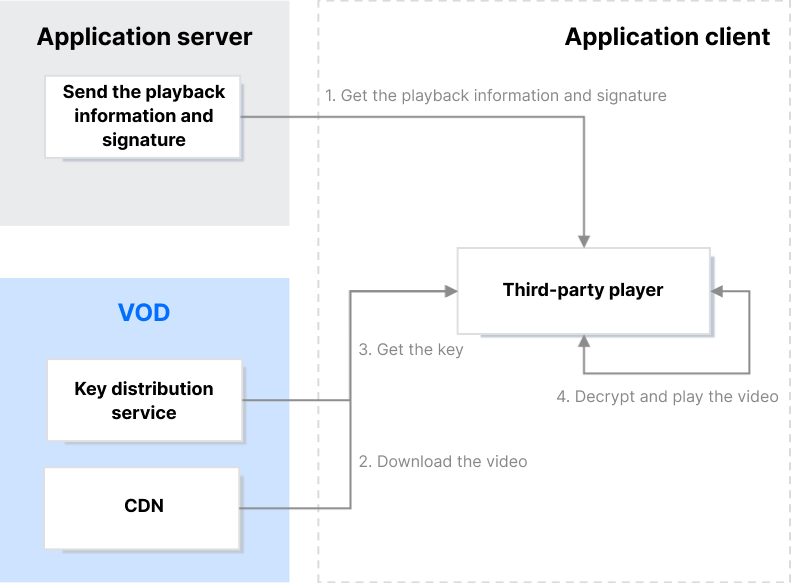
Get the playback information and signature
After successful authentication, your application server sends the playback information and signature (DrmToken) to the client.
Download the video and get the key
A playback URL is generated based on the playback information obtained (DrmToken and content URL). When the player tries to play the video, a request to get the key will be sent automatically.
If key protection is enabled, VOD’s key distribution service will encrypt the content key. For example, if the protection mode is sha256, the key distribution service will use a symmetric key to encrypt the content key.
If key protection is disabled, the key distribution service will send the content key directly.
Decrypt and play the video
If key protection is enabled, the application client needs to decrypt the content key received. For example, if the protection mode is sha256, the client will need to use a symmetric key to decrypt the key information obtained before it can decrypt and play the video.
Generating DrmToken
DrmToken is essentially a variant of JSON Web Token (JWT). It also consists of three parts: the header, the payload, and the signature. However, unlike JWT, VOD connects the three parts with ~.
Header
The header is in JSON format and indicates the algorithm information used by JWT. Its content is fixed as follows:
{
"alg":"HS256",
"typ":"JWT"
}
Payload
The payload is in JSON format and includes the player signature parameters. Below is an example:
{
"type":"DrmToken",
"appId":1500014561,
"fileId":"387702307091793695",
"currentTimeStamp":1650964374,
"expireTimeStamp":2147483647,
"random":4220003655,
"protectSchema":"sha256",
"issuer":"client"
}
Payload parameters
Parameter
Type
Required
Description
type
string
Yes
The signature type, which should be set to DrmToken.
appId
int64
Yes
The AppId.
fileId
string
Yes
The file ID.
issuer
string
Yes
The issuer, which should be set to client.
currentTimeStamp
int64
Yes
The current time (Unix timestamp).
expireTimeStamp
int64
No
The expiration time (Unix timestamp). If you do not specify this, the signature will not expire.
random
int64
No
A random number.
protectSchema
string
No
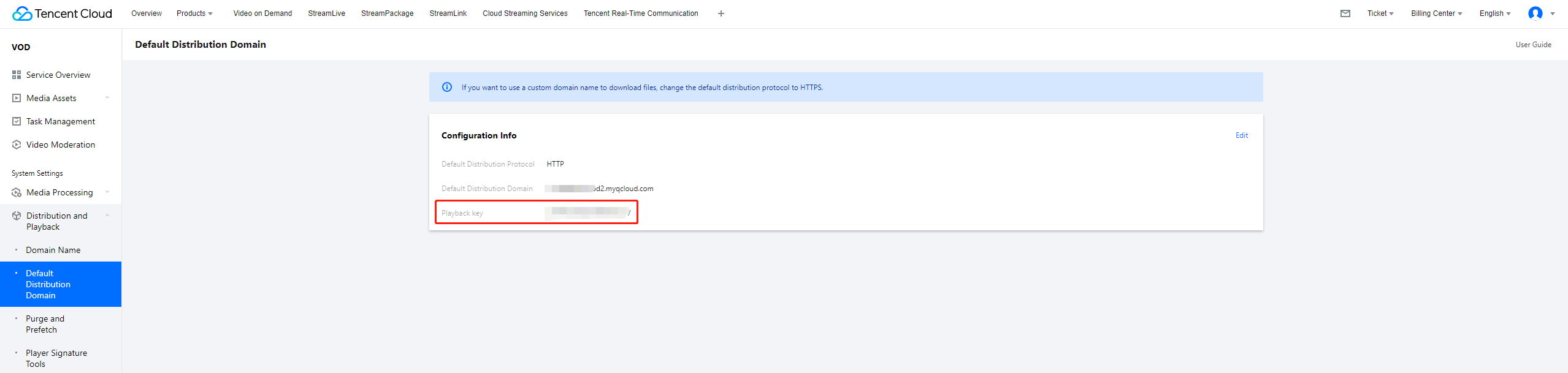
The protection mode. This parameter is valid only if the encryption scheme is SimpleAES. If you set this parameter to sha256, sha256(pkey) will be used as the symmetric key to encrypt the content key (pkey is the playback key, and sha256 indicates the SHA-256 algorithm).
Signature: dK42jB0KP4sXCd7Dunng9AcQ2WlnANuB87PwxmTc3_g. It is generated using pkey (whose value is JduzsUuRvGVPRHvIYwLv).
Connect the header, payload, and signature with ~ and you will get the DrmToken, which is eyJhbGciOiJIUzI1NiIsInR5cCI6IkpXVCJ9~eyJ0eXBlIjoiRHJtVG9rZW4iLCJhcHBJZCI6MTUwMDAxNDU2MSwiZmlsZUlkIjoiMzg3NzAyMzA3MDkxNzkzNjk1Ii
Once you have the playback URL, you can use a third-party player to play the video, but you will need to encrypt the content key obtained from VOD’s key distribution service.
The player will send a request for the content key (CipherContentKey) when it tries to play the video. The request URL is specified by #EXT-X-KEY in the M3U8 file. Below is an example:
CipherContentKey is the encrypted content key, which is returned by VOD’s key distribution service and does not include IV data. AES-CBC-Descrypt indicates the AES-CBC algorithm. IV is the initialization vector, which is 0x00000000000000000000000000000000.
Decryption example
Suppose:
The playback key (pkey) is JduzsUuRvGVPRHvIYwLv, and the symmetric key (SymmetricKey) is 0xece0bae38fbbd66f79c62acefb9ea994dc834d79b45cc4556962d9f00508b9b3 (32 bytes).
The encrypted content key (CipherContentKey) is 0x68addf7984478a3e4797d3a13ecbb6fb (16 bytes).
The IV is always 0x00000000000000000000000000000000 (16 bytes).
The decrypted content key (ContentKey) would be 0xbed3747b8510b040826163c04956a4c1 (16 bytes).
Summary
Now, you should know how to play encrypted videos of VOD using a third-party player.