Preemptible Job
Download
Focus Mode
Font Size
Overview
In Kubernetes clusters, more businesses can run on a single node through containerization. However, this also leads to competition for resources among businesses. To address Requests are used to ensure the minimum amount of resources a Pod can claim to prevent insufficient resources during resource competition. However, the resources claimed through Requests are permanently "occupied" and cannot be used by other businesses, leading to significant waste during traffic troughs. Therefore, Tencent Kubernetes Engine (TKE) has introduced preemptible Jobs, which use idle resources in the cluster and do not occupy the actual remaining schedulable resources of the cluster/nodes. In the event of resource competition, these resources will be prioritized for reclamation to ensure the stability of services that normally use Request resources.
Resource Objects Deployed in the Cluster
Note:
To use preemptible Jobs, you need to first install the QoSAgent Component in the cluster and enable CPU Usage Priority. We will automatically assign the lowest priority (priority 7) to all preemptible Jobs, ensuring they are preempted during resource competition. For the resource objects deployed by this component in the cluster, please refer to the table below.
Kubernetes Object Name | Type | Default Resource Occupation | Associated Namespace |
avoidanceactions.ensurance.crane.io | CustomResourceDefinition | - | - |
nodeqoss.ensurance.crane.io | CustomResourceDefinition | - | - |
podqoss.ensurance.crane.io | CustomResourceDefinition | - | - |
timeseriespredictions.prediction.crane.io | CustomResourceDefinition | - | - |
kube-system | Namespace | - | - |
all-be-pods | PodQOS | - | kube-system |
qos-agent | ClusterRole | - | - |
qos-agent | ClusterRoleBinding | - | - |
crane-agent | Service | - | kube-system |
qos-agent | ServiceAccount | - | kube-system |
qos-agent | Daemonset | - | kube-system |
Overview
Since only native nodes have idle resources, this feature is only supported on Native Nodes.
Supports allocating idle resources in the cluster for Jobs and CronJobs.
These idle resources do not occupy the remaining schedulable resources in the cluster.
In the event of resource competition, idle resources will be prioritized for reclamation, hence they are called Preemptible Jobs.
The values of idle resources for nodes and clusters are dynamically changing based on actual load. When the idle resources of a cluster/node are less than the resources requested by the Job, the Pod will be in a Pending state.
Principles of Request Recommendation
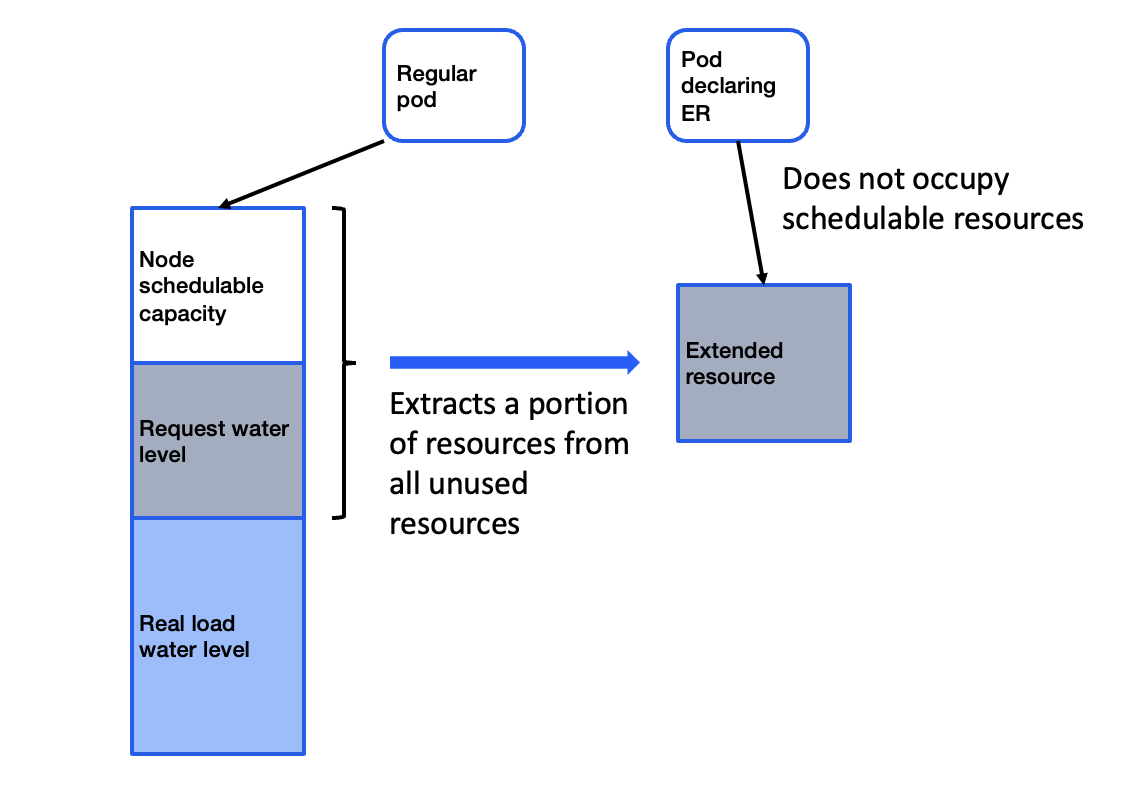
The allocation of idle resources is implemented using Kubernetes' native Extended Resource. By recycling the remaining available resources of the nodes, a shared resource pool is formed. The shared resource pool does not occupy the actual schedulable CPU/RAM resources of the cluster/node.
As shown in the diagram below, the QoS Agent component extracts a portion of resources from all unused resources in the cluster. Based on the historical load profile of the nodes, it predicts a safe value of Extended Resources that can be used by Job/CronJob that declare the use of Extended Resources.
Using Preemptible Jobs
Installing Add-ons
1. Log in to the Tencent Kubernetes Engine console, select Cluster in the left sidebar.
2. On the cluster management page, click the ID of the target cluster to go to the cluster details page.
3. In the left sidebar, select Add-On Management to go to the add-on list page.
4. On the add-on list page, select Create, and on the Create Add-On page, check QoS Agent.
5. Click on Complete to install the add-on.
Deploying Preemptible Jobs
1. Log in to the Tencent Kubernetes Engine console, select Cluster in the left sidebar.
2. On the cluster management page, click the ID of the target cluster to go to the cluster details page.
3. Select Workload > Job/CronJob, and on the Job/CronJob resource list page, click Create.
4. Enable the Preemptible feature on the Create Add-On page. See the figure below:

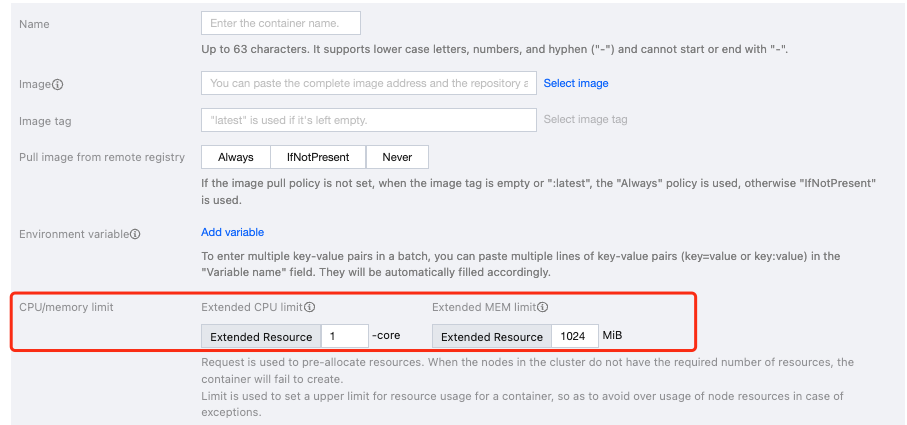
After the preemptible capability is enabled, the way resources input for Job/CronJob has changed. It is no longer necessary to input Request/Limit. Instead, it uses Extended CPU and Extended Memory:
Extended CPU: Apply for idle CPU resources in native nodes. The Extended CPU limit can only be an integer.
Extended Memory: Apply for idle memory resources in native nodes. The Extended Memory limit can only be an integer. See the figure below:
5. A preemptible type of Job created by declaring the use of Extended Resource's idle resources:

Note:
If you do not have native nodes or if the native nodes do not have enough idle resources, you might encounter the following errors: "Insufficient gocrane.io/memory", indicating not enough idle memory resources; or "Insufficient gocrane.io/cpu", indicating not enough idle CPU resources. In such cases, you need to increase the number of native nodes.
Help and Support
Was this page helpful?
You can also Contact sales or Submit a Ticket for help.
Help us improve! Rate your documentation experience in 5 mins.
Feedback