Cluster Orchestration
Download
Focus Mode
Font Size
Cluster orchestration is a grayscale feature for custom cluster component upgrades provided by the cluster planned upgrade feature of Tencent Kubernetes Engine (TKE). It supports dividing user cluster component upgrades into multiple grayscale batches based on cluster tags. Users annotate cluster-related information by adding tag combinations to clusters. During planned upgrade execution, Tencent Cloud uses the user-configured release sequence to orchestrate user clusters into multiple upgrade batches, then performs cluster component upgrades based on the batch sequence and intervals. This document details the features and configuration methods of cluster tags and release sequences.
Cluster Tags
Users can add tag combinations to clusters to annotate the information related to cluster upgrades and maintenance. TKE supports the following cluster tags:
Cluster environment:
Test: This tag is used for daily development testing.
Pre-release: This tag is used for final verification before the release of new versions.
Production: This tag is used for running real online services.
Cluster protection level:
Low protection level: TKE clusters with basic protection, allowing temporary cluster feature unavailability.
Medium protection level: TKE clusters with key protection and high requirements for cluster availability, generally not allowing cluster feature unavailability.
High protection level: TKE clusters with strict protection, not allowing any disruptions that affect cluster availability.
Release Sequences
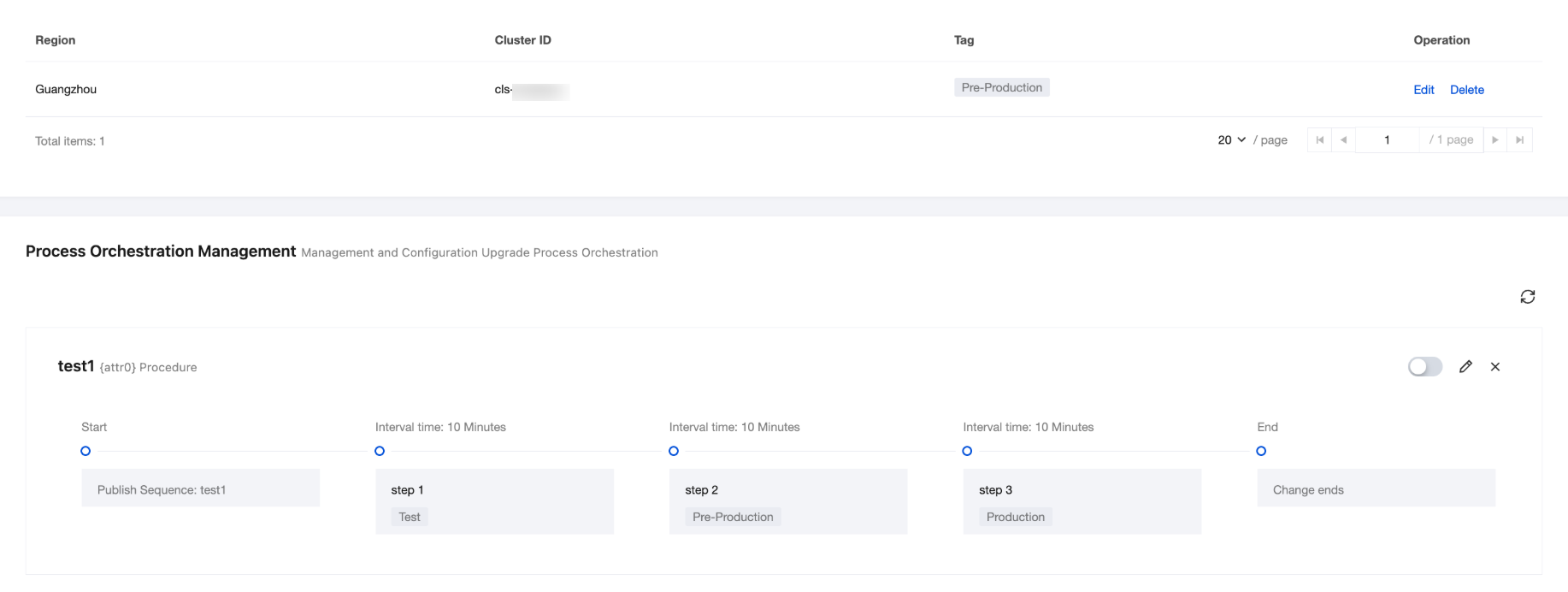
Release sequences allow users to customize the release order of clusters with different maintenance tags. Users can configure cluster tags and wait times for each step in the upgrade process. Tencent Cloud matches clusters based on the tags in each step and executes cluster component upgrades sequentially. Clusters in different steps will have component upgrades executed in batches based on the wait time of each step. Note that if users update cluster maintenance tags or upgrade process orchestration information, the new cluster maintenance tags and upgrade process information will take effect when the next planned upgrade task for cluster components is generated.
Cluster Tag: The cluster maintenance tags matched in this step. During the upgrade process, the planned upgrade feature matches clusters under the user account based on the cluster maintenance tags in the step and executes component upgrades for the successfully matched clusters when the step starts. Each cluster can be assigned to at most one step. If a cluster has been assigned to a previous step, tag matching in subsequent steps will not take effect for this cluster.
Wait Time: The minimum interval between the completion of cluster component upgrades in this step and the start of cluster upgrades in the next step. If the execution time of the next step falls outside the cluster maintenance window after the wait time interval elapses, the corresponding cluster component upgrade in the next step will be rescheduled to the next available maintenance window.
Operation Steps
Creating a Cluster Tag
1. Log in to the TKE console and go to the Planned Upgrade page.
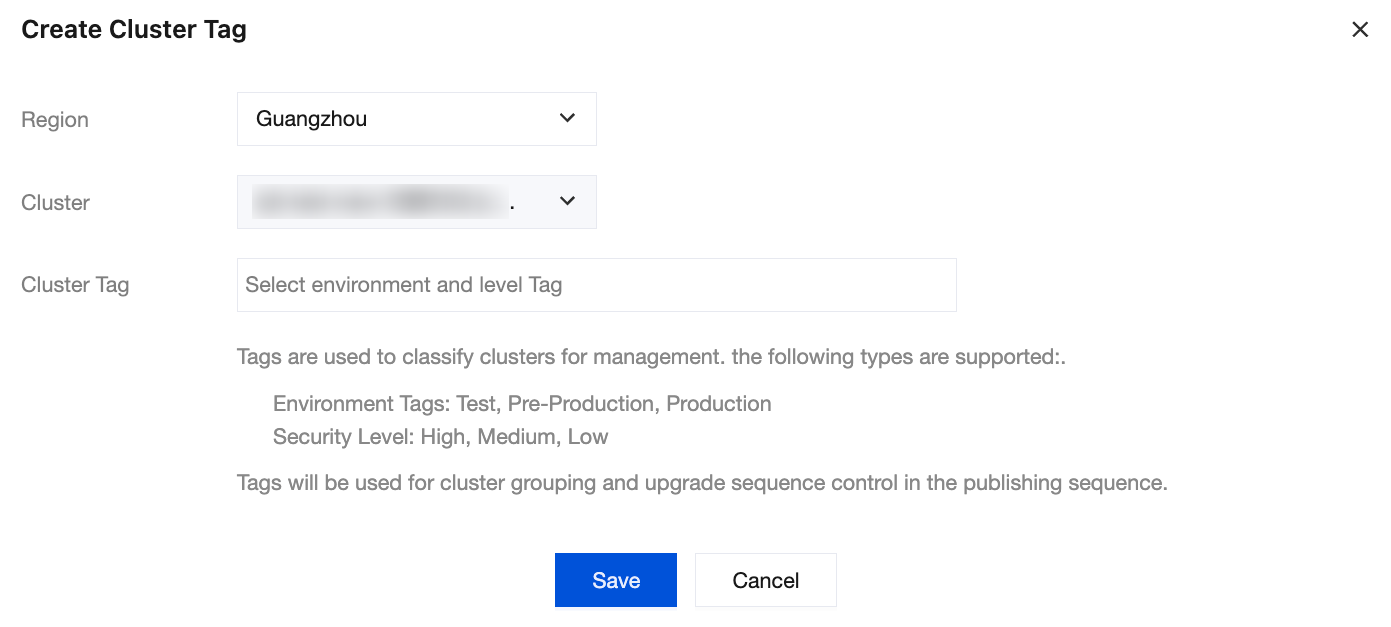
2. Select the Cluster Orchestration tab and click Create Cluster Tag.
Region: Select the region where the cluster is located. Example: Guangzhou.
Cluster: Select the cluster to which maintenance tags will be added.
Cluster Tag: Select the environment type and protection level of the cluster.
3. Click Save to complete the creation of the cluster tag.
Creating a Release Sequence
1. Log in to the TKE console and go to the Planned Upgrade page.
2. Select the Cluster Orchestration tab and click Create Publication Sequence:
Sequence Name: Enter a name for the sequence.
Enabling Status: Enable or disable the upgrade release sequence. If the release sequence is disabled, clusters cannot use the release sequence upgrade mode.
Sequence Procedures:
Cluster Tag: Select the tag combination matched in this step. Only clusters that tags match the specified tag combination will be assigned to this step.
Wait Time: The minimum interval between the completion of cluster component upgrades in this step and the start of the next step.

3. Click Save to complete the creation of the release sequence.
Help and Support
Was this page helpful?
You can also Contact sales or Submit a Ticket for help.
Help us improve! Rate your documentation experience in 5 mins.
Feedback