Connection Pool Overview
Download
Focus Mode
Font Size
This document introduces the connection pool feature of the TDSQL-C for MySQL database proxy.
Connection Pool Types
Session-level connection pool: It can effectively solve the problem of excessively high instance load caused by non-persistent connection services frequently establishing new connections.
Transaction-level connection pool: It is primarily used to reduce the number of business connections directly connected to the database and to mitigate the issue of excessively high load caused by frequent connection establishment in non-persistent connection scenarios.
Supported versions for features
Connection Pool Type | Database Proxy Version Requirement | TDSQL-C for MySQL Instance Version Requirement |
Session-level Connection Pool | Version 1.2.1 or later | TDSQL-C for MySQL 5.7 ≥ 2.0.20/2.1.6 TDSQL-C for MySQL 8.0 ≥ 3.1.6 |
Transaction-level Connection Pool | Version 1.4.4 or later | |
Note
Currently, the connection pool feature does not support different permissions for the same account on different IPs. This may cause permission errors during connection reuse. For example, permissions for database_a are granted to mt@test123 but not to mt@test456. Enabling the connection pool may lead to permission issues.
The connection pool feature refers to the connection pool feature of the database proxy. It does not affect the connection pool feature of the client. If your client already supports connection pooling, you do not need to use the connection pool feature of the database proxy.
Introduction to Session-Level Connection Pools
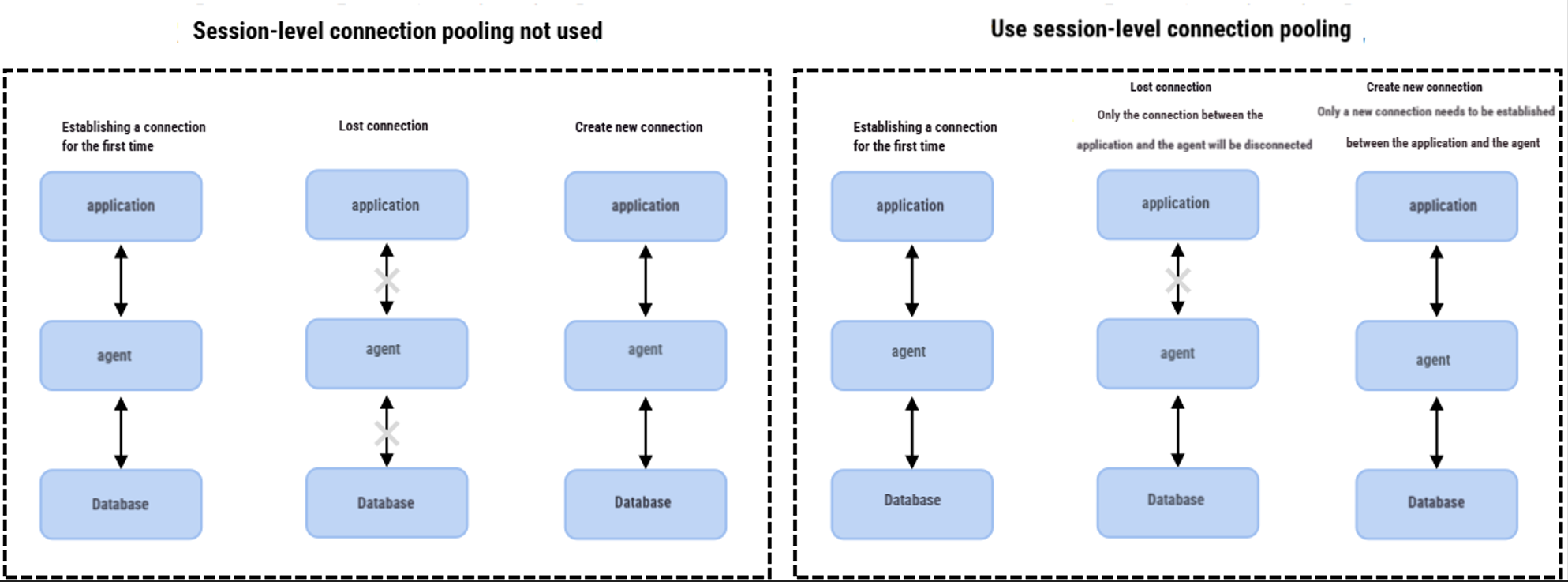
Session-level connection pools are suitable for non-persistent connection scenarios.
Session-level connection pools are primarily used to reduce the instance load caused by non-persistent connection services frequently establishing new connections. When a client connection is disconnected, the system determines whether the current connection is idle. If it is idle, the system places the connection into the proxy's connection pool and retains it for a short period (5 seconds by default, and supports setting the connection retention threshold).
When a client initiates a new connection again, if an available connection exists in the pool, it can be used directly, thereby reducing the connection establishment overhead with the database. If no available idle connection exists in the pool, the normal connection process is followed to establish a new connection with the database.
Notes:
Session-level connection pools do not reduce the number of concurrent connections to the database. Instead, they reduce the overhead on the main thread of TDSQL-C for MySQL by lowering the frequency of connections established between applications and the database, thereby better handling business requests. However, idle connections in the pool will temporarily occupy your connection quota.
Session-level connection pools cannot resolve connection accumulation issues caused by a large number of slow SQL statements. You need to address the slow SQL problem first.
Introduction to Transaction-Level Connection Pools
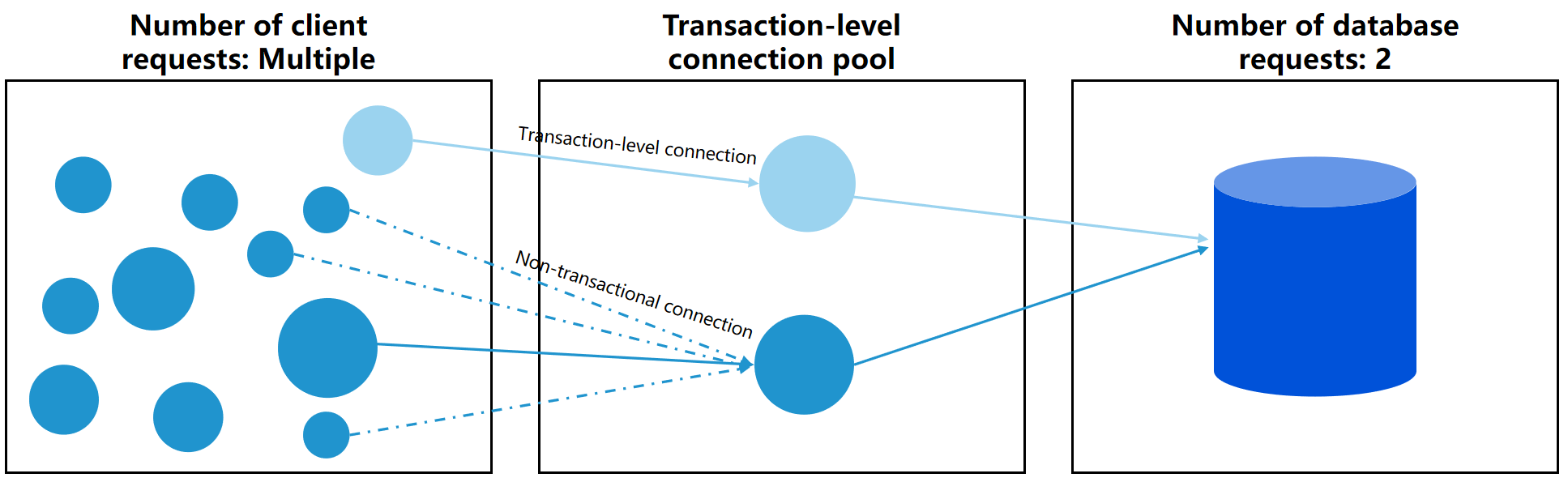
After the transaction-level connection pool is enabled, client requests first establish a connection with the database proxy of TDSQL-C for MySQL. The database proxy does not immediately create a backend database connection. Instead, it first attempts to match an available connection from the transaction-level connection pool (the condition for matching an available connection between a new request and the pool requires that the User, DBName, and DB are completely identical). If the match fails, the database proxy creates a new database connection. If the match succeeds, it directly reuses that connection. After the transaction is committed, the connection is released back into the pool for reuse by subsequent requests. This mechanism effectively reduces the total number of connections between the database proxy and the database.
Connection Locking Scenarios (Non-reusable Connection Scenarios):
Create a temporary table.
Send large-packet requests.
Execute the LOCK TABLE or FTWRL command.
Execute the PREPARE statement.
References
Help and Support
Was this page helpful?
You can also Contact sales or Submit a Ticket for help.
Help us improve! Rate your documentation experience in 5 mins.
Feedback