Modifying a Rule Template
Unduh
Mode fokus
Ukuran font
This document describes how to modify a database audit rule template through the console.
Note:
Starting from September 25, 2023, the relationship between rule templates and audit instances has been changed from initialization to strong association. Modifying the content of a rule template will synchronously affect the audit rules applied by instances already bound to that template.
In the same parameter field of a rule, you can configure up to five signature strings. Separate multiple signature strings with the English vertical bar "|".
Operation Steps
1. Log in to the TDSQL-C for MySQL console.
2. In the left sidebar, select SQL Insight (Database Audit).
3. After selecting a region, click Rule Template.

4. In the rule template list, locate the target rule template (you can also quickly find it by filtering with resource attributes in the search box), and then click Edit in its Operation column.
5. In the Edit Rule Template window, after the relevant configurations are modified, click OK.
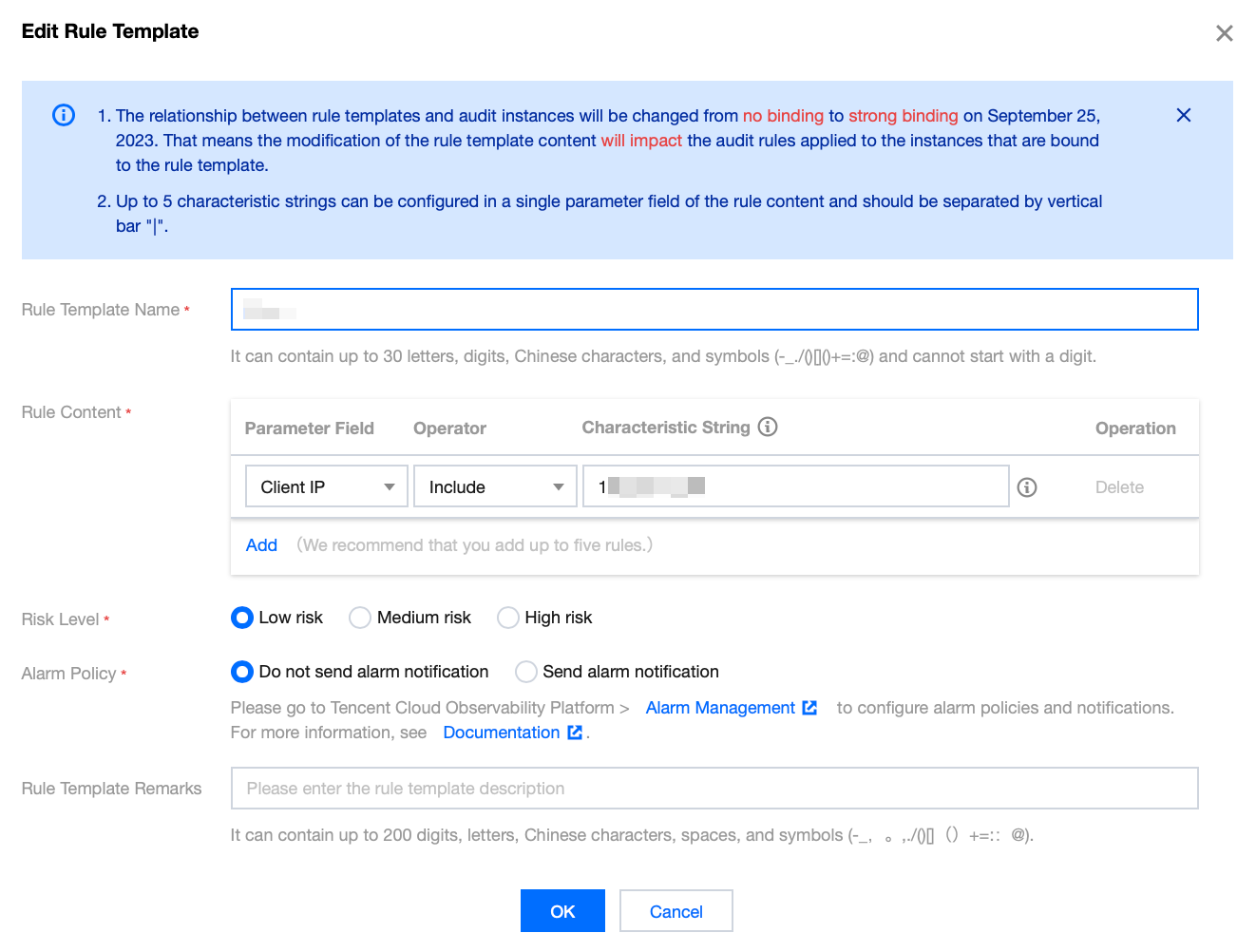
Parameter | Description |
Rule Template Name | Supports only digits, uppercase and lowercase letters, Chinese characters, and special characters -_./()[]()+=:@. Cannot start with a digit. Maximum 30 characters. |
Rule Content | Configure the rule content (parameter field, match type, feature string). For detailed configuration instructions, see the following Rule Content Details and Example introduction. Note: In the rule content section, you can click to add parameter fields. In the operation column under rule content, you can click to delete unwanted parameter fields and conditions. However, at least one parameter field and condition must be retained. |
Risk Level | Select a risk level for the rule template. Supported options are low risk, medium risk, and high risk. |
Alarm Policy | Select an alarm policy for the rule template. Supported options are do not send alarms and send alarms. Note: Go to TCOP > Alarm Management to configure alarm rules and notifications. For details, see Configure Post-Facto Alarms. |
Rule Template Remarks | Supports only digits, uppercase and lowercase letters, Chinese characters, and special characters -_./()[]()+=:@. Cannot start with a digit. Maximum 200 characters. |
Rule Content Details and Examples
Note:
You can configure a single rule or multiple rules.
Multiple rules are in an AND relationship, meaning all conditions must be met simultaneously.
Within a single rule, different characteristic strings are in an OR relationship, meaning only one of them needs to be satisfied.
Only one entry can be added for the same rule. For example, for a database name, a template can only support either inclusion or exclusion, but not both.
Parameter Field | Match Type | Characteristic String |
Client IP | Include, Exclude, Equal to, Not equal to, Regex | Configure up to 5 client IPs, separated by a vertical bar. |
User Account | Include, Exclude, Equal to, Not equal to, Regex | Configure up to 5 usernames, separated by a vertical bar. |
Database Name | Include, Exclude, Equal to, Not equal to, Regex | Configure up to 5 database names, separated by a vertical bar. |
SQL Details | Include, Exclude | Configure up to 5 SQL statements, separated by a vertical bar. |
SQL Type | Equal to, Not equal to | Available types: ALTER, CHANGEUSER, CREATE, DELETE, DROP, EXECUTE, INSERT, LOGOUT, OTHER, REPLACE, SELECT, SET, UPDATE, and PREPARE. Up to 5 SQL types can be selected. |
Affected Rows | >, < | Select the number of affected rows. |
Returned Rows | >, < | Select the number of rows returned. |
Scanned Rows | >, < | Select the number of rows scanned. |
Execution Time | >, < | Select the execution time, in milliseconds. |
Error Code | Equal to, Not equal to | Enter an error code. |
Lock Wait Time | >, < | Select the lock waiting time, in microseconds. |
IO Wait Time | >, < | Select the I/O waiting time, in nanoseconds. |
Transaction Duration | >, < | Select the transaction duration, in microseconds. |
CPU Time | >, < | Select the CPU time, in microseconds. |
Thread ID | Equal to, Not equal to | Enter a thread ID. |
Transaction ID | Equal to, Not equal to | Enter a transaction ID. Note: The field "Transaction ID" is supported by TXSQL version 2.1.11 and later, and TXSQL version 3.1.15 and later. Other versions do not support it. To enable support, upgrade to a supported version. |
Examples
If a user configures a rule with the following content: database name includes a, b, or c, and client IP address includes IP1, IP2, or IP3, then the audit logs filtered by this rule are those where the database name contains a, b, or c and the client IP address contains IP1, IP2, or IP3.
Related APIs
API | Description |
This interface (DescribeAuditRuleTemplates) is used to query audit rule template information. | |
This interface (ModifyAuditRuleTemplates) is used to modify audit rule templates. |
Bantuan dan Dukungan
Apakah halaman ini membantu?
Anda juga dapat Menghubungi Penjualan atau Mengirimkan Tiket untuk meminta bantuan.
masukan