High Memory Utilization
Download
Focus Mode
Font Size
Problem Description
TDSQL-C for MySQL experiences a sudden increase in memory usage, with memory usage continuing to grow without being released. This is specifically reflected in the monitoring chart for the instance's memory utilization, as shown below:
Note:
You can check the instance's memory utilization on the Monitoring and Alarms page.
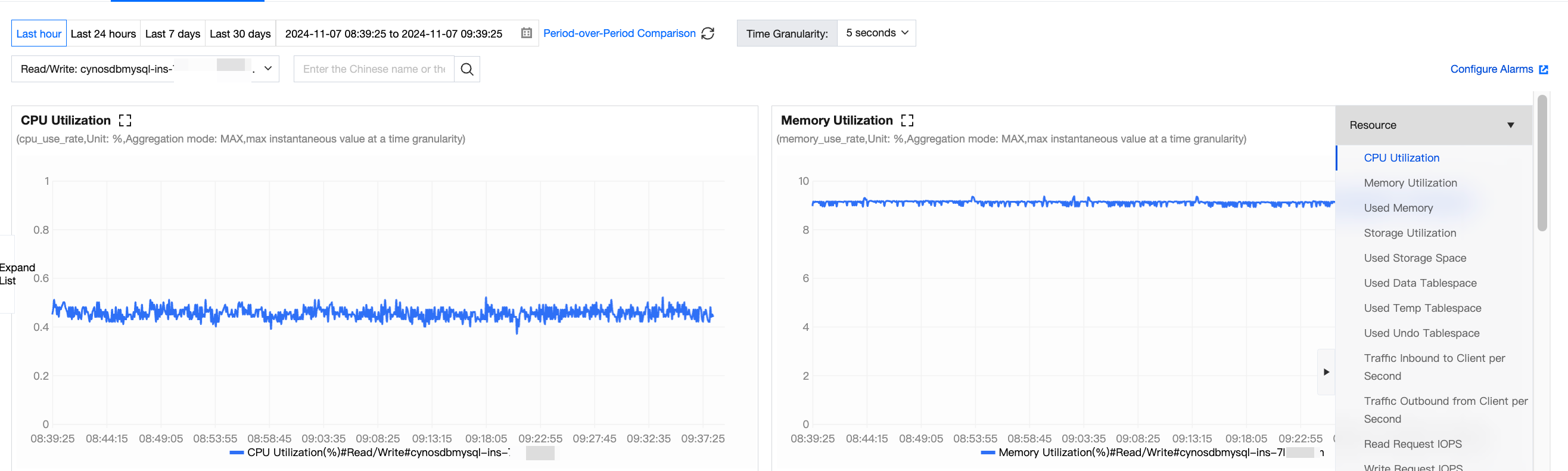
After a sudden increase or a gradual long-term growth, the memory utilization eventually reaches an excessively high level (>96%) and fluctuates within a certain range, frequently triggering custom memory alarms on the Tencent Cloud Observability Platform (TCOP).
Failure Risk
Inefficient SQL statements or improper database parameter settings can cause an increase in memory utilization. During unexpected business peaks, it may cause Out Of Memory (OOM) in cloud databases. When a cloud database becomes unavailable due to OOM, a primary-replica switch will be triggered. During the switch, the business will be unavailable for a short period of time and instances are typically unavailable for less than 60 seconds. If the switch occurs during business peak hours, it will seriously affect the stability and continuity of the business.
Solutions
TDSQL-C for MySQL memory can be generally divided into two parts: global shared memory and session-level private memory:
Shared memory is allocated upon the creation of an instance and shared by all connections.
Private memory is allocated individually to each connection to the TDSQL-C for MySQL server.
Some special SQL statements or field types may cause a single thread to be allocated with cache multiple times. Therefore, OOM exceptions are caused by the private memory of each connection. Limiting the number of connections to a database and optimizing inefficient SQL statements can reduce the risk of excessively high memory utilization. If the memory utilization of TDSQL-C for MySQL is still high, upgrading the memory configuration can improve the overall concurrency and stability of a database.
Directions
1. Optimize slow SQL statements to reduce the session-level private memory usage. You can use DBbrain to analyze slow SQL statements.
2. Reduce invalid persistent connections. Without affecting the business, lower the connection pool configuration or reduce the concurrency on the program side. You can use DBbrain to view current session information.
3. Monitor memory usage (optional): Enable the memory monitoring feature of performance_schema. After enabling performance_schema, query tables starting with memory_summary in the performance_schema database to obtain memory usage details. For example, the global memory utilization analysis table is memory_summary_global_by_event_name.
4. Methods after optimization: Adjust compute configuration and adjust storage space.
Note:
During the upgrade, your business can operate normally. After the upgrade, a switch will occur, with only second-level interruptions. Make sure that your business has a reconnection mechanism.
To protect your business from being affected by insufficient memory or CPU resources, configure reasonable alarm policies for existing instance resources to identify potential resource shortages in advance. For details, see Monitoring Metric Alarm.
Help and Support
Was this page helpful?
You can also Contact sales or Submit a Ticket for help.
Help us improve! Rate your documentation experience in 5 mins.
Feedback