Clone Account
Download
Focus Mode
Font Size
This document describes how to clone an account in the console. The new account can directly inherit the account name, host, remarks, and permissions of the original account.
Understanding Account Types
Among the accounts in TDSQL-C for MySQL, the root account is unique and cannot be cloned. Non-root accounts can be cloned. To learn about account types, see Creating an Account.
Read/Write Attribute Inheritance
When an account is cloned, the read/write attribute inherits the type of the original account by default and takes effect only when the database proxy is enabled. Note that this read/write attribute is not the account permission traditionally created through a direct MySQL connection to control user permissions on database and table data operations (such as SELECT or INSERT). Instead, it is a connection request distribution control attribute specific to the database proxy layer.
The read/write attribute itself is unrelated to the read or write permissions that your account actually has when connecting to MySQL. Its purpose is to accurately distribute your requests to read-only instances or read-write instances. After you configure the read/write attribute for an account that accesses the cluster through the database proxy connection address, the account gains the corresponding routing capability: users only need to use one proxy connection address and one account, and the database proxy automatically and evenly distributes received database requests to the specified instances (read-write instances RW or read-only instances RO) based on the account's read/write attribute, without changing the proxy address or modifying business code. The types are described as follows:
Read-write account (auto)
With this attribute, the read/write request distribution capability of your account depends on whether the database proxy is enabled. If the database proxy is not enabled, you can directly connect to MySQL through this account. If the database proxy is enabled, it can automatically distinguish read and write requests through its read-write splitting capability, sending write requests to read-write instances and read requests to read-only instances.
Read-write account (access only the primary instance)
With this attribute, your requests are routed only to read-write instances by default. To access read-only instances, you can specify this through a HINT.
Read-only account (read-only error reported)
With this attribute, your requests are routed only to read-only instances. Read-only fault error reporting means that when you connect to the database through the database proxy address and a read-only instance encounters a fault, read requests directly report errors and are not forwarded to read-write instances.
Read-only account (read-only failures read from the primary instance)
With this attribute, your requests are routed only to read-only instances. Read-only fault read primary instance means that when you connect to the database through the database proxy address and a read-only instance encounters a fault, read requests are forwarded to read-write instances.
Note
When the database proxy is not enabled, you cannot clone accounts for any account type except "Read-Write Account (Auto)". To clone an account, enable the database proxy first.
Operation Steps
1. Log in to the TDSQL-C for MySQL console.
2. Select a region and perform the corresponding operations based on your actual console view mode.
Click the target cluster in the cluster list on the left to go to the cluster management page.

Find the target cluster in the cluster list on the left, and click Cluster ID or Operation column's Management option to enter the cluster management page.

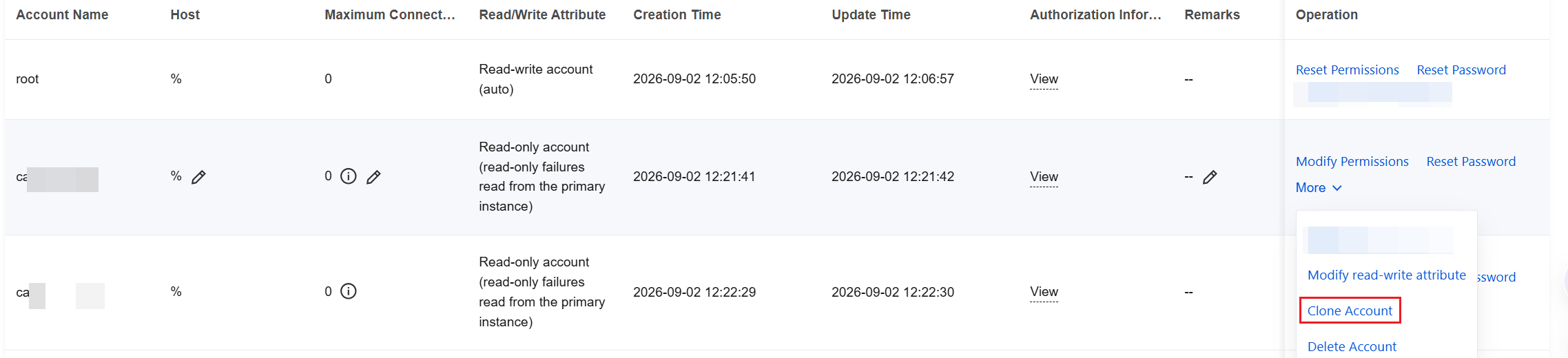
3. On the cluster management page, click Account Management, find the account to be cloned in the account list, and choose More > Clone Account in its Operation column.
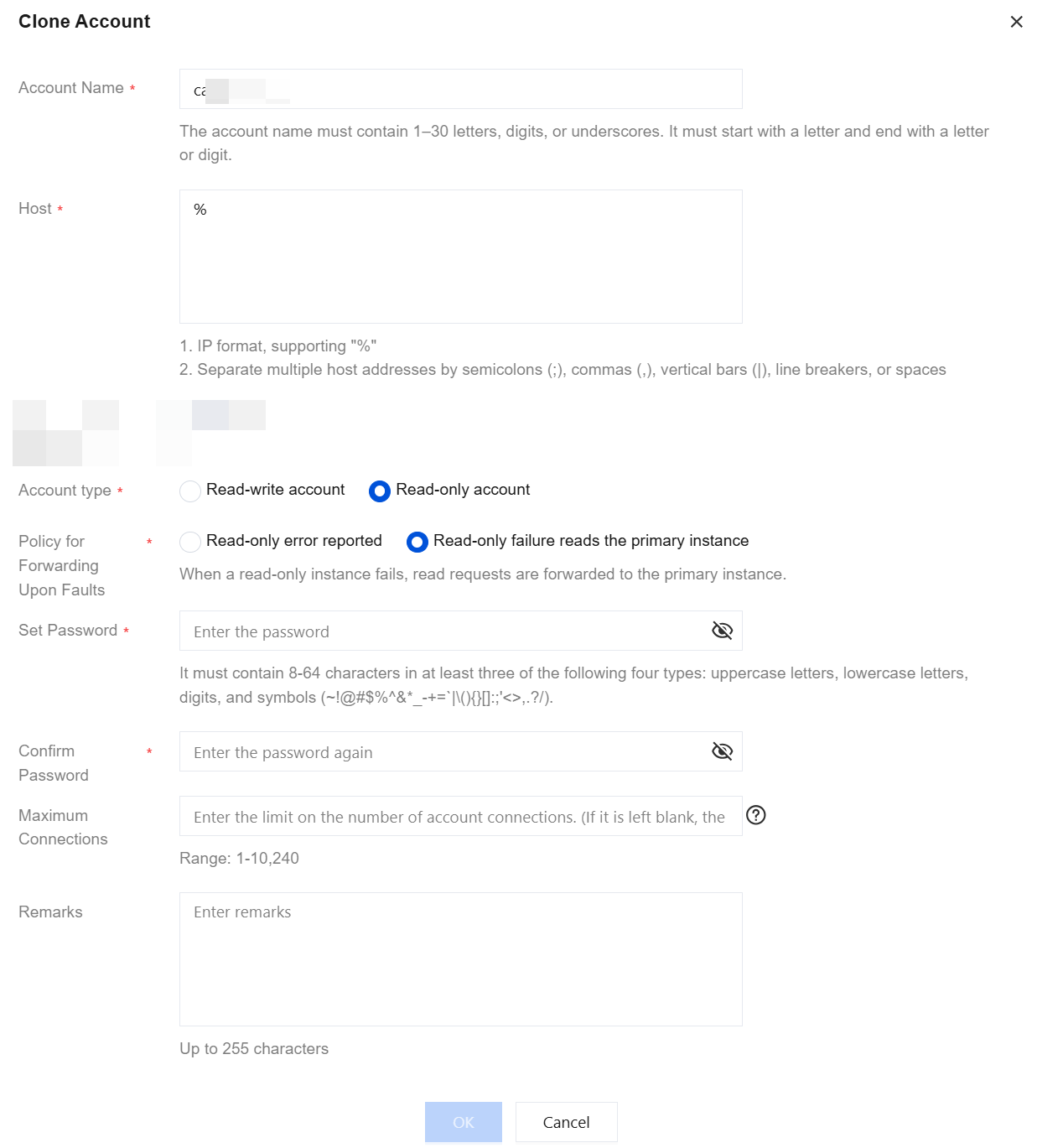
4. In the Clone Account pop-up window, confirm the account information and enter the password, then click OK.
Note:
Help and Support
Was this page helpful?
You can also Contact sales or Submit a Ticket for help.
Help us improve! Rate your documentation experience in 5 mins.
Feedback