Modifying Account Connections
Download
Focus Mode
Font Size
TDSQL-C for MySQL allows you to modify the maximum connections of each account to the database in the console. By doing so, you can prevent a single account from using up all connections.
This document describes how to modify the account connections in the console.
Directions
1. Log in to the TDSQL-C for MySQL console.
2. Select a region at the top and proceed according to the actually used view mode.
Click the target cluster in the cluster list on the left to enter the cluster management page.

Find the target cluster in the cluster list and click the Cluster ID or Manage in the Operation column to enter the cluster management page.

3. Click Account Management, find the target account in the list, select More > Modify Maximum Connections in the Operation column.
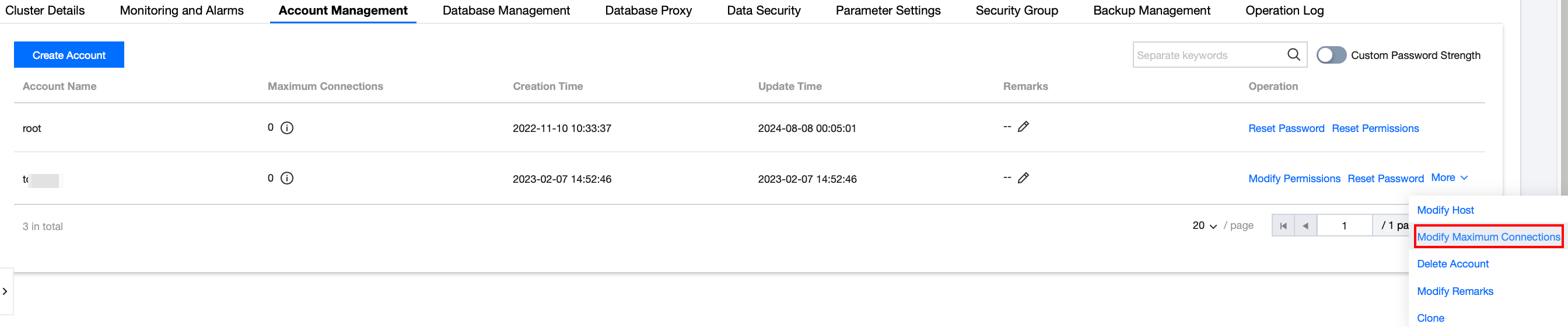
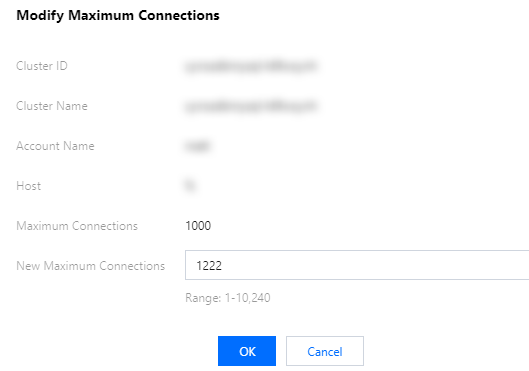
4. In the pop-up window to modify connections, enter a value in New Maximum Connections, and click OK.
Note:
Valid range of connections: 1-10240. If you don't enter a value, the maximum number of connections will be 10240.
Help and Support
Was this page helpful?
You can also Contact sales or Submit a Ticket for help.
Help us improve! Rate your documentation experience in 5 mins.
Feedback