Configuration Adjustments
Download
Focus Mode
Font Size
Due to data synchronization between clusters in the global database (GD), to ensure the integrity and consistency of data synchronization in the secondary cluster, the storage space of the secondary cluster in the same GD cannot be less than that of the primary cluster. Therefore, there are several operational precautions when you perform configuration adjustments on clusters in the GD. This document introduces the operations and instructions for cluster configuration changes in the GD.
Prerequisites
A secondary cluster is added to the GD. For operations, see Managing Secondary Clusters.
Storage Configuration Adjustment Policy
Billing Mode for the Primary Cluster Storage Space | Billing Mode for the Secondary Cluster Storage Space | Configuration Adjustment Policy Introduction |
Yearly/monthly subscription | Yearly/monthly subscription | The storage space of the secondary cluster is not less than that of the primary cluster. |
Yearly/monthly subscription | Pay-as-you-go | The maximum storage space corresponding to the specifications of the secondary cluster should not be less than that corresponding to the specifications of the primary cluster. |
Pay-as-you-go | Pay-as-you-go | The maximum storage space corresponding to the specifications of the secondary cluster should not be less than that corresponding to the specifications of the primary cluster. |
Configuration Adjustment Description
If changing the computing specifications of the read-write instances of the primary cluster impacts the storage space, then the specifications of the read-write instances of the secondary cluster need to be adjusted accordingly to meet the configuration adjustment policy requirements specified in the table above.
When configuration adjustments are performed on the read-write instances of the primary cluster, if the storage space of the read-write instances of the secondary clusters is less than that of the primary cluster, the configuration adjustments for the read-write instances of the primary cluster can only be performed after all configuration adjustments for the read-write instances of the secondary cluster are successful.
Scenario 1: Billing Modes for the Primary Cluster and Secondary Cluster Storage Space Are Yearly/Monthly Subscription
1. Log in to the TDSQL-C for MySQL console.
2. Click GDN in the left sidebar.
3. Find the target GD, click the ID of the primary cluster you want to change the configuration for under the Cluster List field to quickly navigate to the corresponding primary cluster management page.
4. Click Adjust Configuration under the read-write instance on the right.
5. Complete the adjustment operation on the configuration adjustment page and click Purchase Now.
Parameter | Description |
Instance Type | Select the required instance type, which supports general and exclusive editions. |
Instance Specifications | Select the required instance specifications. |
Database Proxy Configuration Adjustment | Select whether to adjust the database proxy configurations. Select yes: This option indicates adjusting the proxy specifications, number of nodes, and AZs. Select no: This option indicates no database proxy configuration adjustment is performed. |
Operation Time | Select the switch time for successful configuration adjustment. Available options include within the maintenance period or upon the successful upgrade. |
Hitless Configuration Adjustment | Choose whether to enable hitless configuration adjustment. When it is enabled, configuration adjustment will be performed without momentary disconnection, and the adjustment will take effect immediately. In special circumstances, if a momentary disconnection occurs, the adjustment will be paused. |
Storage Space | Set the storage space. If the storage space of the primary cluster is not greater than that of the secondary cluster, the configuration adjustment can be performed. If the storage space of the primary cluster is greater than that of the secondary cluster, the configuration adjustment cannot be performed. 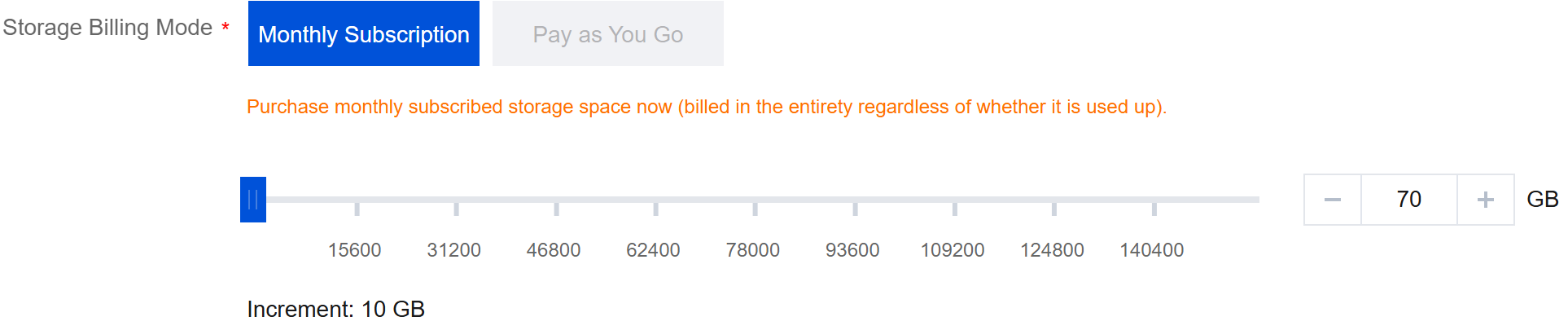 |
Note:
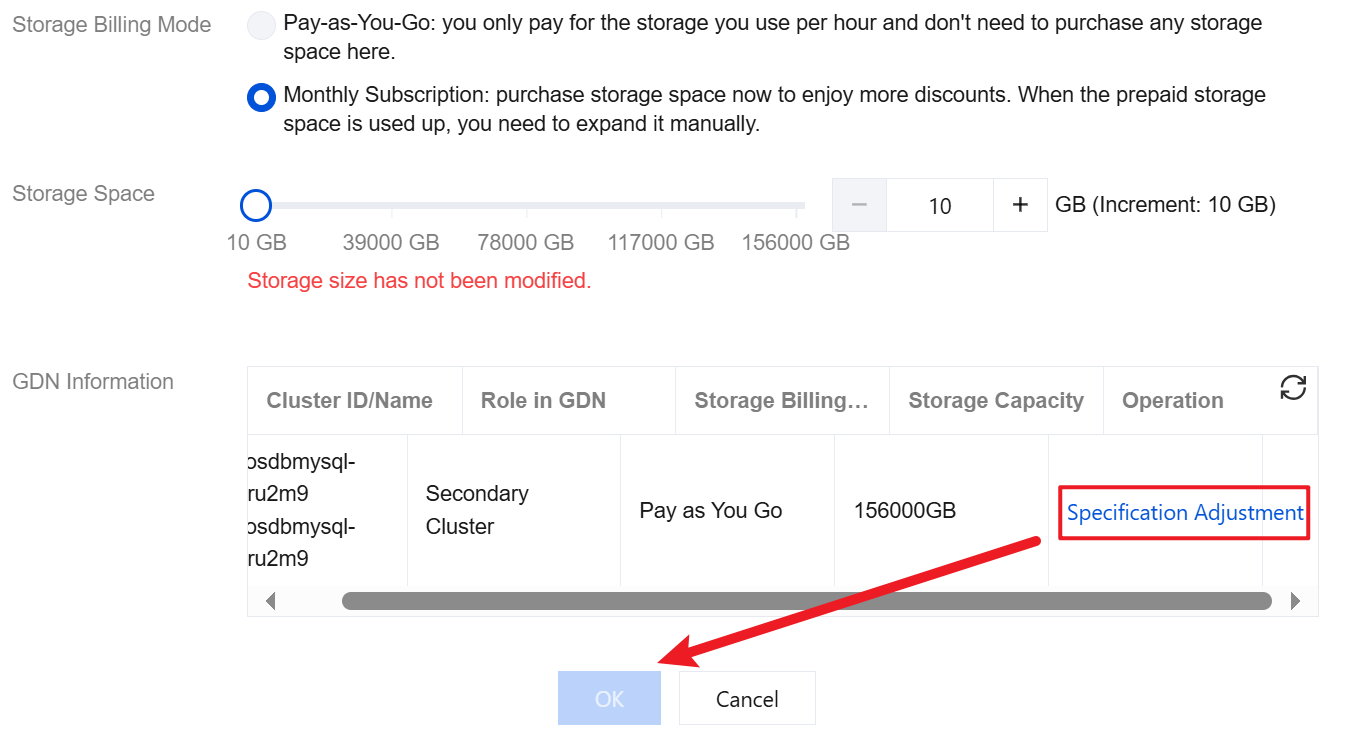
When both the billing modes for the primary cluster and secondary cluster storage space are yearly/monthly subscription, click the edit icon next to the Billing Mode. If the storage space needs to be set to a value greater than that of the secondary cluster, you need to first click Specification Adjustment in the GD information list to adjust the storage space of the secondary cluster to the target size before adjusting that of the primary cluster.
The position of the edit icon next to the billing mode is as shown in the figure below.

After the edit icon is clicked, the configuration adjustment button of the secondary cluster is as shown in the figure below.
Scenario 2: Billing Mode for the Primary Cluster Storage Space Is Yearly/Monthly Subscription, and Billing Mode for the Secondary Cluster Storage Space Is Pay-as-You-Go
1. Log in to the TDSQL-C for MySQL console.
2. Click GDN in the left sidebar.
3. Find the target GD, click the ID of the primary cluster you want to change the configuration for under the Cluster List field to quickly navigate to the corresponding primary cluster management page.
4. Click Adjust Configuration under the read-write instance on the right.
5. Complete the adjustment operation on the configuration adjustment page and click Purchase Now.
Parameter | Description |
Instance Type | Select the required instance type, which supports general and exclusive editions. |
Instance Specifications | Select the required instance specifications. |
Database Proxy Configuration Adjustment | Select whether to adjust the database proxy configurations. Select yes: This option indicates adjusting the proxy specifications, number of nodes, and AZs. Select no: This option indicates no database proxy configuration adjustment is performed. |
Operation Time | Select the switch time for successful configuration adjustment. Available options include within the maintenance period or upon the successful upgrade. |
Hitless Configuration Adjustment | Choose whether to enable hitless configuration adjustment. When it is enabled, configuration adjustment will be performed without momentary disconnection, and the adjustment will take effect immediately. In special circumstances, if a momentary disconnection occurs, the adjustment will be paused. |
Storage Space | Set the storage space. If the maximum storage space corresponding to the selected instance specifications is not greater than that corresponding to the specifications of the secondary cluster instances, the configuration adjustment can be performed. If the maximum storage space corresponding to the selected instance specifications is greater than that of the secondary cluster instances, the configuration adjustment cannot be performed. If a larger storage space is required, you need to upgrade the specifications of the secondary cluster instances before adjusting the specifications of the primary cluster instances. For data about the instance specifications and their corresponding maximum storage space, see Product Specifications. 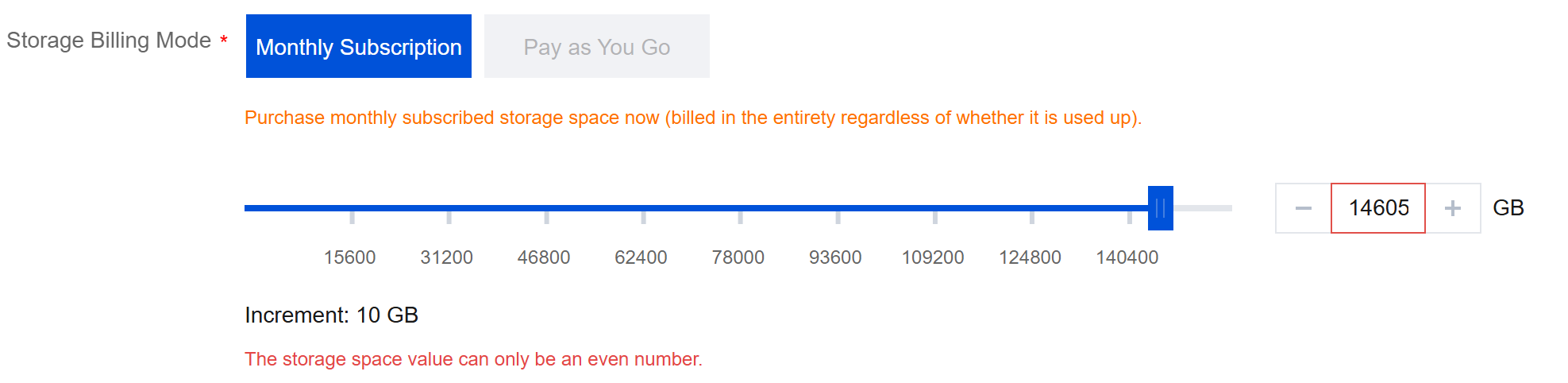 |
Note:
When the billing mode for the primary cluster storage space is yearly/monthly subscription and the billing mode for the secondary cluster storage space is pay-as-you-go, the latter can be changed to yearly/monthly subscription only when the storage space of the secondary cluster is greater than or equal to that of the primary cluster.
Scenario 3: Billing Modes for the Primary Cluster and Secondary Cluster Storage Space Are Pay-as-You-Go
1. Log in to the TDSQL-C for MySQL console.
2. Click GDN in the left sidebar.
3. Find the target GD, click the ID of the primary cluster you want to change the configuration for under the Cluster List field to quickly navigate to the corresponding primary cluster management page.
4. Click Adjust Configuration under the read-write instance on the right.
5. Complete the adjustment operation on the configuration adjustment page and click Purchase Now.
Parameter | Description |
Instance Type | Select the required instance type, which supports general and exclusive editions. |
Instance Specifications | Select the required instance specifications. If the maximum storage space corresponding to the selected instance specifications is not greater than that corresponding to the specifications of the secondary cluster instances, the configuration adjustment can be performed for the selected instance specification. If the maximum storage space corresponding to the selected instance specifications is greater than that corresponding to the specifications of the secondary cluster instances, the configuration adjustment cannot be performed. For data about the instance specifications and their corresponding maximum storage space, see Product Specifications. |
Database Proxy Configuration Adjustment | Select whether to adjust the database proxy configurations. Select yes: This option indicates adjusting the proxy specifications, number of nodes, and AZs. Select no: This option indicates no database proxy configuration adjustment is performed. |
Operation Time | Select the switch time for successful configuration adjustment. Available options include within the maintenance period or upon the successful upgrade. |
Hitless Configuration Adjustment | Choose whether to enable hitless configuration adjustment. When it is enabled, configuration adjustment will be performed without momentary disconnection, and the adjustment will take effect immediately. In special circumstances, if a momentary disconnection occurs, the adjustment will be paused. |
Storage Space | The default billing mode for the storage space is pay-as-you-go. |
Help and Support
Was this page helpful?
You can also Contact sales or Submit a Ticket for help.
Help us improve! Rate your documentation experience in 5 mins.
Feedback