The function platform now supports the Custom Domain Name feature, allowing users to access your functions through a browser or other terminal devices.
By adding a custom domain name, you can point it to any function with the function URL enabled or use path mapping to point to multiple functions. Additionally, you can enable options like HTTPS protocol and WAF for the domain name to ensure its security.
Implementation Principle of Accessing Functions via Custom Domain Name
The function platform assigns a CNAME to each account in each region, with the following format:
<appid>.<region>.tencentscf.com
For example, if your custom domain name is test.com, you add a DNS record with your DNS provider to point to this domain name and configure the path mapping to the specified function on the function platform. When users access the specified path of your custom domain name test.com, the DNS resolution guides them to the function platform through the CNAME, and the request is ultimately routed to the corresponding function via path mapping. The function processes the request and returns the result to the user.
Prerequisites
When the public network services are provided in the Chinese Mainland, you need to register your domain name according to national laws and regulations before binding it to the service, ensuring that your users can access the service through your domain name. Custom domain names bound to functions in Hong Kong (China) and overseas regions do not require registration.
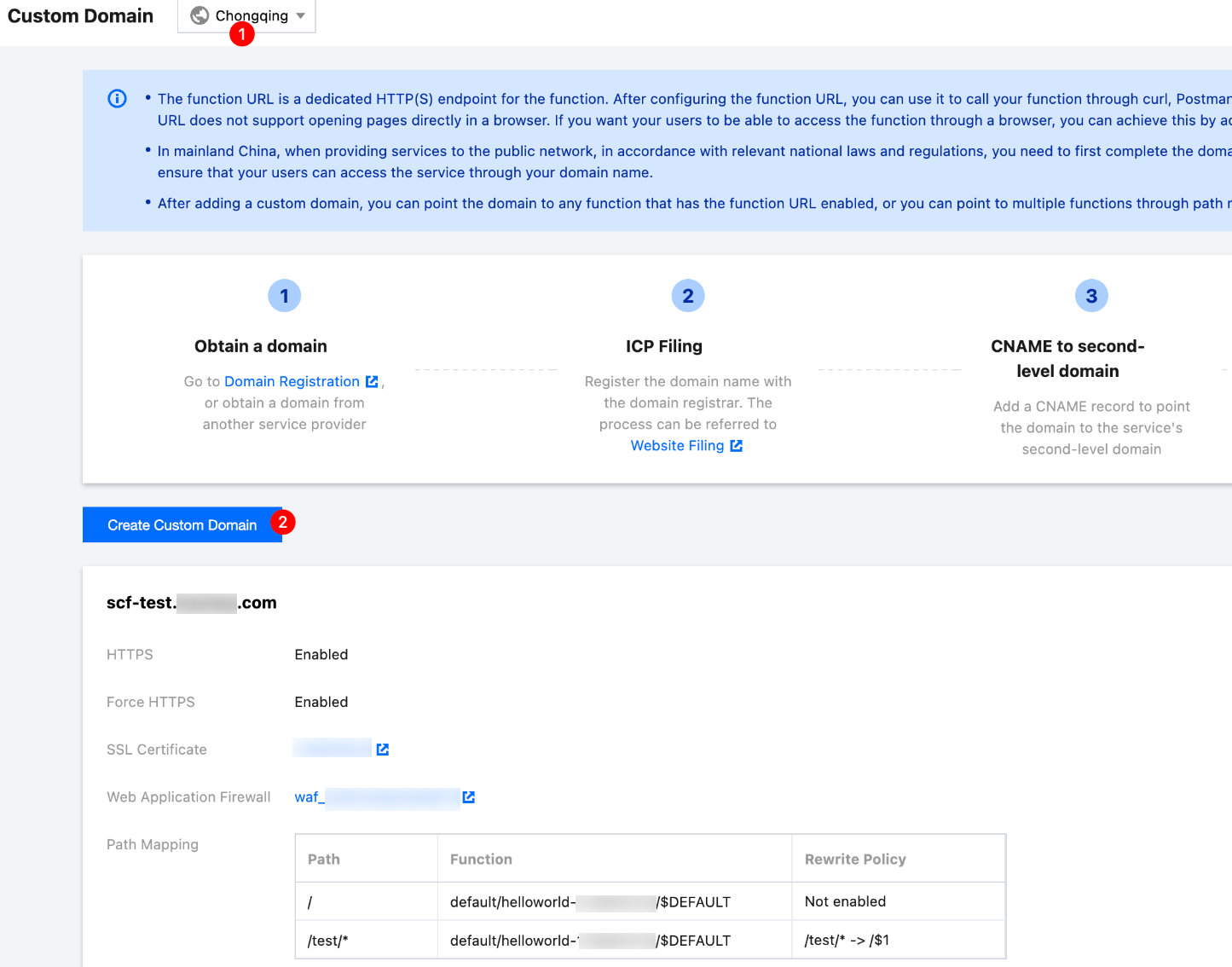
2. In the left sidebar, choose Custom Domain, then click Create custom domain. as shown in the figure below:
Note:
Domain names have regional attributes and can only point to functions within the same region.
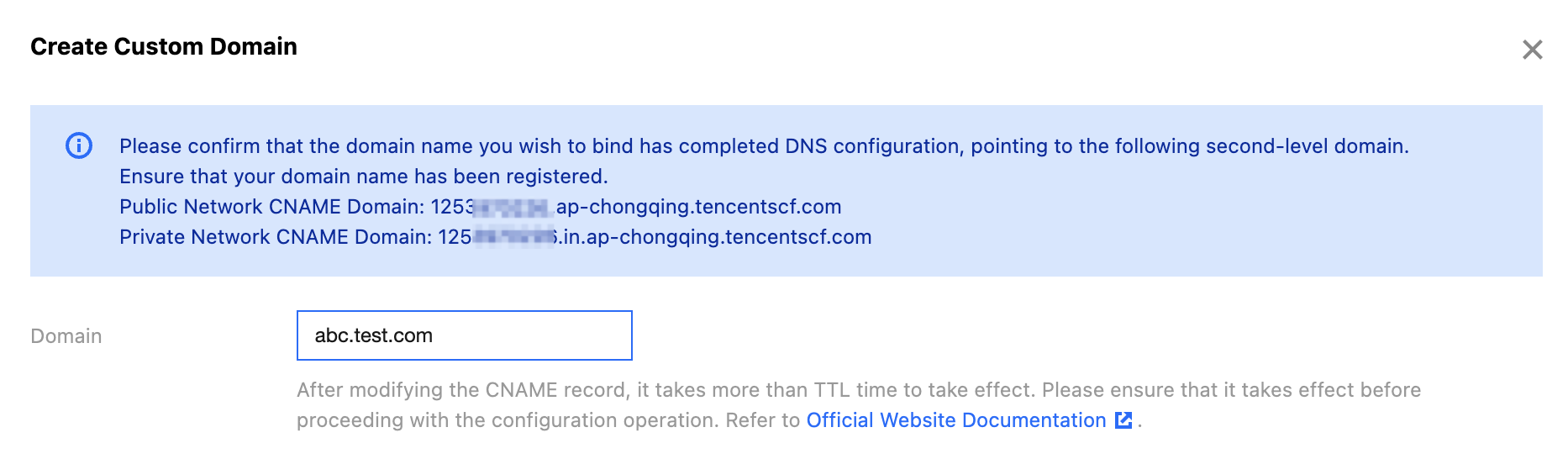
3. In Create custom domain, enter the custom domain name that has been registered. Single domain names, such as test.com, are supported, while wildcard domain names, such as *.test.com, are not supported at this time. As shown in the figure below:
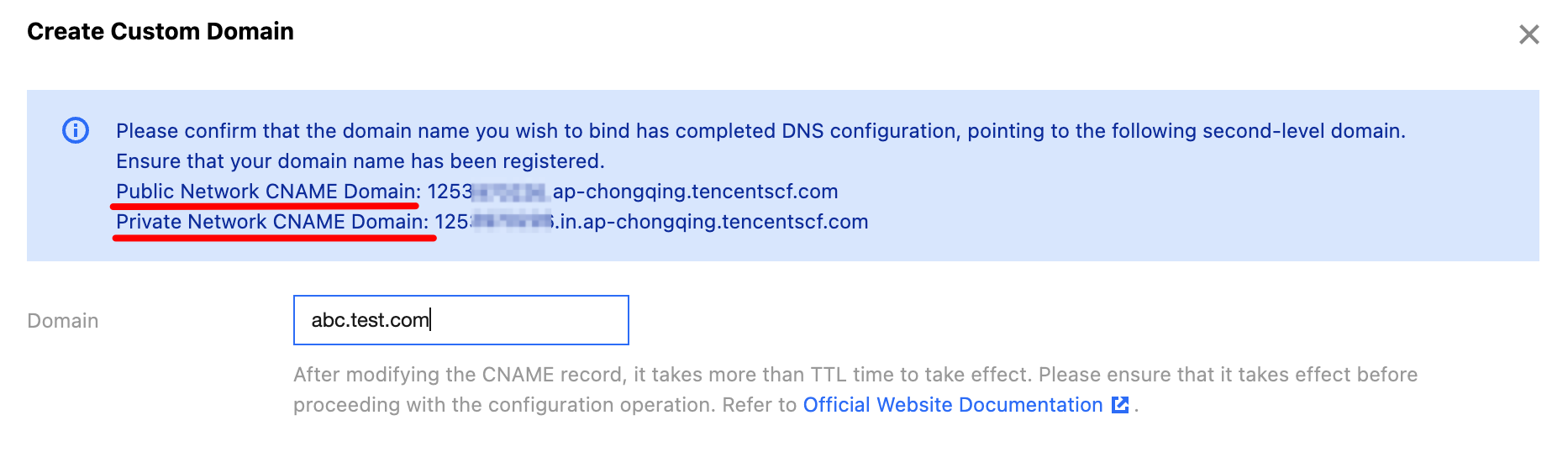
4. In the pop-up window, obtain the Public Network CNAME or Private Network CNAME, then go to your DNS resolution platform and map your custom domain name to this CNAME. After confirming the resolution is complete, proceed to the next step.
The CNAME formats are as follows:
Public Network CNAME:<appid>.<region>.tencentscf.com Example:123456.ap-guangzhou.tencentscf.com
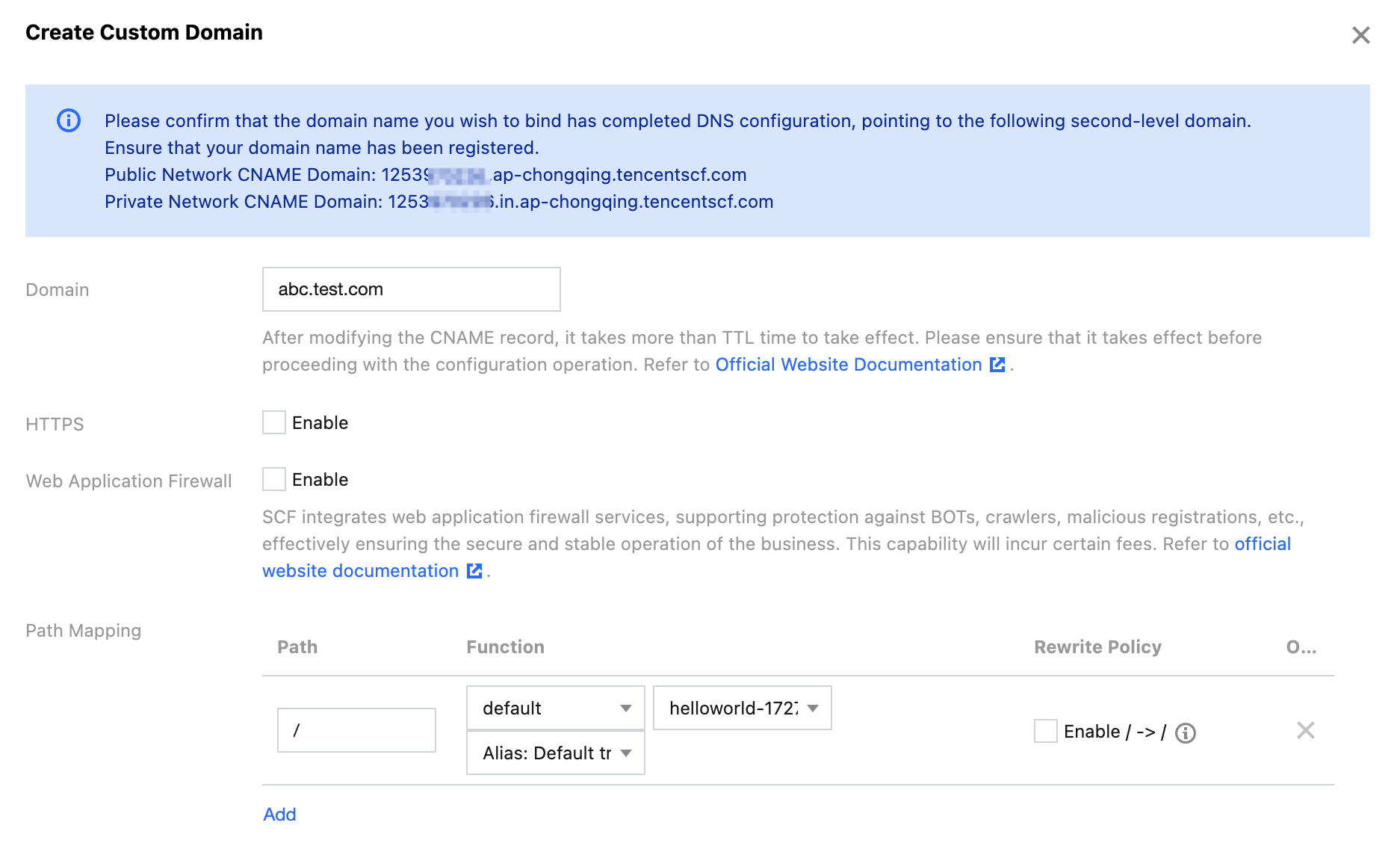
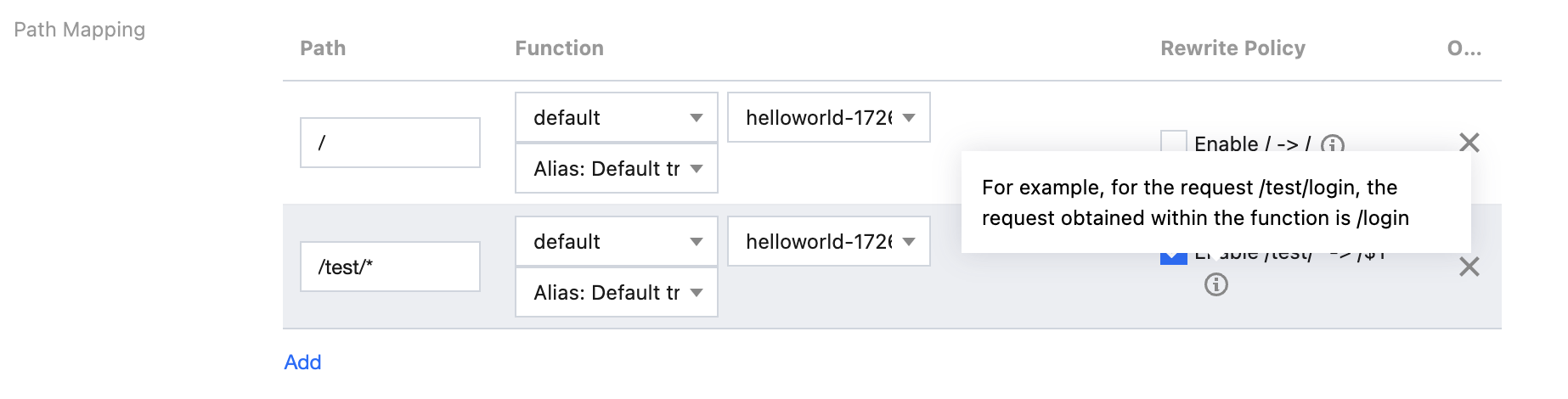
You can map different paths to different functions, allowing different request paths to trigger the execution of different functions. By default, you only need to configure the root path (/) to map to the specified version or alias of a function.
Path Mapping Matching Rules
Exact Path:
The requested path needs to match the configured path exactly in order to trigger the corresponding function.
For example, if the configured path is /a/, with the namespace n1, the function f1, and version 1, then only requests from the path /a/ will trigger version 1 of the f1 function. Requests from /a or /a/b will not trigger version 1 of the f1 function.
For example, if the configured path is /a, with the namespace n1, the function f1, and version 1, then only requests from the path /a will trigger version 1 of the f1 function. Requests from /a/ will not trigger version 1 of the f1 function.
Fuzzy Path:
The wildcard (*) can be used to set the path, but it can only be placed at the end of the path; the longest prefix matching principle applies.
For example, if the configured path is /xxx/*, with the namespace n2, the function f2, and version 1, then any request with the path prefix /xxx/ (such as /xxx/a or /xxx/b/c/d) will trigger version 1 of the f2 function.
Path Rewrite Policy
When you point a sub-path to a function, the path in the request received by the function will include that sub-path by default. For example, the behavior in the following two scenes is:
1. When the exact path /home points to function a, and abc.test.com/home is accessed, the path in the request received by function a will be /home.
2. When the fuzzy path /test/* points to function b, and abc.test.com/test/login is accessed, the path in the request received by function b will be /test/login.
If you want the function to receive requests without the sub-path, you can enable the Rewrite Policy. After the Rewrite Policy is enabled, the behavior for the above two scenes is:
1. When the exact path /home points to function a, and abc.test.com/home is accessed, the path in the request received by function a will be /.
2. When the fuzzy path /test/* points to function b, and abc.test.com/test/login is accessed, the path in the request received by function b will be /login.
Step 3: (Optional) HTTPS Settings
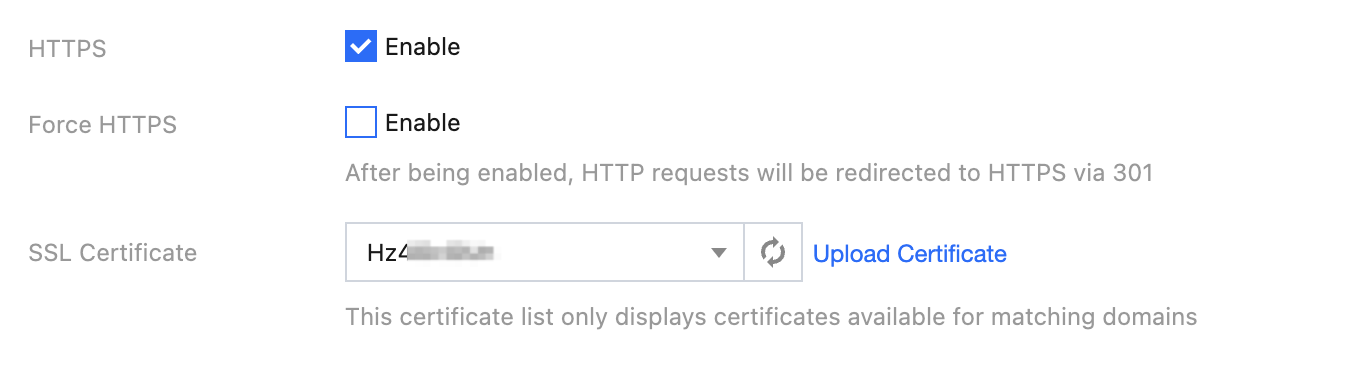
You can also choose to enable the HTTPS protocol for accessing the custom domain name.
After enabling it, you need to select a certificate that matches the domain name from the SSL Certificate Service to complete the configuration. If the certificate dropdown list is empty, it indicates you do not yet have a matching certificate for the domain name in the SSL Certificate Service, and you should first go to the SSL Certificate Service to upload or purchase a certificate.
Once the configuration is complete, the domain name can be accessed via either the HTTP or HTTPS protocol.
You can also enable the Force HTTPS option. Once it is enabled, only HTTPS protocol access to the domain name is supported, and all HTTP access requests will be redirected to HTTPS with a 301 status code.
Step 4. (Optional) WAF Settings
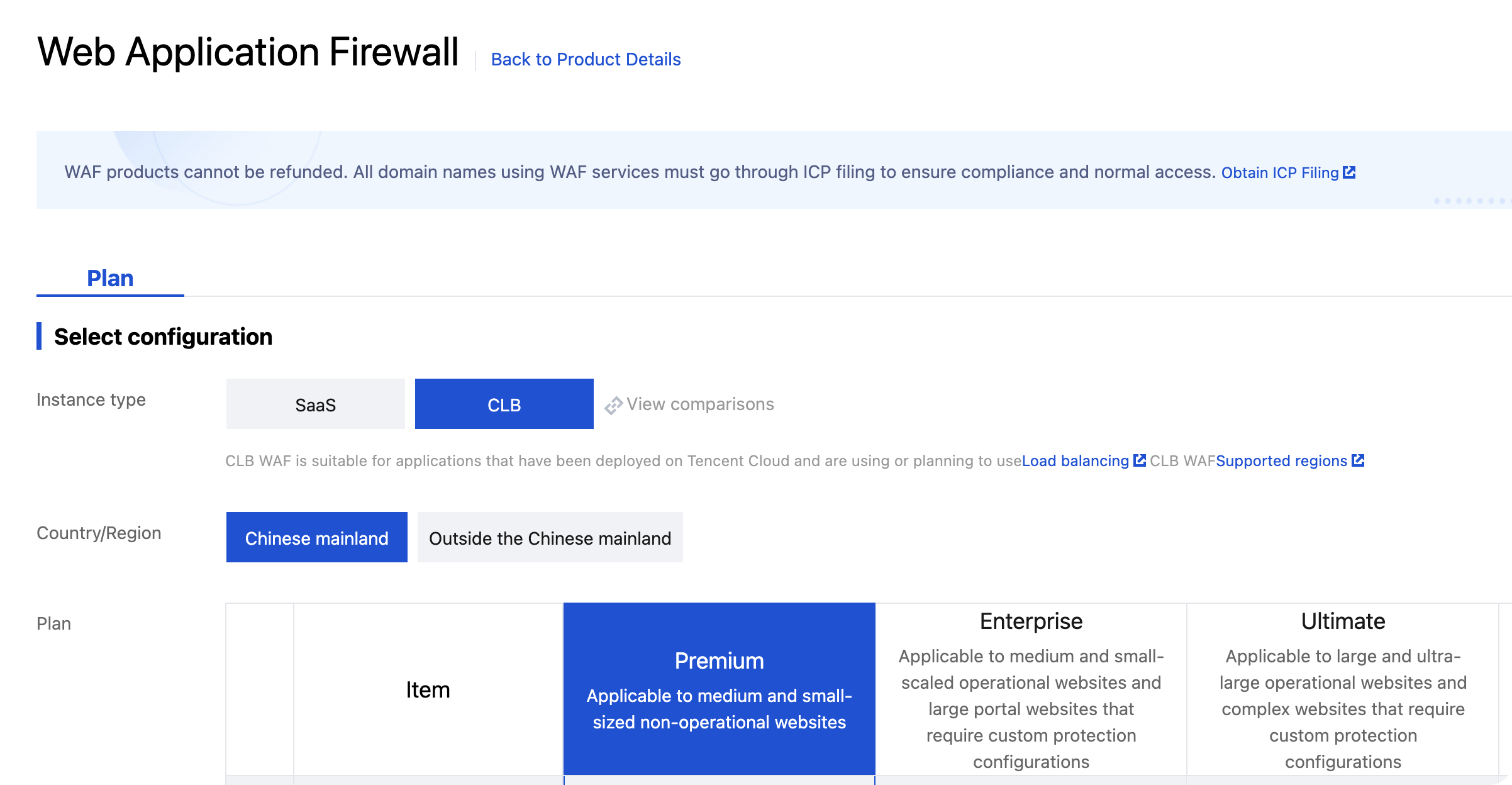
You can also choose to enable WAF, which provides protection against bot attacks, crawlers, and malicious registrations, effectively ensuring the secure and stable operation of your business. This feature will incur some fees. For details, see WAF.
3. On the WAF purchase page, select CLB Instance as shown in the figure below:
4. After completing the purchase, return to the SCF console, go to the Custom Domain Name configuration page, and select Enable WAF. Then, select the corresponding instance ID from the WAF instance dropdown list.
Step 5. Verifying the Custom Domain Name
You can choose to test through a browser or by using the curl command in the command line. After accessing the custom domain name, verify whether the specified function has been called.
Browser Test:
i. Open a browser and enter your custom domain name, such as https://abc.test.com.
ii. Check whether the specified function is correctly called and returns the expected result.
Command Line curl Test:
curl -v https://abc.test.com
Check the output to verify whether the specified function is correctly called and returns the expected result.