Creating Web Services
Baixar
Modo Foco
Tamanho da Fonte
Use Case
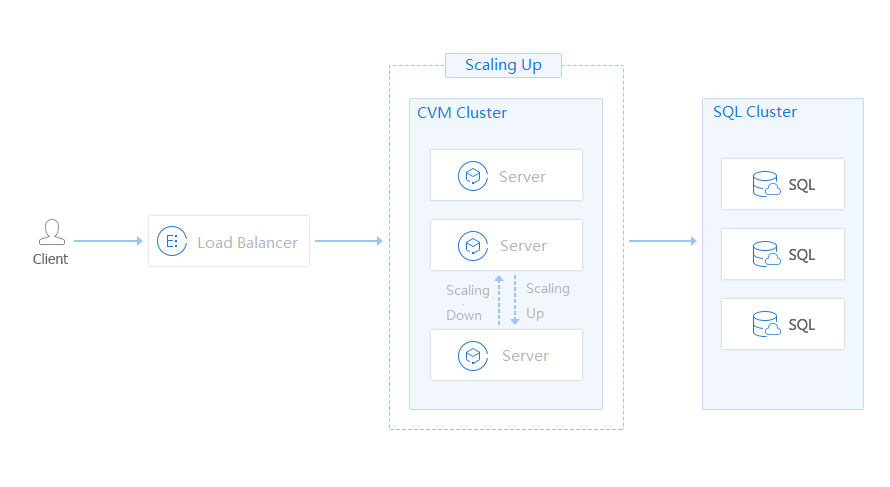
Auto Scaling (AS) is applicable to servers used for common Web services. It helps you to manage servers easily and increase the business robustness.
For e-commerce websites, video websites, and online education websites, requests from clients are directs to the application server through load balancers. In case of rapid changes in the access volume, Auto Scaling can flexibly scale in and out application CVMs based on the volume of requests.
How to Use
Add the following clusters to the scaling group to provide further protection for the cluster:
Frontend server cluster (access layer)
Application server cluster (logic layer)
Cache server cluster (data layer)
You can also configure scheduled scaling policy for expected business peaks (such as online promotions).
Note:
Add CVM instances in the cluster to the scaling group, and enable Removal Protection for certain CVM instances to ensure the normal operations of the cluster. You can also configure the alarm scaling policy to prevent burst traffic or CC attacks.
Benefits of AS
1. AS can help deal with unexpected request traffic and avoid single point of failures.
2. You only need to estimate the resident resources, AS can dynamically adjust elastic resources to reduce IT costs.
3. Scale out quickly in case of CC attacks to avoid request packet loss.
Applicable industries
This solution is applicable to all websites, especially to those with large load fluctuations:
E-commerce websites
Online education websites
Video websites
Live streaming websites
FAQs
Is this scheme suitable for common web services, such as internal systems or websites with steady traffic?
Yes. Common websites will also encounter unexpected situations, such as CC attacks, or piled access due to unexpected incidents.
This solution does no incur any additional cost. You only need to enable Removal Protection for the necessary servers, and don’t need to change the structure and operation of websites.
It’s recommended to take this solution as the best practice for your websites.
Ajuda e Suporte
Esta página foi útil?
Você também pode entrar em contato com a Equipe de vendas ou Enviar um tíquete em caso de ajuda.
comentários