Creating Servers for Sending Requests
Baixar
Modo Foco
Tamanho da Fonte
Scenario Description
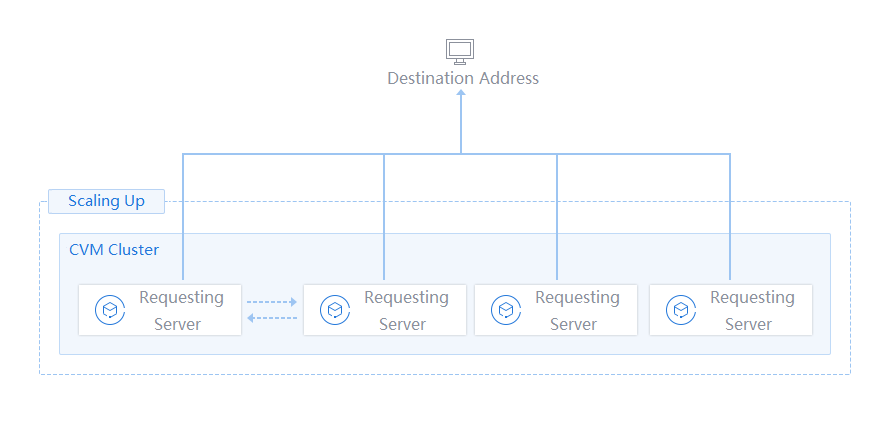
Servers with active outbound access are primarily used to execute scheduled or event-driven external request tasks. These tasks have clear timeliness and do not require servers to run for a long time. Auto Scaling (AS) supports rapid expansion of servers for sending requests to dynamically adjust resources based on task requirements. For example, in an online education SaaS platform, background tasks need to be executed elastically when triggered by user clicks or advertisements, and tasks of an advertisement platform require automatic scaling based on user behavior to ensure response under high concurrency.
Usage
Requesting servers can be managed in scaling groups to achieve automated scaling. The steps are as follows:
1. Create a launch configuration: Select a model, images, storage, and other resources based on task requirements.
2. Create a scaling group and set the policy: Set the minimum capacity and maximum capacity to be within a range required for tasks.
Scheduled tasks should be prioritized for time-sensitive tasks.
An alarm-triggered policy can be added to handle sudden traffic.
3. Manage servers: Add existing Cloud Virtual Machine (CVM) instances to the scaling group, or set removal protection to protect core nodes.
Benefits from AS
Automation efficiency: Manual Ops is not needed, and the deployment time is reduced.
Cost optimization: Resources are used on demand to avoid long-term reservations.
High responsiveness: Rapid scaling is supported to process time-sensitive tasks.
Robustness guarantee: Abnormal nodes can be replaced automatically in case of failures or attacks.
Applicable Industries
Online education SaaS platforms
Advertising and media industries
E-commerce and finance
Data processing and rendering
Ajuda e Suporte
Esta página foi útil?
Você também pode entrar em contato com a Equipe de vendas ou Enviar um tíquete em caso de ajuda.
comentários