tencent cloud

Auto Scaling

Product Introduction
Overview
Strengths
Scenarios
Service Limits
Access Management
Purchase Guide
Getting Started
Creating a Scaling Plan in 5 Minutes
Step 1:Creating a Launch Configuration
Step 2:Creating a Scaling Group
Step 3:Creating a Scaling Policy
Tutorial
Creating Web Services
Creating High-performance Computing Cluster
Creating Servers for Sending Requests
Configuring For High Availability Services
Launch Configuration
Launch Configuration Overview
Creating a Launch Configuration
Viewing Launch Configuration List
Modifying Launch Configurations
Exception Detection
Scaling Groups
Scaling Group Overview
Creating a Scaling Group
Viewing Scaling Group List
Modifying Scaling Groups
Modifying Bound Instances
Adding CLBs
Delete scaling group
Creating Notifications
Creating Scaling Activity Notifications
Specifying Notification Recipients
Expanding and Reducing Capacity
Auto Scaling Lifecycle Hook
Managing Scheduled Actions
Managing an Alarm-triggered Policy
Instance Health Check
Expanding Capacity Manually
Scale-in Process
Viewing Scaling Activities
Suspending and Resuming Scaling
Scale-in Removal Protection
Scaling Activity Cancelled
Scaling Activity Failed
Cooldown Period
Monitoring
Monitor Alarm Metrics
Running Status Check
Scheduled Task
Scheduled Task Execution Time Description
Troubleshooting
Scaling Group Doesn't Work
Scaling Activity Failed
Use Cases
Setting a Fixed Outbound IP Address for Scaling Groups
Deploying Elastic Web Application Service
Enabling Services Upon CVM Start-up
Customer Cases
iCarbonX
API Documentation
History
Introduction
API Category
Making API Requests
Scaling Group APIs
Scaling Group Instances APIs
Launch Configuration APIs
Scheduled Action APIs
Alarm Trigger Policy APIs
Notification APIs
Lifecycle Hook APIs
Instance Refresh APIs
Other APIs
Data Types
Error Codes
FAQs
Contact Us
Glossary
DocumentaçãoAuto ScalingTutorialConfiguring For High Availability Services

Configuring For High Availability Services

PDF
Modo Foco
Tamanho da Fonte
Última atualização: 2024-01-08 17:53:30

Use case

Building master/slave or active-active HA clusters in the traditional way is quite cumbersome. You can use health check of Auto Scaling to implement high availability.
The system will automatically monitor the health status of the active nodes. When the active node does not respond to a ping, Auto Scaling will automatically replicate a healthy instance to replace any abnormal ones, ensuring healthy and smooth business operation and providing comprehensive protection for your business.

Directions

Step 1: Create images of stateless CVMs in a cluster.
Step 2: Create a scaling group, and configure the maximum and the minimum capacities as desired. Then, select Add a CVM on the list of CVMs in the scaling group to manually add the existing CVM to the cluster. Note: When a manually added CVM is replaced, it’s only removed from the scaling group but not terminated.
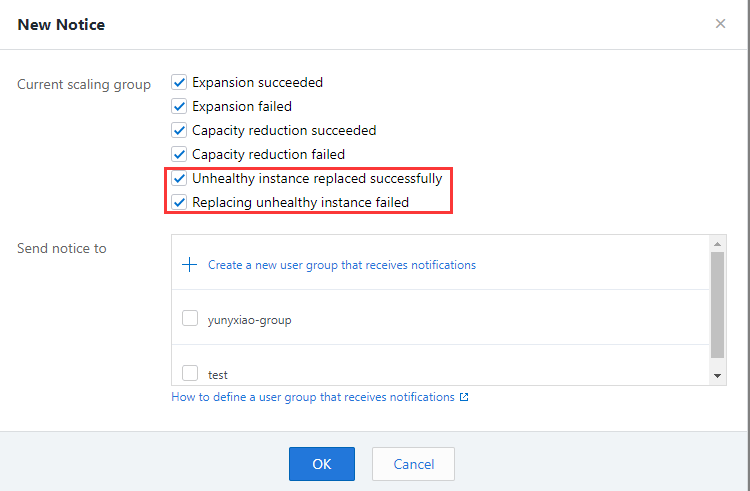
Step 3: Create a notification policy and select to receive notifications about scaling activities that replace unhealthy instances.
Alt text

The configuration is complete.

Benefits of AS

AS can make the cluster secure.

Applicable industries

It is strongly recommended that you add stateless CVMs (if any) to the scaling group, and make this an IT deployment routine.

Ajuda e Suporte

Esta página foi útil?

comentários