CWPP does not conflict with other security products. It protects servers by providing security capabilities in different dimensions than other products.
How do I disable CWPP Pro or CWPP Ultimate?
Log in to the CWPP Console and select License Management in the left navigation pane. Search for the servers for which you want to disable CWPP Pro or CWPP Ultimate, and then click Unbind in the operation column to disable the service. See License Management.
How do I uninstall CWPP Agent?
Log in to the CWPP Console and select Server List in the left navigation pane. Search for the servers from which you want to uninstall CWPP Agent, and then click Unbind in the operation column to uninstall CWPP Agent (the latest status will by synced in about 10 minutes.)
Features
How often are the virus and vulnerability libraries updated?
Virus library: updated at 00:00 every day.
Vulnerability library: updated from time to time.
Why may the detection results be different between multiple scans of the vulnerabilities of Jar packages?
The detection of Jar package vulnerabilities, for example, Struts2 vulnerability highly dependent on whether the Jar package is loaded. The vulnerability cannot be detected when the package is not loaded. When the service is running, the Webserver loads the Jar package in two modes — dynamic loading and static loading. In the dynamic loading mode, the Struts2 vulnerability can only be detected when the Jar package is running, so the check results are different between periods. It is recommended to scan for high-risk Jar package vulnerabilities multiple times to improve the accuracy of the check results.
What is the scanning frequency of files in the malicious file scan?
You can set the scanning frequency of files. For more information, see Malicious File Scan.
How long does it take for security baselines to take effect once they are configured in the product?
The security baselines take effect immediately after their configuration.
What should be done if the result of a security baseline check item is "Failed"?
1. Go to Baseline Management, filter out the check items with a result of "Failed", and click View Details to open the details pop-up window.
2. In the check item details pop-up window, you can see the affected servers. Click Details in the operation column of a server to open the check result pop-up window.
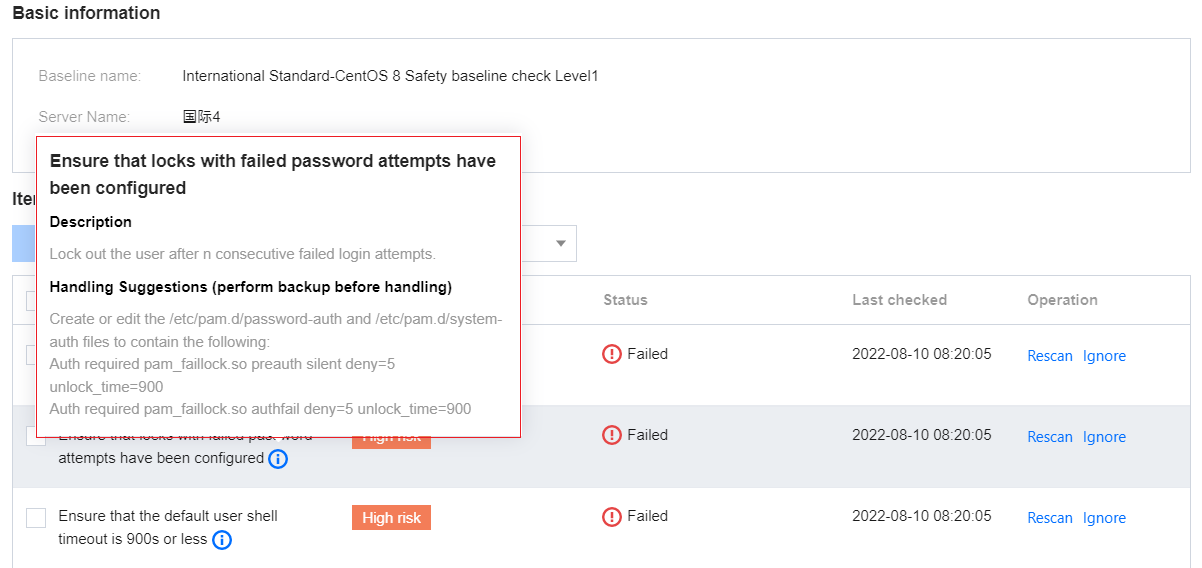
3. In the check result pop-up window, you can view the suggestions on how to fix the failed baseline items.
Will I be notified if CWPP detects attacks such as vulnerabilities and Trojans?
Yes. You will get alarms if CWPP detects attacks such as Trojans and critical vulnerabilities, and will be notified via Message Center, SMS, email, or WeCom. You can set your notification channel in Alarm Settings.