On the Payment Method page, you can query, add, delete, or set a default payment method. You need to add at least one payment method to your account.
Viewing Payment Methods
On the Payment Method page, you can view your existing payment methods, including payment type, account ID, payer name, status, and available operations.
Note:
Click Set as Default to mark it as the default payment method.
You can set only one default payment method. The system automatically deducts payments from your default payment method on the monthly due date (starting from the 10th of each month) or when your available credit is insufficient.
Adding a Payment Method
Log in to the Tencent Cloud console and go to Billing Center > Payment Management > Payment Method. Click Add Payment Method.
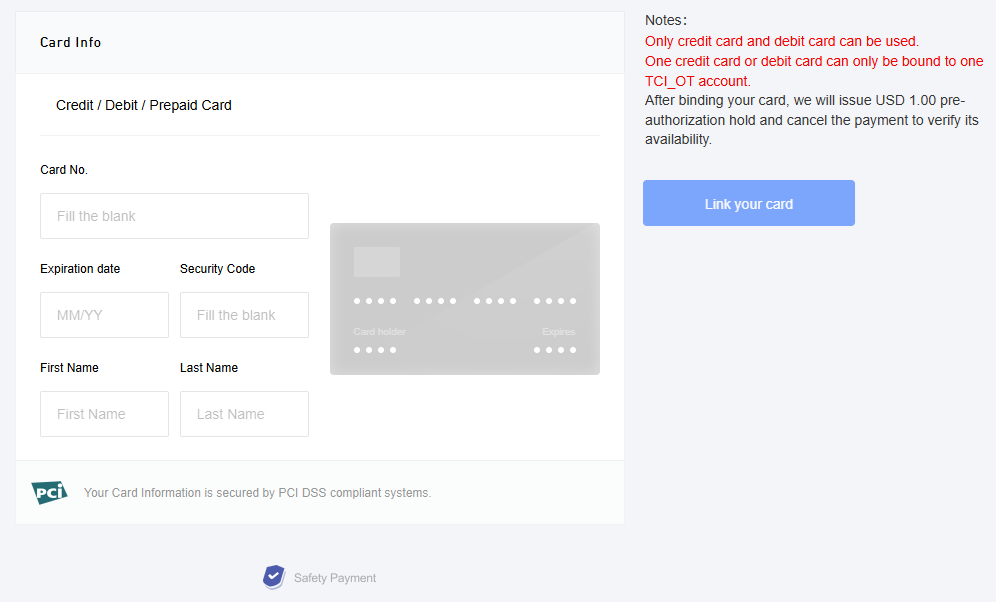
Go to the Add Payment Method page and enter your credit or debit card information to bind the payment method.
After a payment method is added, you can use it to top up and make payments.
Note:
NICEPAY payment service is available to users in South Korea. The supported types of cards include BC card, KB Kookmin card, KEB Bank card, SAMSUNG card, SHINHAN card, HYUNDAI card, LOTTE card, HANMI card, CITI card, NH card, SUHYUP card, SHINHYUP card, WOORI card, HANA SK card, KWANGJU card, JEONBUK card, JEJU card, KDB Capital card, Post card, Savings Bank card, MG card, KDB Bank card, Kakao Bank card, and KBank card.
Deleting Payment Methods
Click Delete to delete a selected payment method. The default payment method cannot be deleted.
To delete the current default payment method, select or add a valid payment method, and then click Set as Default to switch the default payment method. You can keep or delete the previous default payment method as needed.
FAQs
How do I bind a credit/debit card?
You can add a payment method directly on the Payment Method page.
How can I bind a credit/debit card if I have already bound a PayPal account?
PayPal is no longer supported. Go to the Payment Method page to add a new payment method, and click Set as Default to set it as the default. For the previously bound PayPal payment method, click Delete to remove it.
What payment methods does Tencent Cloud support?
Tencent Cloud supports two types of payment method: credit card and debit card.
How many payment methods can I add?
You can add up to five credit/debit cards. If you have already added five cards, you cannot add another until you remove one of the existing cards. Only one credit/debit card can be selected as your default payment method.
What credit card providers does Tencent Cloud support?
Tencent Cloud supports VISA, Mastercard, JCB, DISCOVER, AMEX, and UnionPay.
Why is there a need for customers with a Korean entity to rebind their payment card, and is pre-authorization verification required for rebinding?
From January 24, 2024, the payment capabilities for our Korean customers have been enhanced. It is required to add a payment account anew via the updated payment channel, which will subsequently be used for recharging and making payments. During the card-binding phase in the new payment channel, Korean customers are required to enter the information for card-binding without pre-authorization verification.
Will the pre-authorization fee for binding a bank card be refunded?
Yes. After the pre-authorization fee of 1 USD is successfully deducted by the system, cancellation of pre-authorization will be automatically triggered. Generally, after 1 to 5 business days, the pre-authorization is cancelled, and the fee is refunded.
Why cannot my bank card be successfully bound?
There are many reasons why a bank card cannot be successfully bound. Please check the card you are trying to bind as follows:
Verify the information accuracy of the credit card to be bound, and check for any invalid or erroneous details. Check the expiration date of the credit card. If your credit card has expired, it is recommended to bind a new card or update your current card.
Check your card type. Tencent Cloud does not support prepaid cards, virtual cards, or gift cards, and does not allow to bind enterprise accounts. Please select a credit or debit card of VISA, Master, JCB, DISCOVER, AMEX, or UnionPay. Some card brands may not support debit cards. If binding fails, use a new card.
Check whether the online payment, authorized deduction, and cross-border payment features are enabled for your card, whether the payment limit is sufficient, and whether deduction by USD is supported. If these features are not enabled or the card does not support them, please contact the issuing bank to enable these features or use a new card.
The bank card you are trying to bind has reached the binding limit. Please use a new card.
Check whether your bank card balance is less than 1 USD. To bind a card, pre-authorization deduction of 1 USD is required. If the account balance is insufficient, the pre-authorization will fail, causing the binding failure.
If none of the above reasons matches, please contact us through a ticket.