Live Battles (Web)
Download
Focus Mode
Font Size
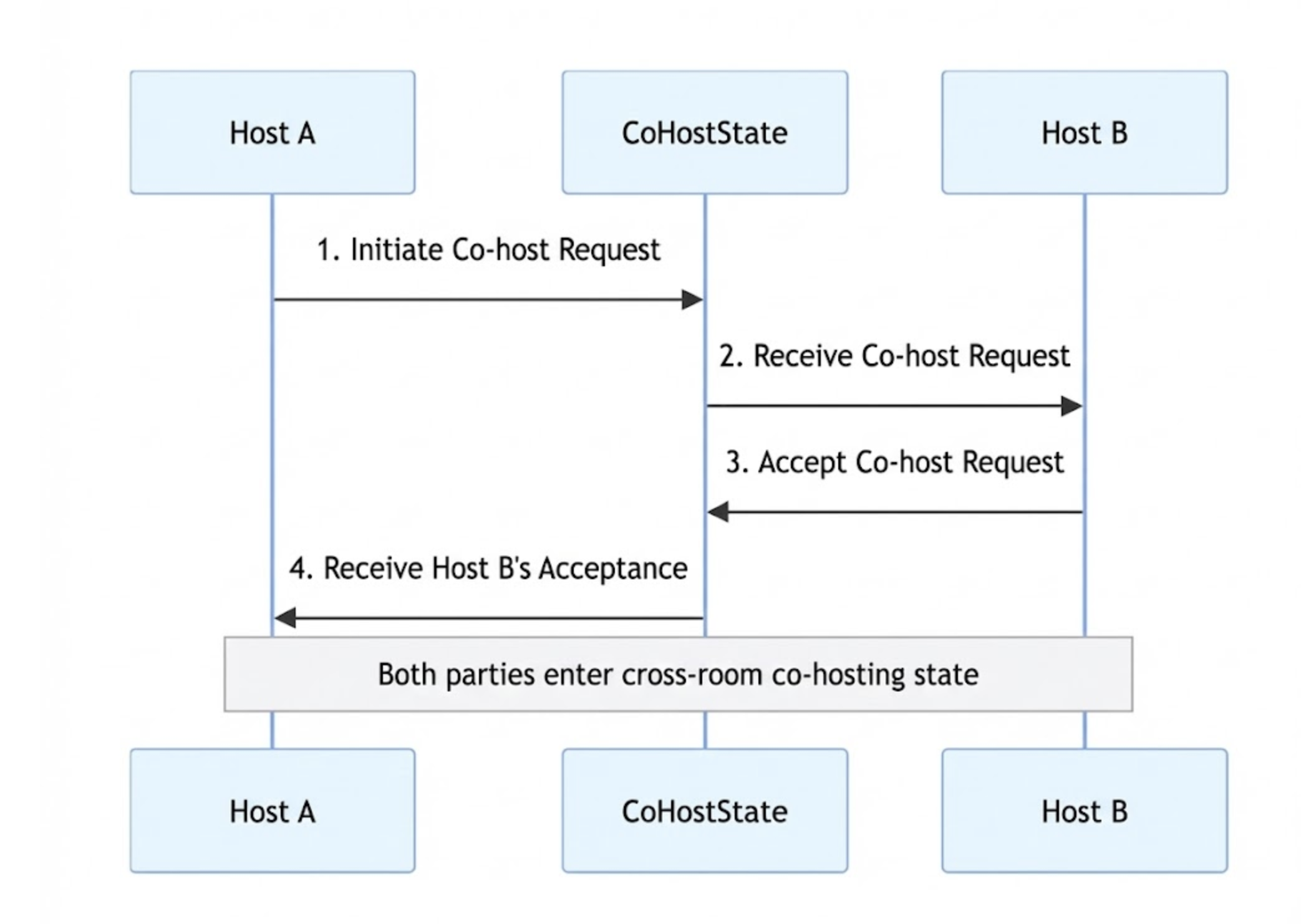
AtomicXCore includes the core CoHostState module, designed for managing cross-room co-hosting. This guide explains how to integrate and use CoHostState to build a complete co-hosting workflow for live streaming applications.
Core Scenario
A typical host co-hosting session involves two main phases. The overall workflow is illustrated below:
Sample Project
Implementation
Component Integration
Note:
Before proceeding, make sure you have created or joined a room as described in the Quick Start Guide. You can then follow the steps below.
Cross-Room Co-Hosting
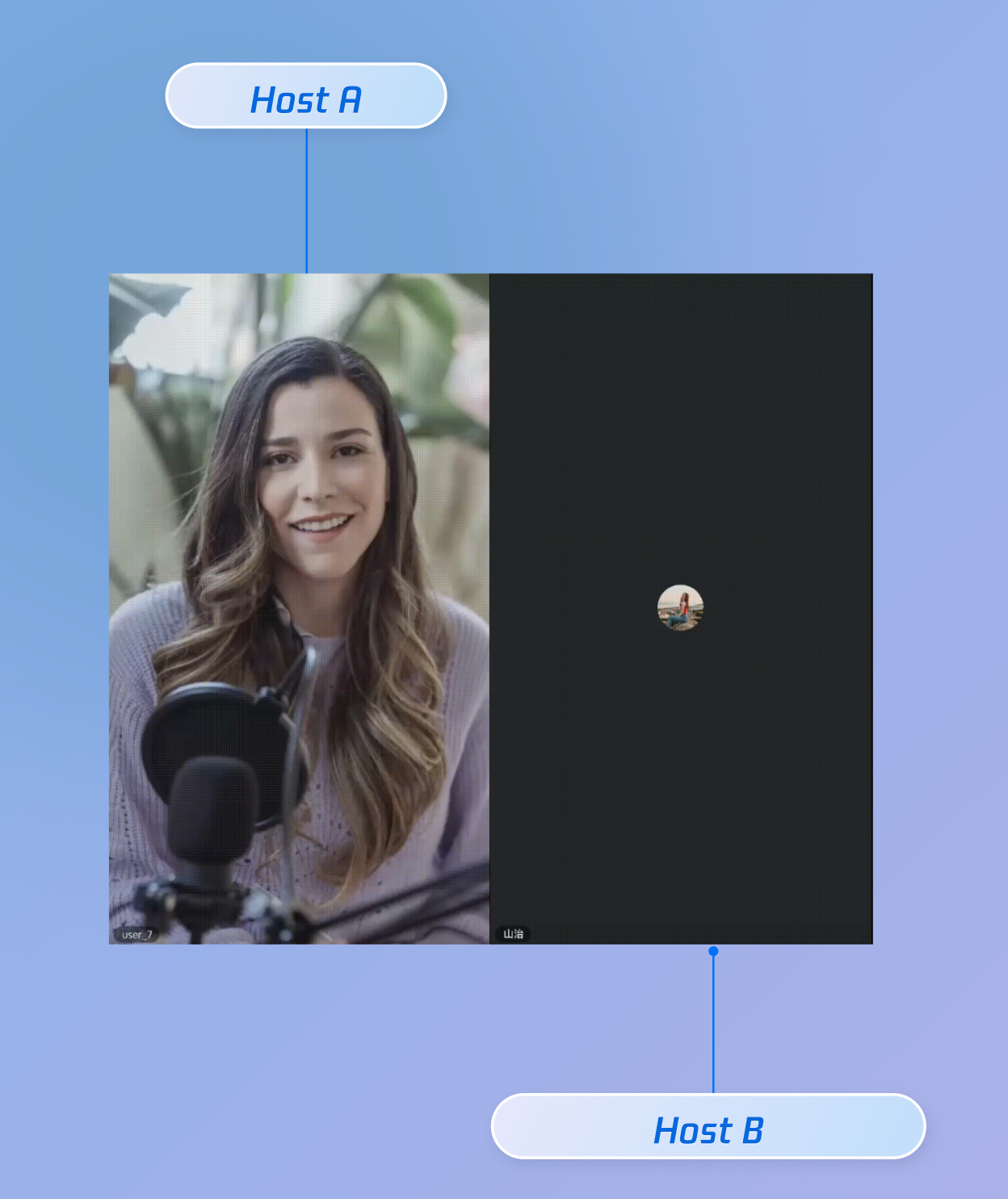
The objective here is to display both hosts’ video streams in a single view. Use CoHostState to enable this functionality.
Inviter Implementation (Host A)
Send Co-Host Invitation
When Host A selects Host B in the UI and initiates a co-host request, call the
requestHostConnection method:import { useCoHostState, CoHostLayoutTemplate } from "tuikit-atomicx-vue3";// Get the CoHostState instanceconst { requestHostConnection } = useCoHostState();// User clicks the "Co-Host" button and selects Host B (targetLiveId)const inviteHostB = async (targetLiveId: string) => {try {await requestHostConnection({liveId: targetLiveId, // Room ID of target Host BlayoutTemplate: CoHostLayoutTemplate.Grid, // Select a layout templatetimeout: 30, // Invitation timeout (seconds)extensionInfo: '', // Optional extension info});console.log("Co-host invitation sent, waiting for response...");} catch (error) {console.error("Failed to send invitation", error);// Optionally show a Toast notification here}};
Subscribe to Invitation Result
Use the
subscribeEvent method from useCoHostState to listen for Host B's response:import { useCoHostState, CoHostEvent } from "tuikit-atomicx-vue3";import { onMounted, onUnmounted } from 'vue';const { subscribeEvent, unsubscribeEvent } = useCoHostState();const onAccepted = (eventInfo: any) => {console.log(`Host ${eventInfo.invitee.userName} accepted your co-host invitation`);};const onRejected = (eventInfo: any) => {console.log(`Host ${eventInfo.invitee.userName} rejected your co-host invitation`);};const onTimeout = (eventInfo: any) => {console.log('Invitation timed out, no response from the other party');};onMounted(() => {subscribeEvent(CoHostEvent.onCoHostRequestAccepted, onAccepted);subscribeEvent(CoHostEvent.onCoHostRequestRejected, onRejected);subscribeEvent(CoHostEvent.onCoHostRequestTimeout, onTimeout);});onUnmounted(() => {unsubscribeEvent(CoHostEvent.onCoHostRequestAccepted, onAccepted);unsubscribeEvent(CoHostEvent.onCoHostRequestRejected, onRejected);unsubscribeEvent(CoHostEvent.onCoHostRequestTimeout, onTimeout);});
Invitee Implementation (Host B)
Receive Co-Host Invitation
Host B can listen for incoming invitations from Host A by subscribing to the
onCoHostRequestReceived event:import { useCoHostState, CoHostEvent } from "tuikit-atomicx-vue3";import { onMounted, onUnmounted } from 'vue';const { subscribeEvent, unsubscribeEvent } = useCoHostState();const onRequestReceived = (eventInfo: any) => {const { inviter } = eventInfo;console.log(`Received co-host invitation from Host ${inviter.userName}`);// Display a dialog to let the user accept or reject};onMounted(() => {subscribeEvent(CoHostEvent.onCoHostRequestReceived, onRequestReceived);});onUnmounted(() => {unsubscribeEvent(CoHostEvent.onCoHostRequestReceived, onRequestReceived);});
Respond to Co-Host Invitation
When Host B makes a selection in the dialog, call the appropriate method:
import { useCoHostState } from "tuikit-atomicx-vue3";// Get the CoHostState instanceconst { acceptHostConnection, rejectHostConnection, applicant } = useCoHostState();// Accept the invitationconst acceptInvitation = async () => {if (applicant.value) {try {// Pass in the inviter's liveId (roomId)await acceptHostConnection({ liveId: applicant.value.liveId });console.log('Co-hosting accepted');} catch (error) {console.error('Failed to accept co-hosting', error);}}};// Reject the invitationconst rejectInvitation = async () => {if (applicant.value) {try {await rejectHostConnection({ liveId: applicant.value.liveId });console.log('Co-hosting rejected');} catch (error) {console.error('Failed to reject co-hosting', error);}}};
Ending Co-Hosting
During a PK session, either host can end the co-hosting connection. You also need to handle cases where the other host leaves, so you can revert to the single-host layout.
End Co-Hosting Manually
To disconnect the current cross-room co-hosting session, call
exitHostConnection. Both the inviter and invitee can use this method.import { useCoHostState, CoHostStatus } from "tuikit-atomicx-vue3";// Get the CoHostState instanceconst { exitHostConnection, coHostStatus } = useCoHostState();// Handler for the "End PK" buttonconst stopPK = async () => {// Check if currently in co-hosting stateif (coHostStatus.value === CoHostStatus.Connected) {try {await exitHostConnection();console.log('Exited co-hosting');// Reset UI layout and handle any additional business logic here} catch (error) {console.error('Failed to exit co-hosting:', error);}}};
Detect Other Host Leaving
Subscribe to the
onCoHostUserLeft event to detect when the other host disconnects or drops due to an exception, and update your UI accordingly.import { useCoHostState, CoHostEvent } from "tuikit-atomicx-vue3";import { onMounted, onUnmounted } from 'vue';const { subscribeEvent, unsubscribeEvent } = useCoHostState();const onUserLeft = (eventInfo: any) => {const { userInfo } = eventInfo;console.log(`Host ${userInfo.userName} has disconnected from co-hosting`);// Restore single-host layout and remove the other host's video stream};onMounted(() => {// Subscribe to user left eventsubscribeEvent(CoHostEvent.onCoHostUserLeft, onUserLeft);});onUnmounted(() => {unsubscribeEvent(CoHostEvent.onCoHostUserLeft, onUserLeft);});
Demo
After integrating these features, use Host A and Host B to perform the corresponding operations. The runtime effect is shown below.
API Documentation
For complete details on all public interfaces, properties, and methods for CoHostState and related classes, see the official API documentation for the AtomicXCore framework. Key States referenced in this guide include:
State | Feature Description | API Documentation |
DeviceState | Controls audio and video devices: microphone (mute/unmute, volume), camera (on/off, switch, quality), screen sharing, and real-time device status monitoring. | |
CoHostState | Manages cross-room host co-hosting: supports multiple layout templates (dynamic grid, etc.), initiates/accepts/rejects co-hosting, and handles co-host interaction management. |
FAQs
Invitee Does Not Receive Co-Host Invitation Callback
If Host B does not trigger the
onCoHostRequestReceived event after Host A calls requestHostConnection, check the following:Parameter validation: Confirm that the
liveId is the actual room ID of the target host, not a user ID or other business identifier.Event subscription: The invitee must call
subscribeEvent for the CoHostEvent.onCoHostRequestReceived event during component mount (onMounted); otherwise, notifications will not be received.Host Not Listed in Candidates
The
candidates computed property automatically filters out users who do not meet the invitation criteria. If the target host is missing, possible reasons include:Already filtered: The user is already in the current co-hosting session (
connected), has been invited (invitees), or is currently applying (applicant).Self excluded: The currently logged-in user is automatically excluded from the list.
List not updated: Make sure
liveList has been fetched correctly. You can manually call fetchLiveList to refresh.Handling Co-Host Invitation Timeout
When calling
requestHostConnection, you can set a timeout (in seconds).Inviter: If no response is received within the timeout, the SDK automatically removes the user from the invitation list and triggers the
CoHostEvent.onCoHostRequestTimeout event.Invitee: If not handled within the timeout, the same timeout event is triggered, and the
applicant state is reset.Recommendation: Both hosts should listen for the
onCoHostRequestTimeout event to update the UI (for example, closing the waiting popup).Accepting Co-Hosting Fails
Accepting co-hosting may fail due to network issues or changes in room status.
Error handling: Always use
try...catch when calling acceptHostConnection.State check: Before calling, verify that
applicant.value exists and that liveId is valid. This helps prevent state inconsistencies due to timeouts or cancellation by the other host.
Help and Support
Was this page helpful?
You can also Contact sales or Submit a Ticket for help.
Help us improve! Rate your documentation experience in 5 mins.
Feedback