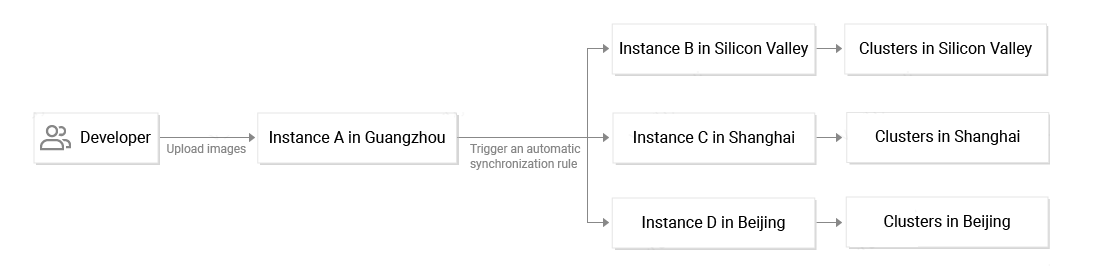
When an enterprise-class container customer expands business throughout the country or to multiple regions worldwide, the customer needs to pull images from the nearest region. This not only improves the pulling speed to ensure fast business deployment, but also enables data transmission through private networks in the same region to reduce public-network bandwidth costs.
TCR supports using shared instances and dedicated Enterprise Edition instances in multiple regions worldwide. In particular, an Enterprise Edition instance supports rule-based automatic synchronization among instances, which can quickly synchronize newly pushed container images to instances in other regions. This not only allows the user to pull images from the nearest region, but also reduces OPS costs and risks resulting from manually pushing images to several regions.
Large-Scale Image Distribution
As the business scale of the enterprise user's container continuously increases or the user migrates their existing large-scale business to a container, the number of nodes in the container also increases, and some clusters can even have more than one thousand nodes each. In addition, with the emergence of business scenarios such as deep learning and DNA computing, the container cluster starts to support a large amount of offline computing load, and the container images for these business scenarios are often several gigabytes in size.
To enable a large number of clusters to concurrently pull images of several gigabytes, TCR Enterprise Edition uses the service backend that supports containerization deployment and the exclusive storage backend (COS bucket) to cope with highly concurrent pulling requests from the Docker client.
Containerized Continuous Deployment
After an enterprise deploys large-scale containers in the cloud, traditional business application development and deployment processes face challenges, and the enterprise turns to the cloud-native DevOps solution. TCR is closely integrated with TKE to deliver the integrated cloud-native DevOps solution. In this solution, the enterprise only needs to create the delivery workflow in the TCR console. After that, source code updates automatically trigger image building and security scanning. Then, the images are synchronized to instances in multiple production regions worldwide. Finally, business applications in the container cluster are automatically updated. If the enterprise already has complete CI/CD workflows, TCR also allows the enterprise to configure custom triggers to interconnect with the enterprise's own CD system and hitlessly incorporate TCR in the existing business development process.