tencent cloud

Game Multimedia Engine

Release Notes
Product Introduction
Overview
Strengths
Features
Scenarios
Compliance
User Tutorial
Billing
Free Plan
Purchase Guide
SDK Download Guide
Product Feature Demo
Basic Feature Demo
Scenario-Specific Demo
Console Guide
Usage Querying
Activating Services
Getting Started
Quick Integration of SDK
Quick Integration of Sample Project
Basic Feature Development Guide
Authentication Key
Voice Chat Role Configuration
Sound Quality
Advanced Feature Development Guide
Server-Side Recording
Range Voice
3D Sound Effect
Sound Effect and Accompaniment
Network Audio Stream Forwarding Routing
Custom Message Channel
How to deal with the restrictions of corporate firewall
Language Parameter Reference List
Integrating GME Chat Room Management
Client API
SDK for Unity
SDK for Unreal Engine
Cocos2D SDK
SDK for Windows
SDK for iOS
SDK for Android
SDK for macOS
H5 SDK
Electron SDK
SDK for Flutter
SDK Version Upgrade Guide
Error Codes
Toolchain
Server APIs
History
Introduction
API Category
Usage APIs
Recording APIs
Making API Requests
Voice Chat APIs
Application APIs
Data Types
Error Codes
FAQ
Product Features
Troubleshooting Guide
Billing
Sample Project Usage
General
Authentication
Voice Chat Room Entry Failure
Sound and Audio
Network
Speech-to-text Conversion
Program Export
Service Agreement
Service Level Agreement
Contact Us
Glossary
GME Policy
Data Privacy and Security Agreement
Privacy Policy

Accompaniment in Voice Chat

PDF
Focus Mode
Font Size
Last updated: 2024-01-18 14:25:17
This document describes the GME APIs for accompaniment in voice chat so that developers can easily integrate and debug them.

APIs for Accompaniment in Voice Chat

API
Description
StartAccompany
Starts playing back the accompaniment.
StopAccompany
Stops playing back the accompaniment.
IsAccompanyPlayEnd
Indicates whether the accompaniment is over.
PauseAccompany
Pauses playing back the accompaniment.
ResumeAccompany
Resumes playing back the accompaniment.
SetAccompanyVolume
Sets the accompaniment volume.
GetAccompanyVolume
Obtains the accompaniment volume.
SetAccompanyFileCurrentPlayedTimeByMs
Sets the playback progress.
Note:
To use accompaniment in voice chat, you must integrate the GME SDK and enable real-time voice chat.

Flowchart


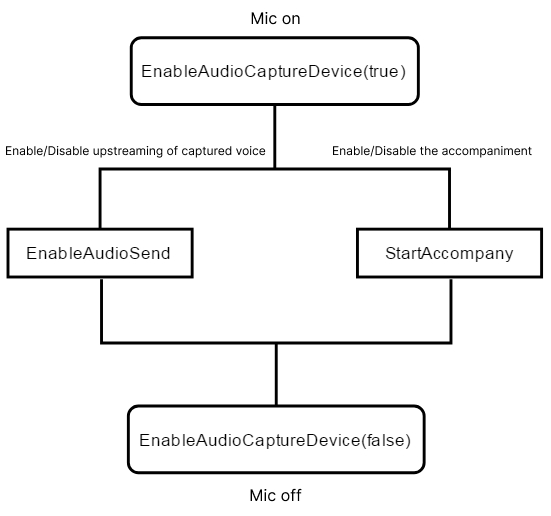
How to use with EnableAudioCaputreDevice

After you enter a voice chat room, call EnableAudioCaputreDevice to enable the capturing device, and call StartAccompany to play back the accompaniment. To capture human voices via the microphone, you should call EnableAudioSend to enable the microphone first.

Starting playing back the accompaniment

This API (StartAccompany) is used to start playing back the accompaniment in M4A, WAV, or MP3 format. Calling this API resets the volume.

Function prototype

ITMGAudioEffectCtrl virtual int StartAccompany(const char* filePath, bool loopBack, int loopCount, int msTime)
Parameter
Type
Description
filePath
char*
Path of the accompaniment file.
loopBack
bool
Indicates whether to output the accompaniment in a mixing mode. This is generally set to true, indicating that the audience can also hear the accompaniment.
loopCount
int
The number of loops. -1 indicates an infinite loop, and 0 indicates not to play back.
msTime
int
Delay time

Sample code

// Code for Windows
ITMGContextGetInstance()->GetAudioEffectCtrl()->StartAccompany(filePath,true,-1,0);
// Code for Android
ITMGContext.GetInstance(this).GetAudioEffectCtrl().StartAccompany(filePath,true,loopCount,0);
// Code for iOS
[[[ITMGContext GetInstance] GetAudioEffectCtrl] StartAccompany:path loopBack:isLoopBack loopCount:loopCount msTime:0];

Starting the playback of the accompaniment being downloaded

Call the StartAccompanyDownloading API to start downloading and playing back the accompaniment. The accompaniment download is implemented in the code. When the download is not completed, the file path can be passed as a parameter to StartAccompanyDownloading, which can implement download-and-play. fileSize is the estimated full file size. When calling this API to pass in a partially downloaded file, first ensure that the file size is at least 10 KB.

Function prototype

ITMGAudioEffectCtrl virtual int StartAccompany(const char* filePath, bool loopBack, int loopCount, int msTime, int fileSize)
Note:
For the iOS client, follow the steps below:
1. To use this feature on iOS, you need to [download the mp3 library](https://picture-1256313114.cos.ap-beijing.myqcloud.com/mp3_codec.zip?_ga =1.162366908.1422691217.1594629603) and import it into your project.
2. Import the downloaded library and add it through “Link Binary With Libraries”.
3. Add the header file “TMGEngine_adv.h” to the same directory as the other SDK header files in your project.

Callback for the accompaniment playback

After the accompaniment is over, call the function OnEvent, and the event message ITMG_MAIN_EVENT_TYPE_ACCOMPANY_FINISH will be returned. The returned parameter data includes “result” and “file_path”.

Sample code

void TMGTestScene::OnEvent(ITMG_MAIN_EVENT_TYPE eventType,const char* data){
switch (eventType) {
case ITMG_MAIN_EVENT_TYPE_ENTER_ROOM:
{
// Process
break;
}
...
case ITMG_MAIN_EVENT_TYPE_ACCOMPANY_FINISH:
{
// Process
break;
}
}
}

Stopping the accompaniment playback

This API (StopAccompany) is used to stop playing back the accompaniment.

Function prototype

ITMGAudioEffectCtrl virtual int StopAccompany(int duckerTime)
Parameter
Type
Description
duckerTime
int
Ducking time

Sample code

ITMGContextGetInstance()->GetAudioEffectCtrl()->StopAccompany(0);

Indicating whether the accompaniment is over

If it is over, true is returned. If it is not, false is returned.

Function prototype

ITMGAudioEffectCtrl virtual bool IsAccompanyPlayEnd()

Sample code

ITMGContextGetInstance()->GetAudioEffectCtrl()->IsAccompanyPlayEnd();

Pausing the accompaniment playback

This API (PauseAccompany) is used to pause the accompaniment playback.

Function prototype

ITMGAudioEffectCtrl virtual int PauseAccompany()


Sample code

ITMGContextGetInstance()->GetAudioEffectCtrl()->PauseAccompany();


Resuming the accompaniment playback

This API (ResumeAccompany) is used to resume the accompaniment playback.

Function prototype

ITMGAudioEffectCtrl virtual int ResumeAccompany()


Sample code

ITMGContextGetInstance()->GetAudioEffectCtrl()->ResumeAccompany();


Specifying whether the speaker can hear the accompaniment

This API is used to specify whether the speaker can hear the accompaniment.

Function prototype

ITMGAudioEffectCtrl virtual int EnableAccompanyPlay(bool enable)

Parameter
Type
Description
enable
bool
Indicates whether the audience can hear the accompaniment.

Sample code

ITMGContextGetInstance()->GetAudioEffectCtrl()->EnableAccompanyPlay(false);


Specifying whether the audience can hear the accompaniment

This API is used to specify whether the audience can hear the accompaniment.

Function prototype

ITMGAudioEffectCtrl virtual int EnableAccompanyLoopBack(bool enable)

Parameter
Type
Description
enable
bool
Indicates whether the audience can hear the accompaniment.

Sample code

ITMGContextGetInstance()->GetAudioEffectCtrl()->EnableAccompanyLoopBack(false);


Setting the accompaniment volume

This API (SetAccompanyVolume) is used to set the accompaniment volume. Value range: 0 - 200. The default value is 100. A value greater than 100 means volume up, while a value less than 100 means volume down.

Function prototype

ITMGAudioEffectCtrl virtual int SetAccompanyVolume(int vol)

Parameter
Type
Description
vol
int
Specifies the volume value.

Sample code

int vol=100;
ITMGContextGetInstance()->GetAudioEffectCtrl()->SetAccompanyVolume(vol);


Getting the accompaniment volume

This API (GetAccompanyVolume) is used to obtain the accompaniment volume.

Function prototype

ITMGAudioEffectCtrl virtual int GetAccompanyVolume()


Sample code

ITMGContextGetInstance()->GetAudioEffectCtrl()->GetAccompanyVolume();


Getting the accompaniment playback progress

This action requires using both of these two APIs: GetAccompanyFileTotalTimeByMs and GetAccompanyFileCurrentPlayedTimeByMs. Please note that Current/Total = current loop times, and Current % Total = current loop playback position.

Function prototype

ITMGAudioEffectCtrl virtual int GetAccompanyFileTotalTimeByMs()
ITMGAudioEffectCtrl virtual int GetAccompanyFileCurrentPlayedTimeByMs()

Sample code

ITMGContextGetInstance()->GetAudioEffectCtrl()->GetAccompanyFileTotalTimeByMs();
ITMGContextGetInstance()->GetAudioEffectCtrl()->GetAccompanyFileCurrentPlayedTimeByMs();


Setting the playback progress

This API (SetAccompanyFileCurrentPlayedTimeByMs) is used to set the playback progress.

Function prototype

ITMGAudioEffectCtrl virtual int SetAccompanyFileCurrentPlayedTimeByMs(unsigned int time)

Parameter
Type
Description
time
int
Specifies the playback progress in milliseconds

Sample code

ITMGContextGetInstance()->GetAudioEffectCtrl()->SetAccompanyFileCurrentPlayedTimeByMs(time);


Setting the accompaniment key

This API (SetAccompanyKey) is used to specify the accompaniment key, and should be called before starting the accompaniment playback.

Function prototype

ITMGAudioEffectCtrl virtual int SetAccompanyKey(int nKey)

Parameter
Type
Description
nKey
int
Key(s) to adjust by. Value range (recommended): -4 to 4, where 0 indicates using the original key.

Error Codes

Error Message
Error Code
Description
Solution
QAV_ERR_ACC_OPENFILE_FAILED
4001
Failed to open the file
Checks whether the file or its path exists, and whether you have access to the file.
QAV_ERR_ACC_FILE_FORAMT_NOTSUPPORT
4002
Invalid file format
Checks whether the file format is correct.
QAV_ERR_ACC_DECODER_FAILED
4003
Decoding failure
Checks whether the file format is correct.
QAV_ERR_ACC_BAD_PARAM
4004
Invalid parameter
Checks whether the parameters in the code are correct.
QAV_ERR_ACC_MEMORY_ALLOC_FAILED
4005
Memory allocation failed
System resources have run out. If this error persists, please submit a ticket for assistance.
QAV_ERR_ACC_CREATE_THREAD_FAILED
4006
Failed to create a thread
System resources have run out. If this error persists, please submit a ticket for assistance.
QAV_ERR_ACC_STATE_ILLIGAL
4007
Invalid state
This error occurs if an API is called in a state that does not allow calling.


Help and Support

Was this page helpful?

Help us improve! Rate your documentation experience in 5 mins.

Feedback