Renewal
Download
Focus Mode
Font Size
Yearly/monthly subscription instances will not run normally upon expiration. If you need to continue using them, you can renew them within the specified date. If you fail to renew in time, your TencentDB for MySQL instance resources will be automatically released, and your data will be deleted. This document introduces the description and operation related to instance renewal of TencentDB for MySQL.
Note:
Downtime and data deletion risks exist after the instance expires. Renew it promptly to avoid affecting your business.
If a terminated or returned yearly/monthly subscription instance is restored from the recycle bin, it cannot be terminated or returned again within 30 minutes. If you need to terminate or return the instance, perform the operation 30 minutes after it has been restored.
Prerequisites
Renewal instances should be yearly/monthly subscription instances. Pay-as-you-go instances currently do not involve expiration and renewal.
Renewal Method
You can renew instances either automatically or manually to ensure data integrity. For manual renewal, you need to periodically renew instances to extend their usage time. Automatic renewal saves you the trouble of periodic manual renewal, and helps avoid affecting the use of instances or causing business interruptions due to forgetting to renew them.
Automatic Renewal Instructions
I. Automatic Renewal Rules
Service content: Automatic renewal of TencentDB for MySQL instances.
Automatic renewal cycle: The automatic renewal cycle and mode you have set shall prevail. For example, if you select a cycle of 1 month, the system will automatically renew it for 1 month each time it expires.
Deducted amount: The instance renewal fee is the same as the new instance purchase fee. For instance fees, see the Purchase Page.
Deduction time and method: The system will start deduction on the expiration date of the product. If the deduction fails due to insufficient account balance, the service will be terminated upon expiration.
II. Enabling Automatic Renewal
You can enable automatic renewal via the following operation path.
Enabling Automatic Renewal via the Product Purchase Page
1. Select automatic renewal on the Product Purchase Page. Enable automatic renewal for new instances when purchasing instances. Devices will automatically renew monthly after expiration when the account balance is sufficient.

Enabling Automatic Renewal on the Product Console Page
Note:
For instances that have been set to be automatically renewed monthly, there is no need to set automatic renewal again. Automatically renewed instances can be viewed in the following method.

1. Log in to the MySQL console, select one or more instances in the instance list, and select More > Enable Auto-Renewal above.

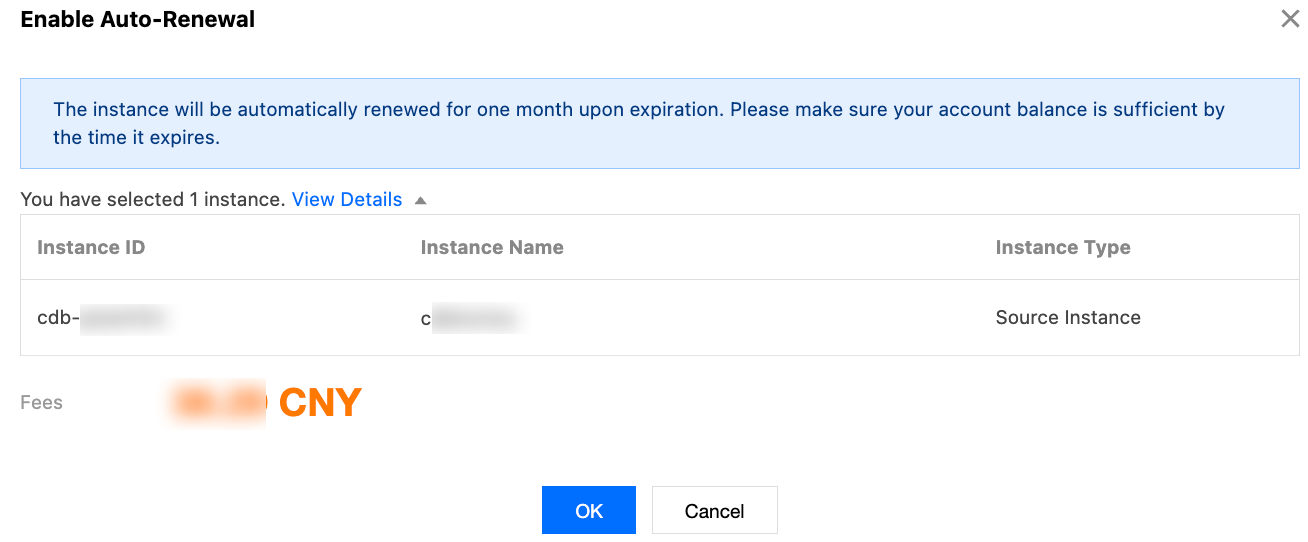
2. In the pop-up dialog box, confirm that everything is correct and click OK.
Note:
As shown in the following figure, "The instance will be automatically renewed for 1 month after expiration" in the dialog box means that automatic renewal has been set, and the instance will be automatically renewed for 1 month every time it expires.
Enabling Automatic Renewal via the Expense Center > Renewal Management Page
1. Log in to the Expense Center > Renewal Management page.
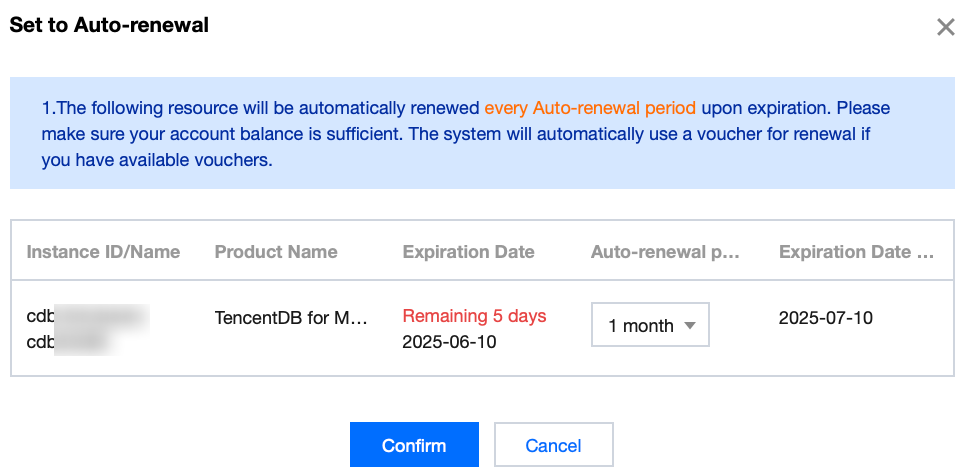
2. Below the manual renewal items, find one or more TencentDB for MySQL instances for which you want to set automatic renewal. Select them and click Set to Auto-Renewal.

3. In the pop-up window to automatic renewal, confirm product information, select the automatic renewal cycle, and click Confirm.
III. Canceling Automatic Renewal
You can cancel automatic renewal via the following operation path.
Canceling Automatic Renewal via the Product Console Page
1. Log in to the MySQL console and find one or more TencentDB for MySQL instances for which you want to cancel automatic renewal.
2. Select the target instance, and select More > Disable Auto-Renewal above.

Canceling Automatic Renewal via the Website Expense Center > Renewal Management Page
1. Log in to the Expense Center > Renewal Management page.
2. Below the automatic renewal items, find one or more TencentDB for MySQL instances for which you want to cancel automatic renewal. Select them and click Set to Manual Renewal.

3. In the pop-up window to set to manual renewal, confirm product information and click Confirm.
IV. Modifying the Automatic Renewal Cycle
Modifying the Automatic Renewal Cycle via the Website Expense Center > Renewal Management Page
1. Log in to the Expense Center > Renewal Management page.
2. Below the automatic renewal items, find one or more TencentDB for MySQL instances for which you want to modify the automatic renewal cycle. Select them and click Modify auto-renewal period.

3. In the pop-up window to modify the automatic renewal cycle, modify the automatic renewal cycle of the instance and click OK.
V. Managing Automatic Renewal
Managing Automatic Renewal via the Website Expense Center > Renewal Management Page
On the Renewal Management page, you can also perform other renewal management operations on your instances, such as viewing the renewal status of your instances, setting non-renewal upon expiration, and setting a unified expiry date. For detailed operation instructions, see Renewal Management.
Manual Renewal Instructions
I. Manual Renewal Rules
Service content: Manual renewal of TencentDB for MySQL instances.
Manual renewal time: Within 7 days after the instance expires or at any time before the instance expires, you can manually renew the instance. The minimum renewal duration is 1 month, and the maximum is 3 years. After renewal, the instance expiration time will be extended by the selected duration of the manual renewal from the previous expiration time. For example, if your instance is expected to expire on January 1, 2025, and you perform a manual renewal for 1 month, the actual expiration time will be February 1, 2025.
Deducted amount: The instance renewal fee is the same as the new instance purchase fee. For instance fees, see the Purchase Page.
Deduction time and method: When you perform manual renewal, the page will navigate to the payment interface. The renewal will take effect immediately after payment.
II. Manual Renewal
Manual Renewal via the Product Console Page
Method 1
1. Log in to the MySQL console, select one or more instances in the instance list, and click Renew above.

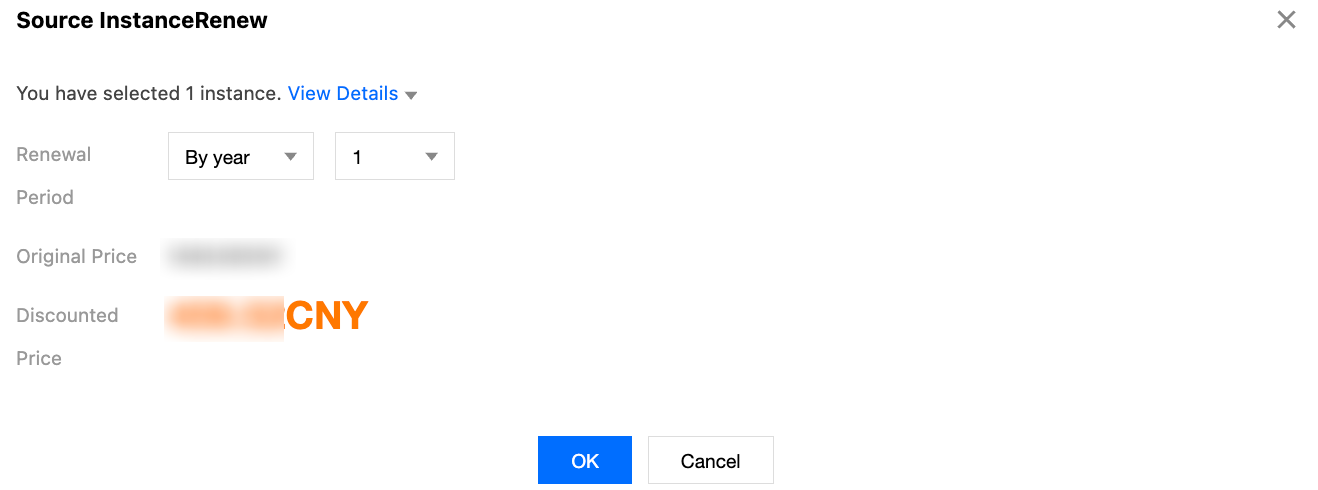
2. In the pop-up dialog box, select the renewal duration and click OK.
Note:
The renewal duration can be selected as monthly or annually. As shown in the following figure, it represents a renewal for 6 months, indicating that the instance will be renewed for another 6 months after expiration. After 6 months, the instance will need to be renewed again.
3. On the order verification page, confirm that everything is correct and then pay for the order.
Method 2
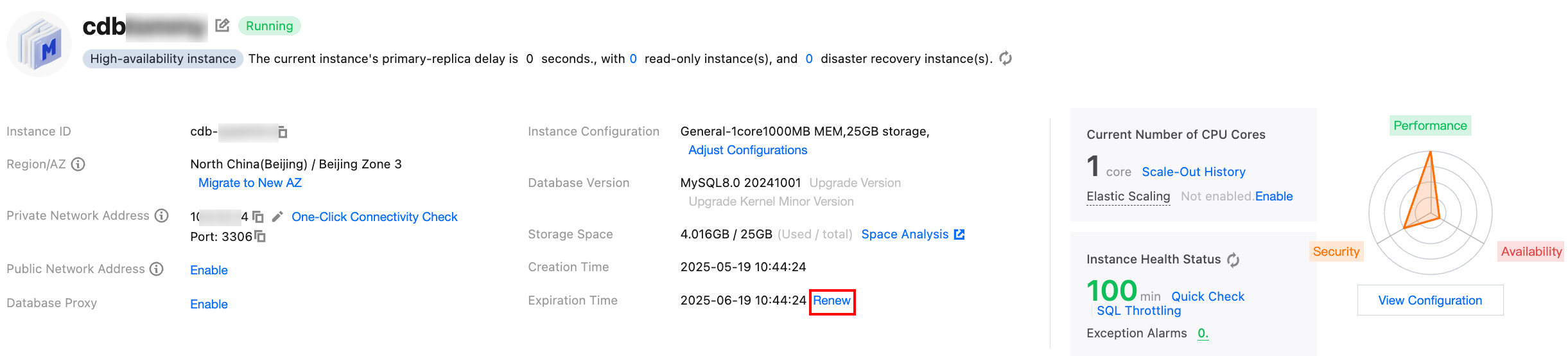
Log in to the MySQL Console. In the instance list, click Instance ID to go to the instance details page. Click Renew after the Expiration Time.
III. Managing Manual Renewal
Managing Manual Renewal via the Website Expense Center > Renewal Management Page
On the Renewal Management page, you can also perform other renewal management operations on your instances, such as viewing the renewal status of your instances, setting non-renewal upon expiration, and setting a unified expiry date. For detailed operation instructions, see Renewal Management.
Help and Support
Was this page helpful?
You can also Contact sales or Submit a Ticket for help.
Help us improve! Rate your documentation experience in 5 mins.
Feedback