By default, sub-users do not have permission to use MySQL SQL Insight (Database Audit). Therefore, you need to create a policy to allow sub-users to use this feature.
If you do not need to manage sub-user access to resources related to MySQL SQL Insight (Database Audit), you can skip this document.
CAM (Cloud Access Management, CAM) is a set of Web services provided by Tencent Cloud. It is primarily used to help users securely manage access permissions to resources under their Tencent Cloud accounts. Through CAM, you can create, manage, and delete users (or groups), and control which Tencent Cloud resources specified users can access via identity and policy management.
When using CAM, you can associate policies with a user or a group of users. Policies can grant or deny permissions for users to access specific resources and perform designated tasks. For more fundamental information on CAM policies, see Policy Syntax.
Grant Permissions to Sub-Users
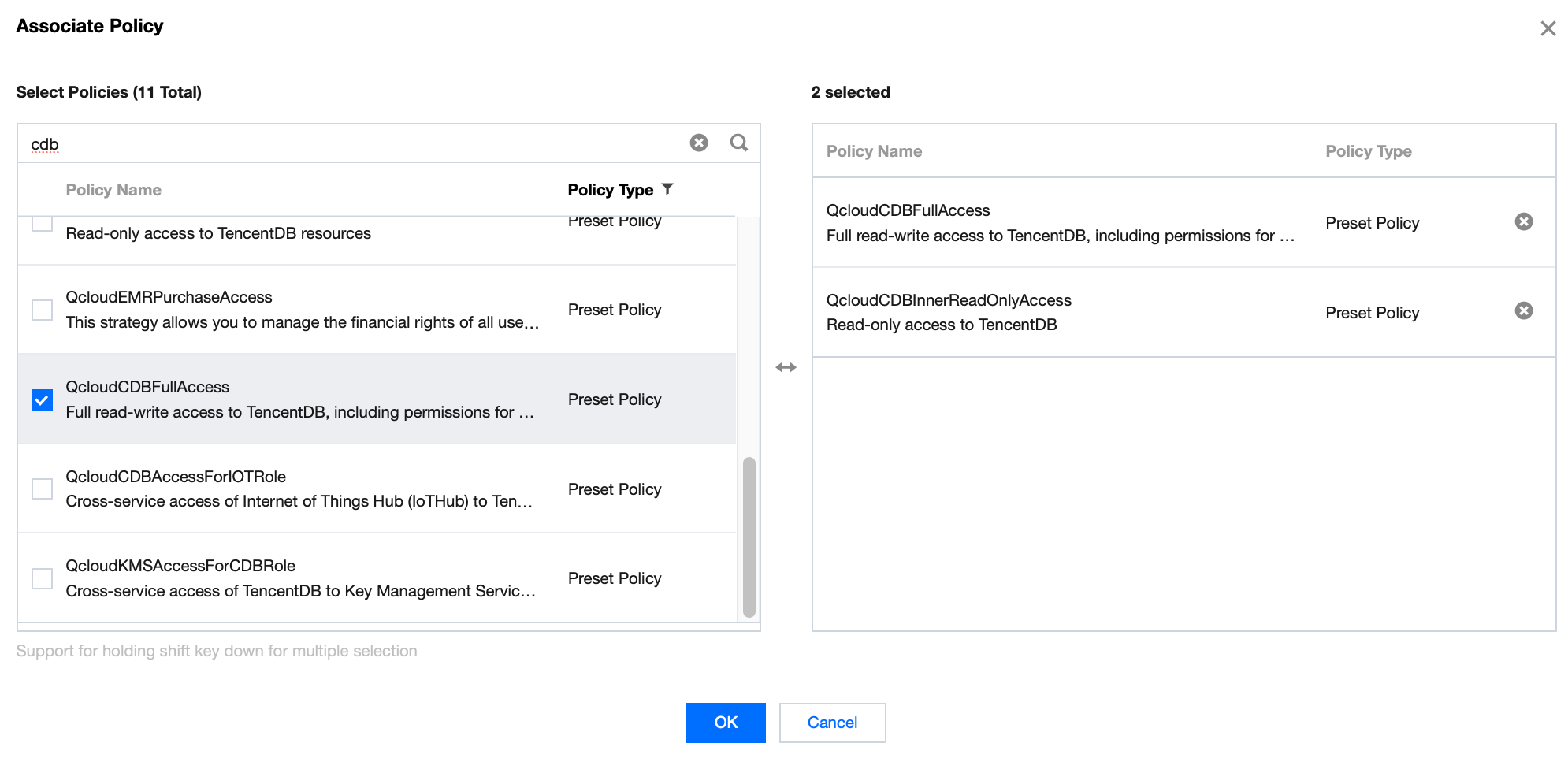
1. Log in to the CAM console as a root account, select the corresponding sub-user from the user list, and click Authorize.
2. In the pop-up dialog box, select the QcloudCDBFullAccess or QcloudCDBInnerReadOnlyAccess preset policy, click OK, to complete the sub-user authorization.
Note:
MySQL SQL Insight (Database Audit) is a sub-module of MySQL databases. Therefore, the two preset policies for MySQL mentioned above cover the permission policies required by MySQL SQL Insight (Database Audit). If a sub-user only needs the permissions required for MySQL SQL Insight (Database Audit), refer to Custom MySQL SQL Insight (Database Audit) Policy.
Policy Syntax
The CAM policy for MySQL SQL Insight (Database Audit) is described as follows:
{
"version":"2.0",
"statement":
[
{
"effect":"effect",
"action":["action"],
"resource":["resource"]
}
]
}
version: Required. Currently, only the value 2.0 is allowed.
statement: Used to describe detailed information about one or more permissions. This element includes permissions or permission sets for multiple other elements such as effect, action, and resource. A policy contains exactly one statement element.
effect: A required field that describes whether the result of the statement is "allow" or "deny". The possible values are allow and deny.
action: A required field used to describe allowed or denied operations. Operations can be APIs (described with the name prefix) or feature sets (a specific set of APIs described with the permid prefix).
resource: A required field that describes the specific data for authorization.
API Operations
In a CAM policy statement, you can specify any API operation from any service that supports CAM. For SQL Insight (Database Audit), use APIs prefixed with `name/cdb:`. To specify multiple operations within a single statement, separate them with commas, as shown below:
"action":["name/cdb:action1","name/cdb:action2"]
You can also use a wildcard to specify multiple operations. For example, you can specify all operations whose names start with the word "Describe", as shown below:
"action":["name/cdb:Describe*"]
Resource path
The general format of resource paths is as follows:
qcs::service_type::account:resource
service_type: Abbreviation for the product, which is cdb in this context.
account: The root account information of the resource owner, such as uin/326xxx46.
resource: the specific resource details of the product, each MySQL instance (instanceId) is a resource.
cdb-kf291vh3 is the ID of the MySQL instance resource, which is the resource in the CAM policy statement.
Examples
The following examples are provided solely to demonstrate CAM usage. For the complete API of MySQL SQL Insight (Database Audit), see the API Documentation.
{
"version":"2.0",
"statement":[
{
"effect":"allow",
"action":[
"name/cdb:DescribeAuditRules"
],
"resource":[
"*"
]
},
{
"effect":"allow",
"action":[
"name/cdb:CreateAuditPolicy"
],
"resource":[
"*"
]
},
{
"effect":"allow",
"action":[
"name/cdb:DescribeAuditLogFiles"
],
"resource":[
"qcs::cdb::uin/326xxx46:instanceId/cdb-kf291vh3"
]
}
]
}
Customizing a MySQL SQL Insight (Database Audit) Policy
1. Log in as the primary account to the CAM console, in the policy list, click Create Custom Policy.
2. In the pop-up dialog box, select Create by Policy Generator.
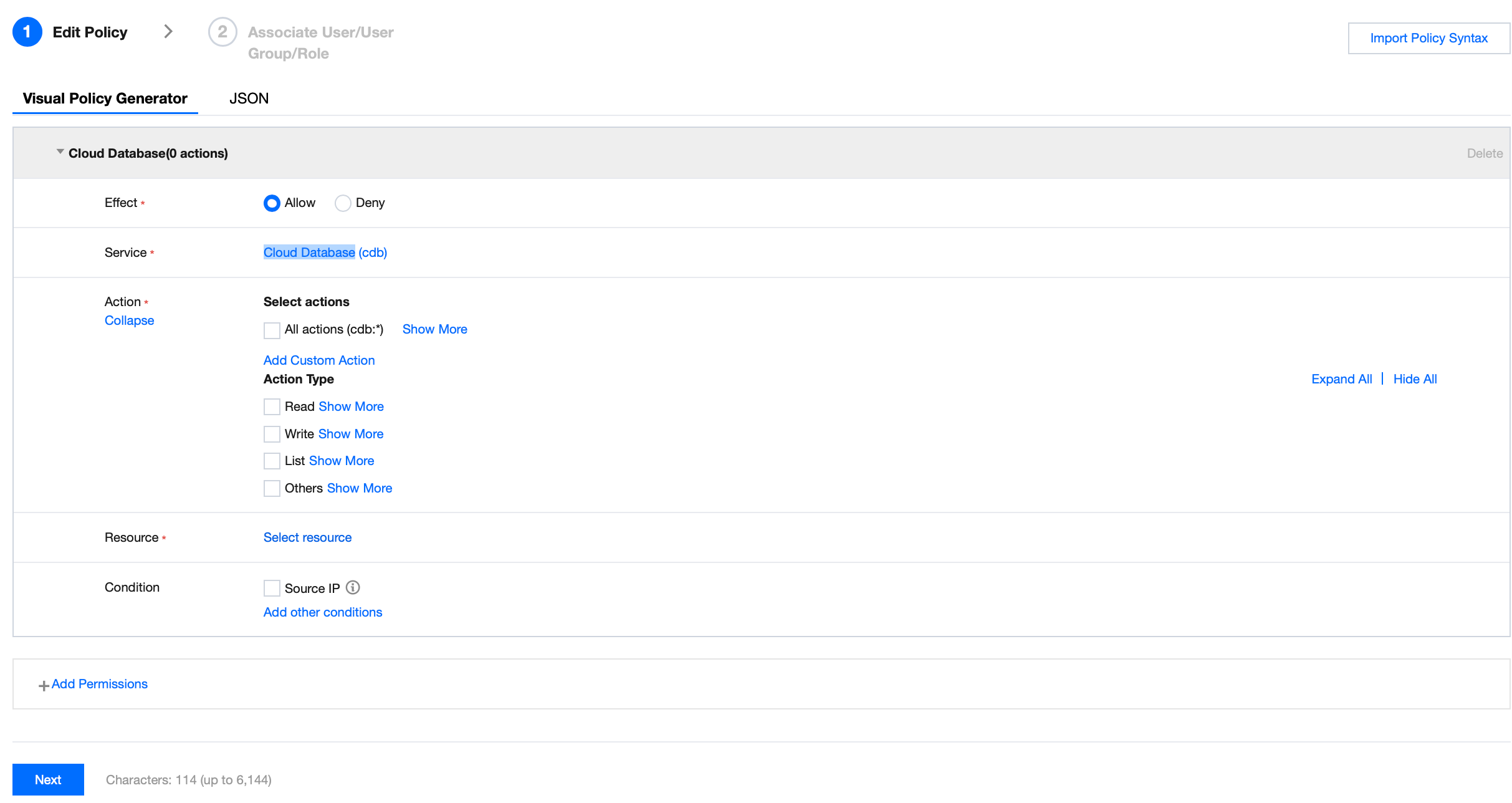
3. On the Select Service and Operation page, select the required configurations, and click Next.
Effect: Select Allow or Deny. If Deny is selected, the user or user group cannot obtain authorization.
Service: Select TencentDB for MySQL (cdb).
Action: Select all APIs for MySQL SQL Insight (Database Audit). For details, see the API Documentation.
Resource: See Resource Description Method, select all resources, which means you can operate the audit logs of all MySQL instances.
Condition: Optional, which configures the effective conditions for the above authorization.
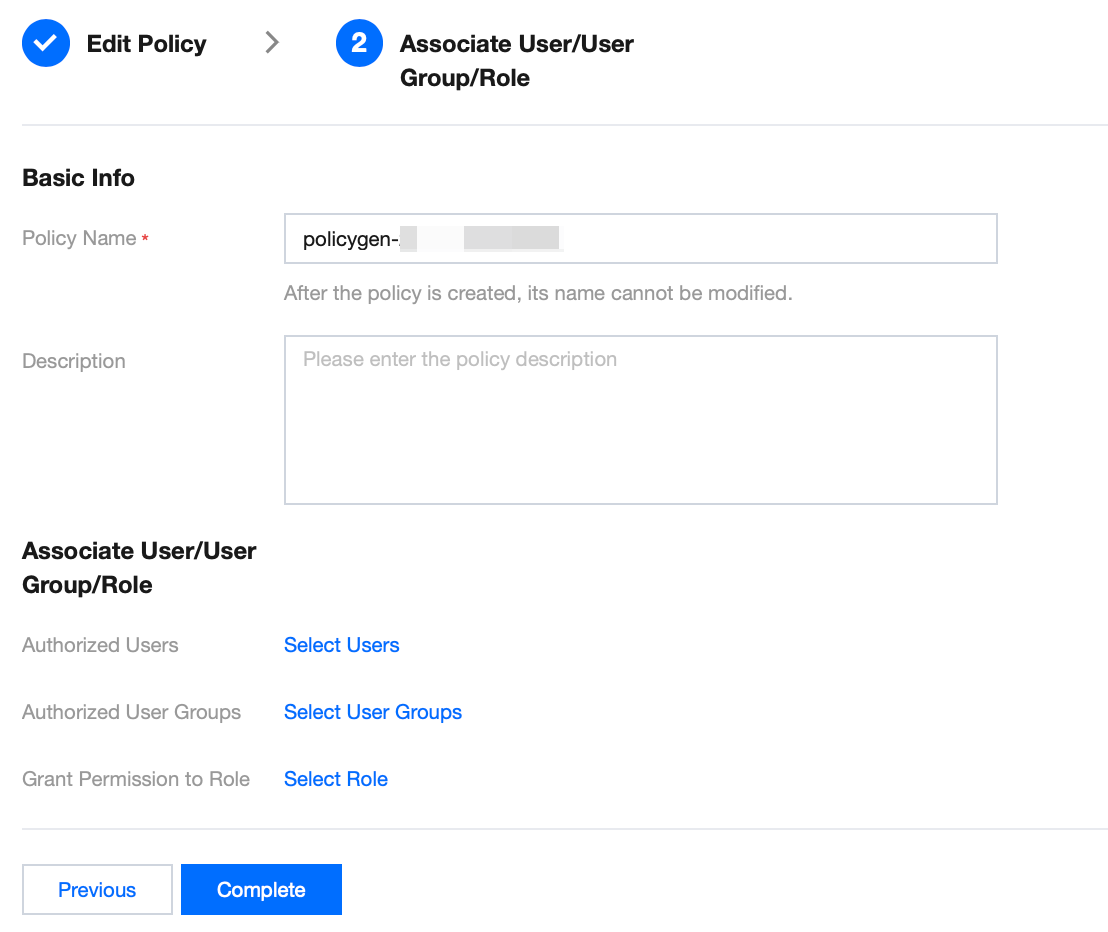
4. On the Associate User/User Group/Role page, enter the "Policy Name" (e.g., SQLAuditFullAccess) and "Description" according to naming conventions, then click Complete.
5. After returning to the policy list, you can view the newly created custom policy.