Setting Automatic Scale-out
Download
Focus Mode
Font Size
This document introduces operations related to setting custom scale-up.
Prerequisites
The instance architecture is TencentDB for MySQL general edition two-node, general edition three-node, and single-node local disk (read-only instance).
The instance specification is equal to or less than 32 cores before the CPU Elastic Scaling feature is enabled.
Your Tencent Cloud account has sufficient balance.
Billing Instructions
Enabling Custom Scale-up
Note:
After custom scale-up is enabled, there is a very low probability that enabling automatic scale-up (namely, automatic expansion performed within other periods) by period or by cycle will fail to be triggered. The backend will retry multiple times until the operation is successful.
1. Log in to the TencentDB for MySQL console. In the instance list, click an Instance ID or Manage in the Operation column to go to the instance details page.
2. Choose Instance Details > Specification Configurations > Elastic CPU Expansion, and click Enable.
3. In the Elastic CPU Expansion window, set the scale-up method, number of cores for scale-up, and scale-up time, and then click Expand Now.
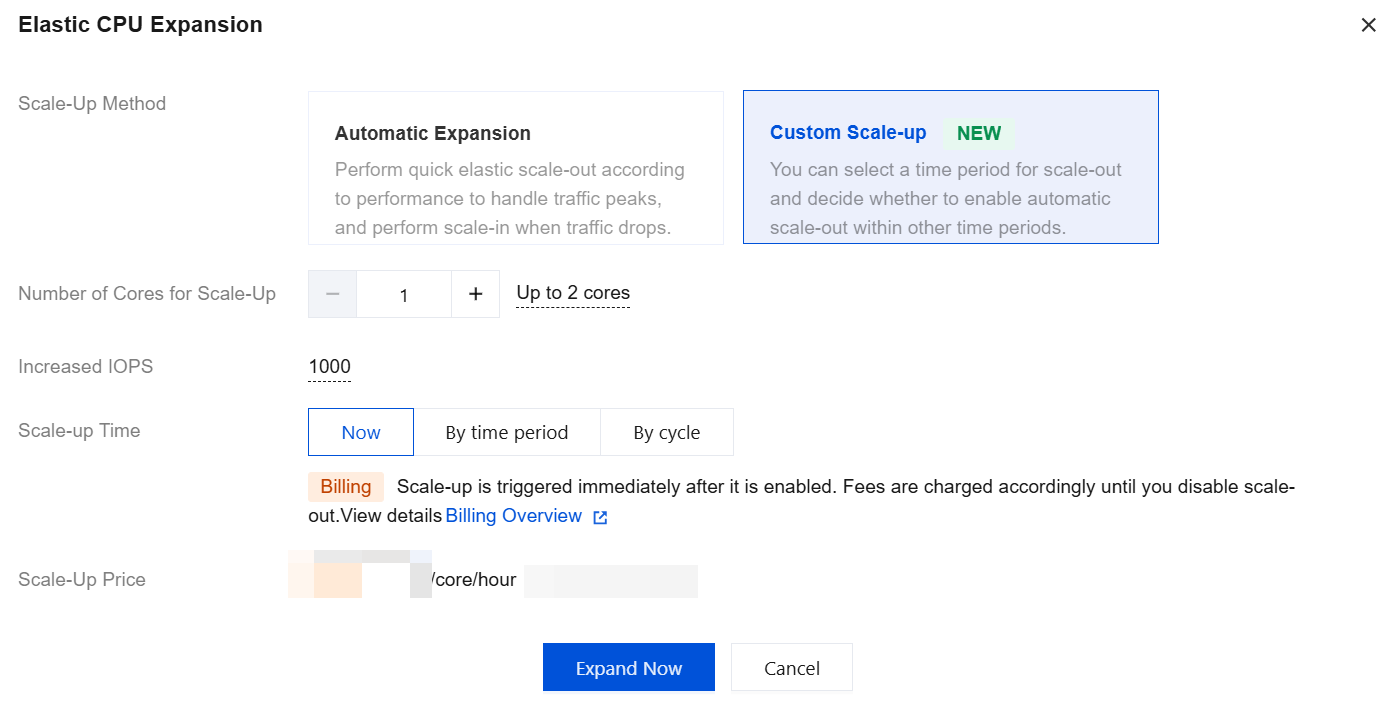
Scale-Up Method: Automatic expansion and custom scale-up are supported. Select custom scale-up here.
Automatic Expansion: Perform quick elastic scale-up according to performance to handle traffic peaks, and perform scale-down when traffic drops.
Custom Scale-up: You can select a period for scale-up and decide whether to enable automatic scale-out within other periods.
Number of Cores for Scale-up: Set the additional CPU cores for addition, supporting scale-up units of 1 core, with a maximum scale-up limit equal to the number of CPU cores in the current specification. For example, if the instance specification is 8 cores and 16 GB of memory, the maximum cores for scale-up is 8.
Increased IOPS: When the number of CPU cores increases by 1, IOPS increases by 1,000 accordingly.
Scale-up Time: Supports Now, By time period, and By cycle. Select one for configuration based on actual needs.

Scale-up Time: Selecting Now indicates that scale-up is triggered immediately after the feature is successfully enabled. After scale-up, automatic scale-down is not allowed. Manually disabling scale-up is required, and then it can be immediately scaled down to the original CPU core number.
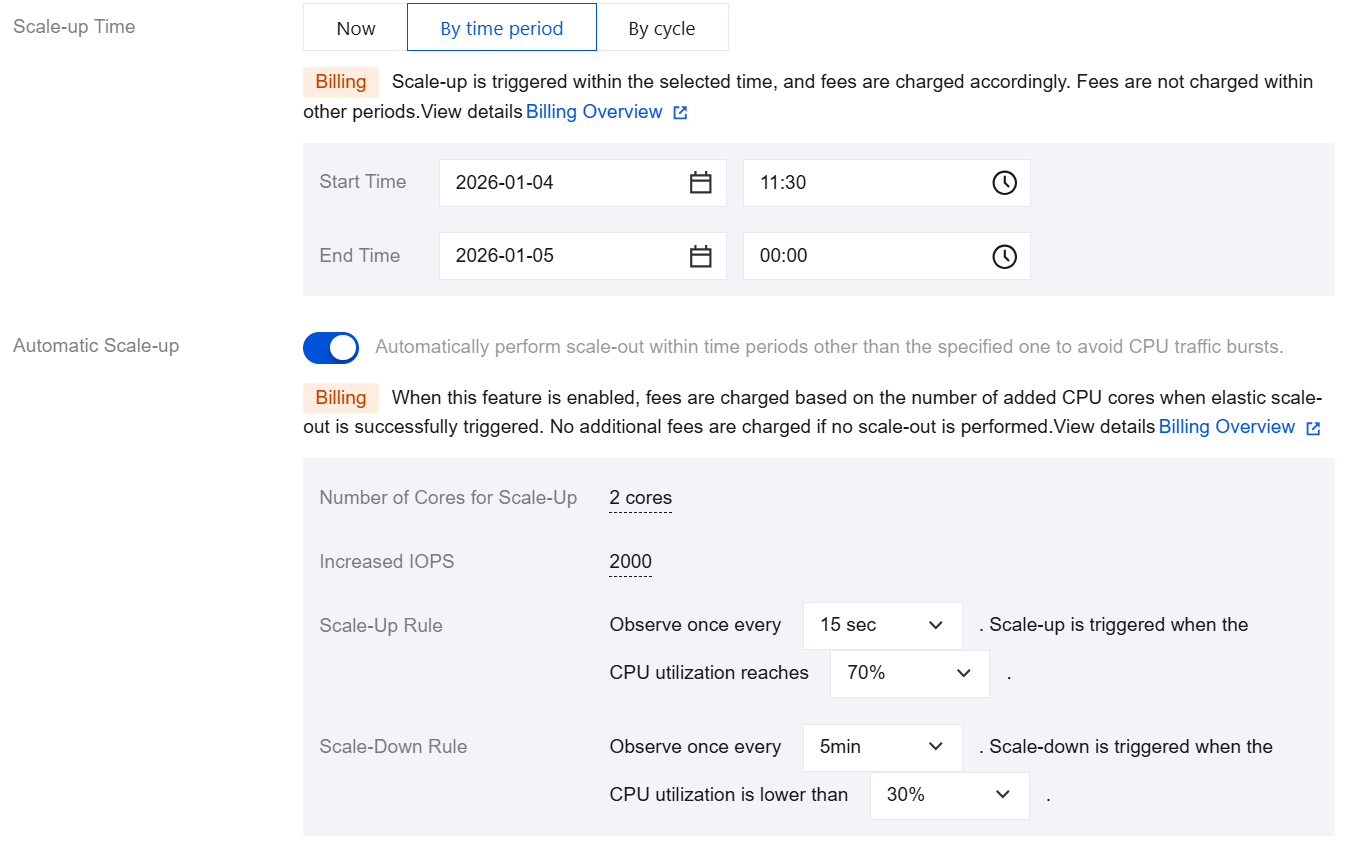
Scale-up Time: Selecting By time period indicates that scale-up is triggered within the selected period after the feature is successfully enabled. If automatic scale-up is not enabled, automatic scale-down will be performed within other periods.
Start Time: The default value is the day the feature is enabled. You can customize the start date and time with a granularity of 30 minutes.
End Time: You can customize the end date and time with a granularity of 30 minutes. If automatic renewal is not enabled for the instance, the latest selectable end time is the expiration time of the instance.
Automatic Scale-up: Disabled by default. You can choose whether to enable it as needed. Once enabled, automatic scaling can be implemented through scaling rules within other periods.
Number of Cores for Scale-up: The default value is the same as the number of CPU cores in the current instance specification.
Increased IOPS: By default, the IOPS increases by 1,000 for each core scaled up.
Scale-Up Rule: Set the observation period and threshold for triggering scale-up.
Observation period: Supported options include 15 seconds, 30 seconds, 45 seconds, 1 minute, 3 minutes, 5 minutes, 10 minutes, 15 minutes, and 30 minutes.
Threshold: Supported options include 40%, 50%, 60%, 70%, 80%, and 90%.
Scale-Down Rule: Set the observation period and threshold for triggering scale-down.
Observation period: Supported options include 5 minutes, 10 minutes, 15 minutes, and 30 minutes.
Threshold: Supported options include 10%, 20%, and 30%.
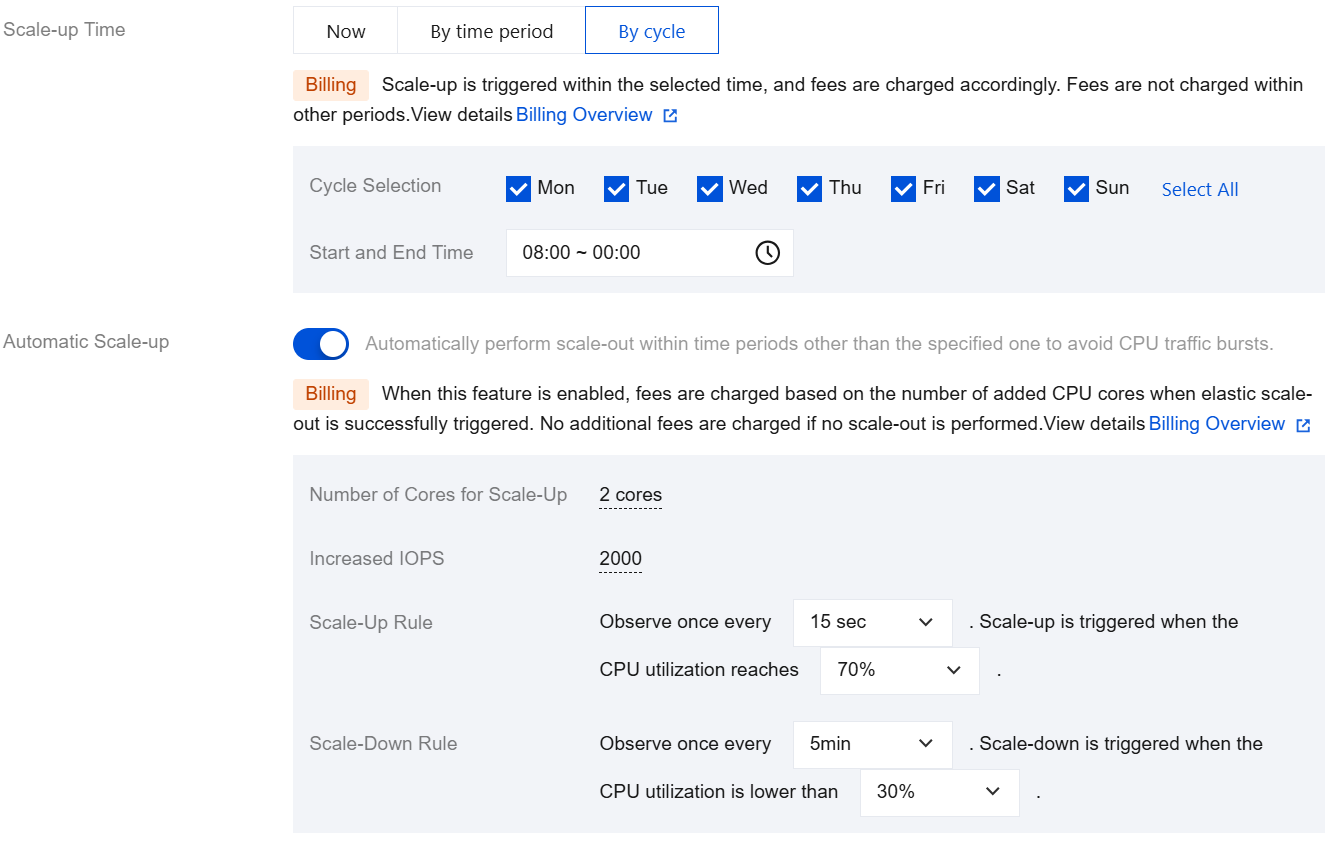
Scale-up Time: Selecting By cycle indicates that scale-up is triggered within the selected cycle after the feature is successfully enabled. If automatic scale-up is not enabled, scale-down will be performed within other cycles.
Cycle selection: Monday to Sunday is checked by default. You can customize the cycle, but at least one day should be selected.
Start and End Time: Default value: 08:00 - 00:00 (the next day). You can customize the start and end time with a granularity of 30 minutes.
Automatic Scale-up: Disabled by default. You can choose whether to enable it as needed. Once enabled, automatic scaling can be implemented through scaling rules within other cycles.
Number of Cores for Scale-Up: The default value is the same as the number of CPU cores in the current instance specification.
Increased IOPS: By default, the IOPS increases by 1,000 for each core scaled up.
Scale-Up Rule: Set the observation period and threshold for triggering scale-up.
Observation period: Supported options include 15 seconds, 30 seconds, 45 seconds, 1 minute, 3 minutes, 5 minutes, 10 minutes, 15 minutes, and 30 minutes.
Threshold: Supported options include 40%, 50%, 60%, 70%, 80%, and 90%.
Scale-Down Rule: Set the observation period and threshold for triggering scale-down.
Observation period: Supported options include 5 minutes, 10 minutes, 15 minutes, and 30 minutes.
Threshold: Supported options include 10%, 20%, and 30%.
4. When the instance status changes from "configuring elastic scale-up policy" to "running", the feature is enabled successfully.
Modifying the Elastic Scale-up Policy for CPU
After custom scale-up is enabled, only adjustments to the current CPU elastic scale-up policy for the instance are supported. If you want to change it, first disable CPU elastic scale-up, and then re-enable it while changing it to the new policy. For example, if the current policy is custom scale-out of 2 cores with scale-up time being now, you are only allowed to adjust the number of cores for scale-up through the Modify operation. Changing the scale-up method or time is not supported through this operation.
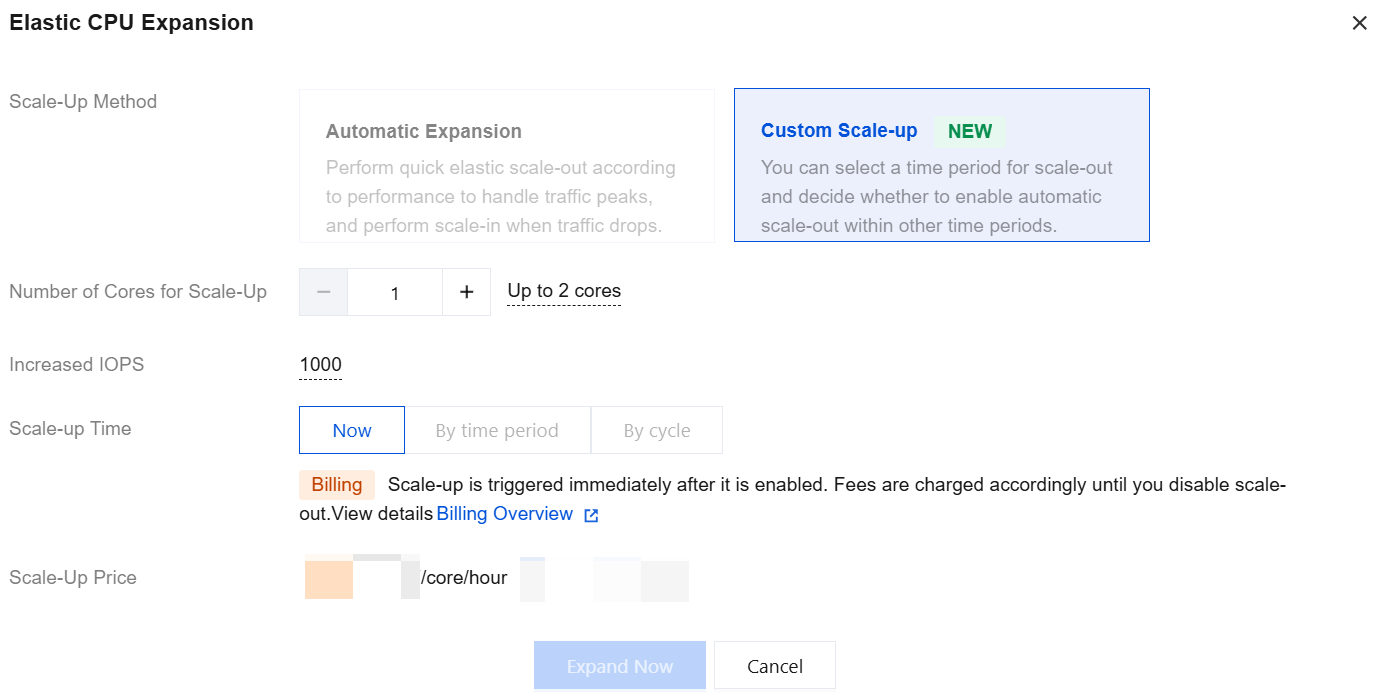
If your current change operation in the console is allowed, you may go to Instance Details > Elastic CPU Expansion and click Edit for reconfiguration.
Disabling Custom Scale-Out
Note:
Once the feature is disabled, the elastic scale-up is unavailable for the current instance.
1. Log in to the TencentDB for MySQL console. In the instance list, click an Instance ID or Manage in the Operation column to go to the instance details page.
2. Choose Instance Details > Specification Configurations > Elastic CPU Expansion, and click Disable Scale-Out.
3. In the pop-up window Disable CPU Expansion, click OK.
Related APIs
API | Description |
This API is used to enable the Elastic CPU Expansion feature for instances. | |
This API is used to disable the Elastic CPU Expansion feature for instances. |
Help and Support
Was this page helpful?
You can also Contact sales or Submit a Ticket for help.
Help us improve! Rate your documentation experience in 5 mins.
Feedback