TencentDB for MySQL supports completing backup retention settings before or when an instance is terminated. This prevents backups from being deleted immediately in case of an accidental instance termination. Users still possess the backups of this instance for a specified period after the instance is terminated. This document describes the operations and details related to backup retention settings.
Prerequisites
The instance architecture is two-node or three-node.
1. Log in to the TencentDB for MySQL console. In the instance list, click Instance ID or Manage in the Operation column to access the instance management page.
2. On the instance management page, select Backup and Restoration, and click Backup Retention Settings.
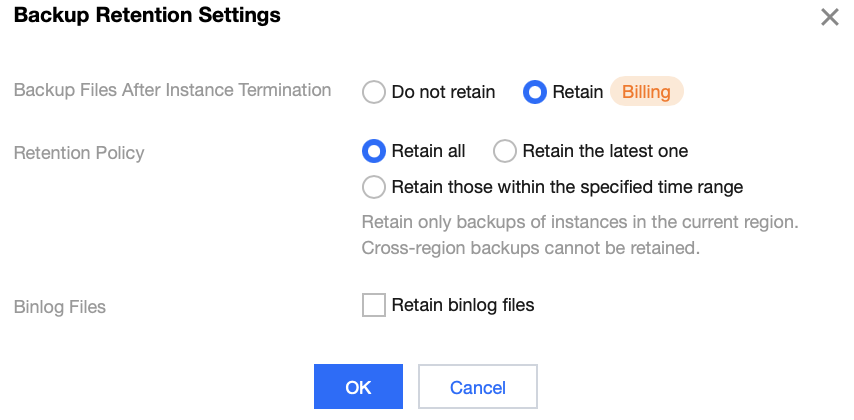
3. In the pop-up window, complete the following configurations, and click OK.
Parameter
Description
Backup Files After Instance Termination
Whether to retain backup files after instance termination. You can select the Retain or Do not retain option.
Do not retain: If you select Do not retain, backups will be terminated simultaneously after instance termination and will not be saved. Data cannot be restored on the cloud.
Retain: If you select Retain, backups within the specified scope will be retained after the instance is terminated. These backups are billed.
Retention Policy
This parameter is displayed if you choose to retain backup files after instance termination. The options are as follows:
Retain all: Retain all backups generated by the instance in the current region. You can choose whether to retain the binlog files.
Retain the latest one: Retain the latest 1 backup generated by the instance in the current region. By default, binlog files cannot be retained.
Retain those within the specified time range: Retain backups generated by the instance in the current region and after the selected time. You can choose whether to retain the binlog files. For example, you can retain backups generated after April 28, 2025.
Binlog Files
When "Retain all" or "Retain those within the specified time range" is selected for Retention Policy, this parameter is displayed, and you can choose whether to retain binlog files.
Querying and Downloading Backups of Terminated Instances
For instances whose backup files are retained after termination, their backups can be queried and downloaded through the database backup page after the instances are terminated and removed.
Note:
After instance termination, backup files that comply with the retention policy will not immediately appear in the list under Database Backup > Backup List > Backups of Terminated Instances.
After instance termination, the system requires time to transfer the backup files in the background, which delays the display of backup files for terminated instances. If you cannot find the target backup file in the list under Backups of Terminated Instances, please refresh and check later.
During the delay, you can still view the backup files in Database Backup > Backup List > Data Backup List.
If the backup file is still not listed under Backups of Terminated Instances after 24 hours, please submit a ticket for assistance.
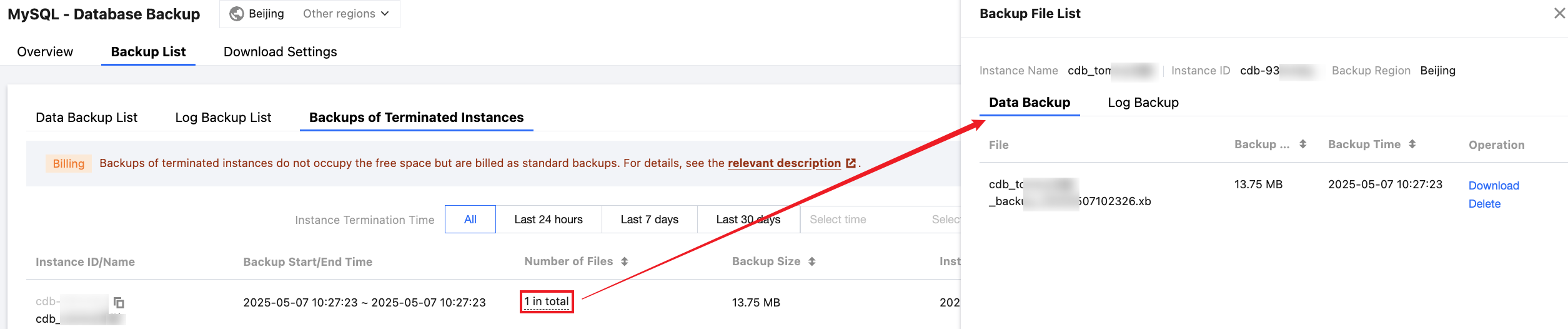
2. On the Database Backup page, choose Backup List > Backups of Terminated Instances. You can query the retained backup information in the list.
Filter from the list: You can filter backups by instance decommissioning time to quickly obtain the corresponding backups.
Filter by instance ID: You can accurately filter target backups of terminated instances by instance ID.
Refresh: You can refresh the list.
Set list fields: You can click the
button to set the fields you want to display in the list.
Download: You can download the list (containing no more than 10,000 data entries).
3. To download a backup file, find the corresponding instance in the list, click the number in the Number of Files column, and view and download the corresponding backup file in the right pop-up window.
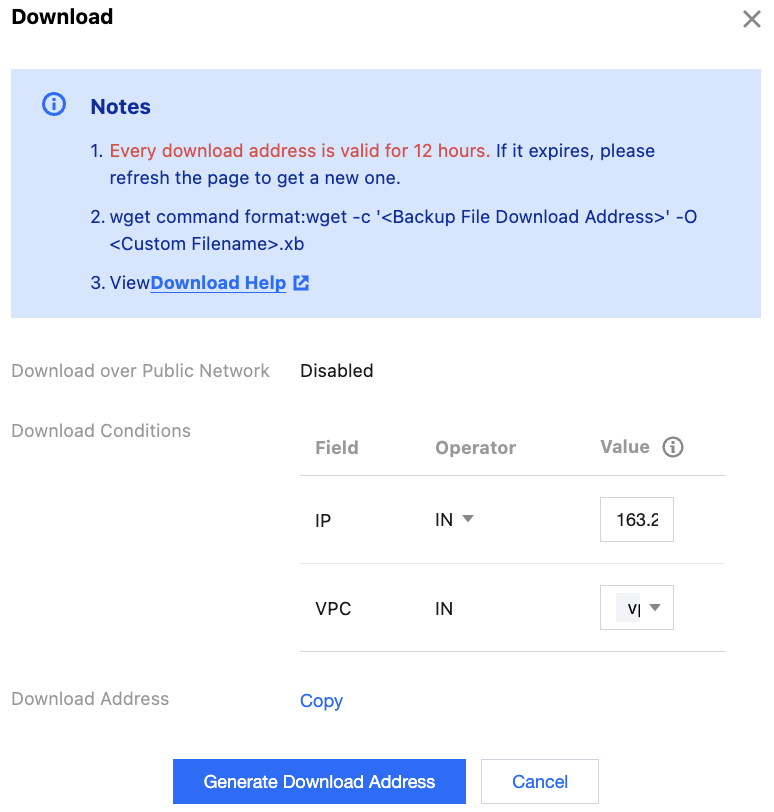
4. Click Download. In the pop-up window, set the Download Conditions, then click Generate Download Address. After successful generation, you can copy the link and use the wget command to download files.
Note:
Every download address is valid for 12 hours. If it expires, please refresh the page to obtain a new one.
If public network download is enabled in the download settings, download conditions are not required. You can copy the download link and download it using the wget command, or download it directly to your local machine. For more information about how to set backup download rules, see Setting Backup Download Rules.