Upgrading the Kernel Minor Version of the Database Proxy
Download
Focus Mode
Font Size
The database proxy periodically updates its kernel minor versions. Some new features require a higher proxy version for support, and you can manually upgrade it in the console. This document describes how to upgrade the kernel minor version of the database proxy via the console.
Warning:
If a bug occurs in the background program or the system identifies a security vulnerability, the system will send upgrade notifications via internal messages, SMS, and other channels. TencentDB for MySQL will be upgraded during your instance's maintenance window. However, this automatic upgrade is only an auxiliary system measure and does not guarantee that all instances can be upgraded to the latest kernel minor version immediately. You can check the kernel minor version status on the database proxy page and manually upgrade it promptly to avoid potential risks that may exist in historical kernel minor versions. If you fail to complete the upgrade within six months after receiving an emergency service upgrade/version upgrade notification due to your own reasons, you will be responsible for any resulting losses and consequences, such as service interruption or data loss. For details, see the TencentDB for MySQL Service Level Agreement.
Background Conditions
Precautions
Upgrading the minor version of the database proxy kernel may cause a second-level momentary disconnection. It is recommended to perform the upgrade during off-peak hours or ensure your application has an automatic reconnection mechanism.
If the upgrade fails, it may be because the database kernel minor version is lower than 20211031. Please first upgrade the database kernel version, then upgrade the database proxy kernel version.
Versions 1.0, 1.1, and 1.2 of the database proxy kernel are legacy releases that are no longer maintained or updated. These versions may contain known issues and vulnerabilities, and are not recommended for production use. It is recommended to upgrade to version 1.3.1 or later.
Attention:
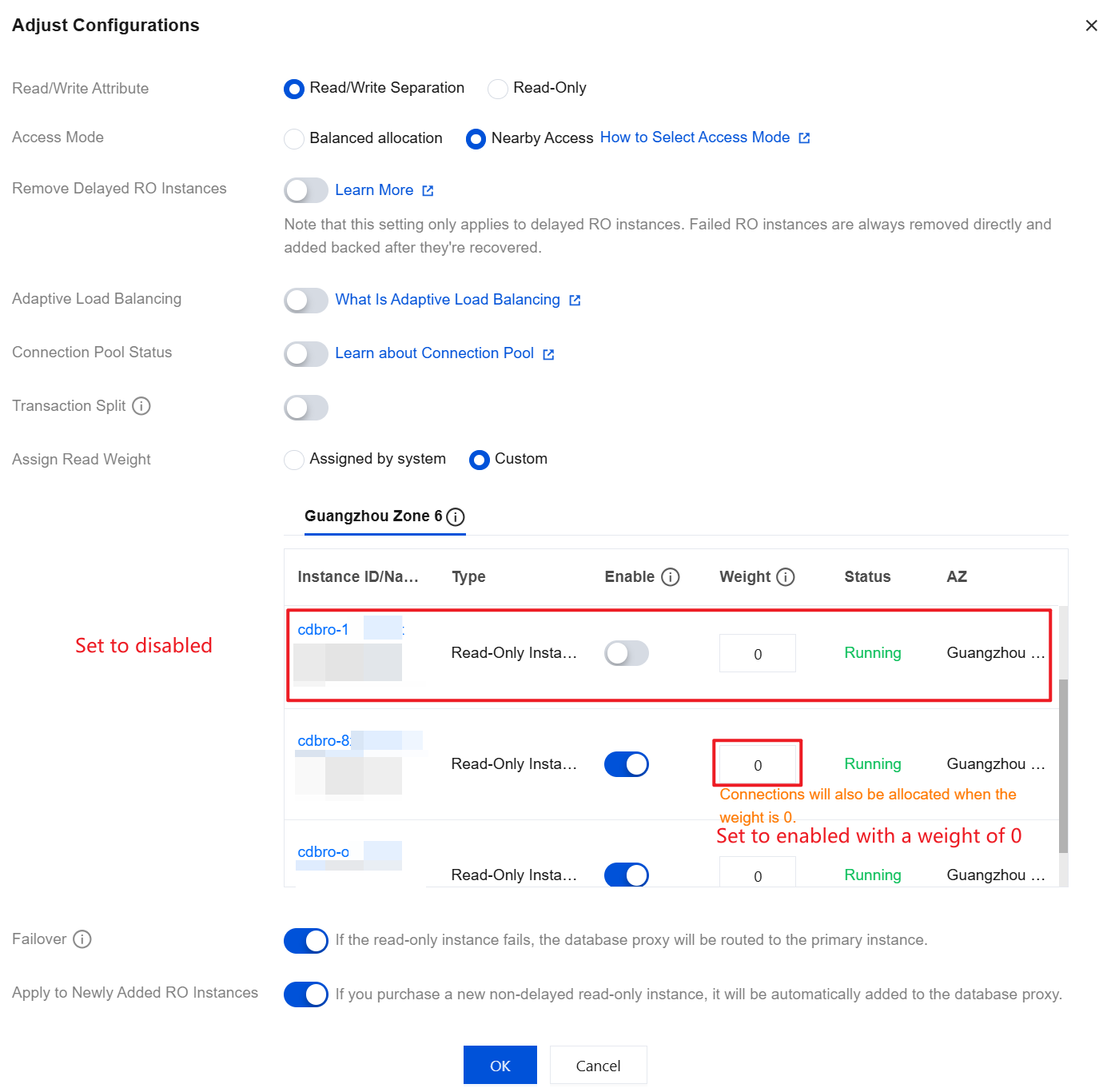
In database proxy kernel versions 1.0 and 1.1, read-only instances with a weight of 0 will not establish connections. In versions 1.2 and later, they will establish connections. It is recommended to check the read-write separation settings after the version is upgraded. For instances that do not participate in read-write separation, disable them in the console rather than setting the weight to 0.
Definition Description of the Database Proxy Kernel Version
Preview version: the latest version of the database proxy, which typically includes new features, but may have unknown bugs. It is released primarily for users to experience the latest features.
Stable version: a tested and verified database proxy version, typically used in production environments. It offers greater reliability than the preview version but may not include the latest features.
Outdated version: older database proxy versions that are no longer maintained or updated. Outdated versions may have known issues and vulnerabilities and are not recommended for production use.
Operation Steps
1. Log in to the TencentDB for MySQL Console, select a region at the top, and then click the target instance ID to go to the instance management page.
2. On the instance management page, select the Database Proxy tab.
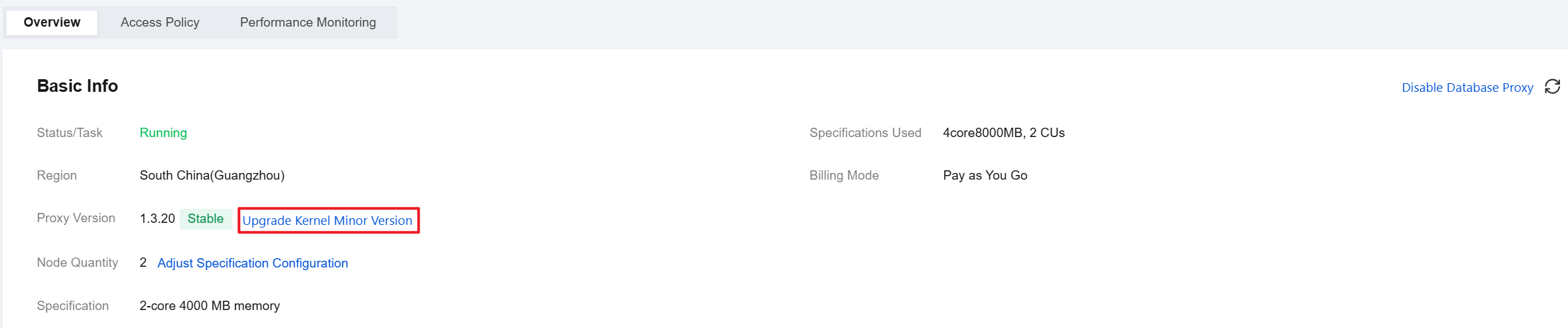
3. On the Database Proxy page, choose Overview > Basic Info > Proxy Version, and click Upgrade Kernel Minor Version.
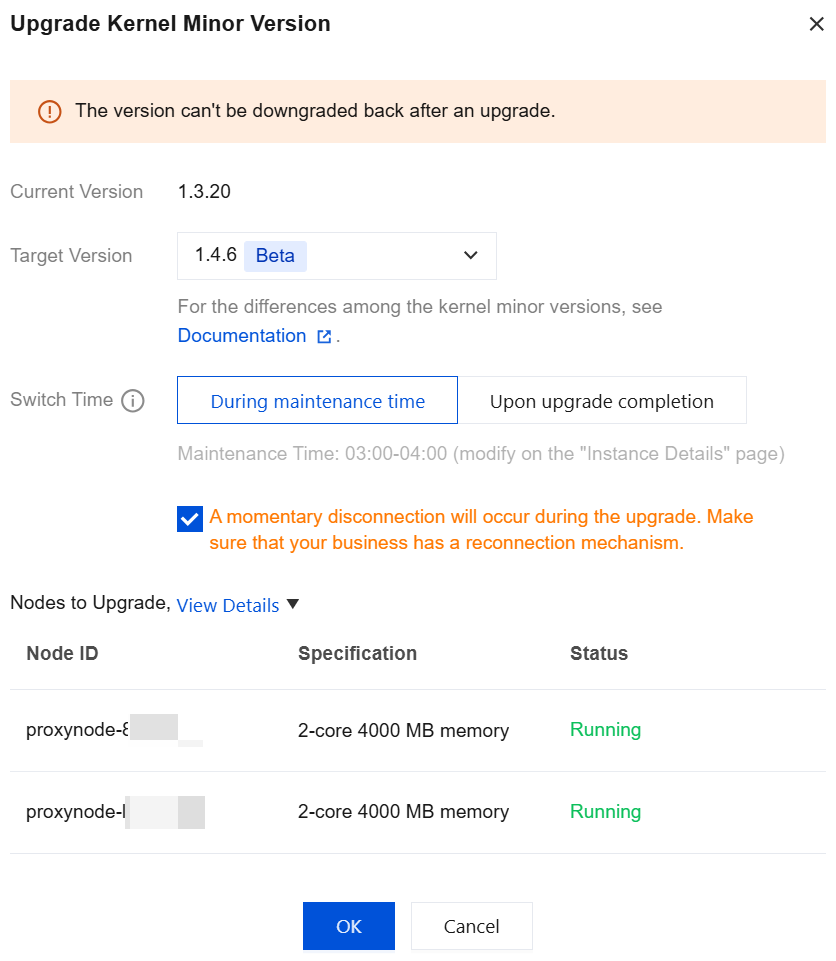
4. In the pop-up dialog box, check the target version to be upgraded, select the upgrade switch time, and click OK after confirmation.
Switch time:
During maintenance time: Upgrades are performed within the maintenance window. You can modify the maintenance window information on the instance details page.
Upon upgrade completion: The upgrade will be performed immediately after confirmation.
Attention:
After a version upgrade, rolling back to an earlier version is not supported.
During the upgrade process, brief disconnections lasting seconds may occur. Ensure your business implements reconnection mechanisms.
By default, all nodes are upgraded to the kernel minor version simultaneously. If some nodes are in an abnormal status, the upgrade cannot be performed.
Help and Support
Was this page helpful?
You can also Contact sales or Submit a Ticket for help.
Help us improve! Rate your documentation experience in 5 mins.
Feedback