Automatic Incremental Backup Failure Caused by a Full Disk
Download
Focus Mode
Font Size
Scenario Description
The database has not been automatically backed up incrementally.
Cause Analysis
As business data continues to grow, the load on the database instance gradually increases, and the previously configured storage space (hard disk) may become insufficient. When the instance storage space reaches its upper limit and enters a full state, the database will reject write operations, which in turn causes incremental backup failures.
Problem-solving Ideas
You need to scale out the storage space of the involved TencentDB for MySQL instance. After the storage space is scaled out, perform a full backup, and then incremental backups can be performed successfully.
Operation Steps
1. Log in to the MySQL console. On the instance list page, select the target instance and choose More > Adjust Configurations in the operation column.
2. On the Adjust Instance Configurations page, scale out the storage space of the instance.

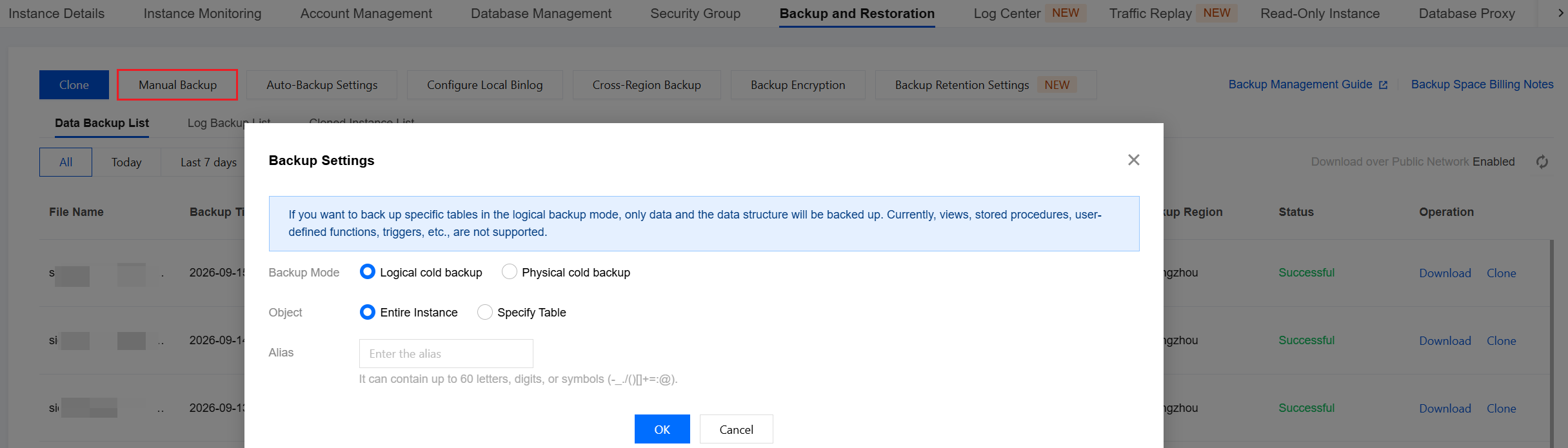
3. On the Backup and Restoration page of the instance, manually initiate a full backup.
Help and Support
Was this page helpful?
You can also Contact sales or Submit a Ticket for help.
Help us improve! Rate your documentation experience in 5 mins.
Feedback