tencent cloud

Tencent Push Notification Service

Release Notes
Announcements
Features
SDK for Android
SDK for iOS
SDK for macOS
Product Introduction
Overview
Strengths
Use Cases
Global Deployment
Purchase Guide
Billing Overview
Purchase Directions
Billing Modes
Free Trial
Payment Overdue
Getting Started
Creating Products and Applications
Quick Integration with Android
Quick Integration with iOS
Creating a Push Task
Querying Push Records
Guidelines for Push Testing Methods
Product Restrictions
Operation Guide
Push Management
Advanced Push Features
Practical Tutorial
iOS Badge Feature Practice
API Documentation
Overview
API Overview
Call Method
Push APIs
Tag APIs
Account APIs
Statistics APIs
User Attribute APIs
Server-Side Error Codes
Server SDKs
API (Java)
SDK Documentation
Android Integration Guide
iOS Integration Guide
Client Integration Plugin
macOS Integration Guide
Users and Permissions
Quick Configuration
Advanced Custom Configuration
Resource Tag
Service Agreement
Service Level Agreement
FAQs
iOS
Android
Flutter
Others
Tencent Push Notification Service Policy
Privacy Policy
Data Processing and Security Agreement
Developer Agreement
Contact Us
Glossary

Overview

PDF
Focus Mode
Font Size
Last updated: 2024-01-16 17:42:20
Pushing messages to iOS devices involves client application (Client App), APNs (Apple Push Notification service), and Tencent Push Notification Service server (Tencent Push Notification Service Provider). They need to collaborate throughout the entire process to successfully push messages to the client. An exception from any of them can lead to a push message delivery failure.

SDK Description

File Composition

XGPush.h, XGPushPrivate.h (header files where the SDK provides APIs)
libXG-SDK-Cloud.a (main SDK file)
libXGExtension.a, XGExtension.h ("arrival and rich media" extension library and API header file)
XGMTACloud.framework ("click report" component)
XGInAppMessage.framework (in-app messages)

Release Notes

Supports iOS 8.0 and later
For iOS 10.0 and later
You need to introduce UserNotification.framework.
We recommend you use Xcode 8.0 and later
If you use Xcode 7 or an earlier version , you need to configure the SDK for iOS on your own to support the compilation of the UserNotification framework.

Description

The SDK for iOS provided by Tencent Push Notification Service contains APIs for clients to implement message pushing. It is mainly used to:
Get and register device tokens automatically to facilitate integration.
Bind accounts, tags, and devices, so you can push messages to specific user groups and have more push methods.
Report the number of clicks, i.e., how many times a message is clicked by users.

Push channel

Message delivery channels used by Tencent Push Notification Service:
Tencent Push Notification Service channel: the channel built by Tencent Push Notification Service. It can deliver messages only when the Tencent Push Notification Service is online (maintaining a persistent connection with the Tencent Push Notification Service backend server). It requires the SDK 1.2.8.0 or later.
APNs channel: Apple's official message push service. For more information, please see APNs.

Flow Description

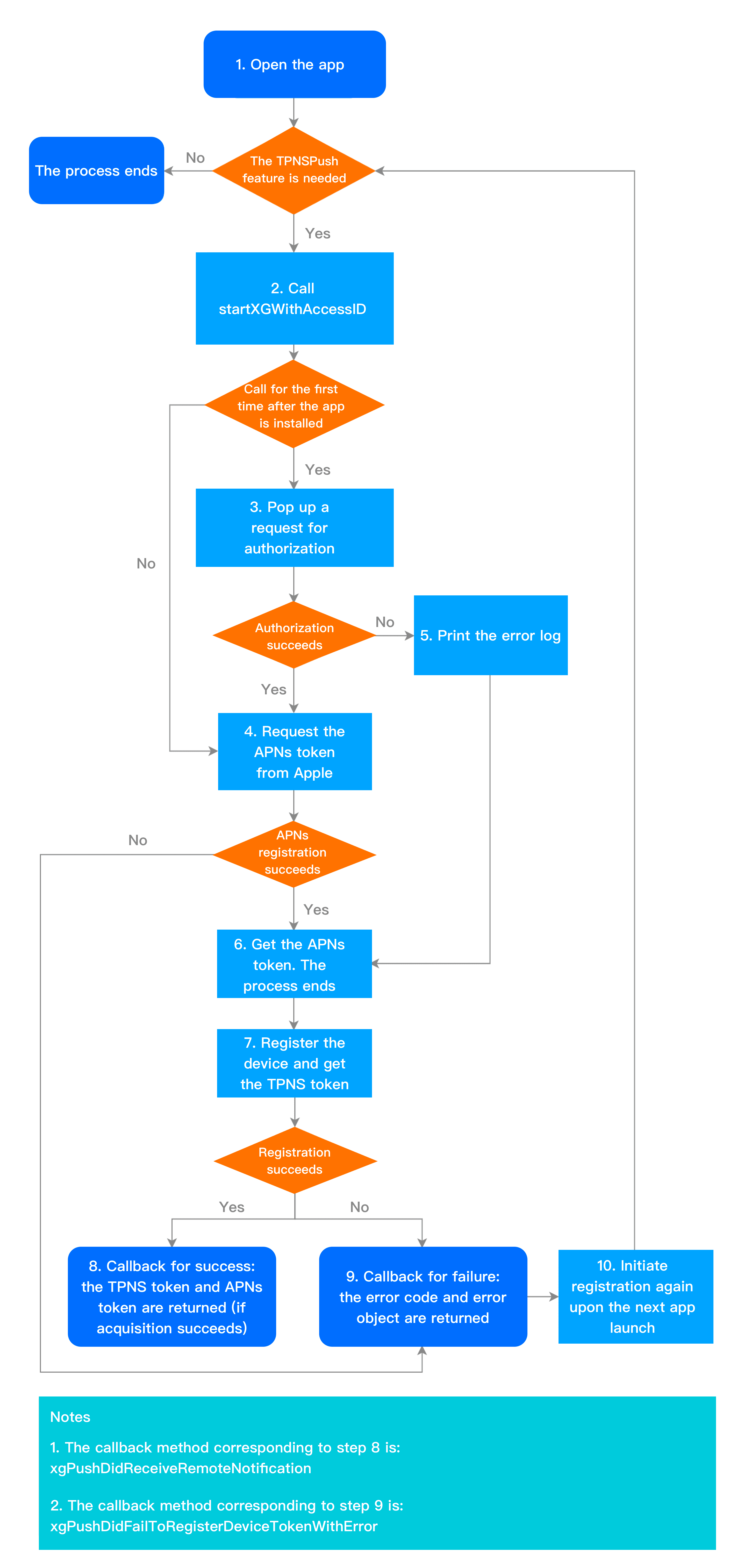
Device registration flow

The device registration flow is as shown below. For specific API methods, see the API documentation.


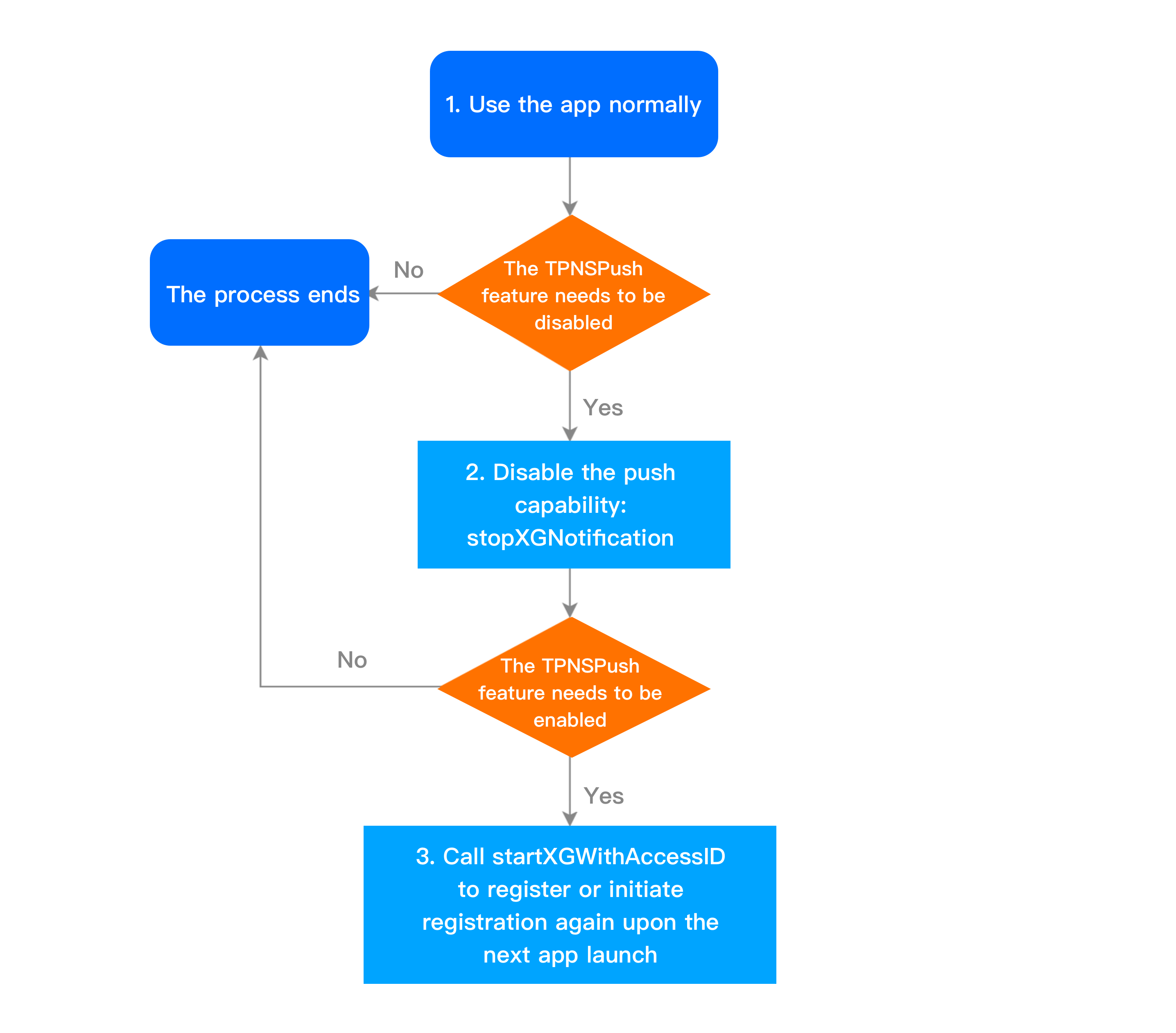
Device unregistration flow

The device unregistration flow is as shown below. For specific API methods, see the API documentation.


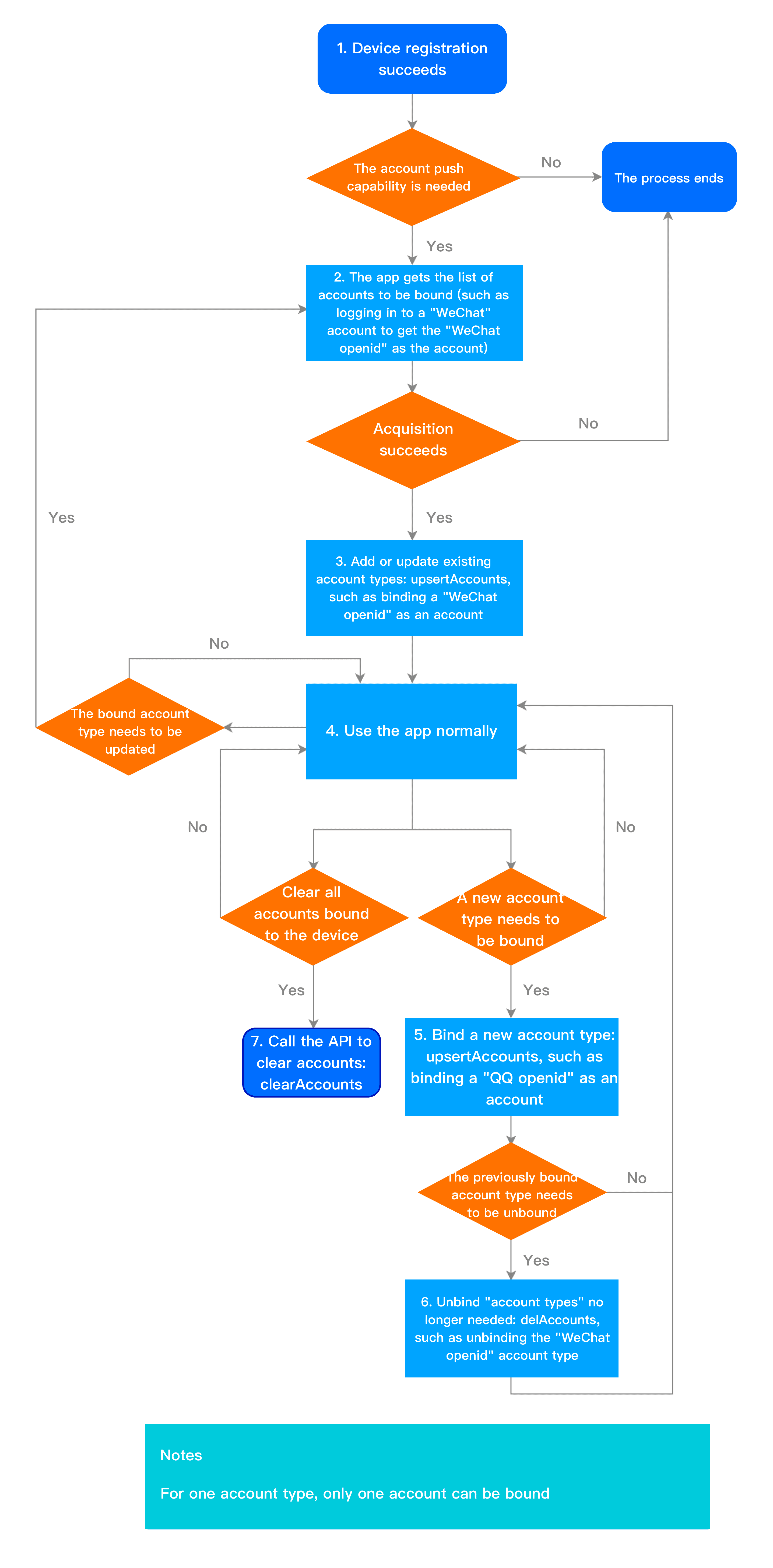
Account flow

The account flow is as shown below. For specific API methods, see the API documentation.


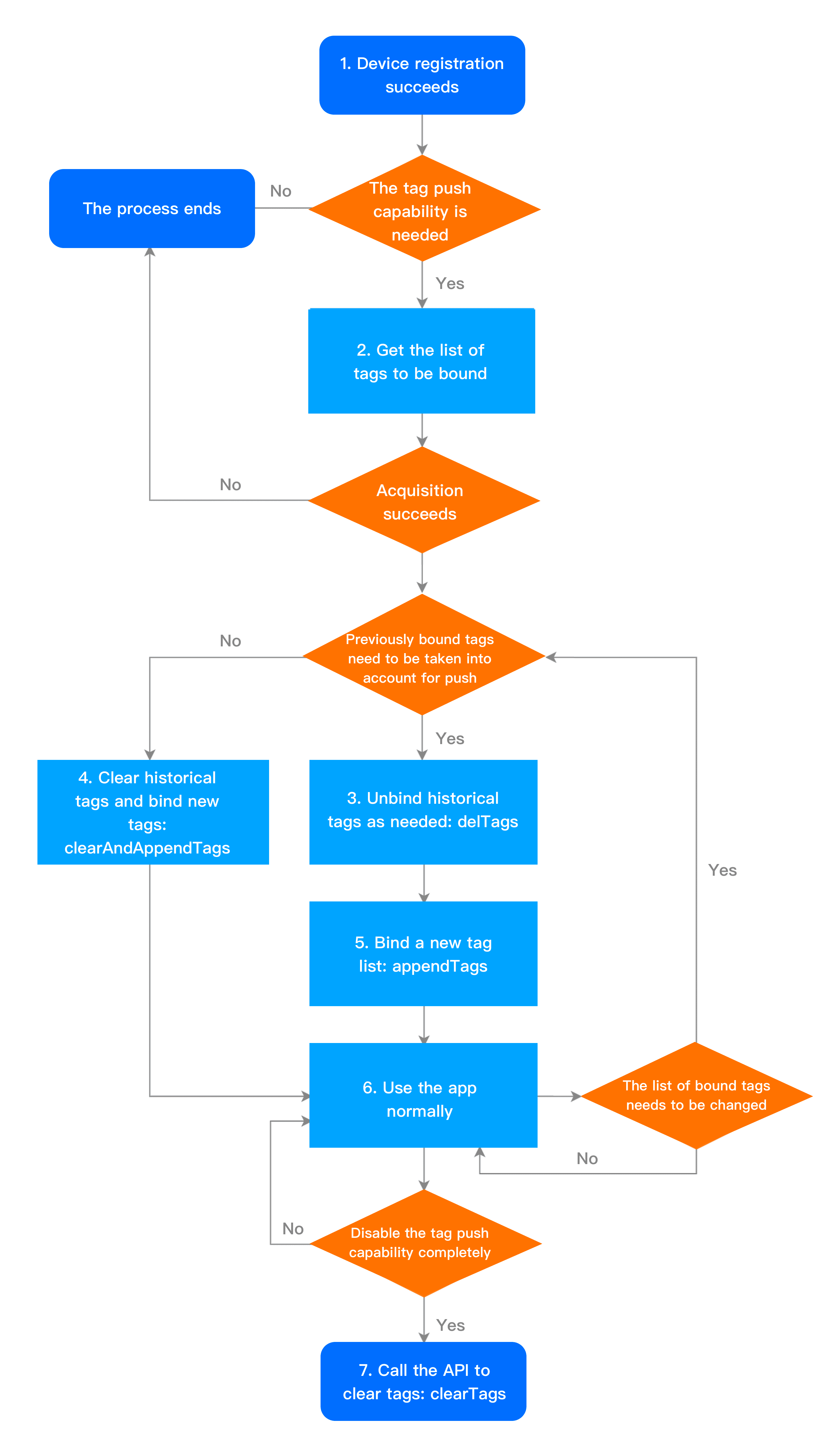
Tag flow

The tag flow is as shown below. For specific API methods, see the API documentation.


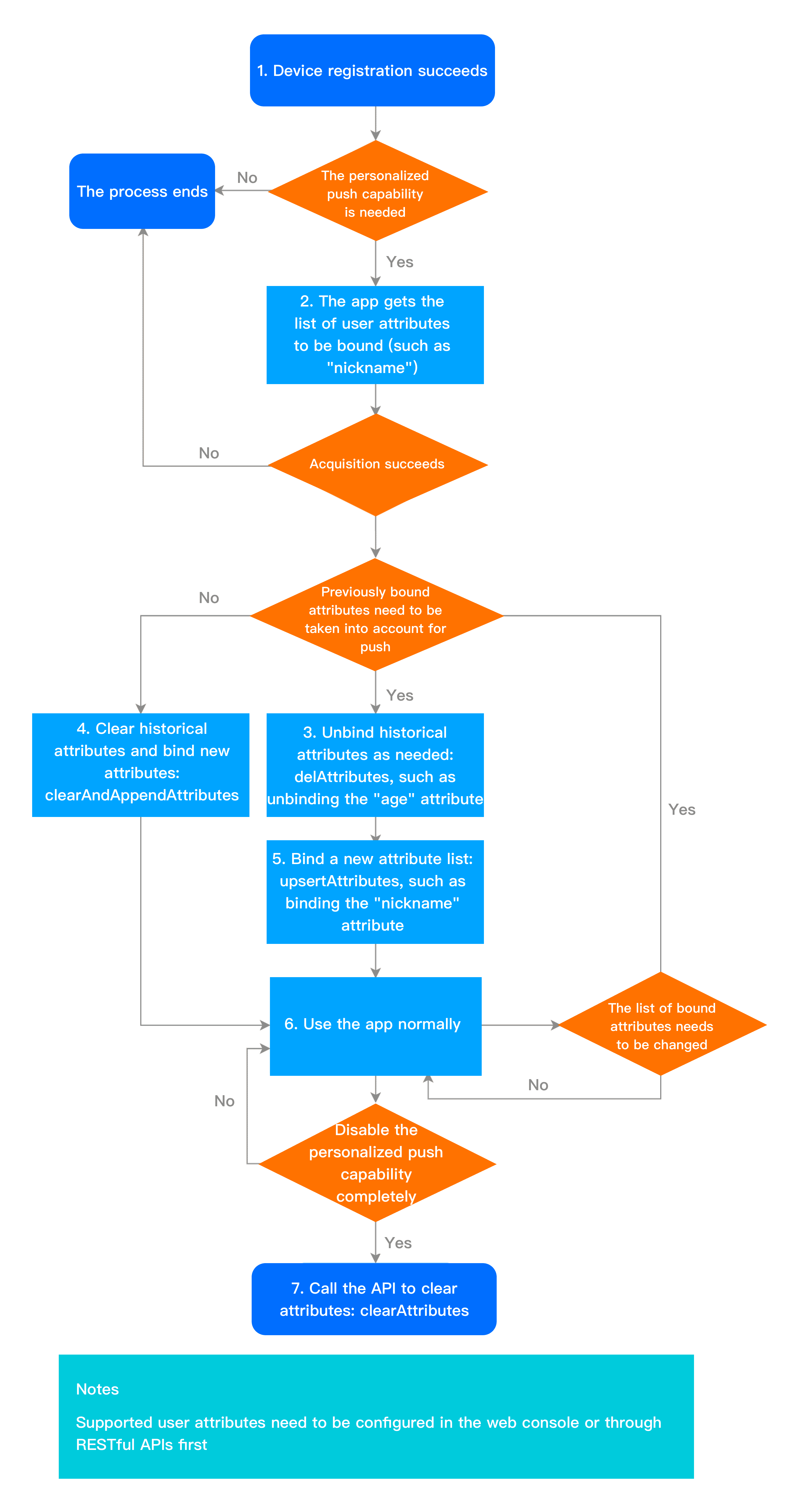
User attribute flow

The user attribute flow is as shown below. For specific API methods, see the API documentation.


Help and Support

Was this page helpful?

Help us improve! Rate your documentation experience in 5 mins.

Feedback