tencent cloud

Cloud Streaming Services

Release Notes and Announcements
Announcements
User Guide
Product Introduction
Overview
CSS Products
Concepts
Features
Use Cases
Strengths
Use Limits
Purchase Guide
Billing Overview
Basic Service Fee
Value-Added Service Fee
Prepaid plan
Purchase Process
Changing Billing Modes
Refund Policy
Viewing Bills
Renewal
Processing for Overdue Payments
Billing FAQs
Live Video Broadcasting (LVB)
Overview
Use Cases
Getting Started
SDK Integration
Live Event Broadcasting (LEB)
Overview
LEB Versus LVB
Use Cases
Getting Started
SDK Integration
Live Video Caster
Overview
Application Scenarios
Feature Area Introduction
Managing Live Video Caster
General Cloud Director
Configuring Program Lists and Automated Broadcasting
Console Guide
Console Overview
Overview
Domain Management
Stream Management
Package Management
Feature Configuration
Relay
Billing Usage Statistics
Monitoring
Toolkit
OOTB live
CAM-Based Access Control
Feature Guide
Push and Playback
Features
Practices in Typical Scenarios
Cloud Native Recording
Live Streaming Security
Global CSS Service
Callback Notifications
User Guides for Common Third-Party Tools
SDK Guide
0. SDK Integration Guide
1. Stream Push
2. Playback
3. Advanced Features
API Documentation
History
Introduction
API Category
Making API Requests
Live Pad APIs
Live Stream Mix APIs
Time Shifting APIs
Monitoring Data Query APIs
Billing Data Query APIs
Live Transcoding APIs
Delayed Playback Management APIs
Domain Name Management APIs
Watermark Management APIs
Certificate Management APIs
Stream Pulling APIs
Recording Management APIs
Live Callback APIs
Screencapturing and Porn Detection APIs
Authentication Management APIs
Live Stream Management APIs
Data Types
Error Codes
Ops Guide
Video Stuttering
Troubleshooting Push Failure
Troubleshooting Playback Failure
CLS Assists in Live Stream Troubleshooting
Troubleshooting High Latency
Troubleshooting Poor Quality of Pulled Video
Authorizing CSS to Store Screenshots in a COS Bucket
Troubleshooting
Live Stream Mixing Error `InvalidParameter.OtherError`
About Pushing
Generating Push URLs
PC Push
Playing Method
Web Player
Live Streaming Quiz
FAQs
Service Region
Live Streaming Basics
Push and Playback
CSS Billing
Global CSS Service
Live Recording
On-Cloud Stream Mix
Domain Configuration
Related to Live Video Caster
Compatibility with Apple ATS
Difference Between Stream Interruption and Stream Suspension
SLA
CSS Service Level Agreement
CSS Policy
Privacy Policy
Data Processing And Security Agreement
Glossary
DocumentationCloud Streaming ServicesTroubleshootingLive Stream Mixing Error `InvalidParameter.OtherError`

Live Stream Mixing Error `InvalidParameter.OtherError`

PDF
Focus Mode
Font Size
Last updated: 2025-10-23 14:51:32

Error

InvalidParameter.OtherError error occurs when stream mixing is initiated.

Possible Causes

The width or height of an input stream image exceeds 2000 px.
The concurrent channels of a stream exceed 20.
An account of “Channel Mode” is using the CreateCommonMixStream API.

Solutions

The following describes common troubleshooting methods for suberror codes.

Error 1: "Message":"InnerErrCode : [ -10021 ],IrnerErrMsg: [ Params Error ]"

The stream mixing backend only supports streams with both image width and height below 2000 px. -10021 error will occur if the width or height of an input stream image exceeds 2000 px.
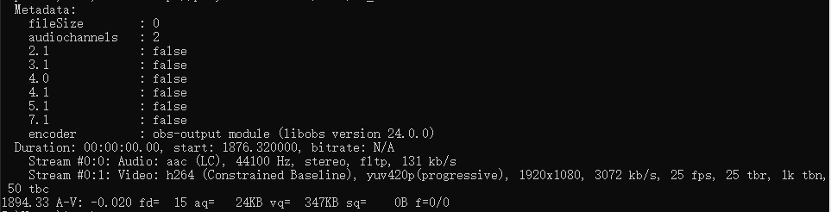
1. Use FFplay to play back a live stream and view its resolution. The resolution below is 1920 x 1080, which will not cause an error. Command: ffplay -i "playback URL".


2. Use VLC to play back the live stream:
Enable VLC, click Media > Open Network Stream > Network, and then enter a URL. After confirmation, you can pull the live stream.
You can view the live stream resolution in Tools > Media Information > Codec.

Error 2: "Message":"InnerErrCode:[ -41 ],InnerErrMsg: [ ]"

The stream mixing backend only supports 20 concurrent channels for one stream. Normally, it is necessary to use the same stream as the input to multiple stream mixing sessions only when multiple hosts are broadcasting for live sale.
Suppose a host creates a stream mixing session, and then exits the session without canceling it. The same stream name will be used by multiple stream mixing sessions if the host enter other sessions, which will trigger this error.
When a stream mixing session is interrupted, the stream mixing screen will stop at the last frame if the background stream is not interrupted. You can call the CancelCommonMixStream API to make the last frame not to stay on the screen. If the background stream is interrupted, the entire screen will be stuck.
If all input streams are successfully pushed with the same stream names within 15 minutes, the stream mixing session will be recovered.
If all input streams are interrupted, the stream mixing session will be automatically canceled after 15 minutes.

Error 3: "Message":"InnerErrCode:[ -4 ],InnerErrMsg: [ get liveconfig failed! ]"

This error will occur when you use an account with the legacy console (channel mode) to call v3.0 API CreateCommonMixStream.
You can upgrade the CSS console to the latest version (live stream code mode) to fix this error.

Error 4: "Message":"input stream num is not match the template id!"

This error will occur if you use a default stream mixing template provided by Tencent Cloud, yet the output stream does not meet the requirements of the template. For example, if you use the template 10, you must have two input streams; if you use the template 390, you must have three input streams, which can be two audio/video streams and one background stream.
For details about parameters and directions, please see CreateCommonMixStream API > MixStreamTemplateId.

Error 5: "Message":"InnerErrCode:[ -300 ],InnerErrMsg: [ outputstreamid not avaliable, outputstreamid alread use as background in other sessionid ]"

This error will occur if the name of stream A is used as the name of the background stream and output stream of session A, and session B initiated later also use the same output steam name.
You can set a different OutputStreamName for session B to fix this error.

Error 6: "Message": "InnerErrCode:[ -2 ],InnerErrMsg: [ small picture out of the background ]"

This error will occur if part of a small image is outside the background image. Suppose the resolutions of the background image and a small image are 1920*1080 and 1280*720, respectively. If LocationX (input image X-axis offset in the output image) + 1280 > 1920 or LocationY (input image Y-axis offset in the output image) + 720 > 1080, this error will occur.
For how to set LocationX, please see CommonMixLayoutParams > LocationX.
For how to set LocationY, please see CommonMixLayoutParams > LocationX.
For more examples about using stream mixing templates, please see Live Stream Mixing.

Error 7: "Message": "InnerErrCode:[ -111 ],InnerErrMsg: [ output_stream_type is [0],but output_stream_id xxxxx is not in input stream list ]"

This error will occur when the OutputStreamType is set to the default value 0 (using one of the input stream names as the output stream name), yet the actual output stream name is not in the input stream list. Notes:
If you set OutputStreamType to 0 or leave it empty, you need to set OutputStreamName to one of the input stream names.
If you want to use a new OutputStreamName, set OutputStreamType to 1.
When you set OutputStreamType to 1, you cannot set OutputStreamName to any stream names in both InputStreamList and the live streaming backend.
Help and Support

Was this page helpful?

Help us improve! Rate your documentation experience in 5 mins.

Feedback