What Are the Billable Items of CSS? How Do I Figure out What Fees I Need to Pay for?
CSS billable items include basic services and value-added services. Extended service fees will be incurred when value-added features provided jointly by CSS and other Tencent Cloud services are used.
Basic service fees: billed by downstream traffic/bandwidth generated by connecting users to cache origin servers. In other words, traffic/bandwidth fees will be incurred as long as your live streaming content is watched by viewers.
Note:
CSS provides two billing modes you can choose from: bill-by-traffic and bill-by-bandwidth. For detailed pricing, see “Bill-by-Traffic/Bandwidth” in Billing Overview. To switch billing modes, see Changing Billing Modes.
Value-added service fees: such services include transcoding, recording, screencapture, and porn detection, which are all disabled by default. If you enable and use them, fees will be incurred. For detailed pricing, see "Value-Added Service Fees" in CSS Pricing Overview.
Extended service fees: value-added services provided jointly by CSS and other Tencent Cloud services and charged according to the billing rules of the corresponding services. Using such services will incur extended service fees. For detailed pricing, see "Extended Service Fees" in CSS Pricing Overview.
How Can I Know Whether My Account Has Overdue Payments?
You can log in to the CSS console and click Fees at the top right to enter the fees overview page. If your available balance is below 0 USD, your account has overdue payment. To continue using CSS and other services, you need to pay the overdue balance in time.
Will I Be Charged for Upstream Push?
Upstream Push is not billed by default.
Upstream usage will also be billed if the ratio of downstream traffic to upstream traffic is smaller than 10:1 and the highest upstream bandwidth used in a day exceeds 100 Mbps.The billing method, tiered pricing rules, and billing regions for upstream traffic inside/outside the Chinese mainland are the same as those for LVB downstream traffic. Upstream traffic became a billable item starting at 00:00 (UTC+08:00), July 1, 2021.
Upstream push usage includes usage from direct pushing to Cloud Streaming Services (CSS), as well as usage generated by relay pushing from TRTC to CSS.
When Will Value-Added Service Fees Start to Be Billed?
After you enable recording, screencapture, porn detection, watermarking, and other value-added services that are bound with push domain names, fees will be incurred when push starts. After you enable transcoding and other value-added services that are bound with playback domain names, fees will be incurred when playback starts. If you created a transcoding template and bound it with a playback domain name, transcoding fees will not be incurred if there is no playback. Enabling watermarking or stream mix may incur standard transcoding fees, which will be billed by the resolution of the output live streams.
In Live Video Caster PGM Output, What Is the Playlist Type? What Is the Universal Type?
Playlist type: It means that the PGM output screen comprises only one stream, charged according to the playlist type.
Universal type: It means that the PGM output screen comprises two or more streams, charged according to the universal type.
The figure on the left is the playlist type, and the figure on the right is the universal type:
Are There Two Expenses for Porn Detection?
Because CSS analyzes screenshots of live streams to detect pornographic content, using the porn detection feature will incur two expenses: screencapture and porn detection. Porn detection fees are based on the number of screenshots analyzed.
CSS offers a free tier of 1,000 screenshots per month for the screencapture feature.
CSS offers a free tier of 1,000 screenshots per month for porn detection.
Can I Track My Usage of CSS Packages in Real Time?
You can view your package usage in the CSS console, but real-time usage statistics are not supported currently.
Your usage each day is not reflected in the data until billing is processed by the system the following day (the exact time may vary).
Can I Allow Only Paid Users to Access My Content?
CSS cannot identify paid users currently. If you record your live streams and save them to VOD, you can allow only paid users to access your content by encrypting the videos.
Why is the Traffic Usage Data Shown in the Console Different from the Log Data?
The downstream traffic recorded in logs is application layer data. The actual traffic consumed is 5-15% more than application layer data.
TCP/IP headers: Each TCP/IP HTTP request packet can be up to 1,500 bytes, including 40-byte TCP and IP headers. The traffic consumed by headers (about 3% of the total) is not counted into application layer data.
TCP retransmission: About 3-10% of packets are lost during transmission. The packets will be sent again by the server. Such traffic (about 3-7% of the total) is not counted by the application layer either.
As an industry standard, billable traffic is application-layer traffic plus the additional traffic described above. Tencent Cloud calculates the additional traffic as 10% of the total, so the traffic usage shown in the console is 110% of that recorded in logs.
Prepaid Packages
I Purchased Traffic Packages. Why Were Fees Still Deducted from My Account Balance?
Traffic packages can only deduct your traffic usage in the daily bill-by-traffic mode.
If you are on daily bill-by-bandwidth mode, your traffic packages cannot be used for deduction. You can change your billing mode in the console. For details, see Changing Billing Modes.
If you are on daily bill-by-traffic mode and fees are still deducted from your account balance, check if you have used value-added services such as live transcoding, live recording, screencapture, and porn detection. Value-added services are billed based on usage. Your usage each day is billed the following day. You can also buy packages for value-added services. CSS offers three types of packages: traffic package, standard transcoding package, and Top Speed Codec (TSC) transcoding package. To learn more, see Prepaid Packages.
Fees are also incurred after you use up your packages. You can view the deduction details in Bill Details. For detailed directions, see Viewing Bills.
I Only Bought Traffic Packages. Will CSS Suspend Services for My Account after I Use up the Packages?
No. Traffic packages are paid in advance, and usage is deducted from purchased packages.
If your billing mode for LVB is daily bill-by-traffic, downstream LVB traffic will be deducted from your traffic packages first, and the additional usage will be billed daily at tiered pay-as-you-go rates.
After you use up your packages, make sure there is sufficient balance in your account to pay your daily pay-as-you-go charges. If you have overdue payments, please top up within 24 hours. Otherwise, services will be suspended for your account. We recommend you check your account balance regularly.
Note:
Traffic packages cannot be used for deduction if you are on monthly bill-by-traffic mode or monthly/daily bill-by-bandwidth mode.
What Specific Services Result in Charges Labeled as Value-Added Features in the Bill?
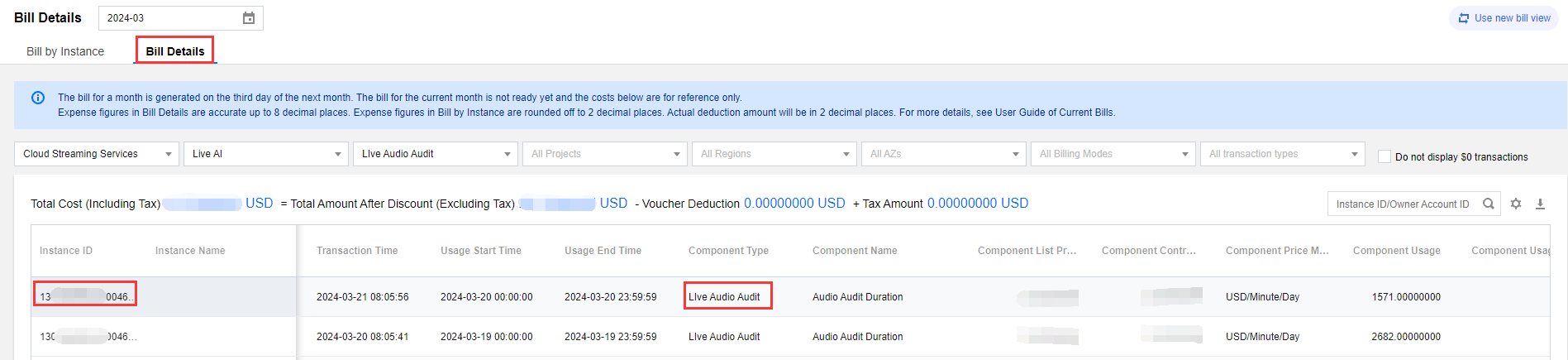
On the bill, charges for value-added features are shown as follows:
You can distinguish between different services using the English Name suffix after the resource alias/ID, as different services have different coefficients:
Name
Value-added Feature
Ratio (Billing Duration (Unit: Billing Unit): Actual Duration (Unit: Minutes))
RealtimeSubtitles
Director's console real-time subtitling
1:1
PullPushLocalMode
Relay to local pattern
0.02:1
LiveDelay
Delayed playback
0.05:1
StandbyStreams
Standby streams
1.6:1
GenerateEffect
Generate Effect
60:1
SendEffect
Send Effect
15:1
Does the Billing Region in the CSS LVB, LEB, and Upstream Push Bills Refer to the Country/Region Where the Usage Occurs?
Billing for LVB , LEB and upstream push is usually done by region. The region in the bill generally refers to the corresponding region, not specific provinces/countries. For example, "South US (Los Angeles)" on the bill does not mean that the usage only occurs in Los Angeles but refers to the usage in the entire North America region. Details about the countries/regions within each region can be found in International/Hong Kong (China), Macao (China), and Taiwan (China) Region Division.
To better understand each region and its corresponding billing region, refer to the following table:
Region
Billing Region
Chinese mainland
South China (Guangzhou)
Asia Pacific 1
Hong Kong (China), Macao (China), and Taiwan (China) (Hong Kong (China))
Asia Pacific 2
Asia Pacific Region (Japan)
Asia Pacific 3
Asia Pacific Region (India)
North America
South US (Los Angeles)
Europe
Europe (Frankfurt)
Middle East
Middle East (Dubai)
Africa
Other regions (Other)
South America
South America (Brazil São Paulo Interconnected Region)
Why Are There Still Traffic Charges after Cloud Streaming Services Are Shut Down?
Disabling the machine is unlike stopping the live stream; the camera is still collecting. It is recommended to check if there are any active streams in Console Stream Management later, where you can perform stream termination/disable operations.
Transcoding Billing
How Is Live Transcoding Billed? How Can I Estimate the Transcoding Fees?
Live transcoding is billed by the transcoding codec, resolution, and corresponding duration. As stream mix and watermarking are processed in the transcoding module, using such features will also incur transcoding fees. For details, see Live Transcoding Billing.
Transcoding fees will only be charged once if the same live stream is watched by multiple viewers at the same bitrate.
Example: suppose you used live transcoding and live watermarking on January 1, 2021, where live stream A was transcoded to H.264_720P for 1 hour and live stream B was watermarked at 480p for 30 minutes.
Then, the transcoding fees you would need to pay on January 2, 2021 would be 0.0057 (USD/min) × 60 (min) + 0.0028 (USD/min) × 30 (min) = 0.426 USD.
Why Was a Transcoding Bill Generated When I Didn't Use Live Transcoding?
Live transcoding services include live real-time transcoding, stream mix, and watermarking. Using stream mix or watermarking will also incur transcoding fees.
Will Live Stream Mix Definitely Incur Transcoding Fees?
Yes. The transcoding fees will be billed according to the output stream after stream mix. As the transcoding resources will be consumed after stream mix is successful, the stream mix duration will be used for billing, regardless of whether the stream is played back. This is different from common transcoding, which is billed by playback duration.
Confused by the Transcoding Bill? Why Are There Two Units of Minutes? How Do You Know Which Bitrate the Bill Corresponds to?
Transcoding service charges are distinguished by designated pricing strategies for different encoding methods and resolutions. The component unit price (USD/minute/minute) can be interpreted as the transcoding resolution, meaning (USD/resolution/minute). Different transcoding price ranges are differentiated by passing different component volumes, so the component volume in the bill should correspond to the resolution rather than the actual transcoding duration, which is included in the bill's usage duration. You can check the encoding method and resolution corresponding to the transcoding bill in the following two ways:
Resource ID query: The resource ID on the bill will indicate the encoding method and resolution corresponding to that bill.
To determine the transcoding method and resolution associated with a bill, you can check the component unit price value in the bill. The specific correspondences are as follows:
The Component Unit Price in the Bill
Transcoding Type
Corresponding Transcoding Method and Resolution
USD/1 minute/minute
Standard transcoding
(liveprocessor)
H264_480P
USD/2 minutes/minute
H264_720P
USD/3 minutes/minute
H264_1080P
USD/4 minutes/minute
H264_2K
USD/5 minutes/minute
H264_4K
USD/6 minutes/minute
H265_480P
USD/7 minutes/minute
H265_720P
USD/8 minutes/minute
H265_1080P
USD/9 minutes/minute
H265_2K
USD/10 minutes/minute
H265_4K
USD/46 minutes/minute
H265_8K
USD/21 minutes/minute
AV1_480P
USD/22 minutes/minute
AV1_720P
USD/23 minutes/minute
AV1_1080P
USD/24 minutes/minute
AV1_2K
USD/25 minutes/minute
AV1_4K
USD/47 minutes/minute
AV1_8K
USD/11 minutes/minute
Top speed codec transcoding
(topspeed)
H264_480P
USD/12 minutes/minute
H264_720P
USD/13 minutes/minute
H264_1080P
USD/14 minutes/minute
H264_2K
USD/15 minutes/minute
H264_4K
USD/16 minutes/minute
H265_480P
USD/17 minutes/minute
H265_720P
USD/18 minutes/minute
H265_1080P
USD/19 minutes/minute
H265_2K
USD/20 minutes/minute
H265_4K
USD/48 minutes/minute
H265_8K
USD/26 minutes/minute
AV1_480P
USD/27 minutes/minute
AV1_720P
USD/28 minutes/minute
AV1_1080P
USD/29 minutes/minute
AV1_2K
USD/30 minutes/minute
AV1_4K
USD/49 minutes/minute
AV1_8K
USD/31 minutes/minute
Top Speed Codec Enhanced Transcoding
(enhancement )
H264_480P
USD/32 minutes/minute
H264_720P
USD/33 minutes/minute
H264_1080P
USD/34 minutes/minute
H264_2K
USD/35 minutes/minute
H264_4K
USD/36 minutes/minute
H265_480P
USD/37 minutes/minute
H265_720P
USD/38 minutes/minute
H265_1080P
USD/39 minutes/minute
H265_2K
USD/40 minutes/minute
H265_4K
USD/50 minutes/minute
H265_8K
USD/41 minutes/minute
AV1_480P
USD/42 minutes/minute
H264_720P
USD/43 minutes/minute
AV1_1080P
USD/44 minutes/minute
AV1_2K
USD/45 minutes/minute
AV1_4K
USD/51 minutes/minute
AV1_8K
Live Recording Billing
How Is Live Recording Billed?
The billing for the live recording feature is based on the peak concurrent recording value for the month. If the recording is stored in COS, charges will also be applied for the total duration of the recording delivered to COS. Each live recording is considered as one recording channel; if you record in two formats (MP4 and HLS) and the recording lasts for one hour, it will be counted as two recording channels, and the total duration of the recording delivered to COS will be counted as two hours.
How Is the Live Recording Channel Peak Calculated?
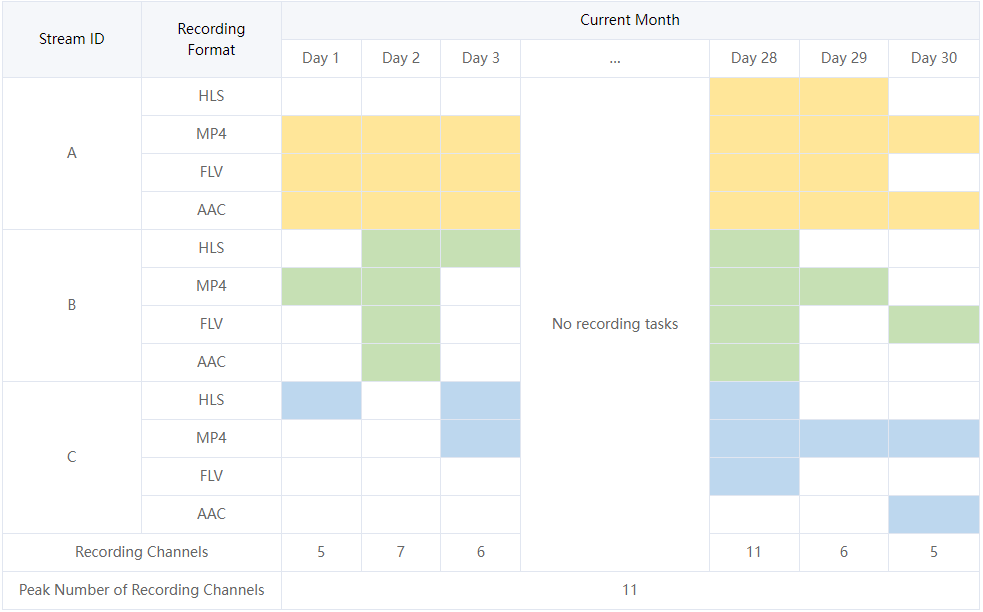
When one live stream (one stream ID) is recorded in one file format, it will be counted as one live recording channel. The number of current recording channels will be queried once every 5 minutes, and the maximum value of sample points in the current month will be used as the monthly recording channel peak for billing.
Example:
Note:
Yellow: recording tasks under stream ID A.
Green: recording tasks under stream ID B.
Blue: recording tasks under stream ID C.
Why Was I Charged 10.5882 USD after Using Live Recording?
If two live streams are recorded simultaneously or one live stream is recorded into two file formats, two recording channels will be generated. Live recording is billed by the recording channel peak at a price of 5.2941 USD per channel per month, so if there are two channels in a month, then a fee of 10.5882 USD will be charged. For more information, please see Live Recording Billing.
We recommend you go to Bill Details > Bill by Instance in the Billing Center to check the billing details for live recording. You can click Bill Details in the "Operation" column to view the actual recording channel peak of the last month.