ROI (region of interest) recognition can identify the positions of important visual elements in a video in real time, such as faces, game characters, or steaming hosts, and send this information along with the video to the playback device. Using the ROI information, the player can do things like blur the background in a scene and prevent on-screen comments from covering important elements of the video.
Prerequisites
You have activated Tencent Cloud Streaming Services and added a push domain.
Instructions
Service Side
After configuring ROI recognition in the console, when the user pulls a stream containing on-screen comments, the backend will trigger the recognition capability of MPS (Media Processing Service). During the transcoding process, the system will get the recognition results in real time, generate SEI (Supplemental Enhancement Information) data according to the protocol, and write it into the stream (currently, only SEI output of H.264 and H.265 formats is supported).
User Side
When the user's video player accesses the live stream, it first parses the SEI data. Then, it decodes the SEI information according to the specific protocol and extracts the SVG data. Finally, by using SVG images and masking techniques, the player can process the ROI information, which allows it to accurately locate and process specific areas in the video.
SEI Parsing Related Information
1. Tencent Cloud SEI Format
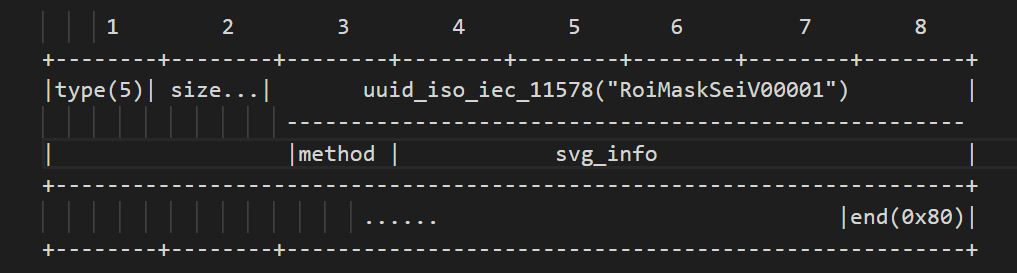
The image below shows the standard SEI format we adopt.
Note:
The size field is variable in length and complies with the H.264 SEI standard. It does not include the 0x80 end byte, but includes a method field (1 byte) and UUID field (16 bytes). The svg_info represents encoded SVG information.
The method field indicates the data storage method, with the following values:
1: Uncompressed
2: Bzip2 Compression
3: Zip Compression
When processing SEI data, we use unregistered user data as the SEI frame type (Type value is 5). This type of SEI frame is used to carry custom data, such as SVG information, for parsing and processing on the player side.
When the SEI content contains 0x000000 or 0x000001, it is necessary to insert 0x03 for escape sequence handling. This is because, in the H.264 standard, consecutive 0x000000 or 0x000001 sequences are considered NAL unit delimiters. Therefore, inserting 0x03 prevents misinterpretation. During decoding, the decoder detects the 0x00 00 03 sequence within the NAL unit and discards the 0x03, thereby restoring the original data.
In processing SEI data, the following conversion rules should be noted:
0x00 00 00 converts to 0x00 00 03 00
0x00 00 01 converts to 0x00 00 03 01
0x00 00 02 converts to 0x00 00 03 02 (0x00 00 02 is reserved for future use)
0x00 00 03 converts to 0x00 00 03 03 (During decoding, only filter once, do not loop filter)
For H.265 SEI support, H.265 SEI NALU type, 39 NAL_UNIT_SEI sei_rbsp() sei payload, that is, NAL_UNIT_SEI (type value 39) will be inserted. The payload of SEI is processed in the same way as in H.264, but the startcode of SEI needs to be consistent with the H.265 standard.
SVG Extraction
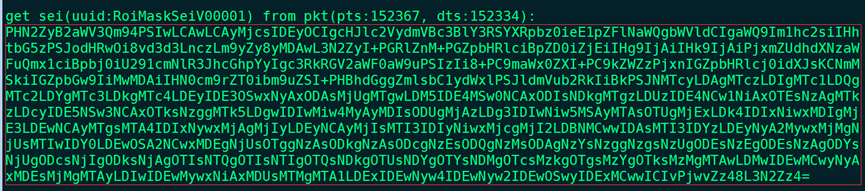
1. By parsing SEI data according to the protocol and extracting SVG information, you will be able to obtain a Base64 string in a format similar to the following:
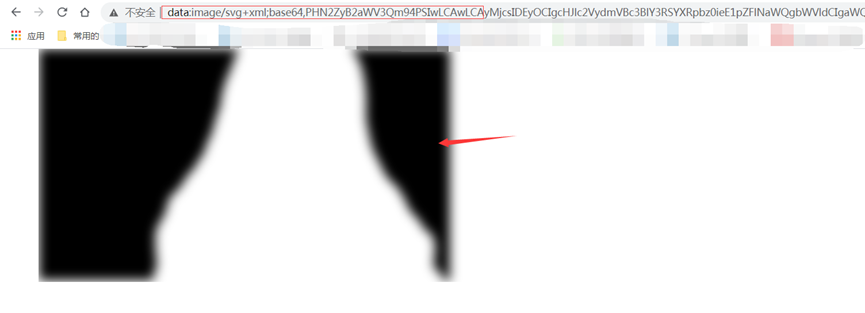
2. Place the extracted Base64 encoded SVG image data (data:image/svg+xml;base64,svg) in the browser's address bar and press Enter to directly view the related image information.