Invisible Watermark(Digital watermark)
다운로드
포커스 모드
폰트 크기
Invisible watermarks (digital watermarks) refer to hidden watermarks that are not directly recognizable to the human eye. With the increasing prevalence of AI-generated content, invisible watermarks offer a more effective solution for tracing and monitoring content compared to easily removable visible watermarks. This technology is primarily used to protect sensitive information and track the source and version information of online content.
CSS supports the digital watermark feature. Supports both Basic Copyright Watermark and NexGuard Forensic Watermark (in collaboration with NAGRA) versions.This document describes how to create, modify, bind, unbind, and delete a digital watermark template in the console.

Digital watermark vs Visible watermark: Key differences compared
Feature dimension | Digital watermark | Visible watermark |
Business description | Enables the embedding of custom text information invisible to the naked eye into videos without affecting the visual quality and integrity. Basic Copyright Watermark and NexGuard Forensics Watermark (in collaboration with NAGRA) are supported. | Supports adding images with specified formats, such as PNG and JPG, or custom text to videos in a visible form. This solution is suitable for scenarios such as copyright protection and brand promotion. |
Visibility and Extraction Method | Invisible to the naked eye, it requires specific decoding algorithms or tools for extraction. | Visible to the naked eye, requiring no tools for identification. |
Core Functions and Protective Efficacy | Covert tracing and evidence collection: User IDs, timestamps, and other information are hidden in the underlying content for precise tracking and legal evidence collection after a leak, making them difficult to detect and remove. | Immediate statements and deterrence: Directly displaying copyright or owner information to warn users to respect copyright and prevent direct misappropriation, but it is relatively easy to remove or circumvent. |
Resistance to attack (robustness) | Exceptional. Well-designed digital watermarks exhibit resilience against various common processing operations, including compression, cropping, and smearing. | Weak. As a visible layer, it will be destroyed along with the carrier, primarily serving as a warning indicator. |
Primary Application Scenarios | Leakage Traceability: Tracing responsible parties when sensitive corporate information is compromised. Copyright Protection: Digital content copyright certification serves as legal evidence. Anti-Counterfeiting Verification: Designed for authenticating the legitimacy of documents such as bills and certificates. Content Authentication: Verifies the authenticity and integrity of digital content. | Copyright Statement: Display copyright information on images and videos to prevent unauthorized copying and distribution of digital works (such as photographs, videos, and music). Brand Promotion: Enterprises can embed corporate logos as watermarks in product images or advertisements to enhance brand visibility. Identity Authentication: Internal corporate documents can display employee information. Document Management: In fields such as education and scientific research, watermarks can be utilized to identify document sources or authors. |
Optimal Collaboration Strategy: Overt Deterrence, Covert Tracking
Visible Watermark and Digital Watermark are not mutually exclusive solutions, but rather complementary technologies that can operate synergistically. The core collaborative logic between them is as follows:
Information Complementarity: Visible Watermark displays fundamental copyright details, while Digital Watermark embeds traceable metadata (such as user ID, distribution channel, and timestamp) to facilitate both deterrence and tracking.
Complementary Technical Reinforcement: Visible Watermark serves as a deterrent, while Digital Watermark operates covertly with robustness as the underlying security layer. Even if the Visible Watermark is removed, the Digital Watermark remains intact for forensic verification.
Business Scenario Integration: In high-security environments, it is advisable to employ both Visible Watermark and Digital Watermark concurrently. For instance, internal documents can display a "For Internal Circulation" Visible Watermark alongside a Digital Watermark containing recipient details, facilitating traceability in the event of a leak.
Visible watermarks provide immediate deterrence, while digital watermarks enable backend tracking. Together, they form a comprehensive copyright protection ecosystem.
Notes
After creating a template, you can bind it to a push domain name. The binding will take effect in 5–10 minutes.
Binding, unbinding, and modifying a template affect only new live streams after the update but not ongoing ones. To make the new rule take effect for ongoing live streams, you need to interrupt them and push them again.
Invisible watermarks are hidden from the audience. When copyright ownership needs to be confirmed, the watermark content can be extracted using an invisible watermark extraction tool.
Prerequisites
Creating Invisible Watermark Template
1. Log in to the CSS console and select Feature Configuration > Live Watermarking. Access the Live Streaming Copyright Protection page.
2. Select Invisible Watermark and click Create Template to access the Invisible Watermark template creation page, then proceed with the following configurations:
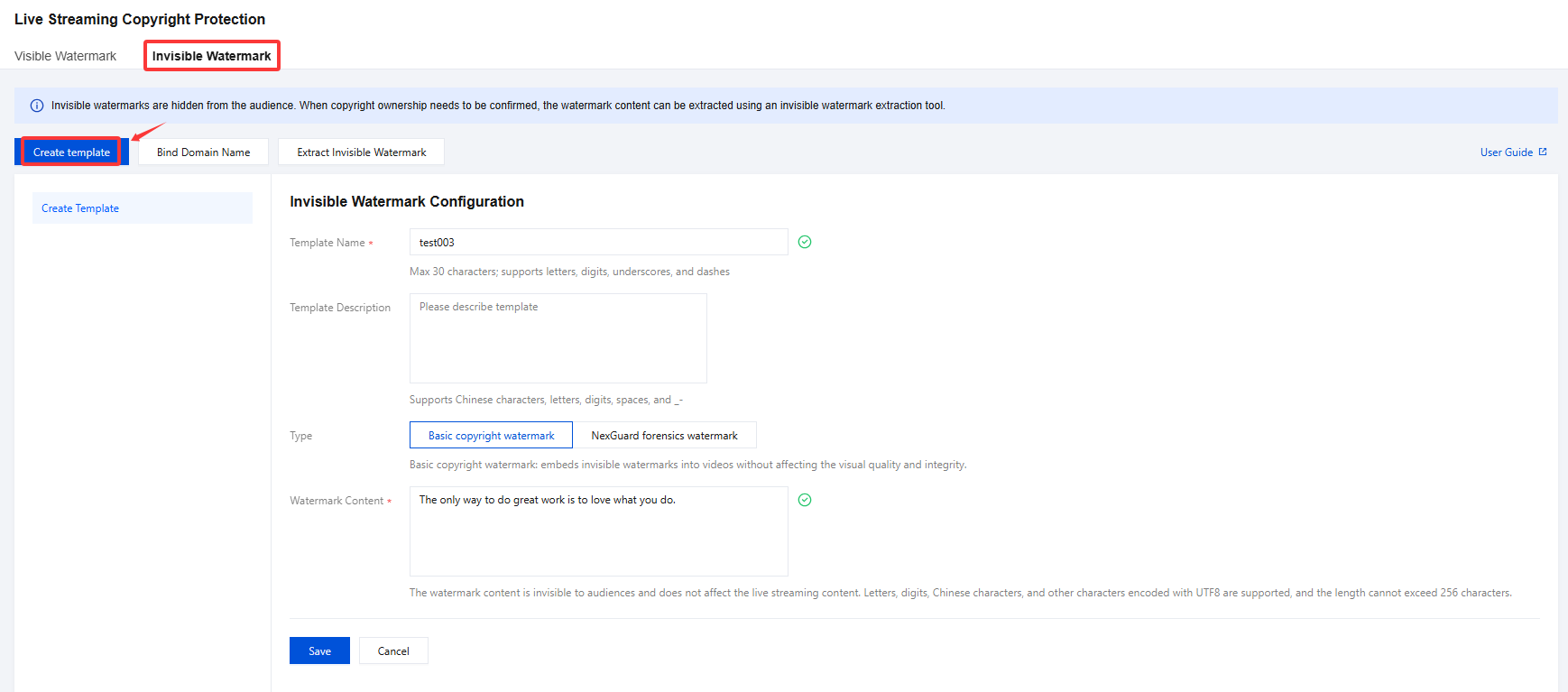
Configuration Item | Configuration description |
Template Name | Enter the Template Name, which can be customized.Max 30 characters; supports letters, digits, underscores, and dashes. |
Template Description | Customizable (Supports Chinese characters, letters, digits, spaces, and _-). |
Type | Depending on your specific business requirements, you may choose between Basic Copyright Watermark or NexGuard Forensics Watermark (in collaboration with NAGRA). Basic copyright watermark: embeds invisible watermarks into videos without affecting the visual quality and integrity. NexGuard forensics watermark (cooperation with NAGRA): features strong concealment and possesses broadcasting-grade anti-removal capabilities. It is tailored for piracy tracking and copyright protection of high-value content. |
Watermark Content | The watermark content is invisible to audiences and does not affect the live streaming content. Letters, digits, Chinese characters, and other characters encoded with UTF8 are supported, and the length cannot exceed 256 characters. |
3. Upon completion, click Save to finalize the configuration.
Binding Domain Name
1. Log in to the CSS console and select Feature Configuration > Live Watermarking >Invisible Watermark.
2. Enter the domain name binding page in either of the following ways:
Directly bind a domain name: click Bind Domain Name in the top-left corner.

Bind a domain name after creating the invisible watermark template: after the invisible watermark template is created, click Bind Domain Name in the pop-up window.
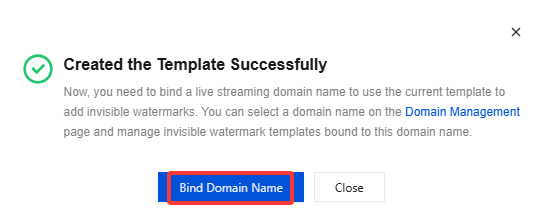
3. In the pop-up window, select an invisible watermark template and a push domain name (Multiple push domain names can be bound simultaneously)and then click Confirm.
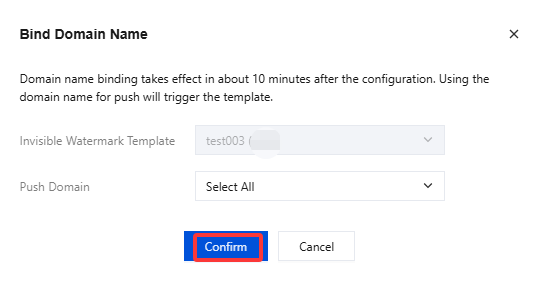
Unbinding
1. Log in to the CSS console and select Feature Configuration > Live Watermarking > Invisible Watermark.
2. Select domain names bound to the invisible watermark template and click Unbind.
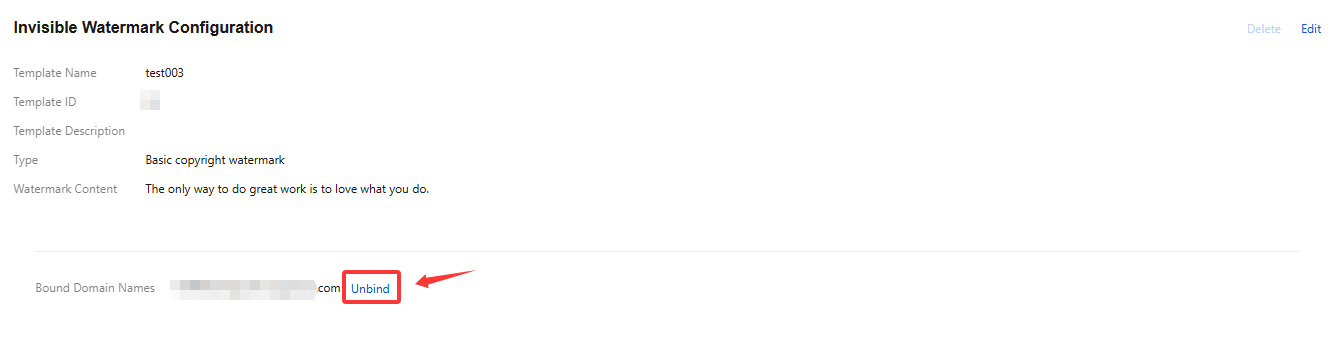
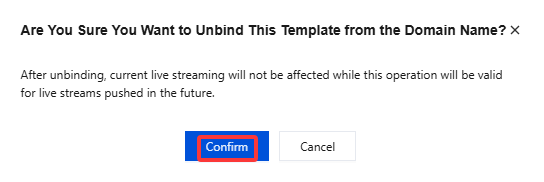
3. Confirm whether to unbind the domain name and click Confirm to unbind it.
Modifying Template
1. Log in to the CSS console and select Feature Configuration > Live Watermarking > Invisible Watermark.
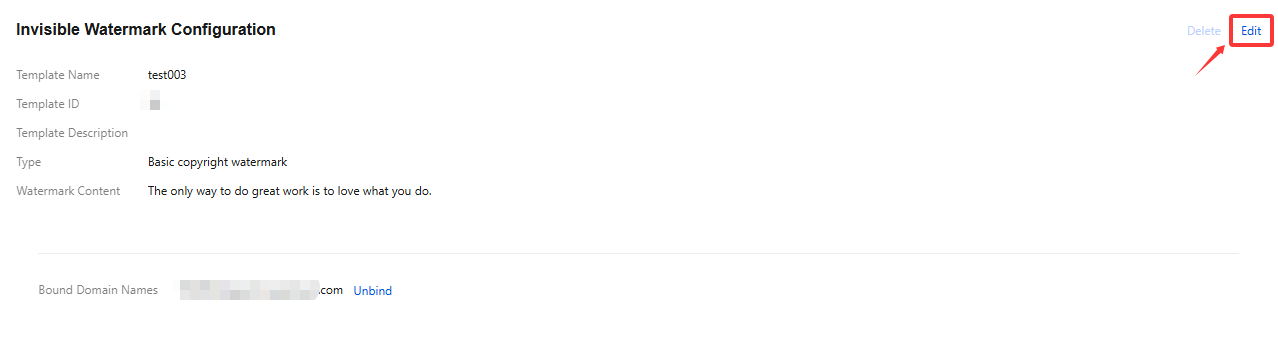
2. Select the target invisible watermark template and click Edit on the right to modify the template information.
3. Click Save.
Deleting Template
Note:
If the template is already associated, you need to Unbind it first before you can perform the delete operation.
Once the template is deleted, it cannot be recovered. Please proceed with caution.
1. Log in to the CSS console and select Feature Configuration > Live Watermarking > Invisible Watermark.
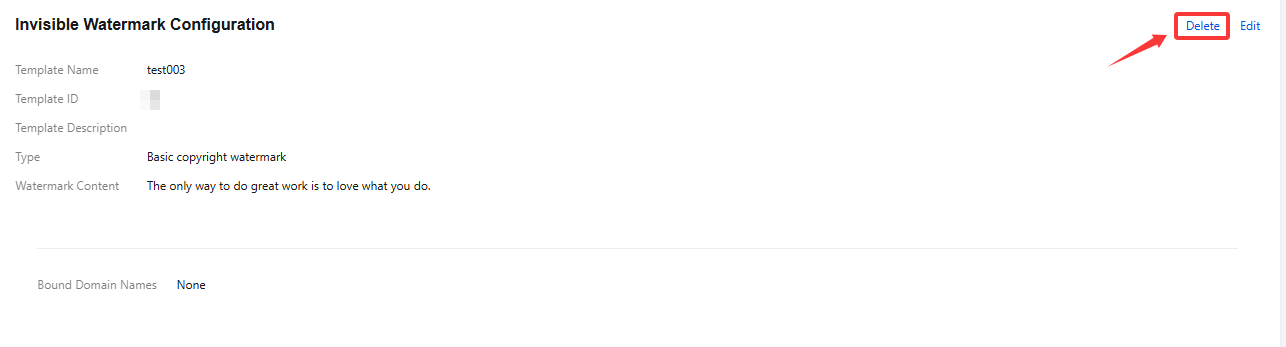
2. Select the invisible watermark template you have successfully created, and click Delete in the upper right corner.
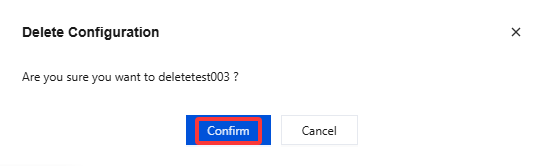
3. In the pop-up dialog box, click Confirm to confirm the deletion.
Extract Invisible Watermark
Note:
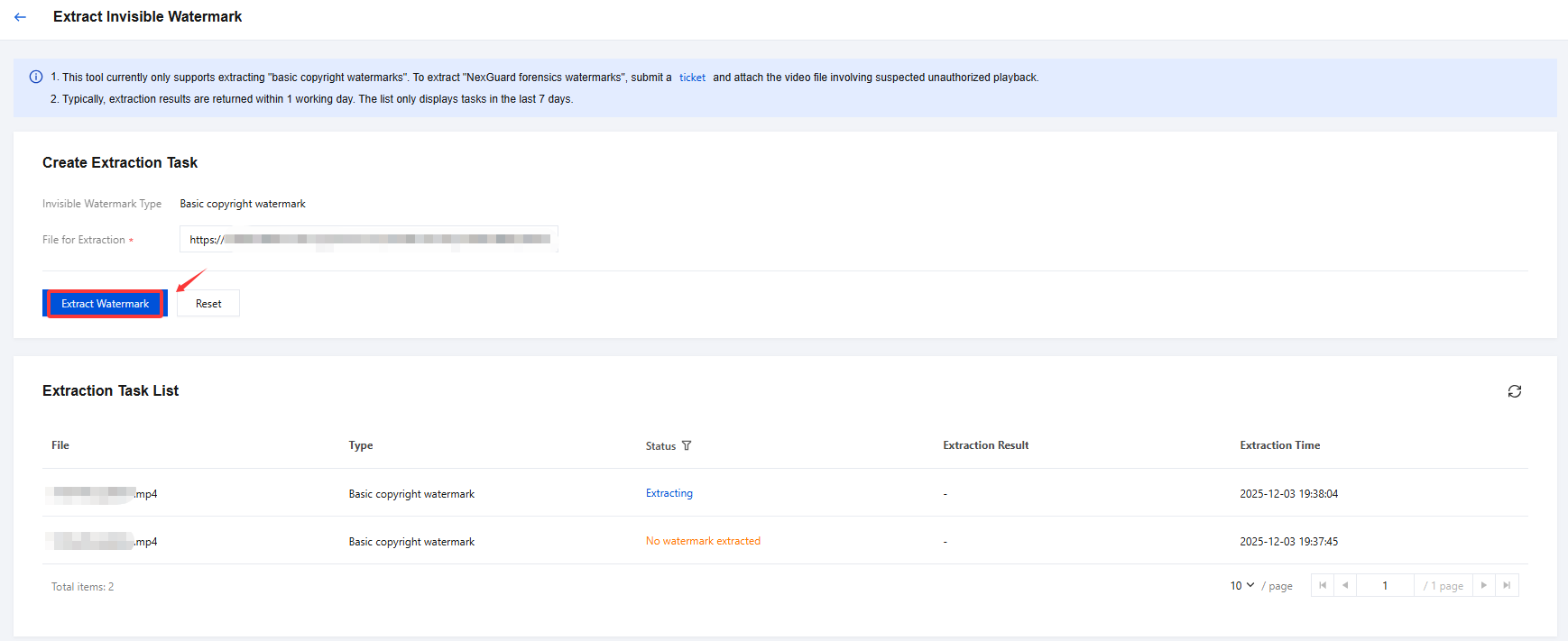
This tool currently only supports extracting "basic copyright watermarks". To extract "NexGuard forensics watermarks", submit a ticket and attach the video file involving suspected unauthorized playback.
Typically, extraction results are returned within 1 working day. The list only displays tasks in the last 7 days.
Create Extraction Task
1. Log in to the CSS console and select Feature Configuration > Live Watermarking. Access the Live Streaming Copyright Protection page.
2. Select Invisible Watermark, then click Extract Invisible Watermark to access the extraction task page and configure the following settings:

The default Invisible Watermark Type is Basic copyright watermark.
File for Extraction:Based on your business requirements, enter the on-demand URL of the file. (Supported video formats for watermark extraction include: 3GP, AVI, FLV, MP4, MPG, ASF, WMV, MKV, MOV, TS, WebM, and MXF)
3. Click Extract Watermark and wait for the extraction results.
Relevant Operations
For more information on how to bind/unbind a domain name to/from an invisible watermark template, please see Invisible Watermark(Digital watermark)Configuration.
피드백